
Introduction
Video content has become extremely important in business strategies nowadays. In addition to brands, SaaS companies, eCommerce stores, and online instructors use videos as a medium to express their ideas, show products, and interact with people. Compared to simple text or images, videos can hook the viewer’s attention quickly.
However, creating traditional videos can be tough – it may be quite costly, time-consuming, and require a degree of editing proficiency that most people lack.
This is exactly the place where VMake.ai steps in to help you. Powered by AI technology, this video creation tool will assist you in making videos fast and hassle-free, even without being a professional or skilled person. In this article, we will look at its functionalities, actual case studies, advantages, and disadvantages, and see if it is worth trying in 2026.
What is VMake.ai?
VMake.ai is video creation software powered by AI that enables users to turn out videos in no time and with hardly any effort. Marketers, businesses, creators, ecommerce sellers, and agencies are the target audience for this product who desire to upgrade their presence via video content. Instead of doing all the shooting and editing by hand, you can use AI to convert basic ideas, photos, or product images into videos that can be shared.
Key tools of VMake.ai
- Seedance 2.0 AI model: A powerful video model used for creating high-quality UGC (user-generated content) videos
- UGC video generator: Turn product images into shoppable videos in just a few clicks
- AI avatars & templates: Create human-like videos without hiring actors or editors
- Image-to-video conversion: Upload one image and generate a full video
- Video enhancement tools: Improve quality, clean up visuals, and optimize for better performance
- Multi-model support: Includes advanced models like Kling 3.0, Veo 3.1, Sora 2, and more
- All-in-one workflow: From video generation to editing and optimization in one place
Key Features of VMake.ai
1. AI Avatar Video Generator
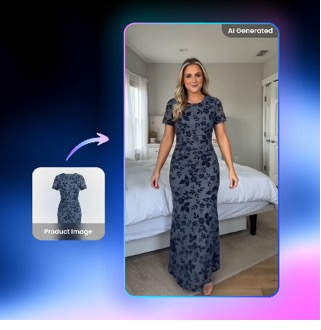
VMake.ai’s AI Avatar Video Generator transforms one product image into a convincing, shoppable video featuring a human-like presenter. It produces very realistic avatars that perfectly lip-sync, show natural expressions, and always display products in the same way, so the videos not only look real but also inspire trust.
You can change the language, the avatar style, and the scene easily to get content localized for different markets. The best part is that no filming, models, or editing skills are needed; everything is done automatically for quick production. Using powerful AI models such as Seedance 2.0, it enables companies to produce native-style, high-quality videos on a large scale at a cheaper cost and with less work.
2. UGC Video Generator
With the UGC Video Generator by VMake.ai, you can make natural, effective videos that resemble genuine user-generated content. For instance, a single product image or a website link can be converted into a full video with visuals, voice, and music in a matter of seconds. It provides multiple workflows such as AI Avatar videos, product exhibits, and recreation-style editing, so you can easily change content styles.
3. Fast Text-to-Video Workflow
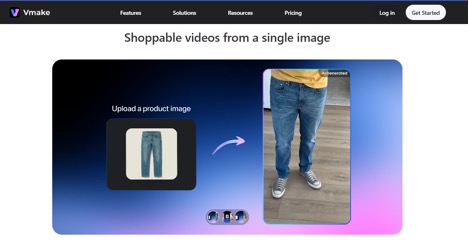
With the fast Text-to-Video Workflow in VMake.ai, you can transform a simple idea, text, image, or even an existing clip into a ready-to-use video in a matter of minutes. All you do is submit your content, pick the style, decide the length (1 to 15 seconds), and generate the video – no video editing skills required. Multiple AI models like Seedance, Kling, etc. are supported, allowing you to choose from different styles like manga, cinematic, or social media formats.
4. Multiple Templates
VMake.ai packs a wide variety of ready-to-use templates at your disposal to help you make videos for ads, business promotions, social media posts, and ecommerce products. These templates come pre-designed with layouts, styles, and structures that suit various platforms, so there’s no need for you to begin from scratch. Simply choose a template, insert your product or text, and the AI will create a fully-fledged video in a short time.
5. AI Enhancement Tools
Using the AI Enhancement Tools available on VMake.ai, performing a few simple clicks can enhance your video quality, by converting blurry or low-resolution videos into clear 2K, 4K, or even AI 4K+ formats. It removes blur automatically, keeps noise to a minimum, adjusts lighting, and restores details that are lost making videos frame by frame look clear and professional without requiring any editing skills.
Why DevOps, SaaS & Tech Teams May Like VMake.ai
DevOps, SaaS, and tech teams may really find VMake.ai appealing as it allows them to produce professional videos without dedicating time to editing or production work. For rapidly moving teams, it turns out to be handy for product demo videos during SaaS launches, internal training content, technical onboarding tutorials, release announcement videos, hiring and employer branding clips, and customer success explainers, all of these can be produced quickly from very simple inputs like text or product images.
Take a DevOps startup launching a CI/CD tool, for instance. The company can immediately generate product demo videos, feature explainers, LinkedIn promotional clips, and step-by-step tutorial walkthroughs with the help of VMake.ai, without needing to hire a video production team. This lends a hand to technical teams in concentrating on product development exclusively while still churning out top-notch content for marketing, training, and customer engagement purposes.
Pros of VMake.ai
- Beginner-friendly interface that is easy to use without technical skills
- Fast video creation, helping you produce content in minutes
- No need for cameras, studios, or film setups
- Realistic AI avatars for product and marketing videos
- Strong support for short-form content like TikTok, Reels, and Shorts
- Reduces dependency on expensive agencies or freelancers
- Scales easily for frequent campaigns and bulk content needs
- Works well for ecommerce, SaaS, and digital marketing use cases
Cons of VMake.ai
- AI avatars may still feel slightly less natural than real human presenters
- Advanced video editors may find limited manual control options
- Output quality depends heavily on the quality of your script or input
VMake.ai vs Traditional Video Production
| Feature | VMake.ai | Traditional Production |
| Speed | Fast video creation in minutes | Slow process, takes days or weeks |
| Cost | Low cost, no production team needed | High cost for crew, studio, and editing |
| Equipment Needed | No camera, lights, or setup required | Requires full filming equipment and studio |
| Skill Level | Beginner-friendly, no editing skills needed | Needs professional videographers and editors |
| Scalability | Easily create large volumes of videos | Hard to scale due to time and cost limits |
Who Should Use VMake.ai?
Best for:
- SaaS startups needing fast product demos and launch videos
- DevOps and tech companies creating explainers, onboarding, and release updates
- Ecommerce brands making product promo and ad videos at scale
- Marketing agencies handling frequent client campaigns
- Course creators building simple training and lesson videos
Not ideal for:
- High-end film or cinematic production work
- Documentary-style storytelling projects
Conclusion
VMake.ai is a robust video-making AI platform that was designed to be fast, easy, and scalable. It enables companies to convert the concepts, product pictures, and written content into the final video format without any editing knowledge, cameras, or production teams.
In short, VMake.ai is a reliable tool for digital marketing and rapid content production. Though it might not be able to substitute extremely sophisticated movie production, it is very good for short-form, promotional, and instructional videos, the reason why it might be a good idea for the teams who want to save time, cut costs, and increase video production with ease in 2026.

I’m Rajesh Kumar, a DevOps, SRE, DevSecOps, Cloud, and Platform Engineering expert passionate about sharing practical knowledge, real-world experiences, and industry best practices. I have worked at Cotocus and regularly write about technology, travel, investing, health, product reviews, and digital marketing through my various platforms.
I publish technical articles at DevOps School, travel stories at Holiday Landmark, stock market insights at Stocks Mantra, health and fitness guidance at My Medic Plus, product reviews at TrueReviewNow, and SEO and digital marketing strategies at Wizbrand.
Find Trusted Cardiac Hospitals
Compare heart hospitals by city and services — all in one place.
Explore Hospitals
Helpful and informative review of an interesting AI tool. It clearly explains the features and real business use cases in a simple way.