
Developers often start evaluating a product before they speak to anyone on your team. They look for a setup guide, check an integration, or search for an example that matches what they want to build.
Your documentation can help them move forward or leave them wondering whether the product will work for them.
That makes documentation part of product growth. Clear guides help people discover useful features, understand your product’s limits, and reach a working result. Here are six ways to make that happen.
1. Understand How Developers Discover Your Product
Start with the questions developers ask when looking for a solution. These might include how to automate a deployment, connect two services, or handle a particular file format.
Some will search Google or browse community discussions. Others may ask an AI assistant to recommend tools or explain their options.
Use AI Visibility Tool to track relevant prompts and review whether AI-generated answers mention your product and how it describes it.
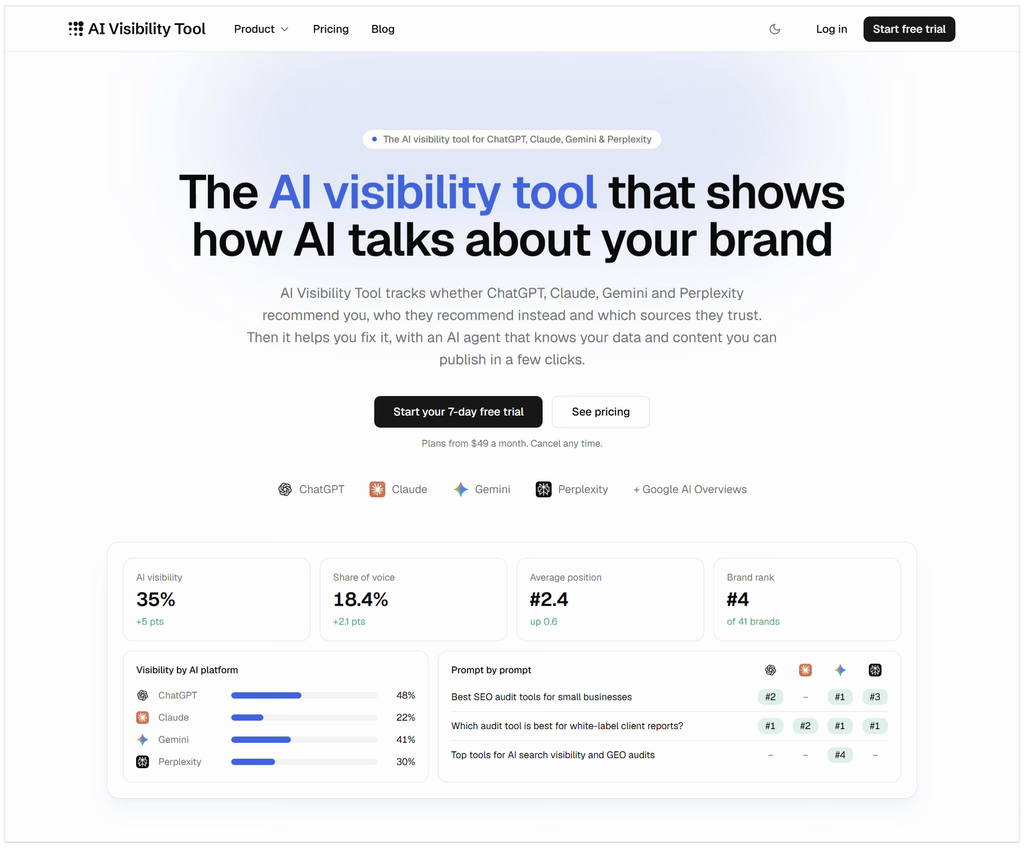
If an answer overlooks a supported use case, check whether your public documentation explains that capability clearly. A missing mention alone does not prove your documentation is the cause, but it gives you something useful to investigate.
Combine this research with support questions and feedback from new users. Build a short list of tasks people want to complete, then check whether each has a clear, accessible guide.
2. Organize Guides Around Real Tasks
A feature reference explains what a product can do. A task-based guide shows someone how to accomplish something with it.
Both are useful, but they serve different needs.
For example, a page called “Webhook Configuration” might list every available setting. A guide called “Send Deployment Notifications to Slack” gives readers a specific outcome to work toward.
For each guide, explain:
- What the reader will accomplish.
- What they need before starting.
- Which steps to follow.
- How to confirm that it worked.
- What to check if something goes wrong.
Link to the detailed reference where readers need more information. This keeps the guide focused while making deeper explanations easy to find.
3. Help Users Reach a Working Result Quickly
A quickstart should give someone an early success with as little unnecessary setup as possible.
Choose one common task and take the reader through the shortest complete path to finishing it. Save advanced configuration and unusual scenarios for separate guides.
Make the basics explicit. State the supported version, required permissions, and any tools the reader needs installed. Mark placeholders clearly so users know which values to replace.
Show the expected result after important steps. If a command returns a status message or creates a resource, explain what the reader should see.
Before publishing, ask someone unfamiliar with the product to follow the guide. Watch where they pause, make assumptions, or need help. Those moments reveal instructions that need work.
4. Use Examples That Reflect Real Work
A tiny code snippet can explain syntax without showing how the feature fits into an actual workflow.
Give readers enough context to adapt your examples. Explain the problem, show the input, and describe the output. Where relevant, include a common failure and how to handle it.
For example, an API integration guide could show a successful request, then explain what to check when authentication fails. That answers a practical question readers may face within minutes of trying the product.
Be clear about limitations, too. If an example is simplified, say what would need to change before using it in production. Avoid presenting demo code as a complete production solution.
Keep examples aligned with the current product. Include documentation updates in your release process when commands, responses, or configuration options change.
5. Connect Documentation With the Rest of Your Content
Useful documentation should be easy to reach from the places where people first encounter your product.
A blog tutorial can introduce a problem and link to a setup guide. An integration page can point directly to the relevant instructions. A repository README can give users a clear route to installation and troubleshooting.
You can also turn recurring support questions into short guides and share them when similar questions arise in developer communities.
Choose the destination carefully. Someone asking about authentication needs the authentication guide, rather than a link to your documentation homepage.
Within the documentation, suggest a relevant next step. After a quickstart, that might be adding error handling, trying an integration, or learning about configuration options.
Keep those suggestions useful and specific to the task the reader just completed.
6. Measure Whether Documentation Helps People Progress
Page views show that people arrived. They do not tell you whether the instructions helped.
Look at several signals together:
- Which searches bring relevant visitors to your guides?
- Which documentation searches return no useful results?
- Where do users report confusing or outdated instructions?
- Do users complete the setup or activation task the guide supports?
- Which questions keep reaching support despite existing documentation?
Where your analytics allow it, examine how documentation use relates to trial activation or successful integrations. Treat that relationship carefully: a visit to a guide does not prove the guide caused a signup or purchase.
Direct feedback helps fill the gaps. A short “Was this helpful?” prompt with an optional comment can reveal a missing prerequisite or a broken example that traffic reports would never explain.
Start With One Important Guide
You do not need to rebuild your documentation all at once.
Choose one task that matters to new users. Make the instructions easier to find, test every step, and show what success looks like. Then review feedback and improve the next guide.
Documentation supports growth when it helps developers make progress. Each useful answer gives someone a clearer reason to try your product and a better chance of succeeding with it.

Find Trusted Cardiac Hospitals
Compare heart hospitals by city and services — all in one place.
Explore Hospitals