
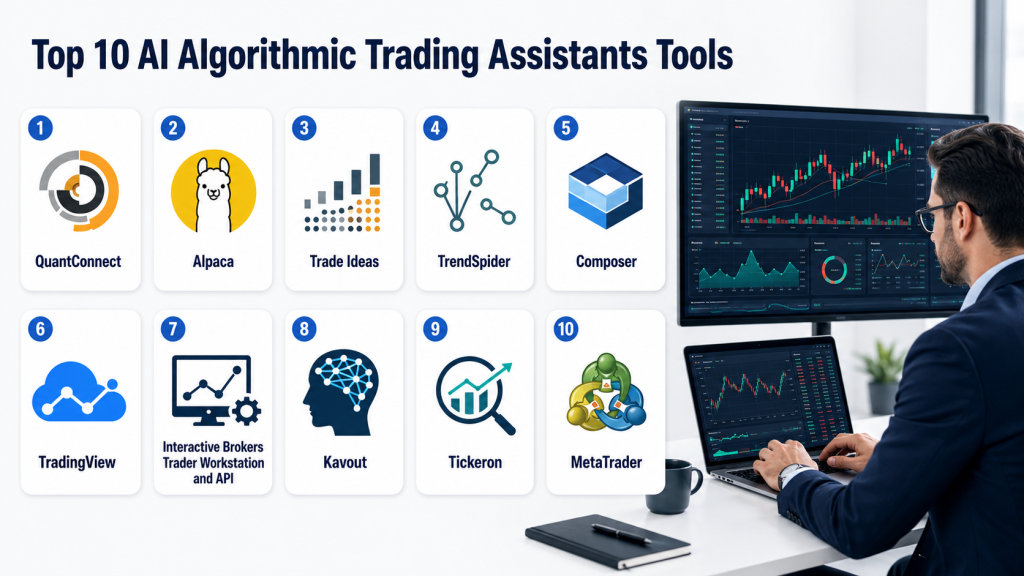
AI Algorithmic Trading Assistants help traders, quants, brokers, fintech teams, hedge funds, portfolio managers, and active investors design, test, monitor, and improve trading strategies using automation, data analysis, machine learning, signal scanning, backtesting, portfolio rules, and execution workflows. These tools can help users research trade ideas, build strategy logic, scan markets, test historical performance, automate alerts, and connect signals with broker execution systems.
Unlike basic charting platforms, AI algorithmic trading assistants focus on decision support and workflow automation. They do not guarantee profits, and they should never be treated as a replacement for risk management. A strong platform should help traders test assumptions, control drawdowns, monitor slippage, avoid overfitting, document strategies, and make disciplined decisions instead of emotional trades.
Introduction
AI Algorithmic Trading Assistants are platforms that use artificial intelligence, machine learning, quantitative models, automation, market data, technical signals, natural language workflows, and backtesting tools to support trading strategy development. They help traders convert ideas into rules, test those rules against historical data, monitor live signals, and in some cases automate execution through broker integrations.
Why It Matters
Trading has become faster, more data-heavy, and more competitive. Manual traders often struggle to monitor multiple markets, test strategies consistently, control risk, and avoid emotional decision-making. AI algorithmic trading assistants help by automating research, scanning, backtesting, signal detection, and workflow execution.
These tools matter because they can improve trading discipline. Instead of relying only on intuition, traders can test rules, compare outcomes, measure risk, and build repeatable processes. For professional teams, AI trading assistants can reduce research time, support strategy experimentation, and improve operational consistency. For retail traders, they can make automation more accessible, but users still need strong risk controls and realistic expectations.
Real World Use Cases
- Building and testing algorithmic trading strategies
- Screening stocks, ETFs, crypto, futures, or forex markets
- Generating trade alerts based on technical or quantitative rules
- Backtesting strategies before live deployment
- Paper trading strategy ideas
- Automating broker execution workflows
- Monitoring portfolio exposure and drawdown
- Detecting unusual volume, volatility, or momentum patterns
- Creating no-code or low-code trading bots
- Using AI assistants to explain strategy logic
- Optimizing entry, exit, and risk management rules
- Building research pipelines for quant teams
- Testing mean reversion, momentum, trend-following, and pair strategies
- Supporting systematic investing and rebalancing workflows
Evaluation Criteria for Buyers
- Quality of backtesting and simulation engine
- Support for live trading, paper trading, and alerts
- Broker and exchange integration depth
- Asset class coverage
- Strategy building flexibility
- Coding, low-code, or no-code experience
- AI signal quality and transparency
- Risk management and position sizing tools
- Data quality, survivorship bias controls, and historical coverage
- Execution reliability and latency
- Portfolio monitoring and drawdown controls
- Model testing, validation, and overfitting protection
- API access and developer tools
- Security, account access, and permissions
- Pricing scalability for strategy volume and data usage
Best for
AI Algorithmic Trading Assistants are best for quantitative traders, active investors, hedge funds, fintech builders, prop trading teams, broker platforms, algorithmic trading learners, research analysts, and developers who want to design and test repeatable trading strategies. They are especially useful for traders who need backtesting, automation, alerts, market scanning, strategy research, and broker-connected workflows.
Not ideal for
These tools are not ideal for people expecting guaranteed profits, fully automated wealth creation, or risk-free trading. They may also be unsuitable for beginners who do not understand market risk, leverage, slippage, drawdowns, and position sizing. A simple brokerage platform, portfolio tracker, or manual research tool may be enough for users who only invest long term and do not actively trade.
What’s Changed in AI Algorithmic Trading Assistants
- Trading assistants are moving from simple bots to research, testing, and execution copilots.
- More platforms now support no-code or low-code strategy building.
- AI is being used to summarize market data, explain signals, and generate strategy ideas.
- Backtesting quality is becoming a major buying priority because poor backtests can mislead users.
- Retail traders now expect paper trading before live deployment.
- Broker API integrations are making automated execution easier for developers.
- Risk controls are becoming more important than signal generation alone.
- AI agents are starting to support research workflows, alert interpretation, and trade planning.
- Technical analysis platforms are adding automated pattern recognition and strategy training.
- Quant platforms are improving cloud research, backtesting, and live deployment workflows.
- Traders are paying more attention to overfitting, slippage, data quality, and execution cost.
- Human oversight remains essential because AI-generated strategies can fail in live markets.
Quick Buyer Checklist
Use this checklist to shortlist AI Algorithmic Trading Assistants quickly:
- Does the tool support your preferred asset class?
- Can you backtest strategies with realistic assumptions?
- Does it support paper trading before live trading?
- Can it connect to your broker or exchange?
- Does it support coding, no-code, or both?
- Are risk controls available for stop loss, position sizing, drawdown, and exposure limits?
- Can you inspect why a signal or trade was generated?
- Does it support alerts, automation, or full execution?
- Is historical data quality clearly explained?
- Can you avoid look-ahead bias and overfitting?
- Does it provide performance metrics such as drawdown, Sharpe ratio, win rate, and turnover?
- Are APIs and SDKs available for developers?
- Are account permissions and security controls clear?
- Is pricing practical for your trading volume and data needs?
- Does the platform encourage responsible testing instead of hype-driven trading?
Top 10 AI Algorithmic Trading Assistants Tools
1- QuantConnect
One-line verdict: Best for developers and quant traders building, backtesting, and deploying custom algorithmic strategies.
Short description:
QuantConnect is an algorithmic trading platform for building, testing, and deploying trading strategies using code. It is widely used by quants, engineers, researchers, and systematic traders who want flexibility across research, backtesting, and live trading workflows.
Standout Capabilities
- Cloud-based quantitative research environment
- Open-source algorithmic trading engine
- Backtesting and live trading workflows
- Support for Python and C Sharp strategy development
- Multi-asset strategy research support varies by data and broker setup
- Strong fit for developers and systematic traders
- Community ecosystem for quant research
- Broker integration options for live trading workflows
AI-Specific Depth
- Model support: Custom machine learning and AI models can be implemented by users
- RAG and knowledge integration: Not applicable for standard trading workflows
- Evaluation: Backtesting, simulations, paper trading, and strategy performance analytics
- Guardrails: Risk controls depend on strategy design and platform settings
- Observability: Backtest reports, logs, trade history, drawdown metrics, and performance analytics
Pros
- Strong flexibility for serious quant research
- Good fit for custom algorithmic strategy development
- Open-source engine gives advanced teams more control
Cons
- Requires coding and quantitative knowledge
- Strategy quality depends heavily on user design
- Not ideal for users wanting one-click trading signals
Security & Compliance
Security controls should be verified directly. Buyers should confirm account access permissions, broker connection controls, encryption, audit logs, API key handling, and deployment security. Certifications are not publicly stated here.
Deployment & Platforms
- Cloud-based research and trading environment
- Open-source engine can support custom deployment
- Web-based platform access
- Broker integrations vary
- Self-hosted or local workflows depend on user setup
Integrations & Ecosystem
QuantConnect fits into developer-led trading research, backtesting, and live trading workflows.
- Broker integrations
- Market data sources
- Python and C Sharp workflows
- Research notebooks
- Backtesting engine
- Live trading deployment
- Community strategy research
Pricing Model
Pricing may include free, tiered, or usage-based options depending on compute, data, and live trading needs. Exact pricing should be verified.
Best-Fit Scenarios
- Developers building custom trading systems
- Quant teams testing multi-asset strategies
- Traders needing research, backtesting, and deployment in one workflow
2- Alpaca
One-line verdict: Best for developers needing API-first brokerage infrastructure for algorithmic trading workflows.
Short description:
Alpaca provides brokerage APIs and trading infrastructure for developers, fintech teams, and algorithmic traders. It is useful for building custom trading bots, paper trading workflows, portfolio apps, and automated execution systems.
Standout Capabilities
- API-first trading infrastructure
- Paper trading support for strategy testing
- Broker execution workflows for supported markets
- Developer-friendly APIs and documentation
- Useful for fintech products and trading apps
- Can connect with custom AI agents or trading assistants
- Supports automated order workflows
- Strong fit for engineering-led trading projects
AI-Specific Depth
- Model support: Users can connect external AI models or custom trading logic
- RAG and knowledge integration: Not applicable for standard execution workflows
- Evaluation: Paper trading and performance tracking depend on implementation
- Guardrails: Order controls, risk rules, and strategy limits must be designed by the user
- Observability: API logs, account activity, order history, and portfolio data vary by implementation
Pros
- Strong developer experience
- Useful for building custom algorithmic trading systems
- Paper trading helps test before live execution
Cons
- Not a complete strategy research platform by itself
- Users must build their own risk controls
- Market and asset support varies by region and account type
Security & Compliance
Security should be carefully reviewed because live trading APIs can control real accounts. Buyers should verify API key permissions, account security, authentication, encryption, audit logs, and broker regulatory coverage. Certifications are not publicly stated here.
Deployment & Platforms
- Cloud-based brokerage APIs
- Developer API access
- Web dashboard availability may vary
- Custom app and bot deployment depends on user infrastructure
- Self-hosted trading logic can be built externally
Integrations & Ecosystem
Alpaca fits into API-driven trading, fintech development, and custom automation workflows.
- Trading APIs
- Market data APIs
- Paper trading environments
- Custom trading bots
- AI agent workflows
- Portfolio apps
- Developer frameworks
Pricing Model
Pricing varies by brokerage services, market data, API usage, and account type. Exact pricing should be verified.
Best-Fit Scenarios
- Developers building trading bots
- Fintech teams creating trading apps
- Traders needing API-based execution and paper trading
3- Trade Ideas
One-line verdict: Best for active stock traders needing AI-driven market scanning and trade alerts.
Short description:
Trade Ideas is a stock scanning and trading alert platform focused on real-time market opportunities, AI-powered signals, backtesting, and active trader workflows. It is suitable for day traders, swing traders, and active market participants who need fast scanning and signal generation.
Standout Capabilities
- AI-powered stock scanning
- Real-time trade alerts
- Strategy testing and signal discovery tools
- Market pattern recognition
- Entry and exit signal workflows
- Portfolio and risk monitoring features vary
- Active trader dashboard experience
- Useful for US stock market-focused workflows
AI-Specific Depth
- Model support: Proprietary AI and signal models
- RAG and knowledge integration: Not applicable
- Evaluation: Backtesting and strategy review capabilities vary by plan
- Guardrails: Alerts, filters, and risk rules depend on user configuration
- Observability: Scan results, signal history, trade alerts, and performance insights vary
Pros
- Strong fit for active stock scanning
- Useful for discovering real-time trade opportunities
- Easier for non-developers than coding platforms
Cons
- Not a full custom quant development environment
- Signal quality still requires user validation
- May be less suited for long-term portfolio investors
Security & Compliance
Security and account-related controls should be verified directly. Buyers should confirm login security, account permissions, broker integration controls, data protection, and audit history where relevant. Certifications are not publicly stated here.
Deployment & Platforms
- Web and desktop workflows may vary
- Cloud-connected scanning tools
- Broker integration options may vary
- Mobile support should be verified
- Self-hosted deployment is not publicly stated
Integrations & Ecosystem
Trade Ideas fits into active stock trading, scanning, alerting, and decision support workflows.
- Stock scanners
- Charting workflows
- Broker connections vary
- Alerts and watchlists
- Backtesting tools
- Strategy discovery workflows
- Active trader dashboards
Pricing Model
Pricing is typically subscription-based with plan differences. Exact pricing should be verified.
Best-Fit Scenarios
- Active stock traders looking for AI alerts
- Swing traders needing scanning and watchlists
- Traders who prefer signal workflows over coding
4- TrendSpider
One-line verdict: Best for technical traders needing automated chart analysis, scanning, and strategy testing.
Short description:
TrendSpider is a technical analysis and market research platform with automation, charting, scanning, alerts, and strategy testing capabilities. It is useful for traders who rely on charts, patterns, indicators, market structure, and technical signals.
Standout Capabilities
- Automated technical analysis
- Smart charting and market scanning
- Strategy testing and alert workflows
- AI-assisted market research features
- Pattern recognition and indicator-based workflows
- Useful for stocks, ETFs, crypto, forex, and other supported markets
- No-code style technical strategy support
- Strong fit for technical-first traders
AI-Specific Depth
- Model support: AI-assisted scanning and strategy training capabilities vary by feature
- RAG and knowledge integration: Not applicable
- Evaluation: Strategy testing and technical signal validation tools vary
- Guardrails: Alerts, rules, scanners, and risk controls depend on user setup
- Observability: Chart annotations, scanner results, strategy tests, and alert history
Pros
- Strong technical analysis automation
- Good fit for traders who do not want to code
- Useful for scanning, alerts, and pattern-based workflows
Cons
- Not a broker-native execution platform by itself
- Strategy quality depends on user assumptions
- Advanced quant users may need more coding flexibility
Security & Compliance
Security controls should be verified directly. Buyers should confirm account protection, broker connection security, data privacy, and permission controls where integrations are used. Certifications are not publicly stated here.
Deployment & Platforms
- Cloud-based platform
- Web-based charting and research interface
- Mobile support should be verified
- Broker integrations may vary
- Self-hosted deployment is not publicly stated
Integrations & Ecosystem
TrendSpider fits into technical analysis, scanning, alerts, and trading research workflows.
- Charting tools
- Market scanners
- Strategy testing
- Alerts
- Broker integrations vary
- Watchlists
- Technical research workflows
Pricing Model
Pricing is typically subscription-based with plan differences. Exact pricing should be verified.
Best-Fit Scenarios
- Technical traders automating chart analysis
- Traders needing scans and alerts without coding
- Users testing indicator-based strategies
5- Composer
One-line verdict: Best for no-code traders building automated stock and ETF strategies visually.
Short description:
Composer is a no-code trading automation platform that allows users to create, test, and manage automated strategies using visual logic. It is useful for investors and traders who want strategy automation without writing code.
Standout Capabilities
- No-code strategy builder
- Visual trading logic creation
- Backtesting and strategy comparison workflows
- Automated portfolio and trading strategies
- Useful for stock and ETF strategy automation
- Simplifies systematic investing for non-developers
- Supports strategy templates and idea exploration
- Good fit for rules-based portfolio automation
AI-Specific Depth
- Model support: AI assistant and strategy automation capabilities vary by feature
- RAG and knowledge integration: Not applicable
- Evaluation: Backtesting and strategy comparison tools
- Guardrails: Strategy rules, allocation limits, and user-defined constraints
- Observability: Backtest results, allocation history, strategy logic, and portfolio outcomes
Pros
- Easy for non-coders
- Useful for rules-based strategy automation
- Visual builder simplifies strategy design
Cons
- Less flexible than coding platforms
- Users must still understand backtesting limitations
- Asset and broker support should be verified
Security & Compliance
Security and trading account controls should be verified directly. Buyers should confirm account access, broker permissions, authentication, encryption, and trading authorization controls. Certifications are not publicly stated here.
Deployment & Platforms
- Cloud-based platform
- Web-based no-code interface
- Broker and account integrations vary
- Mobile support should be verified
- Self-hosted deployment is not publicly stated
Integrations & Ecosystem
Composer fits into no-code systematic trading and portfolio automation workflows.
- Strategy builder
- Backtesting workflows
- Portfolio automation
- Broker connections vary
- Strategy templates
- Trading rules
- Performance dashboards
Pricing Model
Pricing is typically subscription or platform-based. Exact pricing should be verified.
Best-Fit Scenarios
- Non-coders building automated ETF strategies
- Investors testing rules-based allocation logic
- Traders wanting visual strategy creation
6- TradingView
One-line verdict: Best for chart-focused traders needing scripting, alerts, and community strategy workflows.
Short description:
TradingView is a widely used charting and market analysis platform with scripting, alerts, indicators, screeners, and community-published strategies. It is suitable for traders who want advanced charting, signal creation, market monitoring, and broker-connected workflows.
Standout Capabilities
- Advanced charting and market analysis
- Pine Script for custom indicators and strategies
- Alerts based on technical rules and scripts
- Community strategy and indicator ecosystem
- Multi-asset market coverage varies by data feed
- Broker integration options vary
- Useful for discretionary and systematic traders
- Strong fit for visual research and signal creation
AI-Specific Depth
- Model support: Custom script logic, third-party AI workflows vary
- RAG and knowledge integration: Not applicable
- Evaluation: Strategy testing and chart-based analysis tools vary
- Guardrails: Alerts, scripts, and risk controls depend on user setup
- Observability: Chart signals, alerts, strategy tests, watchlists, and indicator outputs
Pros
- Strong charting and scripting ecosystem
- Large community of indicators and strategies
- Useful for alerts and visual trading workflows
Cons
- AI assistant depth varies by use case and third-party tools
- Backtesting assumptions require careful review
- Live automation may need external integrations
Security & Compliance
Security should be verified directly. Buyers should confirm account security, broker connection permissions, data privacy, alert security, and access controls. Certifications are not publicly stated here.
Deployment & Platforms
- Web-based platform
- Desktop and mobile apps may be available
- Broker integrations vary
- Cloud-based alerts
- Self-hosted deployment is not publicly stated
Integrations & Ecosystem
TradingView fits into charting, alerting, scripting, and trader community workflows.
- Broker integrations
- Market data feeds
- Pine Script strategies
- Alerts
- Screeners
- Community indicators
- Chart layouts
Pricing Model
Pricing may include free and subscription-based plans depending on features, alerts, data, and usage. Exact pricing should be verified.
Best-Fit Scenarios
- Traders needing advanced charting
- Users building custom alerts and scripts
- Active investors following multiple markets visually
7- Interactive Brokers Trader Workstation and API
One-line verdict: Best for experienced traders needing broker-grade execution with powerful automation APIs.
Short description:
Interactive Brokers Trader Workstation and API support professional trading, market access, portfolio management, and automated execution workflows. It is useful for advanced traders, institutions, and developers building custom algorithmic trading systems connected to a broker environment.
Standout Capabilities
- Broker-grade trading platform
- API access for automated strategies
- Broad market and asset access varies by region and account type
- Professional order types and execution tools
- Paper trading support may be available
- Portfolio and risk monitoring workflows
- Strong fit for experienced traders and institutions
- Useful for connecting external AI models to execution workflows
AI-Specific Depth
- Model support: External AI and custom models can connect through user-built systems
- RAG and knowledge integration: Not applicable
- Evaluation: Paper trading and performance tracking depend on setup
- Guardrails: Account risk controls, order limits, and custom logic depend on user configuration
- Observability: Order history, account data, execution reports, logs, and portfolio metrics
Pros
- Strong broker infrastructure
- Powerful API for experienced developers
- Broad execution and order management capabilities
Cons
- Steeper learning curve for beginners
- AI assistant capabilities are not native in the same way as dedicated AI tools
- Users must design and validate their own strategies
Security & Compliance
Security and account controls should be verified directly. Buyers should confirm authentication, API permissions, account restrictions, audit history, encryption, and regulatory coverage by region. Certifications are not publicly stated here.
Deployment & Platforms
- Desktop trading platform
- API-based automation
- Web and mobile access may vary
- Broker-hosted account infrastructure
- Custom strategy deployment depends on user setup
Integrations & Ecosystem
Interactive Brokers fits into professional trading, execution, and custom automation workflows.
- Trading APIs
- Market data feeds
- Order management
- Portfolio monitoring
- Paper trading workflows
- External model integrations
- Custom trading systems
Pricing Model
Pricing depends on brokerage account type, commissions, data subscriptions, and market access. Exact pricing should be verified.
Best-Fit Scenarios
- Advanced traders automating execution
- Developers building broker-connected trading systems
- Institutions needing professional market access
8- Kavout
One-line verdict: Best for investors needing AI-assisted stock research, ranking, and market intelligence.
Short description:
Kavout provides AI-powered financial research tools, market intelligence, stock ranking, and investing insights. It is useful for investors and analysts who want AI-assisted research support rather than a full custom execution platform.
Standout Capabilities
- AI-powered market research
- Stock ranking and signal workflows
- Research support across multiple markets varies
- Useful for idea generation and screening
- Financial data analysis and insight generation
- AI research agent capabilities may vary
- Helpful for investors comparing opportunities
- Supports decision support rather than pure execution automation
AI-Specific Depth
- Model support: Proprietary AI and research models
- RAG and knowledge integration: AI research workflows may use market and financial information, exact depth varies
- Evaluation: Signal validation and performance analytics should be verified
- Guardrails: Research filters, ranking logic, and user review workflows
- Observability: Rankings, research outputs, signals, and market insight dashboards vary
Pros
- Useful for AI-assisted investment research
- Good for screening and idea discovery
- Accessible for users who do not build strategies from scratch
Cons
- Not a full broker execution platform
- Signal methodology should be reviewed carefully
- Exact pricing and model transparency should be verified
Security & Compliance
Security capabilities should be verified directly. Buyers should confirm account security, data handling, access controls, and privacy practices. Certifications are not publicly stated here.
Deployment & Platforms
- Cloud-based research platform
- Web-based workflows
- API access should be verified
- Broker execution support is not the core focus
- Self-hosted deployment is not publicly stated
Integrations & Ecosystem
Kavout fits into research, stock screening, market intelligence, and investment decision workflows.
- AI research tools
- Stock ranking workflows
- Market data analysis
- Research dashboards
- Watchlists
- Portfolio idea generation
- Investment research workflows
Pricing Model
Pricing is typically subscription or platform-based. Exact pricing should be verified.
Best-Fit Scenarios
- Investors needing AI research support
- Analysts screening global market opportunities
- Teams using AI signals as inputs into broader research
9- Tickeron
One-line verdict: Best for traders wanting AI pattern recognition, trade ideas, and signal discovery.
Short description:
Tickeron provides AI-powered trading ideas, pattern recognition, market scanning, and signal tools for investors and traders. It is useful for users who want AI-generated insights and technical pattern-based trade discovery.
Standout Capabilities
- AI pattern recognition
- Trade idea generation
- Market scanning and signal workflows
- Technical analysis automation
- Portfolio and watchlist tools vary
- Useful for active traders and retail investors
- Supports educational and idea discovery workflows
- Helps identify technical setups faster
AI-Specific Depth
- Model support: Proprietary AI models for pattern recognition and signals
- RAG and knowledge integration: Not applicable
- Evaluation: Signal history and performance tracking vary by feature
- Guardrails: User filters, signal preferences, and review workflows
- Observability: Pattern alerts, trade ideas, signal dashboards, and performance views vary
Pros
- Good fit for AI-driven trade idea discovery
- Useful for pattern-based traders
- Easier than building custom models
Cons
- Users must validate every signal independently
- Not a full institutional trading platform
- Exact model transparency should be reviewed
Security & Compliance
Security details should be verified directly. Buyers should confirm account controls, data privacy, access security, and any broker connection permissions. Certifications are not publicly stated here.
Deployment & Platforms
- Cloud-based platform
- Web-based tools
- Mobile support should be verified
- Broker integration support varies
- Self-hosted deployment is not publicly stated
Integrations & Ecosystem
Tickeron fits into AI signal discovery, technical analysis, and active trading research workflows.
- AI trade ideas
- Technical pattern recognition
- Market scanning
- Watchlists
- Signal dashboards
- Research workflows
- Trading education tools
Pricing Model
Pricing is typically subscription-based with plan differences. Exact pricing should be verified.
Best-Fit Scenarios
- Traders needing AI-generated trade ideas
- Users focused on chart patterns and signals
- Retail investors seeking research support
10- MetaTrader
One-line verdict: Best for forex and CFD traders using expert advisors and automated trading scripts.
Short description:
MetaTrader is a widely used trading platform for forex, CFD, and broker-connected trading workflows. It supports automated trading through expert advisors, scripts, indicators, strategy testing, and custom trading logic, depending on broker setup.
Standout Capabilities
- Automated trading through expert advisors
- Custom indicators and scripts
- Strategy testing tools
- Broker-connected execution
- Strong forex and CFD ecosystem
- Large marketplace and developer community
- Useful for technical and systematic traders
- Supports custom automation workflows
AI-Specific Depth
- Model support: Custom AI models can be connected through scripts or external systems, native AI depth varies
- RAG and knowledge integration: Not applicable
- Evaluation: Strategy testing and historical simulation tools vary
- Guardrails: Risk controls depend on expert advisor design and broker settings
- Observability: Trade logs, strategy tester reports, account history, and indicator outputs
Pros
- Large ecosystem for automated trading
- Strong fit for forex and CFD traders
- Supports custom scripts and expert advisors
Cons
- Broker quality and execution conditions vary
- AI capabilities depend heavily on third-party tools or custom code
- Users must carefully manage leverage and risk
Security & Compliance
Security and account controls depend on broker and platform configuration. Buyers should verify broker regulation, account security, API or script permissions, encryption, and withdrawal controls. Certifications are not publicly stated here.
Deployment & Platforms
- Desktop trading platform
- Mobile support may be available
- Broker-hosted trading accounts
- Custom scripts and expert advisors
- Self-hosted automation depends on user setup
Integrations & Ecosystem
MetaTrader fits into forex, CFD, technical trading, and automated strategy workflows.
- Broker integrations
- Expert advisors
- Custom indicators
- Strategy tester
- Marketplaces
- Trading scripts
- Account history and logs
Pricing Model
Platform access is often broker-dependent, while marketplace tools, VPS services, signals, and third-party automation may have separate costs. Exact pricing varies.
Best-Fit Scenarios
- Forex traders using expert advisors
- Traders automating technical strategies
- Users needing a large ecosystem of scripts and indicators
Comparison Table
| Tool Name | Best For | Deployment | Model Flexibility | Strength | Watch-Out | Public Rating |
|---|---|---|---|---|---|---|
| QuantConnect | Custom quant strategies | Cloud and open-source engine | Custom AI and code | Backtesting and deployment depth | Requires coding | N/A |
| Alpaca | API-first trading apps | Cloud APIs | External AI and custom logic | Developer-friendly execution | Not full research platform | N/A |
| Trade Ideas | Active stock scanning | Cloud or desktop varies | Proprietary AI signals | Real-time market alerts | Validate signals carefully | N/A |
| TrendSpider | Technical analysis automation | Cloud | AI-assisted scans and strategies | Chart automation | Not broker-native execution | N/A |
| Composer | No-code strategy automation | Cloud | Visual strategy logic | No-code trading workflows | Less flexible than coding | N/A |
| TradingView | Charting and scripting | Cloud | Script-based logic | Charting ecosystem | Automation needs setup | N/A |
| Interactive Brokers TWS and API | Broker-grade automation | Desktop and API | External AI and custom logic | Execution depth | Steep learning curve | N/A |
| Kavout | AI investment research | Cloud | Proprietary AI research | Stock ranking and insights | Not execution-focused | N/A |
| Tickeron | AI trade ideas | Cloud | Proprietary AI signals | Pattern recognition | Signal validation needed | N/A |
| MetaTrader | Expert advisor automation | Desktop and broker-connected | Custom scripts and external AI | Forex automation ecosystem | Broker risk varies | N/A |
Scoring and Evaluation
The scoring below is a comparative editorial rubric, not a lab benchmark or public rating. Scores reflect algorithmic trading relevance, AI depth, backtesting quality, automation flexibility, integration value, risk controls, usability, and practical usefulness for traders or developers. Final selection should depend on trading style, asset class, coding ability, broker needs, risk tolerance, and strategy maturity.
| Tool | Core | Reliability and Eval | Guardrails | Integrations | Ease | Performance and Cost | Security and Admin | Support | Weighted Total |
|---|---|---|---|---|---|---|---|---|---|
| QuantConnect | 9 | 9 | 8 | 8 | 6 | 8 | 8 | 8 | 8.15 |
| Alpaca | 8 | 7 | 7 | 9 | 7 | 8 | 8 | 8 | 7.80 |
| Trade Ideas | 8 | 7 | 7 | 7 | 8 | 7 | 7 | 8 | 7.45 |
| TrendSpider | 8 | 8 | 7 | 7 | 8 | 8 | 7 | 8 | 7.70 |
| Composer | 8 | 8 | 7 | 7 | 9 | 8 | 7 | 7 | 7.75 |
| TradingView | 8 | 7 | 7 | 8 | 9 | 8 | 8 | 8 | 7.90 |
| Interactive Brokers TWS and API | 9 | 8 | 8 | 9 | 5 | 8 | 9 | 8 | 8.10 |
| Kavout | 7 | 7 | 6 | 6 | 8 | 7 | 7 | 7 | 6.95 |
| Tickeron | 7 | 7 | 6 | 6 | 8 | 7 | 7 | 7 | 6.95 |
| MetaTrader | 8 | 7 | 7 | 8 | 7 | 8 | 7 | 8 | 7.50 |
Top 3 for Enterprise
- QuantConnect
- Interactive Brokers TWS and API
- Bloomberg-style institutional platforms may be considered separately when execution, data, and compliance needs are enterprise-grade
Top 3 for SMB
- TradingView
- TrendSpider
- Composer
Top 3 for Developers
- QuantConnect
- Alpaca
- Interactive Brokers TWS and API
Which AI Algorithmic Trading Assistant Is Right for You
Solo or Freelancer
Solo traders should start with tools that match their skill level. TradingView is useful for charting, alerts, and simple scripts. TrendSpider is strong for technical analysis automation. Composer is better for no-code strategy automation. QuantConnect is ideal only if the user is comfortable with coding and strategy testing.
SMB
Small trading teams, education businesses, and boutique research groups should focus on workflow consistency, backtesting quality, and risk controls. TrendSpider and Trade Ideas are good for active scanning. Composer can help with no-code systematic strategies. QuantConnect is better for teams with technical skill and a need for custom research.
Mid-Market
Mid-market trading firms and fintech teams need stronger integration, broker connectivity, data quality, and testing workflows. QuantConnect, Alpaca, Interactive Brokers API, and TradingView can be combined into a flexible stack. Kavout and Tickeron may support research and idea generation but should not be the only decision source.
Enterprise
Enterprise trading teams should prioritize data governance, compliance, execution reliability, risk controls, monitoring, audit logs, and internal model governance. QuantConnect can support research and backtesting workflows. Interactive Brokers may support execution for certain setups. Larger institutions may also require proprietary infrastructure, OMS integration, and compliance surveillance beyond retail trading assistants.
Regulated Industries
Broker-dealers, advisory firms, proprietary trading firms, and fintech platforms should treat algorithmic trading as a controlled operational process. They should prioritize audit trails, pre-trade risk controls, model validation, user permissions, order limits, error handling, and compliance review. AI-generated trading signals should be documented and tested before deployment.
Budget vs Premium
Budget-conscious users can start with TradingView, MetaTrader, or basic platform tiers depending on market and broker needs. Traders who want no-code automation can evaluate Composer or TrendSpider. Premium buyers and technical teams should consider QuantConnect, Alpaca, Interactive Brokers API, or a custom trading infrastructure depending on execution and data requirements.
Build vs Buy
Build internally when you have coding skills, market data access, risk management knowledge, execution expertise, and time to validate strategies. Buy when you need faster setup, prebuilt scanning, no-code workflows, or managed research tools. Many serious traders use a hybrid approach by using vendor platforms for research and building custom execution logic separately.
Implementation Playbook
First Phase: Pilot and Success Metrics
- Define your trading objective clearly.
- Select one strategy type such as momentum, mean reversion, trend following, pairs trading, or portfolio rebalancing.
- Start with paper trading or backtesting before using real capital.
- Capture baseline metrics such as return, drawdown, volatility, win rate, profit factor, turnover, slippage, and maximum loss.
- Map required data sources such as price, volume, fundamentals, news, options data, crypto order books, or macro signals.
- Define risk rules such as position size, stop loss, exposure limit, daily loss limit, and maximum number of trades.
- Document strategy logic before testing.
- Avoid changing rules repeatedly after seeing backtest results.
Second Phase: Security, Evaluation, and Rollout
- Connect broker or exchange accounts only after testing in paper mode.
- Use restricted API permissions where possible.
- Add risk limits before enabling live orders.
- Test strategy behavior during volatile market periods.
- Review slippage, fees, liquidity, and execution assumptions.
- Add alerts for failed orders, abnormal drawdown, API errors, and unexpected trade frequency.
- Keep a strategy change log for every update.
- Review whether live performance matches backtest expectations.
Third Phase: Optimization and Scale
- Monitor live performance against backtest assumptions.
- Tune strategy parameters carefully without overfitting.
- Expand to new markets only after validating data quality and execution conditions.
- Build dashboards for performance, risk, exposure, and drawdown.
- Compare AI-generated signals with rule-based signals and human review.
- Review strategies after major market regime changes.
- Maintain emergency stop controls.
- Schedule regular governance reviews for strategies, models, broker access, and risk limits.
Common Mistakes and How to Avoid Them
- Believing AI trading tools guarantee profits
- Deploying live strategies without paper trading
- Overfitting strategies to historical data
- Ignoring slippage, spreads, and transaction costs
- Using poor-quality market data
- Trading too frequently without cost analysis
- Not setting position size and drawdown limits
- Giving API keys excessive permissions
- Trusting signals without understanding the logic
- Changing strategy rules too often
- Ignoring market regime changes
- Using leverage without strong risk controls
- Not monitoring live bots continuously
- Treating backtest results as future guarantees
- Choosing a platform before defining trading style
FAQs
1- What is an AI Algorithmic Trading Assistant?
An AI Algorithmic Trading Assistant helps traders research, test, monitor, and automate trading strategies using AI, market data, rules, backtesting, alerts, and broker integrations. It supports decision-making but does not guarantee profit.
2- How is it different from a normal trading bot?
A normal trading bot may simply execute predefined rules. An AI trading assistant may also help generate ideas, scan markets, analyze signals, test strategies, explain patterns, and support workflow automation.
3- Can AI trading assistants guarantee returns?
No. No trading platform can guarantee returns. Markets are uncertain, and even strong backtests can fail in live trading due to slippage, fees, liquidity, volatility, and changing market conditions.
4- Are these tools suitable for beginners?
Some tools are beginner-friendly, especially no-code platforms and charting tools. However, beginners should avoid live automation until they understand risk management, backtesting limits, position sizing, and drawdowns.
5- What is backtesting?
Backtesting means testing a trading strategy against historical data to see how it might have performed. It is useful, but results can be misleading if data quality, slippage, fees, or overfitting are ignored.
6- What is paper trading?
Paper trading means running a strategy in a simulated environment without risking real money. It helps users test logic, order behavior, and workflow reliability before going live.
7- What is overfitting in trading strategies?
Overfitting happens when a strategy is too closely tuned to past data and fails in live markets. Traders should test strategies across different periods, markets, and conditions.
8- Can AI assistants execute trades automatically?
Some platforms can support automated execution through broker integrations or APIs. Users should enable automation only after testing, adding risk controls, and understanding account permissions.
9- What data is needed for algorithmic trading?
Common data includes price, volume, order book data, fundamentals, news, macro indicators, options data, sentiment data, and portfolio data. The right data depends on the strategy.
10- Is coding required?
Not always. Tools like Composer, TrendSpider, and some scanner platforms support no-code or low-code workflows. QuantConnect, Alpaca, and broker APIs are better for users who can code.
11- What are the biggest risks in automated trading?
The biggest risks include poor strategy design, overfitting, broker connection failures, bad data, excessive leverage, unexpected volatility, high fees, and missing risk controls.
12- Can these tools be used for crypto trading?
Some platforms support crypto trading or crypto market analysis, but support varies. Users should verify exchange integrations, data quality, liquidity assumptions, and risk controls before use.
13- Should traders use AI signals without review?
No. AI signals should be treated as decision support, not automatic truth. Every signal should be tested, reviewed, and monitored before it affects real capital.
14- How should I choose the right platform?
Choose based on your trading style, asset class, coding ability, broker needs, risk controls, backtesting requirements, and budget. No single platform is best for every trader.
Conclusion
AI Algorithmic Trading Assistants can help traders and investment teams research strategies, scan markets, automate alerts, backtest ideas, and connect trading logic with execution workflows. The best tool depends on your trading style, coding skill, asset class, broker needs, risk tolerance, and workflow maturity. QuantConnect is strong for developers and quant research, Alpaca is useful for API-first trading apps, Trade Ideas supports active stock scanning, TrendSpider fits technical analysis automation, Composer helps no-code traders build strategies, TradingView is strong for charting and scripting, Interactive Brokers TWS and API supports broker-grade execution, Kavout and Tickeron support AI-driven research and signals, and MetaTrader remains popular for expert advisor automation. Start with a clear strategy idea, test it through backtesting and paper trading, verify risk controls, then scale slowly with monitoring, documentation, and human oversight.

Find Trusted Cardiac Hospitals
Compare heart hospitals by city and services — all in one place.
Explore Hospitals
What’s missing here is the real production gap between backtesting and live trading. Most AI trading assistants perform well in simulations, but the article doesn’t address issues like slippage, API latency, partial fills, or broker execution limits, which often break strategies in real markets. Also, there’s little focus on risk-layer separation and model version tracking, both of which are critical for controlling exposure and debugging trades when strategies start behaving unexpectedly in production.