
Web development teams live in two worlds. On one side, client expectations keep rising: faster launches, zero downtime, and the ability to update dozens of sites without breaking anything. On the other side, many agencies still manage deployments through manual FTP uploads, one-click WordPress updates, and hope. The gap between what clients demand and what traditional workflows deliver gets harder to ignore.
DevOps practices have transformed how software teams build and ship code. The same principles now reshape digital agencies. CI/CD pipelines, infrastructure as code, automated testing, and observability move out of the cloud-native world and into web development shops managing content-driven sites. The global DevOps market was valued at $13-$16 billion in 2025, according to IMARC Group, with projections indicating continued growth as more organizations automate their delivery pipelines.
This article explains why traditional web development workflows need an upgrade, which DevOps practices matter most for agencies, and how to start without over-engineering the first step.
Why Traditional Web Development Needs DevOps
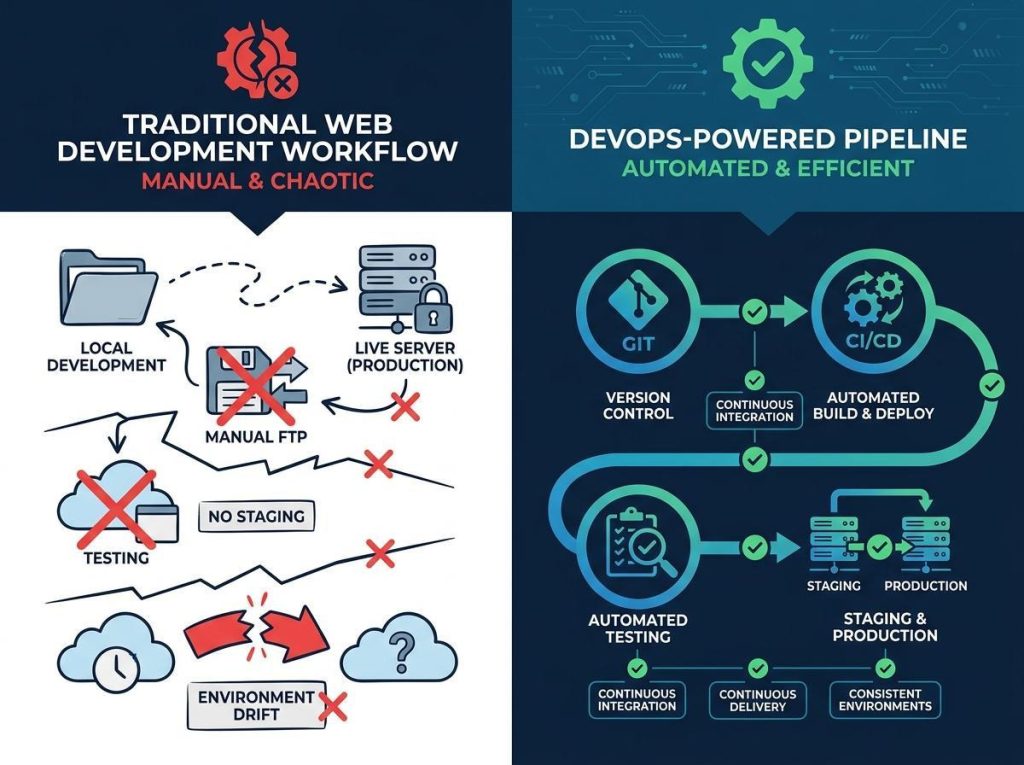
Most digital agencies suffer from what infrastructure engineers call the “snowflake server” problem. Every client site runs on a slightly different configuration. One uses shared hosting with PHP 7.4. Another runs on a VPS with Nginx and PHP 8.2. A third sits on a managed WordPress platform with its own quirks. Over time, these environments drift apart. A deployment that works on one site breaks another, and nobody knows why until the client calls.
Teams lose about 7 hours per week to inefficient tooling and process friction, according to the GitLab Global DevSecOps Report 2025, which surveyed 3,266 respondents through The Harris Poll. That’s nearly a full working day lost to workarounds, manual checks, and recovery from preventable errors.
For agencies managing complex multi-location WordPress ecosystems, these challenges multiply. A single deployment error across dozens of franchise sites can cascade into widespread service disruption. This is why agencies like Quantenwerft have moved toward automated deployment workflows. When you’re responsible for 50-plus brand sites, manual processes become a business risk, not just an inconvenience.
Core DevOps Practices for Web Development Teams
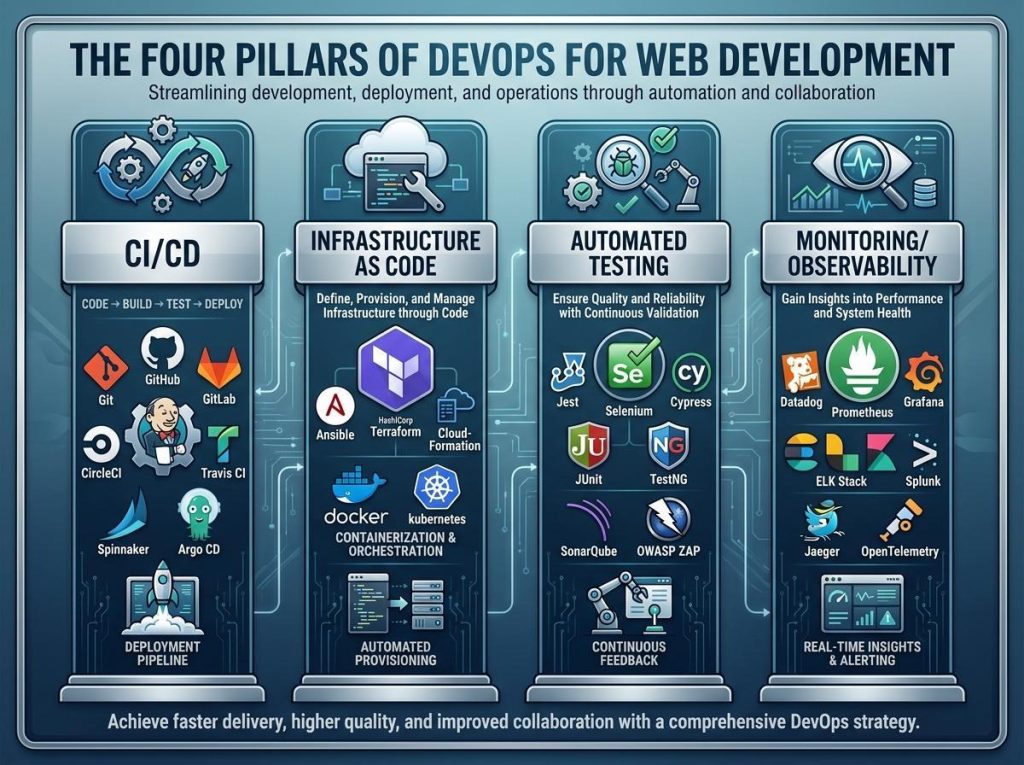
CI/CD Pipelines for CMS-Driven Sites
The old way meant editing files on a staging server, then copying them to production via FTP or a control panel. The new approach uses Git-based workflows, branch strategies, automated builds, and controlled deployments. A developer pushes a theme update to a feature branch. CI tools run linting and build steps. A pull request triggers a deploy to a staging environment for review. After approval, the same pipeline pushes to production.
Tools such as GitHub Actions, GitLab CI, and Buddy Works make this achievable for teams without dedicated DevOps engineers. The GitLab Global DevSecOps Report 2025 found that organizations using DevOps practices see 49% shorter time-to-market and 61% improvement in deliverable quality, per IMARC Group’s 2025 analysis.
Infrastructure as Code for Hosting Environments
Web agencies used to set up hosting environments by hand, clicking through control panels and noting down configuration steps in shared documents. That approach breaks as soon as someone forgets a setting or a server gets rebuilt from a stale backup.
Infrastructure-as-code tools, such as Terraform, let teams define hosting environments in version-controlled configuration files. Spinning up a staging environment that mirrors production becomes a single command instead of a multi-hour process. This level of consistency is especially useful for platforms running on Magento cloud hosting, where even small configuration differences can create unexpected issues. Docker adds local development parity, so a developer’s laptop runs the same stack as production. For DevOps platforms for teams evaluating their toolchain, environment reproducibility is a baseline requirement.
Automated Testing in the Pipeline
Testing in web development often means clicking through a site after a deployment and checking for visual issues. Automated testing changes that. PHPUnit runs unit tests on plugin and theme code. Tools such as Percy or Playwright handle visual regression testing, catching layout breaks that a human might miss. WPScan runs security checks against known vulnerabilities. Performance budgets flag pages that exceed size or load-time thresholds.
The Google Cloud DORA 2025 State of AI-assisted Software Development Report found that AI-powered testing helps teams achieve 83% test coverage, while 90% of technology professionals now use AI at work. The report also noted that teams combining AI tooling with strong DevOps practices see an “amplifier effect” on performance.
Monitoring and Observability
Deploying without monitoring means flying blind. Uptime checks, error tracking with Sentry, and real-user performance monitoring give agencies visibility into what happens after a deployment. When a plugin update causes a white screen or a third-party API goes down, the team knows before the client does.
The WordPress DevOps Challenge
CMS platforms add complexity that traditional software projects don’t face. A web application’s state lives in code. A WordPress site’s state lives partly in code and partly in the database. Content, user accounts, plugin settings, and widget configurations all live in the database, making rollbacks harder than reverting a Git commit.
Plugins introduce a second dimension of complexity. Updates come from third-party developers on irregular schedules. An automated pipeline that blindly updates plugins can break a site if the plugin author changes a function signature or drops PHP version support. Smart pipelines stage plugin updates, run automated tests, and only promote to production after passing checks.
The Container Native Cloud Foundation’s 2025 Annual Cloud Native Survey (628 practitioners, published January 2026) found that 82% of container users now run Kubernetes in production, up from 66% in 2023, and 98% of organizations have adopted cloud native techniques. While most agencies don’t need Kubernetes, the industry moves toward automated, declarative infrastructure management. Agencies that ignore this change risk falling behind competitors who have already automated their workflows.
For teams running WordPress at scale, the Kinsta guide on modern agency tech stacks offers a practical look at how DevOps tooling fits into a CMS-heavy environment. The key takeaway is that WordPress doesn’t have to be the exception to DevOps best practices.
Real-World Example: Multi-Location Brand Deployment
Consider a fitness brand with 50-plus franchise locations, each running its own sub-site on a shared WordPress installation. Without automation, updating a theme or rolling out a new plugin means touching each site individually. That’s not scalable.
A DevOps approach changes the picture. A centralized plugin repository stores approved versions and distributes them via PRs. When a developer submits a plugin update, CI runs compatibility checks against all active themes and configurations. A staging environment mimics the production multisite setup. After QA signs off, a blue-green deployment strategy rolls the update across all franchise sites with zero downtime. If something fails, the orchestrator rolls back the deployment on a site-by-site basis, not all at once.
This pipeline doesn’t require a massive platform engineering team. It needs version control, a CI runner, and a deployment strategy accounting for CMS-managed content. For infrastructure as code for beginners, starting with a single multisite deployment pipeline teaches more than a month of theory.
Measuring Success With DORA Metrics
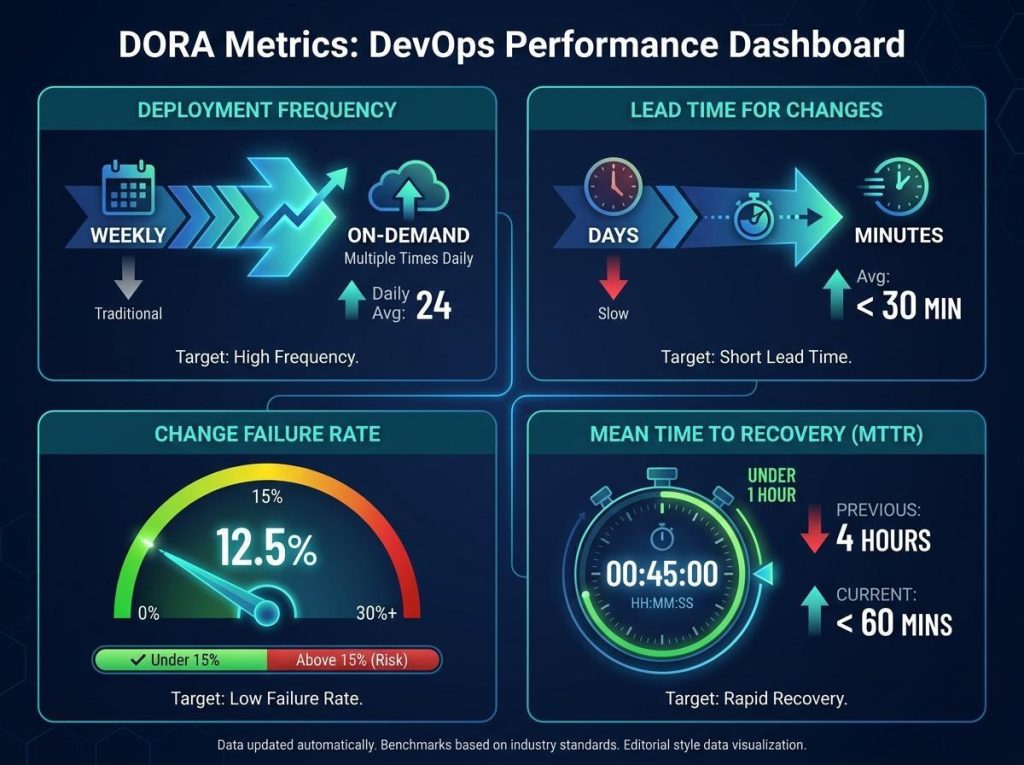
The same metrics that measure elite software teams apply to web development agencies. The DORA framework tracks four key indicators:
- Deployment Frequency: How often does the team deploy to production? Elite teams deploy on demand. For agencies, moving from weekly to daily or on-demand deployments is a measurable improvement.
- Lead Time for Changes: How long does it take from a code commit to running in production? Manual workflows stretch this to days or weeks. Automated pipelines cut it to minutes.
- Change Failure Rate: What percentage of deployments cause a failure in production? The target is under 15%. Tracking this makes teams more careful about what ships.
- Time to Restore Service: When something breaks, how long does recovery take? Elite teams restore service in under an hour. Automated rollback and infrastructure-as-code make this achievable.
For agencies, these metrics need adaptation. A database schema change on a WordPress site carries different risks from a backend microservice update. But the framework works the same way: measure what you’re doing, set targets, and improve incrementally.
Faster deployment cycles mean agencies can iterate on on-page SEO improvements more quickly. Title tags, meta descriptions, structured data, and content updates move through the same CI/CD pipeline as code changes. For agencies treating organic growth as a product feature, the alignment between DevOps velocity and a strong SaaS SEO strategy creates a compounding advantage: every deployment is also a potential ranking improvement.
Common Mistakes When Adopting DevOps in Web Development
The biggest mistake is skipping the fundamentals. Teams that jump into a complex pipeline without first getting all code under version control end up with automated chaos instead of benefits. Without Git, there is no foundation.
Another common failure is treating staging environments as optional. Many agencies run production-only setups, testing changes directly on live sites. The CNCF Annual Cloud Native Survey 2025 showed that cloud native adoption correlates strongly with environment parity. When staging doesn’t match production, the pipeline catches nothing real.
Database changes are a third blind spot. A plugin update that alters database tables can’t be rolled back by reverting a Git commit. Teams need database migration strategies and backup-and-restore procedures in the pipeline.
Over-engineering is the other side of the problem. A team of three developers doesn’t need a Kubernetes cluster and service mesh. They need a Git repo, a CI runner, and a staging environment. Start simple. Add complexity only when the current pipeline creates friction.
Getting Started: A Practical Roadmap
Building a DevOps workflow for web development doesn’t require a six-month transformation. Here’s a sequence that works:
- Step 1: Version control everything. Themes, plugins, configuration files, deployment scripts, and documentation are all added to Git. No exceptions.
- Step 2: Set up staging environments that mirror production. Use the same PHP version, extensions, database server, and caching layer. If staging differs from production, it’s not a staging environment.
- Step 3: Automate one deployment workflow. Pick the site you deploy most often and build a CI/CD pipeline for it. Use it as a proof of concept before rolling it out to other sites.
- Step 4: Add automated testing. Start with one test type and expand. Visual regression testing catches the most embarrassing bugs for the least effort.
- Step 5: Implement monitoring and alerting. Know when sites go down before the client emails you. Set up uptime monitoring on every site in your portfolio.
- Step 6: Build internal tooling for scale. As your pipeline matures, look for patterns that repeat across client sites and abstract them into reusable components. This is where DevSecOps tools for security start to make sense, especially when you’re managing deployments across multiple security-conscious clients.
Conclusion
DevOps is no longer a practice reserved for teams shipping microservices. The same principles that make cloud-native teams faster and more reliable apply directly to web development agencies managing client sites at scale. CI/CD pipelines eliminate manual deployment risk. Infrastructure as code stops environment drift before it starts. Automated testing catches regressions that human reviewers miss. Monitoring gives teams visibility into what their deployments actually do.
The agencies that invest in these practices will outpace competitors still relying on FTP and manual updates. The transition doesn’t have to be overwhelming. Start with version control. Add a staging environment. Automate one pipeline. Measure the results. Then scale from there.

I’m Rajesh Kumar, a DevOps, SRE, DevSecOps, Cloud, and Platform Engineering expert passionate about sharing practical knowledge, real-world experiences, and industry best practices. I have worked at Cotocus and regularly write about technology, travel, investing, health, product reviews, and digital marketing through my various platforms.
I publish technical articles at DevOps School, travel stories at Holiday Landmark, stock market insights at Stocks Mantra, health and fitness guidance at My Medic Plus, product reviews at TrueReviewNow, and SEO and digital marketing strategies at Wizbrand.
Find Trusted Cardiac Hospitals
Compare heart hospitals by city and services — all in one place.
Explore Hospitals
One important aspect that could be explored further is how digital agencies handle multi-client governance and operational isolation as they scale DevOps practices. Automating deployments is valuable, but agencies also need strategies for managing secrets, enforcing environment boundaries, tracking infrastructure costs, and maintaining audit trails across dozens or hundreds of client projects. Another practical consideration is establishing service-level objectives (SLOs) and proactive observability, allowing teams to detect performance regressions before clients notice them. As AI-assisted development becomes more common, agencies may also need additional controls to validate AI-generated code, pipeline changes, and infrastructure configurations before they reach production.