Microsoft Sentinel and Microsoft Defender Portal: The Complete Hands-On Tutorial for SIEM, SOAR, Threat Detection, and Security Operations
Beginner to Advanced | Azure Security | SOC | SIEM | SOAR | KQL | Hands-On Labs
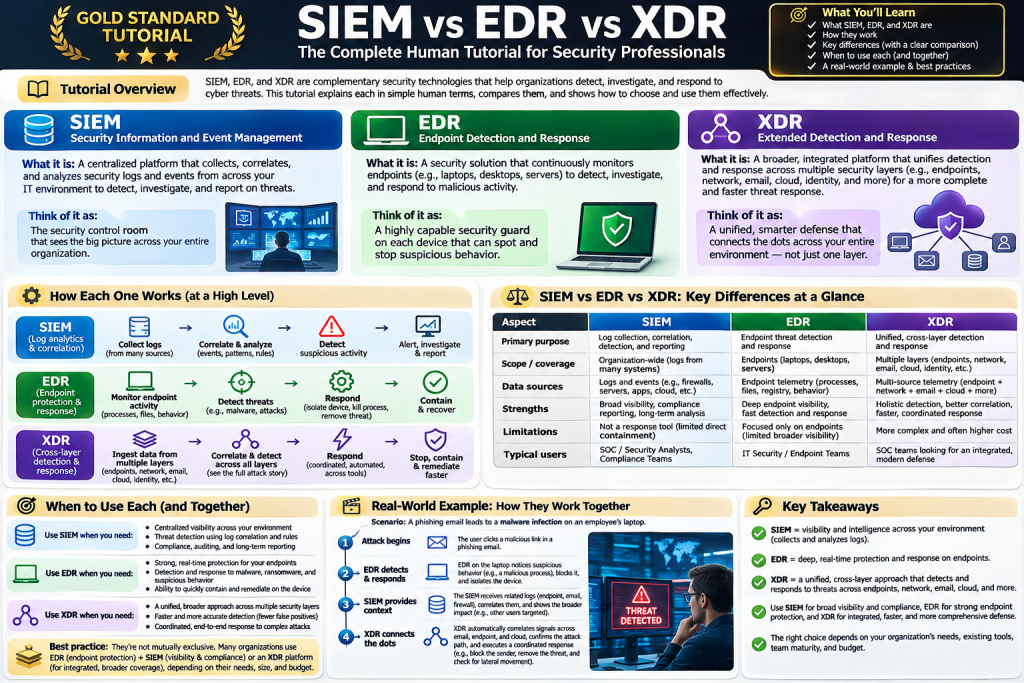
Microsoft Sentinel and Microsoft Defender portal are two important parts of Microsoft’s modern cybersecurity ecosystem. Together, they help Security Operations Center (SOC) teams collect security telemetry, detect suspicious activity, investigate threats, and respond to security incidents.
However, there is a common source of confusion: Is Microsoft Sentinel the same as Microsoft Defender? Do you need both? Where should you configure them, and which portal should you use?
This tutorial answers those questions and walks through the complete process, from creating an Azure account to building a working SIEM lab, writing Kusto Query Language (KQL) queries, detecting suspicious activity, and investigating incidents.
1. What is Microsoft Sentinel?
Microsoft Sentinel is a cloud-native Security Information and Event Management (SIEM) platform with Security Orchestration, Automation, and Response (SOAR) capabilities.
It allows organizations to collect security data from different systems, analyze it, identify potential threats, and automate selected responses.
For example, imagine an organization with 500 employees, 200 servers, several Azure subscriptions, an AWS environment, and hundreds of laptops.
Security-relevant events are generated continuously: failed logins, administrative changes, suspicious processes, firewall blocks, unusual network connections, and cloud configuration changes.
Microsoft Sentinel can bring relevant telemetry into a central security analytics environment.
Key capabilities
| Capability | What it does |
|---|---|
| SIEM | Centralizes and analyzes security logs |
| SOAR | Automates incident-response workflows |
| Threat detection | Uses analytics rules and threat intelligence |
| Incident investigation | Correlates and investigates security alerts |
| Threat hunting | Uses KQL to investigate suspicious activity |
| Workbooks | Visualizes security data and trends |
| UEBA | Analyzes user and entity behavior |
| Integrations | Connects Microsoft and third-party security sources |
2. What is Microsoft Defender portal?
The Microsoft Defender portal is Microsoft’s unified web interface for security operations.
The Defender portal provides access to capabilities from multiple Microsoft security products, depending on licensing, permissions, and configuration.
These include Microsoft Defender for Endpoint, Defender for Office 365, Defender for Identity, Defender for Cloud Apps, and Microsoft Sentinel.
A crucial distinction is that Microsoft Defender XDR is a security product, whereas Microsoft Defender portal is the interface used to access security capabilities.
3. Microsoft Sentinel vs. Microsoft Defender XDR vs. Defender portal
| Feature | Microsoft Sentinel | Microsoft Defender XDR | Defender portal |
|---|---|---|---|
| Type | SIEM and SOAR | Extended Detection and Response | Unified web interface |
| Primary role | Cross-platform log analytics | Detection and response across supported security domains | Security operations experience |
| Data sources | Microsoft, AWS, Linux, firewalls, third-party systems | Supported Defender products and integrated signals | Displays connected products’ data |
| Threat hunting | KQL-based | Advanced hunting | Provides access to hunting interfaces |
| Automation | Playbooks and automation rules | Automated investigation and response | Access to response workflows |
| Azure subscription | Required for Sentinel | Not inherently required | Not inherently required |
| Separate licensing | Azure consumption-based | Product-specific licensing | Portal itself is not a separate SIEM license |
Practical example
Suppose an attacker compromises an employee’s laptop, steals credentials, and attempts to access an Azure environment.
Microsoft Defender for Endpoint may detect suspicious activity on the laptop. Microsoft Defender XDR can correlate related signals from supported Defender products.
Microsoft Sentinel can additionally correlate this activity with Azure administrative logs, firewall logs, Linux authentication records, and other connected data sources.
The Defender portal provides a unified place for analysts to investigate supported alerts and incidents.
4. Microsoft Sentinel architecture explained
The following architecture shows how logs travel from applications and infrastructure into Sentinel and how analysts use them.
Security monitoring architecture
- Security data sources: Azure, AWS, Google Cloud, Windows and Linux endpoints, firewalls, VPNs and applications.
- Data ingestion: Azure Monitor Agent, supported APIs, Syslog, Common Event Format (CEF) and other data connectors.
- Microsoft Sentinel: A Log Analytics workspace supports log storage, KQL queries, analytics rules, threat intelligence and SOAR integrations.
- Microsoft Defender portal: Analysts use the unified security interface for incident triage, threat hunting and investigations.
- Security operations: SOC analysts and automation workflows perform authorized investigation and response actions.
Architecture note: This is a simplified conceptual view. Defender services can use additional data stores and analytics components.
Understanding the main components
Log Analytics workspace: The underlying Azure Monitor resource used by Sentinel for analytics-tier log data. It contains tables that can be queried using KQL.
Data connectors: Integrations that bring telemetry from cloud services, endpoints, identity platforms, network devices, and security products.
Analytics rules: Detection logic that evaluates data and creates alerts when configured conditions are satisfied.
Incidents: Investigative records that group related alerts and security evidence, allowing analysts to triage and respond.
Playbooks: Automated workflows built using Azure Logic Apps, commonly used for notifications, enrichment, ticket creation, and approved response actions.
Part 2 — Hands-On Installation and Configuration
5. Prerequisites for Microsoft Sentinel
Before starting, prepare the following:
- An active Microsoft Azure subscription.
- A Microsoft Entra tenant and appropriate account permissions.
- Permission to create a resource group and Log Analytics workspace.
- Appropriate Sentinel roles for installation, data connector configuration, and investigations.
- A budget for any chargeable Azure resources.
Before onboarding, review the required Azure and Microsoft Entra roles. Creating Sentinel resources, connecting a workspace to the Defender portal, and accessing security data can require different permissions. See the Microsoft Sentinel prerequisites and Defender portal onboarding requirements.
6. Create an Azure account
Open Azure free account registration
- Visit the Azure free account website.
- Select Start free.
- Sign in with a Microsoft account or create one.
- Complete identity and payment verification if requested.
- Activate your subscription.
- Open Azure Portal.
A free Azure account and the Sentinel trial are separate offers. Do not assume every Azure resource is free.
7. Create a Log Analytics workspace
Sign in to Azure Portal and search for Microsoft Sentinel.
Select Create → Create a new workspace.
Use the following example configuration for a personal lab:
| Field | Example value |
|---|---|
| Subscription | Your Azure subscription |
| Resource group | rg-soc-lab |
| Workspace name | law-sentinel-soc-lab |
| Region | Japan East, if supported |
| Purpose | Learning and testing |
Select Review + Create, then Create.
After deployment, return to Microsoft Sentinel, select the newly created workspace, and click Add.
This enables Sentinel on the Log Analytics workspace. See the official onboarding quickstart.
8. Connect Sentinel to Microsoft Defender portal
Open Microsoft Defender portal and sign in with an account in the same Microsoft Entra tenant as your Sentinel workspace.
Many new deployments are automatically connected to the Defender portal. Check whether Microsoft Sentinel appears in the navigation.
If it does not, and you have the required permissions, use:
System → Settings → Microsoft Sentinel → Connect a workspace
Select your workspace, choose the primary workspace if prompted, review the changes, and click Connect. See the Defender portal workspace connection steps.
Important change for 2027
Microsoft has announced that after March 31, 2027, Microsoft Sentinel will no longer be supported in the Azure portal. The Defender portal will become the exclusive interface for Sentinel operations. See the official transition announcement.
For new learners, it makes sense to become comfortable with the Defender portal now.
9. Understanding the Microsoft Defender portal navigation
The Defender portal contains multiple security areas. Some features appear only when the relevant products and licenses are enabled.
| Feature | What you do there |
|---|---|
| Home | Review security posture and summary metrics |
| Incidents | Investigate and manage incidents |
| Advanced hunting | Run KQL queries |
| Analytics | Manage Sentinel detection rules |
| Data connectors | Configure security data ingestion |
| Content hub | Install security content solutions |
| Workbooks | Build dashboards and reports |
| Automation | Manage response workflows |
| Threat intelligence | Investigate threat indicators |
The exact menu paths can vary by enabled products and portal experience. Microsoft’s Sentinel navigation reference provides the current feature mapping.
10. Install your first data connector
A new Sentinel workspace generally contains little useful security data until you connect data sources.
For a beginner, Azure Activity is a practical starting point because it records subscription-level management operations.
Examples include resource creation, deletion, administrative updates, and other Azure control-plane events.
Configuration procedure
- In the Defender portal, open Microsoft Sentinel → Content management → Content hub.
- Search for Azure Activity.
- Install the Azure Activity solution.
- Navigate to the Sentinel data connectors area.
- Select Azure Activity.
- Open its connector page.
- Follow the configuration instructions to connect the intended subscription and send activity logs to the workspace.
The Azure Activity connector uses the supported Azure diagnostic-settings integration. Verify the required permissions and destination workspace before enabling it. See Microsoft’s diagnostic-settings connector guidance.
Generate sample activity
Create a temporary Azure resource group called rg-sentinel-demo, then delete it after testing.
These management operations can generate Azure Activity records.
Wait for ingestion, then run the following query in a Sentinel-aware KQL environment.
AzureActivity
| where TimeGenerated > ago(24h)
| project TimeGenerated, Caller, OperationNameValue, ActivityStatusValue, ResourceGroup
| order by TimeGenerated desc
| take 50
Expected result: A table showing recent Azure management operations, including their timestamps, callers, operation names, and statuses.
If no rows appear, confirm that the connector is configured, that the correct workspace is selected, and that sufficient time has passed for ingestion.
Part 3 — Learning KQL for Security Analytics
11. What is Kusto Query Language (KQL)?
Kusto Query Language is used to explore, filter, summarize, and analyze telemetry stored in supported Microsoft data platforms.
It is an essential skill for Microsoft Sentinel administrators, SOC analysts, and threat hunters.
KQL queries commonly begin with a table name and use the pipe operator (|) to pass results through additional transformations.
Example 1: Display the latest Azure activities
AzureActivity
| take 10
This returns ten records from the table. Without an explicit sort, they are not guaranteed to be the most recent.
For the latest records, use:
AzureActivity
| top 10 by TimeGenerated desc
Example 2: Find failed Azure management operations
AzureActivity
| where TimeGenerated > ago(24h)
| where ActivityStatusValue =~ "Failure"
| project TimeGenerated, Caller, OperationNameValue, ResourceGroup
| order by TimeGenerated desc

Code language: JavaScript (javascript)
This helps identify unsuccessful management operations, although a failed operation alone does not indicate an attack.
Example 3: Find frequently active identities
AzureActivity
| where TimeGenerated > ago(24h)
| where isnotempty(Caller)
| summarize OperationCount = count() by Caller
| top 10 by OperationCount desc
This identifies callers generating the most Azure management activity.
Example 4: Analyze failed Microsoft Entra sign-ins
This query requires the SigninLogs table to be populated through the relevant Microsoft Entra data connector.
SigninLogs
| where TimeGenerated > ago(24h)
| where ResultType != "0"
| summarize FailedAttempts = count() by UserPrincipalName, IPAddress
| where FailedAttempts >= 5
| order by FailedAttempts desc

Code language: JavaScript (javascript)
This identifies combinations of users and IP addresses with at least five failed sign-in events in 24 hours.
The threshold is illustrative, not a production-ready brute-force detection. Production rules should consider baselines, service accounts, time windows, identity risk, and false positives.
Example 5: Monitor data ingestion
Usage
| where TimeGenerated > ago(7d)
| where IsBillable == true
| summarize VolumeGB = sum(Quantity) / 1000.0 by DataType
| order by VolumeGB desc

Code language: JavaScript (javascript)
This provides an approximate breakdown of billable usage by data type. The exact interpretation depends on the usage record units and billing model, so reconcile cost estimates against Azure Cost Management.
Part 4 — Threat Detection, Incident Management, and SOAR
12. Create your first Sentinel analytics rule
Analytics rules turn security queries into automated detections.
For example, you can create a rule that detects a high number of failed Microsoft Entra sign-in attempts from the same IP address.
Step-by-step
- Open the Microsoft Defender portal.
- Navigate to Investigation & response → Detection → Analytics, under the Sentinel experience.
- Create a new scheduled query rule.
- Enter the rule name:
SOC Lab - Repeated Failed Sign-ins. - Select an appropriate severity, such as Medium.
- Paste the following KQL query.
SigninLogs
| where TimeGenerated > ago(15m)
| where ResultType != "0"
| summarize FailedAttempts = count(),
            TargetedUsers = dcount(UserPrincipalName)
    by IPAddress
| where FailedAttempts >= 10

Code language: JavaScript (javascript)- Configure the query scheduling and lookback period, avoiding unintended overlapping evaluations.
- Configure alert enrichment and entity mapping for
IPAddress. - Configure incident creation or alert grouping according to the available rule options.
- Review, validate, and enable the rule.
Important: This lab requires the SigninLogs table and a configured Entra sign-in connector. A rule that runs successfully but has no matching data will not generate alerts.
For production, refine the detection with authentication context, trusted IP exclusions, identity risk signals, and repeat-event suppression.
13. Investigate security incidents
Once a detection generates an incident, an analyst can investigate it from the Defender portal.
A typical investigation follows this workflow:
- Alert generated: A detection rule identifies suspicious activity.
- Incident triage: Review severity, evidence and affected entities.
- Investigation: Correlate events using KQL and related alerts.
- Containment: Take authorized actions to limit the threat.
- Resolution: Document findings and close the incident.
Example incident investigation
Suppose Sentinel detects 35 failed sign-in attempts from one IP address.
An analyst should investigate whether the attempts targeted one account or multiple users, whether any subsequent authentication succeeded, whether the IP is known or trusted, and whether the affected accounts performed suspicious operations.
An analyst can assign the incident, record evidence, and determine whether it represents a genuine security incident or a false positive.
14. Automate security response using SOAR
Microsoft Sentinel supports SOAR through automation rules and playbooks.
A playbook is built using Azure Logic Apps and can integrate with ticketing systems, communication services, identity platforms, and other APIs.
Example: Automated incident notification
- Microsoft Sentinel creates an incident.
- An automation rule starts a configured Logic Apps playbook.
- The playbook sends a notification to the SOC team.
- The playbook optionally opens a ticket in an approved ticketing system.
For your first SOAR lab, create a Logic Apps playbook that sends an incident notification to a test mailbox. Use a managed identity and the minimum required permissions.
Once this works, you can explore enrichment workflows, approval steps, and carefully controlled containment actions. Avoid automatically disabling accounts or blocking IP addresses until your detection quality and authorization procedures have been validated.
Part 5 — Microsoft Sentinel for DevOps, Cloud, and Kubernetes
15. Integrating Sentinel with modern cloud infrastructure
Sentinel is not limited to Microsoft infrastructure. It can ingest telemetry from supported AWS services, Linux servers, network appliances, and other platforms.
For a DevOps or SRE team, potential integrations include:
| Infrastructure | Security use case |
|---|---|
| Azure | Administrative operations, identity and resource changes |
| AWS | CloudTrail events and cloud security findings |
| Linux | Authentication failures, privilege escalation events |
| Kubernetes | Audit events and suspicious cluster activity |
| Firewalls | Network connections and blocked traffic |
| CI/CD | Unauthorized pipeline or deployment changes |
| Identity providers | Suspicious sign-ins and privilege changes |
The exact implementation depends on supported connectors, data export mechanisms, permissions, and ingestion costs.
For Kubernetes, for example, you might collect audit events through a supported logging pipeline and investigate unusual access to Kubernetes secrets, cluster role changes, or privileged workload creation.
Sentinel should complement, rather than replace, Kubernetes admission controls, runtime security, vulnerability management, and cloud-native security monitoring.
16. Microsoft Sentinel pricing and free trial
For eligible new workspaces, the introductory Sentinel trial includes 31 days with up to 10 GB per day of Analytics logs ingestion covered under the trial allowance.
| Trial detail | Allowance |
|---|---|
| Trial duration | 31 days |
| Analytics logs ingestion | First 10 GB per day |
| Notes | Other Azure resources and services may still incur charges |
Read the Microsoft Sentinel pricing and billing guide before connecting high-volume data sources.
How to keep your lab costs low
- Start with the Azure Activity connector rather than ingesting large quantities of endpoint or firewall telemetry.
- Configure Azure Cost Management budgets and alerts.
- Avoid connecting production subscriptions to an experimental workspace.
- Use only the tables and data sources necessary for your exercises.
- Review retention settings and charges before enabling additional capabilities.
- After completing the lab, remove unused connectors, Logic Apps, and other resources.
Removing Sentinel alone does not automatically remove the underlying Log Analytics workspace or its associated charges. Consult the billing documentation.
Part 6 — Practical Learning Roadmap
17. Seven-day Microsoft Sentinel hands-on training plan
| Day | Topic | Practical exercise |
|---|---|---|
| Day 1 | Azure and Sentinel setup | Create a workspace, enable Sentinel and access the Defender portal |
| Day 2 | Data ingestion | Install Azure Activity and verify ingested events |
| Day 3 | KQL fundamentals | Practice filtering, aggregation, sorting and time ranges |
| Day 4 | Detection engineering | Create and validate a scheduled analytics rule |
| Day 5 | Incident investigation | Triage alerts, investigate entities and document evidence |
| Day 6 | SOAR automation | Build a notification playbook with Logic Apps |
| Day 7 | SOC capstone | Generate test events and investigate an end-to-end incident |
18. Common problems and troubleshooting
| Problem | Possible cause and solution |
|---|---|
| Sentinel missing from Defender portal | Verify workspace onboarding, tenant, and permissions |
| Cannot connect workspace | Check required Entra and Azure RBAC roles |
| KQL query returns no records | Confirm connector status, workspace, table and time range |
| Analytics rule generates no alerts | Verify matching events, rule status and scheduling |
| Playbook cannot execute | Check Logic Apps trigger configuration, authorization and permissions |
| Unexpected Azure charges | Review ingestion, retention, automation and related resource costs |
19. Frequently asked questions
Is Microsoft Sentinel the same as Microsoft Defender?
No. Sentinel is a SIEM and SOAR platform. Microsoft Defender is a family of security products, while the Defender portal provides a unified interface.
Can I use Microsoft Sentinel without Microsoft Defender XDR?
Yes. Microsoft Sentinel can be used in the Defender portal without a Defender XDR or Microsoft 365 E5 license. Some Defender-specific features will remain unavailable without the corresponding products. See the Microsoft documentation.
Does Microsoft Sentinel require an Azure subscription?
Yes. Sentinel is deployed using Azure resources, including a Log Analytics workspace.
Is Microsoft Sentinel free?
It is a paid service with an introductory trial for eligible workspaces and some free eligible data sources. Other Azure charges may apply.
Do I need to install Microsoft Sentinel on a server?
No. Sentinel is a cloud-native service. Some data sources may require agents, collectors, connectors, or additional configuration.
Should I learn Sentinel or Microsoft Defender XDR first?
If your primary goal is SIEM engineering, log analytics, cloud monitoring, and detection engineering, start with Sentinel and KQL. If your focus is endpoint, identity, and Microsoft 365 threat detection and response, learn Defender XDR alongside it.
Can Sentinel monitor AWS and Kubernetes?
Yes, through appropriate integrations and supported data ingestion pipelines. It is not restricted to Azure.
20. Official Microsoft documentation
These are useful references for continuing your learning:
- Microsoft Sentinel overview
- Deploy Microsoft Sentinel step by step
- Connect Sentinel to Microsoft Defender portal
- Configure Microsoft Sentinel data connectors
- Microsoft Sentinel pricing and billing
Conclusion
Microsoft Sentinel and Microsoft Defender portal are complementary parts of a modern Security Operations Center.
Sentinel provides cross-platform security analytics, threat detection, incident management, and SOAR capabilities. The Defender portal provides the unified operational interface where analysts can work with Sentinel and other enabled Microsoft security products.
For beginners, the most effective learning sequence is Azure account → Log Analytics workspace → Microsoft Sentinel → Defender portal → Data connectors → KQL → Analytics rules → Incident investigation → SOAR automation.
For experienced DevOps, SRE, cloud, and security engineers, the next level is integrating security telemetry from cloud infrastructure, Linux systems, Kubernetes, identity providers, and CI/CD environments into repeatable detection and response workflows.
The ultimate objective is not merely collecting logs. It is turning security telemetry into reliable detections, actionable investigations, and measurable improvements in an organization’s security posture.

I’m Rajesh Kumar, a DevOps, SRE, DevSecOps, Cloud, and Platform Engineering expert passionate about sharing practical knowledge, real-world experiences, and industry best practices. I have worked at Cotocus and regularly write about technology, travel, investing, health, product reviews, and digital marketing through my various platforms.
I publish technical articles at DevOps School, travel stories at Holiday Landmark, stock market insights at Stocks Mantra, health and fitness guidance at My Medic Plus, product reviews at TrueReviewNow, and SEO and digital marketing strategies at Wizbrand.
Find Trusted Cardiac Hospitals
Compare heart hospitals by city and services — all in one place.
Explore Hospitals