
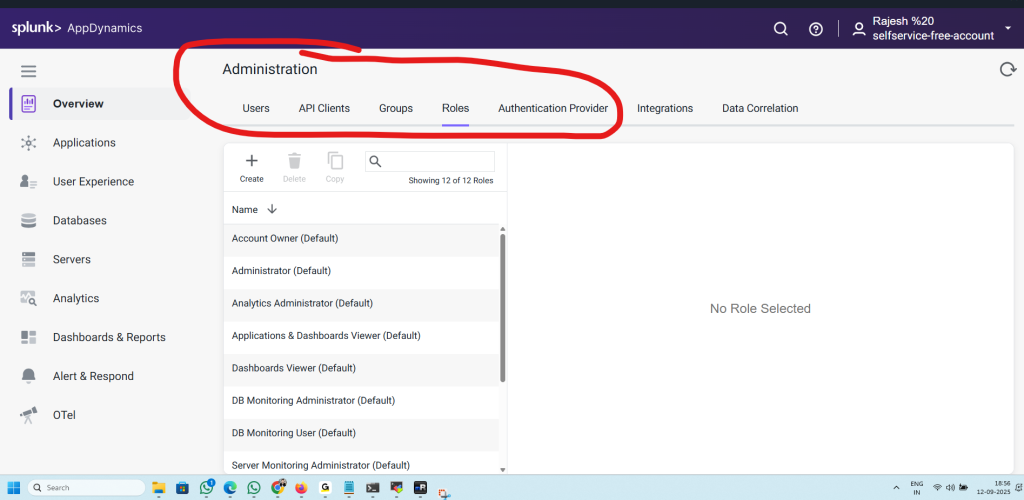
1. Users
- Where you manage individual user accounts.
- You can create, edit, or delete users.
- Assign them to groups or roles so they get the right level of access.
- Each user will log in with their credentials (local or via external auth provider).
Use case: Add your DevOps engineers, SREs, or business analysts as users with the right permissions.
2. API Clients
- Used to create programmatic access tokens for APIs.
- Allows scripts, automation tools, or integrations (like CI/CD pipelines) to interact with AppDynamics without a user manually logging in.
- Supports OAuth tokens for secure API access.
Use case: When Jenkins, Ansible, or Terraform needs to fetch metrics or manage configurations in AppDynamics.
3. Groups
- Logical collections of users.
- Permissions can be managed at the group level instead of assigning them individually to each user.
- Helps with role-based access control (RBAC).
Use case: Create groups like “SRE Team”, “DB Admins”, or “Executives” and assign roles to the group.
4. Roles
- Define what users (or groups) are allowed to do inside AppDynamics.
- Predefined roles exist (like Administrator, DB Monitoring User, Analytics Administrator).
- You can also create custom roles with specific permissions (e.g., only dashboard viewing, no editing).
Use case: Restrict a user to “read-only dashboards” while giving admins “full access.”
5. Authentication Provider
- Manages how users authenticate into AppDynamics.
- Options include:
- Internal Authentication (AppDynamics’ own user/password system).
- External Authentication (LDAP, SAML, OAuth, or enterprise identity providers like Okta, Azure AD, Keycloak).
- Supports SSO (Single Sign-On) for easier enterprise integration.
Use case: Configure your corporate SSO provider so users log in with company credentials instead of managing separate passwords.
✅ In summary:
- Users = individual accounts.
- API Clients = automation access (tokens).
- Groups = collections of users.
- Roles = what permissions they have.
- Authentication Provider = how users log in (local vs enterprise SSO).
Here’s a flow diagram that shows how all the circled pieces in your AppDynamics Administration section fit together:
🔑 AppDynamics Access Control Flow
   [Authentication Provider]
        (LDAP / SAML / OAuth / Local)
                  │
                  ▼
             [Users] ────────┐
                  │          │
                  ▼          │
              [Groups]       │
                  │          │
                  ▼          │
                [Roles] ◄────┘
                  │
                  ▼
         [Permissions & Access]
How it works
- Authentication Provider
- Decides how users log in:
- Local AppDynamics login
- Enterprise SSO (Okta, Azure AD, Keycloak, LDAP, etc.)
- Ensures identity validation.
- Decides how users log in:
- Users
- Represent individual accounts (Rajesh, DevOps engineer, DBA, etc.).
- They authenticate via the chosen provider.
- Groups
- Collections of users.
- Example: SRE Team, DB Admins, Business Analysts.
- Makes it easier to manage permissions at scale.
- Roles
- Define what actions are allowed.
- Example: Administrator, Analytics Viewer, DB Monitoring User.
- Can be assigned to groups or directly to users.
- Permissions & Access
- The final outcome.
- Determines what dashboards, reports, or configurations each user can see and modify.
- API Clients (parallel path)
- Not tied to human users.
- Get tokens from Authentication Provider.
- Used by automation tools (CI/CD pipelines, scripts) to interact with AppDynamics APIs.
✅ Summary:
- Authentication Provider = Entry gate (how users authenticate).
- Users = Individual identities.
- Groups = Collections of users.
- Roles = Define permissions.
- API Clients = Machine-to-AppDynamics access.

I’m Rajesh Kumar, a DevOps, SRE, DevSecOps, Cloud, and Platform Engineering expert passionate about sharing practical knowledge, real-world experiences, and industry best practices. I have worked at Cotocus and regularly write about technology, travel, investing, health, product reviews, and digital marketing through my various platforms.
I publish technical articles at DevOps School, travel stories at Holiday Landmark, stock market insights at Stocks Mantra, health and fitness guidance at My Medic Plus, product reviews at TrueReviewNow, and SEO and digital marketing strategies at Wizbrand.
Find Trusted Cardiac Hospitals
Compare heart hospitals by city and services — all in one place.
Explore Hospitals





