
EKS Standard:
- Control Plane:
- AWS manages the Kubernetes control plane.1
- Worker Nodes:
- You manage the worker nodes (EC2 instances).2 This gives you maximum control over the underlying infrastructure.
- You can use EKS Managed Node Groups for some automation, or manage them entirely yourself.3
- Use Cases:
- Ideal for applications requiring fine-grained control over EC2 instances.4
- Suitable for stateful applications and workloads with specific hardware requirements.5
EKS Fargate:
- Control Plane:
- AWS manages the Kubernetes control plane.
- Worker Nodes:
- AWS manages the underlying infrastructure.6 You deploy pods, and Fargate provisions the necessary compute resources.7
- Serverless operation: you don’t manage EC2 instances.8
- Use Cases:
- Best for stateless, event-driven, and serverless applications.9
- Simplifies operations by eliminating the need to manage worker nodes.10
EKS Anywhere:
- Control Plane & Worker Nodes:
- You manage the Kubernetes cluster on your own on-premises infrastructure.11
- Extends EKS to your data centers, providing a consistent Kubernetes experience.12
- Use Cases:
- For organizations with on-premises infrastructure or hybrid cloud requirements.13
- Enables consistent Kubernetes deployments across different environments.14
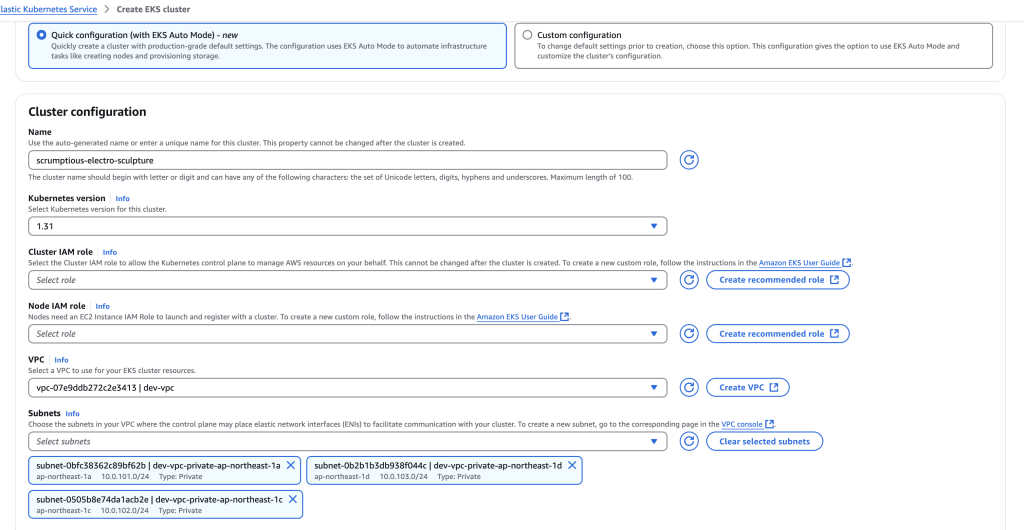
EKS Auto Mode:
- Control Plane:
- This mode is designed to further automate the management of the EKS control plane.15 It aims to reduce the operational burden of managing the control plane.16
- Worker Nodes:
- Worker nodes are still managed either by the user, or by managed node groups.
- Use Cases:
- Designed to simplify EKS operations.17
- Useful for those who want to reduce the amount of interaction they have with the control plane of their EKS clusters.
- It is designed to make EKS more hands off.18
Key Differences Summarized:
- Infrastructure Management: The primary difference lies in who manages the worker nodes. EKS Standard gives you full control, Fargate eliminates node management, and EKS Anywhere lets you manage clusters on-premises.19 EKS Auto mode, focuses on automating the control plane.
- Serverless vs. Managed: Fargate is a serverless option, while EKS Standard and EKS Anywhere involve managing infrastructure.20
- On-Premises vs. Cloud: EKS Anywhere extends EKS to on-premises environments.21
Here’s the corrected and updated comparison of EKS Standard, EKS Fargate, EKS Anywhere, and EKS Auto Mode as of March 2026:
Major Differences Between EKS Standard, EKS Fargate, EKS Anywhere, and EKS Auto Mode
| Feature | EKS Standard | EKS Fargate | EKS Anywhere | EKS Auto Mode |
|---|---|---|---|---|
| Deployment Model | Managed control plane with EC2-based worker nodes | Serverless Kubernetes pods running on Fargate | Self-managed Kubernetes clusters on on-premises infrastructure | Fully managed Kubernetes cluster with simplified infrastructure setup |
| Node Management | Users provision and manage EC2 instances as worker nodes | No node management, Fargate provisions compute resources automatically | Users manage physical/virtual nodes on their own infrastructure | AWS manages the cluster, but users must provide an existing VPC |
| Control Plane | AWS-managed control plane | AWS-managed control plane | Self-managed control plane | Fully managed by AWS |
| Worker Nodes | EC2 instances (managed by users) | No worker nodes, only Fargate pods | Self-managed nodes (bare metal, VMs, cloud) | Managed by AWS, automatically optimized |
| Use Case | Workloads requiring full control over EC2-based compute and networking | Serverless Kubernetes for lightweight and auto-scaling workloads | Hybrid cloud, on-premises Kubernetes deployments | Users who want to run Kubernetes without managing infrastructure |
| Cost Model | Pay for EC2 instances + control plane separately | Pay per pod running on Fargate (no EC2 costs) | Costs depend on on-prem infrastructure; AWS charges EKS Anywhere licensing fees | Pay only for running workloads, infrastructure cost is included |
| Scaling | User-defined scaling using EC2 ASG | Autoscaling based on Fargate pods | Scaling depends on on-premises capacity and user configurations | Fully automated scaling, AWS optimizes resources dynamically |
| Networking | Requires VPC setup and security group configuration | Uses AWS VPC with automatic networking | User-managed networking based on on-premises setup | Requires an existing VPC (AWS does not create it) |
| Security & IAM | Users configure IAM roles, security groups, and network policies manually | AWS manages IAM roles per pod and provides pod-level isolation | Self-managed security, integrates with on-prem security controls | AWS manages IAM roles and security at the Kubernetes level but does not configure VPC security |
| Storage | Supports EBS, EFS, FSx, and custom storage | Integrates with AWS storage but has some limitations on persistent volumes | User-managed storage solutions | AWS auto-configures storage, but users must define storage classes |
| Maintenance & Updates | Users responsible for cluster upgrades and node patching | AWS maintains infrastructure updates, users handle Kubernetes updates | Self-managed; updates and patches controlled by users | Fully managed, AWS handles all updates and patches |
| Integration | Works with EC2, ALB, ASG, IAM, and other AWS services | Deep integration with AWS services but limited workload flexibility | Works with on-prem infrastructure and edge computing | Fully integrated with AWS services, but less customizable |
| Customizability | High—users choose instance types, storage, networking, etc. | Low—AWS handles everything | High—tailored for on-premises needs | Limited—AWS optimizes everything for ease of use |
| Operational Overhead | Medium—users manage EC2 nodes, networking, and updates | Low—no node management, AWS handles infra | High—users handle everything (network, nodes, security) | Very Low—AWS fully manages Kubernetes and scaling |
Key Takeaways (March 2026 Updates)
- EKS Standard → Best for users needing full control over compute, networking, and security.
- EKS Fargate → Best for serverless Kubernetes, where users don’t want to manage EC2 instances.
- EKS Anywhere → Best for hybrid and on-prem Kubernetes, allowing full infrastructure control.
- EKS Auto Mode → Best for users wanting fully managed Kubernetes, but requires an existing VPC.

I’m Rajesh Kumar, a DevOps, SRE, DevSecOps, Cloud, and Platform Engineering expert passionate about sharing practical knowledge, real-world experiences, and industry best practices. I have worked at Cotocus and regularly write about technology, travel, investing, health, product reviews, and digital marketing through my various platforms.
I publish technical articles at DevOps School, travel stories at Holiday Landmark, stock market insights at Stocks Mantra, health and fitness guidance at My Medic Plus, product reviews at TrueReviewNow, and SEO and digital marketing strategies at Wizbrand.
Find Trusted Cardiac Hospitals
Compare heart hospitals by city and services — all in one place.
Explore Hospitals





