
Originally published on 2015-02-24; fully revised and updated.
TeamCity Meta-Runners let you package repeated build logic into reusable runner types. If you maintain multiple build configurations and keep copying the same steps, this pattern helps you centralize those steps, expose only the parameters that vary, and keep your CI setup easier to maintain.
What Meta-Runners solve in TeamCity
Standard build runners are convenient, but teams often end up duplicating identical step sequences across many build configurations. Meta-Runners address this by turning existing build steps into a reusable custom runner. You can then add that custom runner wherever needed instead of recreating the same commands repeatedly.
Templates vs Meta-Runners vs command-line steps
These options are related, but they solve different reuse problems:
| Option | Best for | Reuse scope | Key limitation |
|---|---|---|---|
| Build configuration template | Standardizing mostly similar build configurations | Whole configuration baseline | A build configuration can be based on only one template |
| Meta-Runner | Reusing one or more repeated build steps | Build-step level across many configurations | Needs deliberate parameter design to stay generic |
| Command-line runner only | Quick one-off scripts | Single step in a single configuration | Duplication and drift when copied across projects |
Convert a fixed deploy command into a reusable step
The original example starts with a command-line runner that deploys to one specific Heroku remote:
git remote add heroku git@heroku.com:django-ci-example.git
git push heroku master
To make this reusable, extract the remote URL into a TeamCity parameter:
git remote add heroku %heroku.remote%
git push heroku masterCode language: CSS (css)
You then provide %heroku.remote% in the build parameters for each consuming build configuration.
Extraction and reuse workflow
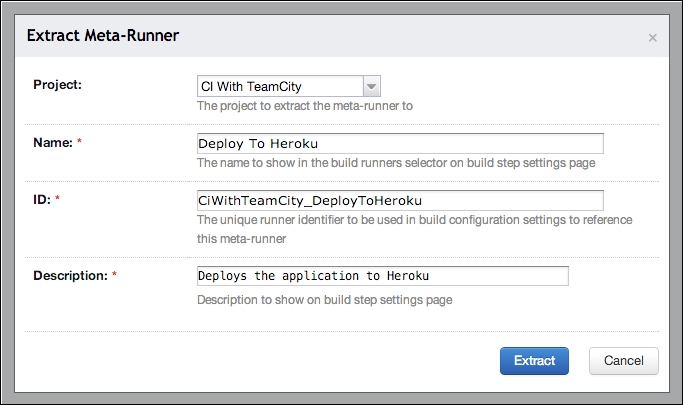
In the original TeamCity flow, you parameterize the step first, then use Extract Meta-Runner from the build configuration settings.
flowchart TD
    A[Open build configuration] --> B[Parameterize fixed values]
    B --> C[Validate command line step]
    C --> D[Click Extract Meta-Runner]
    D --> E[Name and save Meta-Runner]
    E --> F[Open another build configuration]
    F --> G[Add build step with Meta-Runner type]
    G --> H[Set heroku.remote value]
    H --> I[Run build and verify]
- Create or update the original build step so variable values are parameters.
- Extract a Meta-Runner from that build configuration.
- Edit the generated Meta-Runner if you want fewer parameters or steps.
- Add the Meta-Runner as a normal runner type in other build configurations.
Using the Meta-Runner in other build configurations
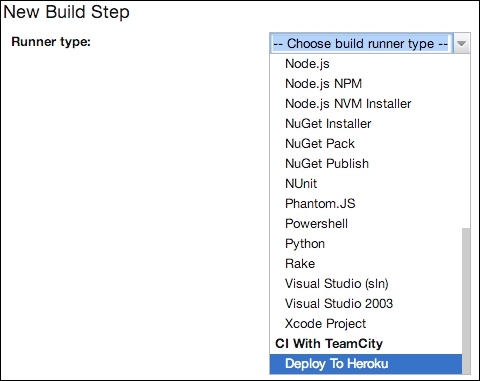
After extraction, the new runner appears in the Runner type list when adding build steps. When selected, the exposed parameter fields (for example, heroku.remote) can be set per build configuration. This preserves step behavior while removing copy-paste maintenance.
A useful detail from the original guide: a Meta-Runner is stored as XML and can be edited in TeamCity. You can remove default parameter values if you want users to provide explicit values each time.
Security and maintainability notes
The original article notes that deploying to Heroku through git remotes requires SSH keys on the agent, and that this example is primarily instructional rather than an ideal production deployment pattern. Treat runner extraction as the key concept, and apply your organization’s secret-handling and deployment controls.
Original references preserved from the source material: Chapter 3, Chapter 6, and heroku-headless.
Common pitfalls
- Leaving environment-specific values hardcoded instead of parameterized.
- Using a template when only step-level reuse is needed.
- Extracting too many unrelated steps into one Meta-Runner.
- Keeping risky default parameter values that are easy to forget to override.
- Ignoring agent prerequisites such as SSH key availability for git-based deploys.
Attribution: Based on the original DevOpsSchool post and its referenced material from Learning Continuous Integration with TeamCity.

I’m Rajesh Kumar, a DevOps, SRE, DevSecOps, Cloud, and Platform Engineering expert passionate about sharing practical knowledge, real-world experiences, and industry best practices. I have worked at Cotocus and regularly write about technology, travel, investing, health, product reviews, and digital marketing through my various platforms.
I publish technical articles at DevOps School, travel stories at Holiday Landmark, stock market insights at Stocks Mantra, health and fitness guidance at My Medic Plus, product reviews at TrueReviewNow, and SEO and digital marketing strategies at Wizbrand.
Find Trusted Cardiac Hospitals
Compare heart hospitals by city and services — all in one place.
Explore Hospitals

