
Find the Best Cosmetic Hospitals

Explore trusted cosmetic hospitals and make a confident choice for your transformation.

“Invest in yourself — your confidence is always worth it.”

Explore Cosmetic Hospitals

Start your journey today — compare options in one place.

Composer update fails with composer.json php version ^7.1.3

Hi geeks, yesterday i tried to run a command in my laravel project ver 5.8 then it’s showing two issue in my git bash. my php version in composer.json file is “^7.1.3”.
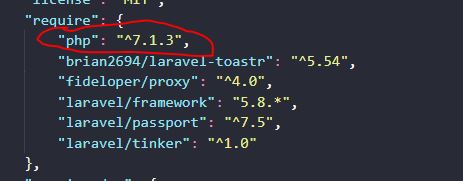
php version in composer.json file
 Problem 1
    - Root composer.json requires php ^7.1.3 but your php version (8.0.0) does not satisfy that requirement.
  Problem 2
    - laravel/framework[v5.8.0, ..., 5.8.x-dev] require php ^7.1.3 -> your php version (8.0.0) does not satisfy that requirement.
    - Root composer.json requires laravel/framework 5.8.* -> satisfiable by laravel/framework[v5.8.0, ..., 5.8.x-dev].Code language: JavaScript (javascript)

Composer update command issue

whenever you find these type of issue then try below command to solve the issue: if sometimes your issue will not resolve by below command then please comment us for more solution on this type of issue.

composer install --ignore-platform-reqs

For more understanding on these issues please read below references:

Reference 1

Reference 2

Find Trusted Cardiac Hospitals

Compare heart hospitals by city and services — all in one place.

Explore Hospitals

Similar Posts

  • How to define String in PHP?

    A string is a group of characters, where a character is equivalent to a byte. This implies PHP just supports a 256-character set and subsequently doesn’t offer local Unicode support. ex:- Single quote (‘) :- Single quote strings are the most straightforward approach to indicate string. Single quote is utilized to indicate string when we…

  • Potential SCM Problem Classes | SCM Potential considerations in an organization

    When planning for SCM in your product development organization, you must first understand the classes of potential problems that can exist. Once the classes are understood, the inherent problems that are causing configuration management issues may be easily identified.
    Potential SCM Problem Classes

    1. Multiple developer syndrome—When you have a project that requires more than one developer, there is the problem with multiple people working on one product base. This could be a test plan, requirements specification, or code. Effort is wasted when two or more people work on the same file and then save it. Without SCM control, the last person to save the file has those changes saved. All the other changes are lost. The simplistic method of locking a file while one person reads it prevents others from simultaneously working on the file.
    2. Multiple releases—Enhancements to the base product should result in additional releases of the product containing the latest changes. Once the second release is available, some users are on an earlier release. Having an SCM makes managing those releases possible. When bugs are reported, changes must be made across all impacted releases. As new features become available in the product, they must be made available to all current users, no matter what the release date.