
SysOps Job Description: What It Entails

Are you interested in learning about SysOps? If so, you’ve come to the right place! In this article, we’ll cover everything you need to know about the SysOps job description. First, let’s start with the basics.
What is SysOps?
SysOps is short for Systems Operations. It involves managing and maintaining an organization’s computer systems and servers. SysOps professionals are responsible for ensuring that these systems are functioning correctly and securely. This includes monitoring, troubleshooting, and optimizing systems to ensure they are running efficiently.
What Does a SysOps Professional Do?
As a SysOps professional, you’ll be responsible for a wide range of tasks. Some of these include:
- Monitoring system performance and making adjustments as needed
- Troubleshooting issues that arise
- Managing backups and disaster recovery plans
- Ensuring security protocols are in place and up to date
- Optimizing systems to improve efficiency
- Collaborating with other IT professionals to ensure smooth operations
- Documenting processes and procedures
- Staying up to date on the latest technologies and trends
Qualifications for a SysOps Professional
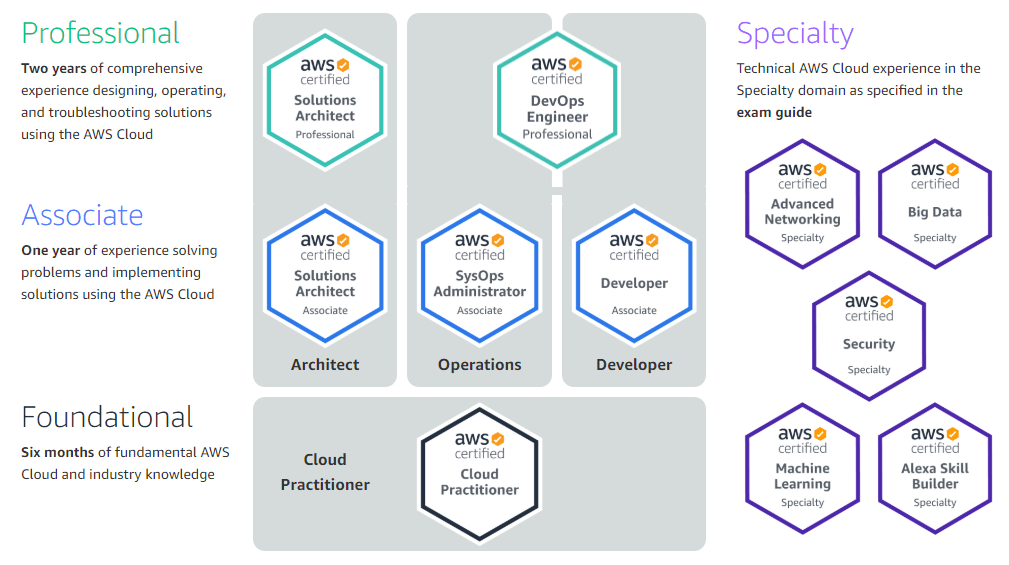
To become a SysOps professional, you’ll need a strong background in IT. A bachelor’s degree in computer science, information technology, or a related field is often required. Additionally, you’ll need experience with various operating systems, such as Linux or Windows. Experience with cloud computing is also highly valued.
Skills Required for a SysOps Professional
In addition to the qualifications listed above, there are certain skills that are essential for success in a SysOps role. These include:
- Strong problem-solving skills
- Excellent communication skills
- Attention to detail
- Ability to work well under pressure
- Ability to work independently and as part of a team
- Strong organizational skills
- Analytical thinking
SysOps vs. DevOps
You may have heard of DevOps, another IT-related term that sounds similar to SysOps. While the two terms are related, they are not interchangeable. DevOps involves the integration of development and operations teams to streamline the software development process. SysOps, on the other hand, focuses specifically on the management and maintenance of computer systems and servers.
Conclusion
In conclusion, a SysOps professional is responsible for managing and maintaining an organization’s computer systems and servers. This involves monitoring system performance, troubleshooting issues, managing backups and disaster recovery plans, ensuring security protocols are in place, optimizing systems to improve efficiency, collaborating with other IT professionals, documenting processes and procedures, and staying up to date on the latest technologies and trends. To be successful in this role, you’ll need a strong background in IT, as well as certain skills like problem-solving, communication, and attention to detail. So if you’re interested in a career in IT, consider pursuing a role in SysOps!

👤 About the Author
Ashwani is passionate about DevOps, DevSecOps, SRE, MLOps, and AiOps, with a strong drive to simplify and scale modern IT operations. Through continuous learning and sharing, Ashwani helps organizations and engineers adopt best practices for automation, security, reliability, and AI-driven operations.
🌐 Connect & Follow:
Website: WizBrand.com
Facebook: facebook.com/DevOpsSchool
X (Twitter): x.com/DevOpsSchools
LinkedIn: linkedin.com/company/devopsschool
YouTube: youtube.com/@TheDevOpsSchool
Instagram: instagram.com/devopsschool
Quora: devopsschool.quora.com
Email– contact@devopsschool.com
Find Trusted Cardiac Hospitals
Compare heart hospitals by city and services — all in one place.
Explore Hospitals