
Here’s a comprehensive, up-to-date tutorial on GitLab 18.0 entity structure as of May 2026, covering:
- GitLab Organization
- GitLab Namespaces
- GitLab Groups
- GitLab Subgroups
- GitLab Projects
This includes definitions, scopes, use cases, comparisons, and tutorial instructions for setup across both GitLab SaaS (cloud) and Self-Managed (CE/EE) environments.
📌 Introduction
GitLab’s entity model defines how users organize, secure, and collaborate across codebases, projects, and teams. Understanding this structure ensures scalable DevOps practices in both SaaS (GitLab.com) and Self-Managed instances.
🔷 1. GitLab Organization
✅ Definition
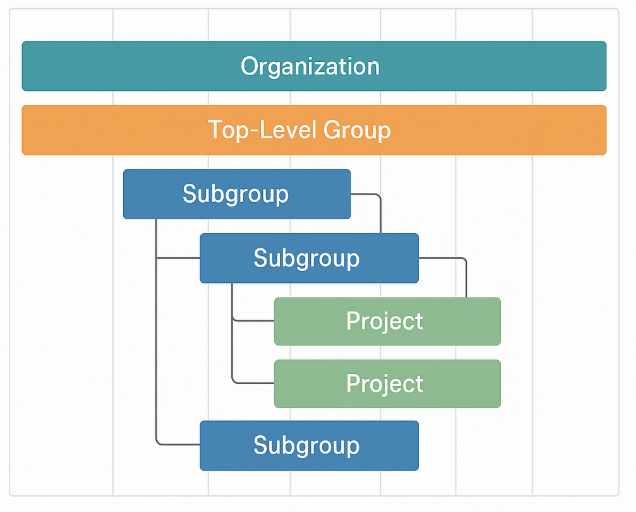
In GitLab 18.0, an Organization is a new, top-level administrative abstraction, currently available in GitLab SaaS only (cloud). It acts as a logical container for top-level groups, enabling centralized governance and billing.
⚠️ Availability
| Platform | Availability |
|---|---|
| GitLab SaaS (cloud) | ✅ Available (preview; limited UI) |
| Self-Managed CE/EE | 🔒 Not available by default; optional via ui_for_organizations feature flag (admin only) |
🧰 What it Contains
- Top-Level Groups
- Users (org-wide membership management)
- Billing settings
- Audit logs
- (Roadmap: Org-wide SAML/SCIM, policies)
🔧 Use Cases
- Central billing and licensing
- Multi-group user identity control
- Enterprise-wide policy enforcement
- Sharding (via GitLab Cells architecture)
🔍 Scope
- Logical boundary above top-level groups
- Not used for CI/CD execution or repository directly
🔷 2. GitLab Namespace
✅ Definition
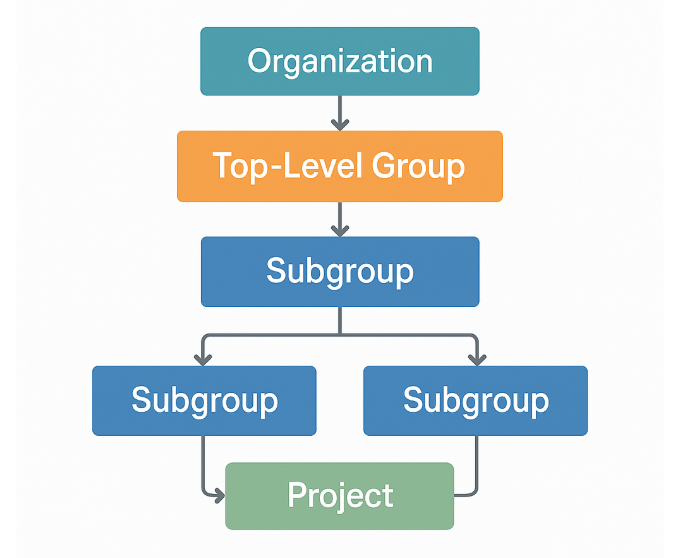
A namespace is a container for GitLab entities such as projects or groups. All projects belong to exactly one namespace, which defines the project’s path and access scope.
🔁 Types
| Namespace Type | Purpose | Example |
|---|---|---|
| User | Private space for an individual user | gitlab.com/alice/myapp |
| Group | Shared space for a team/org | gitlab.com/devops-team/myapp |
🔧 Use Cases
- Defines URL structure of projects
- Manages project ownership
- Scopes CI/CD variables, runners, permissions
🔍 Scope
- Always associated with projects
- Can be visualized in hierarchy trees (
namespace/project)
🔷 3. GitLab Group
✅ Definition
A Group is a primary organizational unit used to:
- Host multiple projects
- Share permissions
- Define CI/CD settings
- Manage users and roles
In GitLab, Top-Level Groups are the main entity for organizing work in both SaaS and Self-Managed setups.
🧰 What it Contains
- Subgroups
- Projects
- Members & access roles
- Shared runners, CI/CD variables, templates
🔧 Use Cases
- Department or product-level structure
- Access control inheritance
- Centralized monitoring via dashboards
- Epics for cross-project planning
🔍 Scope
- All settings cascade downward to children
- Can contain unlimited subgroups/projects
🔷 4. GitLab Subgroup
✅ Definition
A Subgroup is a group nested inside a parent group, used for more granular organization and permission scoping.
🧰 What it Contains
- Projects
- More nested subgroups (up to 20 levels)
- Inherited members + directly assigned ones
🔧 Use Cases
- Separate teams/modules under a department
- Restrict access to sensitive projects
- Model client-facing vs internal delivery teams
🔍 Scope
- Inherits from parent group
- Permissions can be elevated per subgroup, but not reduced
🔷 5. GitLab Project
✅ Definition
A Project is the fundamental unit of work — where source code, CI/CD pipelines, issues, and collaboration tools reside.
🧰 What it Contains
- Git repository
.gitlab-ci.ymlfor pipelines- Issues, Merge Requests
- Wiki, Releases, Containers
- Security scans (SAST, DAST, Dependency Scanning)
🔧 Use Cases
- Hosting microservices or monoliths
- Executing DevSecOps workflows
- Managing documentation, assets
- Automating deployment pipelines
🔍 Scope
- Lives inside a group or subgroup (cannot be top-level on its own)
- Inherits permissions and variables from parent group
📊 Entity Comparison Table
| Feature | Organization | Namespace | Group | Subgroup | Project |
|---|---|---|---|---|---|
| GitLab.com (SaaS) | ✅ Preview | ✅ Core concept | ✅ Primary unit | ✅ Supported | ✅ Core unit |
| Self-Managed | 🔒 Feature-flag | ✅ Core concept | ✅ Primary unit | ✅ Supported | ✅ Core unit |
| User-Creatable | 🔒 Limited (SaaS) | ✅ Implicit on create | ✅ Yes | ✅ Yes | ✅ Yes |
| Visibility Control | Org-wide roadmap | Inherited | Public/Internal/Priv | Public/Internal/Priv | Public/Internal/Priv |
| Role Management | Admins (future) | User/Group based | Guest to Owner | Inherit / Elevate | Guest to Maintainer |
| Contains | Groups | Projects | Subgroups, Projects | Subgroups, Projects | Code, Pipelines, Issues |
🛠️ How to Create (Step-by-Step)
🟢 GitLab SaaS (Cloud)
- Create a Top-Level Group (functions as your “Org”)
- Go to:
https://gitlab.com/groups/new - Enter:
DevOpsSchool - Set visibility:
PrivateorInternal - Click Create Group
- Go to:
- Create Subgroups
- Navigate to
DevOpsSchool - Click New Subgroup
- Name:
Academics,Operations,Clients, etc.
- Navigate to
- Create Projects
- Go inside a subgroup (e.g.,
Academics/SoftwareEngineering) - Click New Project
- Choose
Blank,Template, orImport
- Go inside a subgroup (e.g.,
- (Optional) Access Organization (if enabled)
- Visit
https://gitlab.com/-/organizations - Manage top-level groups under the org
- Visit
🔵 Self-Managed CE/EE
- Same flow as above using Top-Level Groups
- Enable Organization UI (Enterprise only):
sudo gitlab-rails console Feature.enable(:ui_for_organizations)
✅ Summary
- GitLab 18.0 introduces Organizations, but they are not yet fully user-facing except in select SaaS environments.
- Top-Level Groups remain the most important and practical unit for structuring your organization today.
- Use Subgroups for complex team layouts or access control needs.
- Every Project must live inside a Namespace (Group or User).
- Permissions cascade downward but can be elevated per scope.

I’m Rajesh Kumar, a DevOps, SRE, DevSecOps, Cloud, and Platform Engineering expert passionate about sharing practical knowledge, real-world experiences, and industry best practices. I have worked at Cotocus and regularly write about technology, travel, investing, health, product reviews, and digital marketing through my various platforms.
I publish technical articles at DevOps School, travel stories at Holiday Landmark, stock market insights at Stocks Mantra, health and fitness guidance at My Medic Plus, product reviews at TrueReviewNow, and SEO and digital marketing strategies at Wizbrand.
Find Trusted Cardiac Hospitals
Compare heart hospitals by city and services — all in one place.
Explore Hospitals