
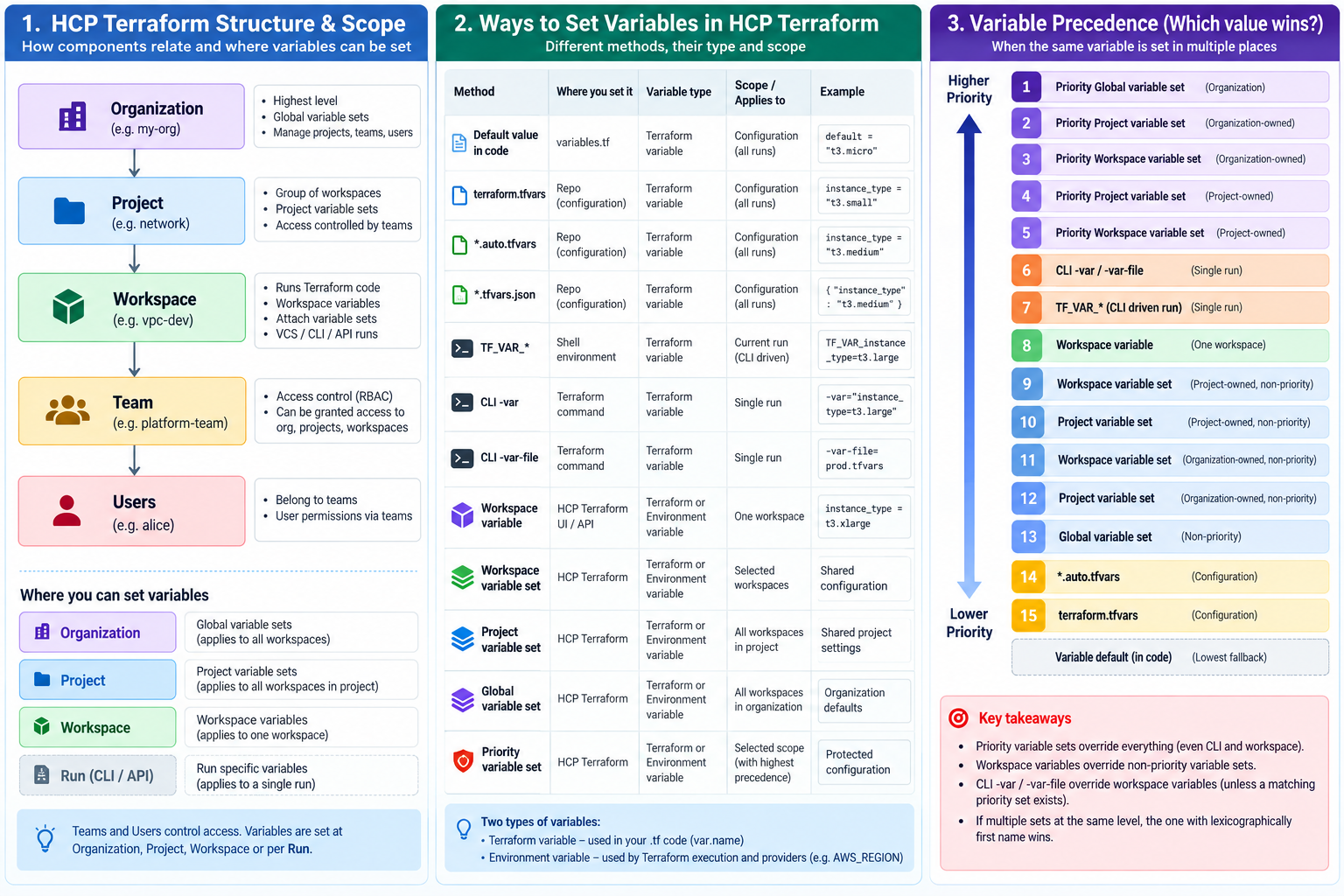
Updated: October 2026 | Based on current HashiCorp documentation
HCP Terraform provides several ways to pass values to Terraform code. These include variable defaults, .tfvars files, environment variables, workspace variables, project/organization variable sets, and run-specific CLI arguments.
The three most important things to understand are:
- Type: Is it a Terraform input variable or an environment variable?
- Scope: Does the value apply to one run, one workspace, a project, or the entire organization?
- Precedence: When the same variable is defined in multiple places, which value wins?
One particularly important rule: Workspace variables normally override variable sets, but Priority Variable Sets can override even workspace variables and command-line values.
1. Two types of variables in HCP Terraform
| Feature | Terraform variable | Environment variable |
|---|---|---|
| Purpose | Configure Terraform resources and modules | Configure providers, authentication and Terraform execution |
| Example | instance_type | AWS_REGION |
Access in .tf code | var.instance_type | Usually through provider or Terraform process behavior |
| Workspace UI category | Terraform Variable | Environment Variable |
| Supports HCL checkbox | Yes | No |
| Supports Sensitive flag | Yes | Yes |
| Can be in variable sets | Yes | Yes |
Example A: Terraform input variable
In variables.tf:
variable "instance_type" {
  description = "EC2 instance type"
  type        = string
  default     = "t3.micro"
}Code language: JavaScript (javascript)
In HCP Terraform, configure:
Category: Terraform variable
Key:      instance_type
Value:    t3.mediumCode language: HTTP (http)
And access it in code:
resource "aws_instance" "example" {
  ami           = var.ami_id
  instance_type = var.instance_type
}Code language: JavaScript (javascript)
Terraform uses t3.medium, overriding the default t3.micro.
Example B: Environment variable
In HCP Terraform:
Category: Environment variable
Key:      AWS_REGION
Value:    ap-northeast-1Code language: HTTP (http)
Terraform’s AWS provider can consume the environment variable:
provider "aws" {
  # Region may be supplied by AWS_REGION
}Code language: PHP (php)
Important: AWS_REGION does not automatically become var.aws_region. If you want var.aws_region, declare an input variable and provide its value through a Terraform variable or TF_VAR_aws_region.
For AWS authentication, prefer OIDC-based dynamic provider credentials over permanent access keys.
2. All ways to set and pass variable values
| Method | Where defined | Scope | Example |
|---|---|---|---|
| Default value | variables.tf | Terraform configuration | default = "t3.micro" |
terraform.tfvars | Repository / configuration directory | Configuration | instance_type = "t3.small" |
*.auto.tfvars | Repository / configuration directory | Configuration | instance_type = "t3.medium" |
*.tfvars.json | Repository / configuration directory | Configuration | JSON-formatted inputs |
TF_VAR_* | Shell environment | Current process / run | TF_VAR_instance_type |
CLI -var | Terraform command | Single run | -var="instance_type=t3.large" |
CLI -var-file | Terraform command | Single run | -var-file=prod.tfvars |
| Workspace variable | HCP Terraform UI/API | One workspace | instance_type = t3.xlarge |
| Workspace-scoped variable set | HCP Terraform | Selected workspaces | Shared configuration |
| Project-scoped variable set | HCP Terraform | All workspaces in project | Shared project settings |
| Global variable set | HCP Terraform | All organization workspaces | Organization defaults |
| Priority variable set | HCP Terraform | Selected scope, enforced precedence | Protected configuration |
You can also create and update workspace variables and variable sets programmatically using the HCP Terraform API or the Terraform tfe provider. These are management methods, not additional precedence levels.
3. Variable scope mapping
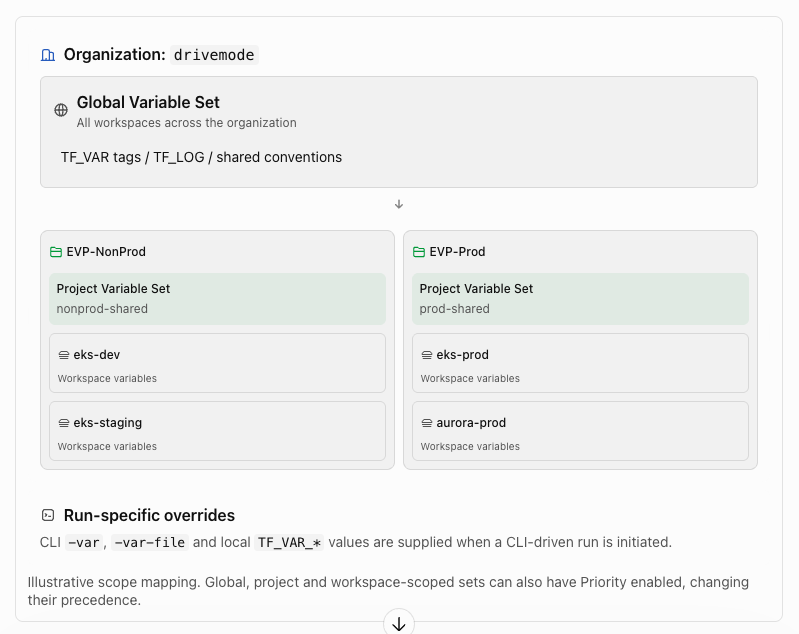
Who owns a variable set vs where it applies?
These are separate concepts in modern HCP Terraform.
| Ownership | Assignment scope | Effect |
|---|---|---|
| Organization-owned | Global | Every workspace in the organization |
| Organization-owned | Specific projects | All workspaces in selected projects |
| Organization-owned | Specific workspaces | Only selected workspaces |
| Project-owned | Entire project | All workspaces in that project |
| Project-owned | Specific workspaces | Only selected workspaces within that project |
A project does not have a separate ordinary variable-value layer. Project-wide values are provided through variable sets.
Similarly, Teams and Users manage access permissions; they are not variable scopes.
4. Complete HCP Terraform variable precedence
This is the most important reference table.
Highest priority at the top. The first applicable source with a matching variable type and key wins.
| Rank | Variable source | Priority enabled |
|---|---|---|
| 1 | Global variable set | Yes |
| 2 | Organization-owned, project-scoped variable set | Yes |
| 3 | Organization-owned, workspace-scoped variable set | Yes |
| 4 | Project-owned, project-scoped variable set | Yes |
| 5 | Project-owned, workspace-scoped variable set | Yes |
| 6 | CLI -var / -var-file | N/A |
| 7 | Local TF_VAR_* for CLI-driven remote runs | N/A |
| 8 | Workspace-specific variable | N/A |
| 9 | Project-owned, workspace-scoped variable set | No |
| 10 | Project-owned, project-scoped variable set | No |
| 11 | Organization-owned, workspace-scoped variable set | No |
| 12 | Organization-owned, project-scoped variable set | No |
| 13 | Global variable set | No |
| 14 | *.auto.tfvars files | N/A |
| 15 | terraform.tfvars | N/A |
| — | Terraform input variable default | Lowest fallback |
This is the precedence order published in HashiCorp’s current HCP Terraform documentation. It also explains why ownership and Priority status can matter more than the apparent specificity of the scope.
The table focuses on HCP Terraform’s published tiers. Terraform also supports the JSON variants *.auto.tfvars.json and terraform.tfvars.json; their ordering follows Terraform’s normal variable-file rules.
Five rules worth memorizing
- A workspace variable overrides normal, non-priority variable sets.
- Run-specific CLI values override workspace variables, unless a matching Priority Variable Set takes precedence.
- A Priority Global Variable Set has the highest precedence.
- Within otherwise equal variable sets, the set whose name sorts first lexically wins. For example,
A-settingswins overB-settings. - Two global variable sets cannot define conflicting variables of the same key and type.
Unlike the normal non-priority case, an organization-owned priority set can outrank a project-owned priority set, as shown in the ranking.
5. Interactive precedence example
Suppose node_count is defined at several levels for the same workspace.
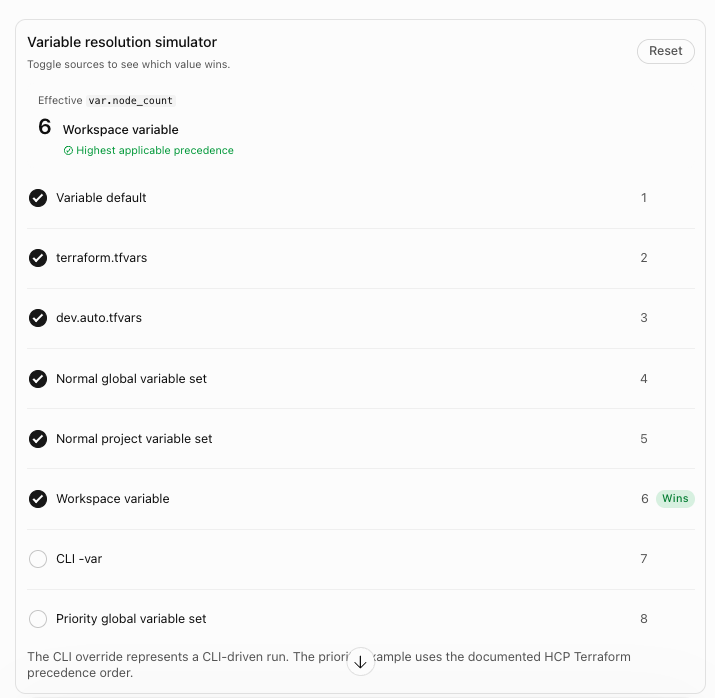
The CLI override represents a CLI-driven run. The priority example uses the documented HCP Terraform precedence order.
Example: What happens when values conflict?
| Source | node_count |
|---|---|
variables.tf default | 1 |
terraform.tfvars | 2 |
dev.auto.tfvars | 3 |
| Normal project variable set | 5 |
| Workspace variable | 6 |
The effective value is 6, because the workspace variable overrides the lower-ranked sources.
If you now run:
terraform plan -var="node_count=7"Code language: JavaScript (javascript)The effective value becomes 7 in a CLI-driven remote run.
But if a Priority Global Variable Set defines node_count = 8, then the effective value becomes 8, even when the CLI specifies 7.
6. Practical examples for each method
Method A — Values in .tfvars files
terraform.tfvars:
node_count = 2
environment = "development"Code language: JavaScript (javascript)production.auto.tfvars:
node_count = 3
environment = "production"Code language: JavaScript (javascript)
Terraform automatically reads these files when they are included in the configuration. The *.auto.tfvars values have precedence over terraform.tfvars.
A custom file such as production.tfvars must be explicitly supplied using -var-file rather than relying on automatic loading.
Method B — TF_VAR_* in your terminal
export TF_VAR_node_count=4
export TF_VAR_environment="staging"

terraform planCode language: JavaScript (javascript)
With a CLI-driven HCP Terraform remote run, these inputs can override workspace variables and normal variable sets. They do not replace the provider credentials and other execution-environment settings required in HCP Terraform.
HashiCorp Developer
Method C — Complex values through Workspace Variables
Terraform code:
variable "subnet_ids" {
  type = list(string)
}Code language: PHP (php)
HCP Terraform UI:
Category: Terraform
Key: subnet_ids

Value:
["subnet-abc123", "subnet-def456"]

HCL: EnabledCode language: CSS (css)
For lists, maps and objects, enable the HCL checkbox when entering HCL expressions in the HCP Terraform UI.
HashiCorp Developer
Method D — Set variables through the HCP Terraform Runs API
The Runs API also supports run-specific values. For example, a run creation payload may include:
{
  "data": {
    "type": "runs",
    "attributes": {
      "variables": [
        {
          "key": "node_count",
          "value": "5"
        }
      ]
    },
    "relationships": {
      "workspace": {
        "data": {
          "type": "workspaces",
          "id": "ws-EXAMPLE"
        }
      }
    }
  }
}Code language: JSON / JSON with Comments (json)
These are supplied to a particular run, rather than permanently updating the workspace. Values must be valid HCL literals. This is useful for CI/CD orchestration and automation.
HashiCorp Developer
Method E — Manage HCP Terraform variables using Terraform
You can manage the platform’s variable configuration through the official hashicorp/tfe provider:
resource "tfe_variable" "example" {
  workspace_id = tfe_workspace.example.id

  key      = "instance_type"
  value    = "t3.medium"
  category = "terraform"
}Code language: JavaScript (javascript)
This creates a workspace Terraform variable with the normal workspace-variable precedence. The tfe_variable_set, tfe_project_variable_set, and tfe_workspace_variable_set resources support reusable sets and their assignments.
Terraform Registry
+1
7. Critical difference: Execution mode and workflow
The HCP Terraform execution model affects which sources are available.
| Execution / workflow | Workspace variables | Variable sets | Local CLI overrides |
|---|---|---|---|
| VCS-driven remote | Yes | Yes | Not supplied by VCS runs |
| UI-triggered remote | Yes | Yes | Not from user’s local shell |
| CLI-driven remote | Yes | Yes | Yes |
| API-driven remote | Yes | Yes | Run-specific API values |
| Agent execution | Yes | Yes | When CLI-driven |
| Local execution mode | No | No | Standard local Terraform precedence |
HashiCorp Developer
+2
The Local execution mode exception is especially important. Even though Terraform state is stored in HCP Terraform, HCP Terraform does not evaluate its workspace variables or variable sets for local execution.
Likewise, in CLI-driven remote runs, shell variables on your laptop such as AWS_ACCESS_KEY_ID are not automatically forwarded as remote provider credentials. Configure the execution environment in HCP Terraform or use dynamic authentication.
8. Recommended variable design for AWS infrastructure
For a real infrastructure project, I recommend separating shared configuration, environment-specific settings and authentication.
| Variable | Type | Recommended scope |
|---|---|---|
default_tags | Terraform | Organization-owned variable set or project set |
environment | Terraform | Workspace |
aws_region | Terraform | Project set or workspace |
vpc_cidr | Terraform | Workspace |
eks_cluster_name | Terraform | Workspace |
node_count | Terraform | Workspace |
TF_LOG | Environment | Workspace, only for debugging |
TFC_AWS_PROVIDER_AUTH | Environment | Workspace or relevant variable set |
TFC_AWS_RUN_ROLE_ARN | Environment | Workspace or relevant variable set |
| Database password | Sensitive Terraform or provider environment variable | Workspace or restricted variable set |
For AWS dynamic credentials, configure the HCP Terraform OIDC integration and required environment variables such as:
TFC_AWS_PROVIDER_AUTH = true

TFC_AWS_RUN_ROLE_ARN =
arn:aws:iam::123456789012:role/terraform-roleCode language: JavaScript (javascript)
These values configure HCP Terraform authentication rather than declaring application-level input variables.
HashiCorp Developer
9. Other ways values reach Terraform code
Not every value used by Terraform comes from input variables.
Child-module inputs are passed explicitly from the root module:
module "vpc" {
  source = "./modules/vpc"

  cidr = var.vpc_cidr
}Code language: JavaScript (javascript)
Workspace outputs can provide values to another workspace through provider data sources or tfe_outputs:
data "tfe_outputs" "network" {
  organization = "my-org"
  workspace    = "network-prod"
}

output "vpc_id_from_network" {
  value = data.tfe_outputs.network.nonsensitive_values.vpc_id
}Code language: JavaScript (javascript)
These fetched values are resolved through data sources and do not participate in the input-variable precedence table.
Terraform Registry
+1
For Terraform Stacks, variable sets work differently: Stacks reference selected sets explicitly through store blocks, rather than using the workspace precedence hierarchy.
HashiCorp Developer
10. Best practices and common pitfalls
- Prefer variable sets for shared values and workspace variables for environment-specific values.
- Avoid duplicate keys across multiple non-priority sets unless overriding them is intentional.
- Use Priority Variable Sets selectively, because they can prevent workspace teams from overriding values.
- Do not place secrets in committed
.tfvarsfiles. - Mark sensitive HCP Terraform values appropriately, while remembering that Sensitive does not guarantee secrets stay out of Terraform state.
- Use dynamic provider credentials rather than persistent AWS access keys.
- Check the workspace Variables page for OVERWRITTEN markers when debugging conflicts.
- Treat changing a widely shared variable set as a potentially multi-workspace infrastructure change.
HashiCorp Developer
+1
Final reference: Which source should I use?
| Requirement | Best choice |
|---|---|
| General fallback value | Variable default |
| Environment configuration maintained in Git | .auto.tfvars |
| Common configuration across organization | Global variable set |
| Shared configuration for one project | Project-scoped variable set |
| Different value for every workspace | Workspace variable |
| Single execution override | CLI -var / -var-file or run API |
| Provider credentials | Dynamic credentials / environment variables |
| Centrally enforced configuration | Priority variable set, with policy enforcement where necessary |
| Values from another Terraform deployment | Provider data source / tfe_outputs |
The overall rule is that scope determines where a variable applies, while precedence determines which value wins. Ownership and Priority settings are the two HCP Terraform-specific details that make this different from ordinary local Terraform.
Official documentation: HCP Terraform Variables & Precedence, Manage Variables and Variable Sets, and Terraform Input Variable Precedence.

I’m Rajesh Kumar, a DevOps, SRE, DevSecOps, Cloud, and Platform Engineering expert passionate about sharing practical knowledge, real-world experiences, and industry best practices. I have worked at Cotocus and regularly write about technology, travel, investing, health, product reviews, and digital marketing through my various platforms.
I publish technical articles at DevOps School, travel stories at Holiday Landmark, stock market insights at Stocks Mantra, health and fitness guidance at My Medic Plus, product reviews at TrueReviewNow, and SEO and digital marketing strategies at Wizbrand.
Find Trusted Cardiac Hospitals
Compare heart hospitals by city and services — all in one place.
Explore Hospitals