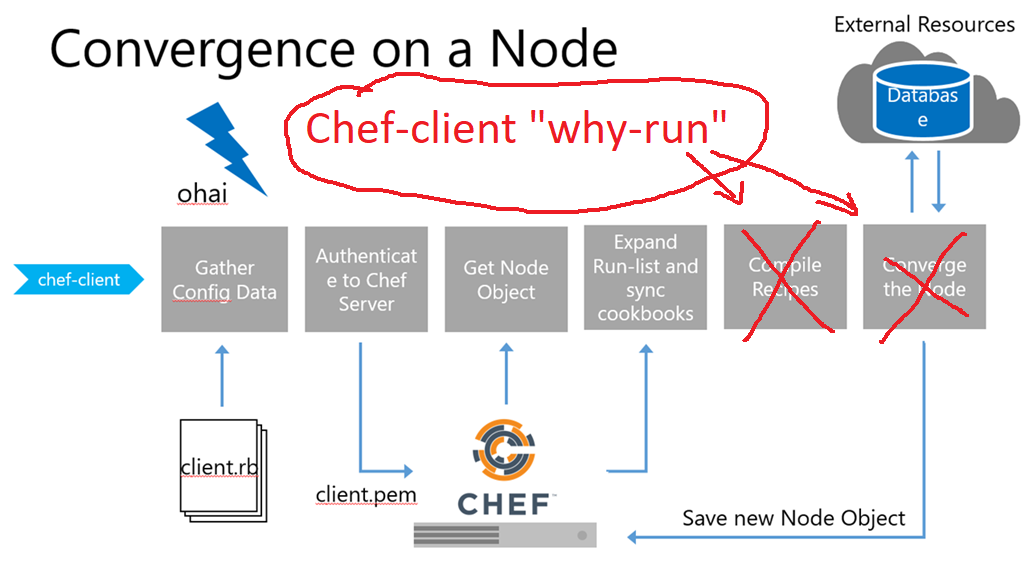
why-run mode is a way to see what the chef-client would have configured, had an actual chef-client run occurred. This approach is similar to the concept of “no-operation” (or “no-op”): decide what should be done, but then don’t actually do anything until it’s done right. Run the executable in why-run mode, which is a type of chef-client run that does everything except modify the system.
When why-run mode is enabled, a chef-client run will occur that does everything up to the point at which configuration would normally occur. This includes
- Getting the configuration data,
- Authenticating to the Chef server,
- Rebuilding the node object,
- Expanding the run-list,
- Getting the necessary cookbook files,
- Resetting node attributes,
- Identifying the resources, and
- Building the resource collection and
- Does not include mapping each resource to a provider or configuring any part of the system.
How to run chef-client?
[code]$ sudo chef-client -o ‘recipe[ntp]’ –why-run
$ sudo chef-client -o ‘recipe[ntp]’ -W[/code]

I’m Rajesh Kumar, a DevOps, SRE, DevSecOps, Cloud, and Platform Engineering expert passionate about sharing practical knowledge, real-world experiences, and industry best practices. I have worked at Cotocus and regularly write about technology, travel, investing, health, product reviews, and digital marketing through my various platforms.
I publish technical articles at DevOps School, travel stories at Holiday Landmark, stock market insights at Stocks Mantra, health and fitness guidance at My Medic Plus, product reviews at TrueReviewNow, and SEO and digital marketing strategies at Wizbrand.
Find Trusted Cardiac Hospitals
Compare heart hospitals by city and services — all in one place.
Explore Hospitals