
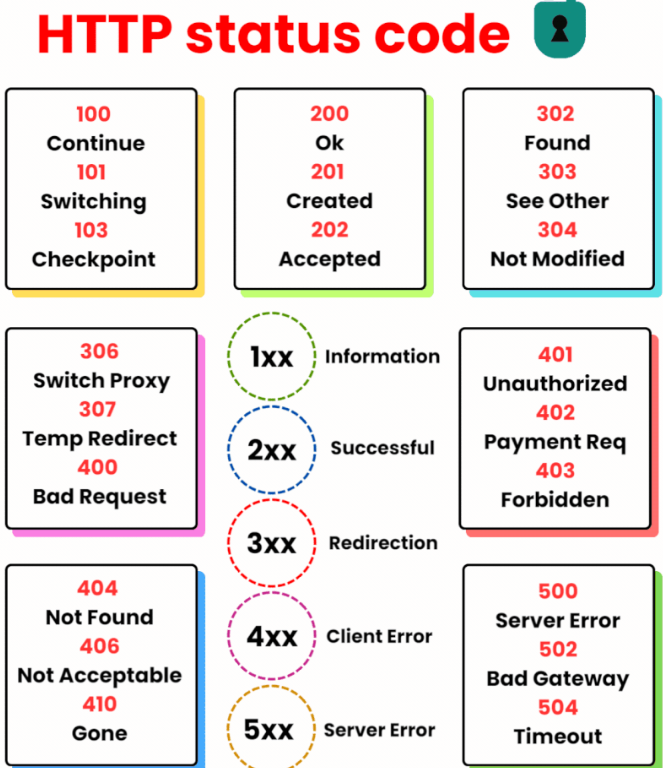
Here is a table of common HTTP status codes with their explanations:
| Status Code | Description |
|---|---|
| 100 | Continue – The server has received the request headers, and the client should proceed to send the request body. |
| 101 | Switching Protocols – The requester has asked the server to switch protocols, and the server is acknowledging that it will do so. |
| 200 | OK – The request has succeeded. The information returned with the response is dependent on the method used in the request. |
| 201 | Created – The request has been fulfilled and has resulted in one or more new resources being created. |
| 202 | Accepted – The request has been accepted for processing, but the processing has not been completed. |
| 203 | Non-Authoritative Information – The server is a transforming proxy (e.g. a web accelerator) that received a 200 OK from its origin, but is returning a modified response. |
| 204 | No Content – The server successfully processed the request and is not returning any content. |
| 205 | Reset Content – The server successfully processed the request, but is not returning any content, and requires that the requester reset the document view. |
| 206 | Partial Content – The server is delivering only part of the resource due to a range header sent by the client. |
| 300 | Multiple Choices – There are multiple options for the resource that the client may follow. |
| 301 | Moved Permanently – This and all future requests should be directed to the given URI. |
| 302 | Found – The requested resource resides temporarily under a different URI. |
| 303 | See Other – The response to the request can be found under another URI using a GET method. |
| 304 | Not Modified – The resource has not been modified since the version specified by the request headers. |
| 305 | Use Proxy – The requested resource is available only through a proxy, whose address is provided in the response. |
| 307 | Temporary Redirect – In this case, the request should be repeated with another URI; however, future requests should still use the original URI. |
| 400 | Bad Request – The server cannot or will not process the request due to an apparent client error. |
| 401 | Unauthorized – Similar to 403 Forbidden, but specifically for use when authentication is required and has failed or has not yet been provided. |
| 402 | Payment Required – Reserved for future use. |
| 403 | Forbidden – The request was valid, but the server is refusing action. |
| 404 | Not Found – The requested resource could not be found but may be available in the future. |
| 405 | Method Not Allowed – A request method is not supported for the requested resource. |
| 406 | Not Acceptable – The requested resource is capable of generating only content not acceptable according to the Accept headers sent in the request. |
| 407 | Proxy Authentication Required – The client must first authenticate itself with the proxy. |
| 408 | Request Timeout – The server timed out waiting for the request. |
| 409 | Conflict – The request could not be processed because of conflict in the request, such as an edit conflict between multiple simultaneous updates. |
| 410 | Gone – The resource requested is no longer available and will not be available again. |
| 411 | Length Required – The request did not specify the length of its content, which is required by the requested resource. |
| 412 | Precondition Failed – The server does not meet one of the preconditions that the requester put on the request. |
| 413 | Payload Too Large – The request is larger than the server is willing or able to process. |
| 414 | URI Too Long – The URI provided was too long for the server to process. |
| 415 | Unsupported Media Type – The request entity has a media type which the server or resource does not support. |
| 416 | Range Not Satisfiable – The client has asked for a portion of the file (byte serving), but the server cannot supply that portion. |
| 417 | Expectation Failed – The server cannot meet the requirements of the Expect request-header field. |
| 418 | I’m a teapot – This code was defined in 1998 as one of the traditional IETF April Fools’ jokes, in RFC 2324, Hyper Text Coffee Pot Control Protocol. |
| 421 | Misdirected Request – The request was directed at a server that is not able to produce a response. |
| 422 | Unprocessable Entity – The request was well-formed but was unable to be followed due to semantic errors. |
| 423 | Locked – The resource that is being accessed is locked. |
| 424 | Failed Dependency – The request failed due to failure of a previous request. |
| 425 | Too Early – Indicates that the server is unwilling to risk processing a request that might be replayed. |
| 426 | Upgrade Required – The client should switch to a different protocol such as TLS/1.0. |
| 428 | Precondition Required – The origin server requires the request to be conditional. |
| 429 | Too Many Requests – The user has sent too many requests in a given amount of time. |
| 431 | Request Header Fields Too Large – The server is unwilling to process the request because its header fields are too large. |
| 451 | Unavailable For Legal Reasons – The user requests an illegal resource, such as a web page censored by a government. |
| 500 | Internal Server Error – A generic error message, given when an unexpected condition was encountered and no more specific message is suitable. |
| 501 | Not Implemented – The server either does not recognize the request method, or it lacks the ability to fulfill the request. |
| 502 | Bad Gateway – The server was acting as a gateway or proxy and received an invalid response from the upstream server. |
| 503 | Service Unavailable – The server cannot handle the request (because it is overloaded or down for maintenance). |
| 504 | Gateway Timeout – The server was acting as a gateway or proxy and did not receive a timely response from the upstream server. |
| 505 | HTTP Version Not Supported – The server does not support the HTTP protocol version used in the request. |
| 506 | Variant Also Negotiates – Transparent content negotiation for the request results in a circular reference. |
| 507 | Insufficient Storage – The server is unable to store the representation needed to complete the request. |
| 508 | Loop Detected – The server detected an infinite loop while processing a request. |
| 510 | Not Extended – Further extensions to the request are required for the server to fulfill it. |
| 511 | Network Authentication Required – The client needs to authenticate to gain network access. |

I’m Rajesh Kumar, a DevOps, SRE, DevSecOps, Cloud, and Platform Engineering expert passionate about sharing practical knowledge, real-world experiences, and industry best practices. I have worked at Cotocus and regularly write about technology, travel, investing, health, product reviews, and digital marketing through my various platforms.
I publish technical articles at DevOps School, travel stories at Holiday Landmark, stock market insights at Stocks Mantra, health and fitness guidance at My Medic Plus, product reviews at TrueReviewNow, and SEO and digital marketing strategies at Wizbrand.
Find Trusted Cardiac Hospitals
Compare heart hospitals by city and services — all in one place.
Explore Hospitals
A useful addition would be explaining the operational value of HTTP status codes beyond application development. In production systems, response codes provide valuable insights into service health, API reliability, and user experience. Tracking patterns such as spikes in 4xx or 5xx responses through monitoring tools can help teams quickly identify configuration issues, failed deployments, or infrastructure problems. Using these metrics as part of continuous observability enables faster troubleshooting and supports more stable, resilient applications.