
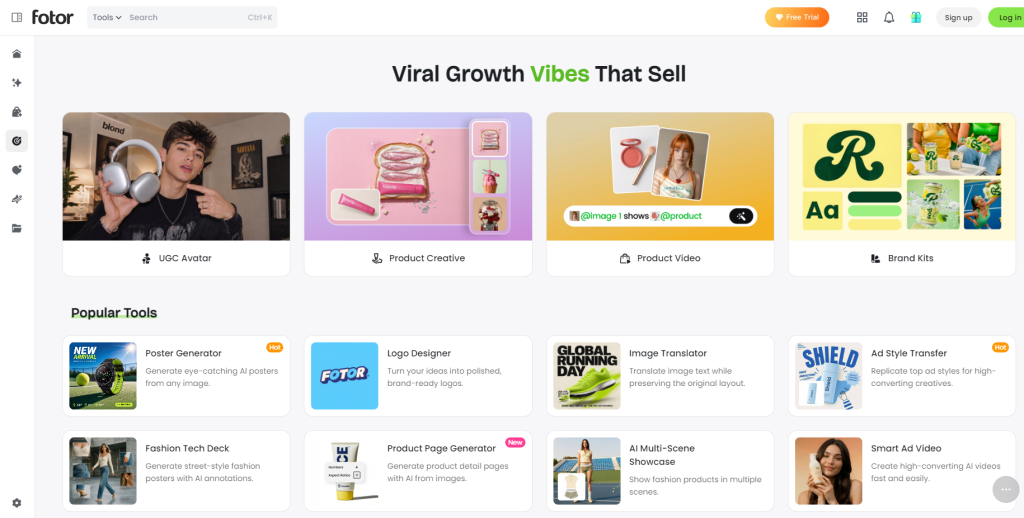
Video is king in online marketing, but shooting and editing professional clips is time-consuming and costly. Fotor – a popular web-based creative suite – offers AI-powered video tools to help businesses produce social ads, product demos, and short promotional clips. Its suite includes a general video creator plus specialized tools for e-commerce: an AI product video generator and a UGC-style video (AI avatar) generator. These let businesses create engaging TikTok/Reels ads, unboxing demos, review videos and more without any filming crew. We’ll explore its features, ease-of-use and how it stacks up for e-commerce marketers.
It was originally known as a photo editor, but it has added robust features. Its AI studio can turn text or images into 4–15 second clips in HD (up to 1080p), with multiple style options.
Key Features of Fotor’s Tools
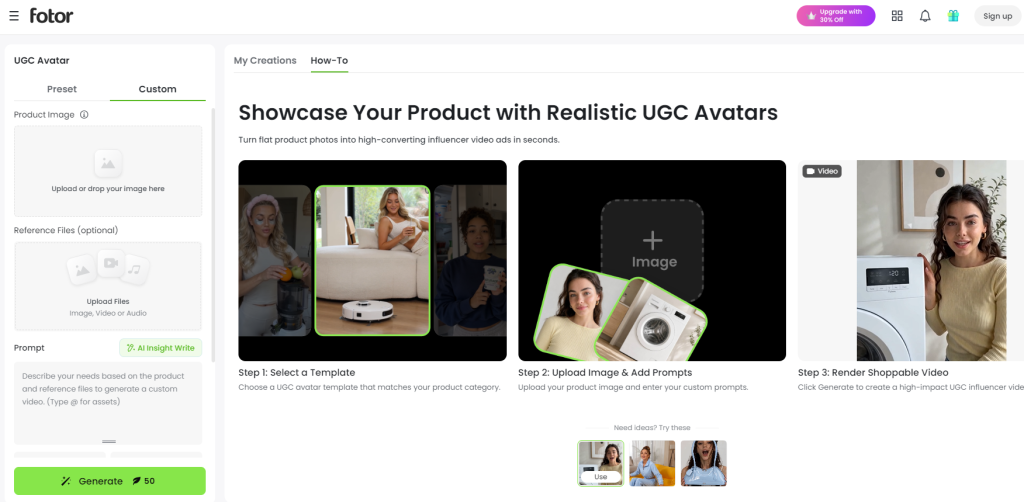
- AI UGC & Avatar Video Generator
Businesses can produce authentic promotional videos with its AI avatars. Upload Product Photos, select a Virtual Creator and create TikTok, Instagram Reels or YouTube Shorts like an Influencer. Brands can also upload their own avatar for a more personalised touch. It allows you to make interesting product reviews, demos, and social ads without hiring creators, making it simple. For those seeking an UGC video generator, it comes with a convenient tool to create platform-ready marketing videos.
- AI Product Video Maker
Fotor turns product pictures, URLs or descriptions into quick promotional videos by applying animation, captions and voiceovers. It enables product demos, launch videos and ad templates and optimises videos for social media or eCommerce platforms automatically. It is practical for online stores due to its HD exports and customizable styles.
- Text-to-Video & Image-to-Video
This tool is able to generate short videos from a text prompt or a static image. Users can try using various resolutions, animation styles and make quick edits including removing backgrounds, applying filters and enhancements before exporting the final video.
- Easy Customization
Users can modify aspects, video duration and visual style to suit various platforms. Polished marketing videos are easily produced with minimal effort using AI generated models, hand interactions and auto synching audio.
- Fast & Beginner-Friendly
The speed and simplicity are Fotor’s design. Its user-friendly platform enables users to generate numerous video variations in less time, which is valuable for corporations seeking multiple video ideas but with limited time and budget constraints.
What Makes Fotor Different?
There is an AI video space out there that’s pretty competitive, and it is one of many tools that caters to a specific niche; whether it be avatar videos, short form ads, cinematic clips, or more advanced video editing. Another advantage is the ability to manage multiple creative tasks within the same platform. Instead of using separate tools for image editing, graphic design, and short-form video creation, businesses can complete much of their marketing workflow in one place. This can improve productivity and help maintain consistent branding across social media, websites, and advertising campaigns.
This is particularly helpful for businesses looking to generate video, visuals and marketing materials without having to switch between several tools. Some platforms might have more advanced settings for motion, timing, or voice customizations, but others may be better suited for those who prioritize quick, easy, and budget-friendly features. It offers a practical middle-ground for eCommerce teams and marketers, offering creative flexibility while remaining simple to use.

Use Cases of Fotor AI Video Generator
These tools are designed to help businesses create professional marketing content quickly without requiring advanced editing skills or expensive production equipment. Its AI-powered workflows make it suitable for a variety of commercial and creative applications.
- eCommerce Product Marketing: Convert product pictures, text or product links into promotional videos for online shopping, marketplaces and online advertising campaigns.
- Social Media Advertising: Develop short, video-focused ads, optimized for TikTok, Instagram Reels, YouTube Shorts and Facebook, to boost engagement and highlight products in a visual way.
- UGC-Style Product Promotions: Generate product reviews, demos and promotion videos in real video style without influencers or creators using AI Avatars.
- Product Launch Campaigns: Make launch videos, teaser clips and announcements for new products with AI generated animation, voiceovers and styles for graphics.
- Content Creation for Small Businesses: Entrepreneurs, startups, and marketing teams can save time and money whilst producing good video content, for websites, emails, social media, and online ads.
- Convert ideas, concepts or existing images into compelling brand videos, for digital channels, with the Text-to-Video and Image-to-Video features.
User Experience
One of the biggest advantages of Fotor is its straightforward workflow. The platform guides users through each step, from uploading images or entering a text prompt to selecting a style and exporting the finished video. Most features are accessible from a clean dashboard, making it suitable for beginners while still offering enough customization for experienced marketers. Since it is web-based, users can create content without installing additional software, making it convenient for remote teams and businesses working across multiple devices. The simple interface also reduces the time spent learning the platform, allowing businesses to focus more on creating content than mastering complex editing tools.
Pros and Cons
Pros
- Easy to use interface with an easy to use workflow.
- Multiple device support, web-based platform.
- Provides all-in-one video-making, image editing, and graphic design tools.
- Supports text to video, image to video, product videos and AI avatar videos.
- Customizable templates, aspect ratios and export options for various social media platforms.
- Ideal for businesses wanting to produce advertising materials in a rapid fashion with no need for advanced editing skills.
Cons
- Frequent video generation may require upgrading to a paid plan.
- Advanced editing features, such as detailed timeline or motion controls, are limited compared to professional video editing software.
- Longer or more complex video projects may require additional editing in dedicated video production tools.
Conclusion
For e-commerce and business users, Fotor offers a practical AI video solution. It simplifies video marketing, letting you “turn your ideas into videos with ease” (as analysts note). Fotor brings together video creation, image editing, and design features in a single platform, making it a practical option for businesses that regularly produce digital content. Its focus on simplicity and automation helps reduce the time needed to create promotional videos for social media, online stores, and marketing campaigns. Although advanced users may prefer software with more detailed editing controls, Fotor provides enough flexibility for most day-to-day business needs. For eCommerce brands, startups, and marketers looking to streamline content creation, it offers a balanced combination of convenience, creative features, and ease of use.

I’m Rajesh Kumar, a DevOps, SRE, DevSecOps, Cloud, and Platform Engineering expert passionate about sharing practical knowledge, real-world experiences, and industry best practices. I have worked at Cotocus and regularly write about technology, travel, investing, health, product reviews, and digital marketing through my various platforms.
I publish technical articles at DevOps School, travel stories at Holiday Landmark, stock market insights at Stocks Mantra, health and fitness guidance at My Medic Plus, product reviews at TrueReviewNow, and SEO and digital marketing strategies at Wizbrand.
Find Trusted Cardiac Hospitals
Compare heart hospitals by city and services — all in one place.
Explore Hospitals
AI tools can help brands create product videos faster, but the final content still needs to feel genuine. Clear product details and realistic visuals help viewers understand what they are considering. It is worth checking generated text, product colors, and key features before publishing. Teams should also confirm usage rights for music, images, and AI-created assets. Testing videos with different audiences can show which formats build trust and encourage meaningful engagement.
The bigger challenge with AI video at scale may not be generation speed but maintaining consistency. When a brand creates dozens of product or UGC variations, every output still needs checks for accurate product representation, approved messaging, voice quality, visual identity, and platform-specific requirements. A lightweight human-review step and versioned brand templates could prevent small AI errors from becoming repeated across an entire campaign.