
Helix Core (P4D) is version control system introduced in 1995 and its based on client application and server application communicating over a TCP/IP connection. A full version of Helix Core is free for up to 5 users and 20 workspaces. And the platform works on Windows, Mac, and Linux. It can also be interrated with Helix Swarm and HelixTeamHub for free.
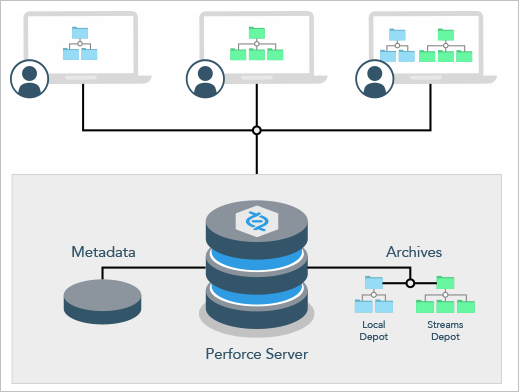
The server application manages a single repository that consists of one or more depots. A client application communicates with the server to allow the user to view:
- trees of versioned files
- repository metadata (file history, users, groups, labels, permissions)
Clients also manage local workspaces (local directories) that contain a subset of the files in the repository. Users can view, check out, and modify these local files and submit changes back to the repository. Versioned files are stored on the server in depots of various types, such as:
- Local – A local depot is writable, and is the default depot type. Files reside in the server’s root directory and are managed directly by the server. By default, there is one local depot named depot on every Helix Core installation.
- Stream – A stream depot is also writable, but contains streams, a type of branch that includes hierarchy and policy.
- Remote – A remote depot references files that reside on other servers, and cannot be written to.
- Archive – An archive depot is used in conjunction with the p4 archive and p4 restore commands to facilitate offline (or near-line) storage of infrequently-accessed revisions, typically large binaries.
- Spec – The spec depot, if present, automatically archives edited forms.
- Unload – The unload depot, if present, holds infrequently-used metadata (about old client workspaces and labels) that has been unloaded with the p4 unload command.
- Tangent – A tangent depot defines a read-only location that holds tangents created by the p4 fetch -t command. The tangent depot named tangent is automatically created by p4 fetch -t if one does not already exist.
- Graph – A depot of type graph can contain Git repos.
It has 5 important components as below;
- Helix Core (P4D) Server – Server application
- Helix Core Clients – client application
- Helix Core Plugins – To Integrate with your existing tools
- Helix Swarm – Code review and collaboration.
- Helix4Git – Optional add-on to scale Git.

I’m Rajesh Kumar, a DevOps, SRE, DevSecOps, Cloud, and Platform Engineering expert passionate about sharing practical knowledge, real-world experiences, and industry best practices. I have worked at Cotocus and regularly write about technology, travel, investing, health, product reviews, and digital marketing through my various platforms.
I publish technical articles at DevOps School, travel stories at Holiday Landmark, stock market insights at Stocks Mantra, health and fitness guidance at My Medic Plus, product reviews at TrueReviewNow, and SEO and digital marketing strategies at Wizbrand.
Find Trusted Cardiac Hospitals
Compare heart hospitals by city and services — all in one place.
Explore Hospitals





