
Are you tired of spending hours searching for the right data? Do you want to improve your data management and analysis? Look no further than data catalog tools! These tools allow you to organize and manage your data, making it easier to find and analyze. In this article, we will explore the top data catalog tools available on the market.
What is a Data Catalog?
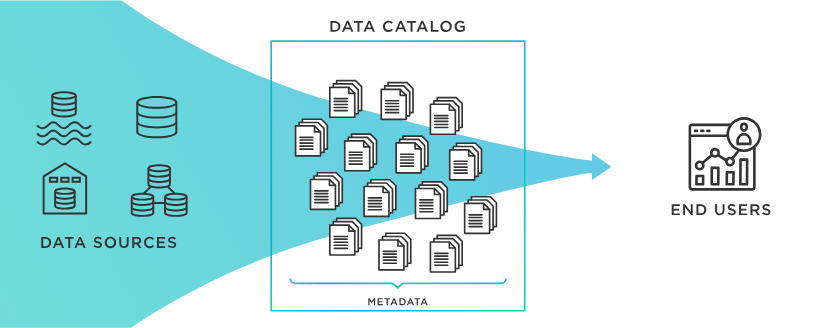
Before we delve into the tools, let’s first define what a data catalog is. A data catalog is a centralized repository that stores metadata about data assets. This metadata includes information such as the data’s origin, format, structure, and relationships to other data. Essentially, a data catalog serves as a map or index of your data, making it easier to navigate and understand.
Top Data Catalog Tools
1. Alation
Alation is a popular data catalog tool used by many large organizations, including Airbnb and Pfizer. It offers features such as data lineage tracking, data governance, and collaboration tools. Alation also has a machine learning component that can suggest data assets based on your previous searches and usage.
2. Collibra
Collibra is another enterprise-level data catalog tool that focuses on data governance and compliance. It offers a customizable business glossary, data lineage tracking, and collaboration features. Collibra also has a machine learning component that can help automate data classification and tagging.
3. Informatica Enterprise Data Catalog
Informatica Enterprise Data Catalog is a comprehensive data catalog tool that focuses on data discovery and metadata management. It offers features such as data lineage tracking, data profiling, and semantic search. Informatica also integrates with other Informatica products, such as their data integration and data quality tools.
4. Waterline Data
Waterline Data is a data catalog tool that uses AI and machine learning to automate the data discovery and tagging process. It offers features such as data lineage tracking, data quality monitoring, and collaboration tools. Waterline Data also integrates with other data management tools such as Apache Atlas and Cloudera Navigator.
5. Apache Atlas

Apache Atlas is an open-source data catalog tool that is part of the Apache Hadoop ecosystem. It offers features such as data classification, data lineage tracking, and policy management. Apache Atlas also integrates with other Apache Hadoop tools, such as Hive, HBase, and Kafka.
Conclusion
Data catalog tools are essential for any organization that wants to improve their data management and analysis. By centralizing metadata about your data assets, these tools make it easier to find and understand your data. The five tools we discussed in this article are just a few of the many options available on the market. When choosing a data catalog tool, consider your organization’s specific needs and goals to find the best fit.

👤 About the Author
Ashwani is passionate about DevOps, DevSecOps, SRE, MLOps, and AiOps, with a strong drive to simplify and scale modern IT operations. Through continuous learning and sharing, Ashwani helps organizations and engineers adopt best practices for automation, security, reliability, and AI-driven operations.
🌐 Connect & Follow:
Website: WizBrand.com
Facebook: facebook.com/DevOpsSchool
X (Twitter): x.com/DevOpsSchools
LinkedIn: linkedin.com/company/devopsschool
YouTube: youtube.com/@TheDevOpsSchool
Instagram: instagram.com/devopsschool
Quora: devopsschool.quora.com
Email– contact@devopsschool.com
Find Trusted Cardiac Hospitals
Compare heart hospitals by city and services — all in one place.
Explore Hospitals