
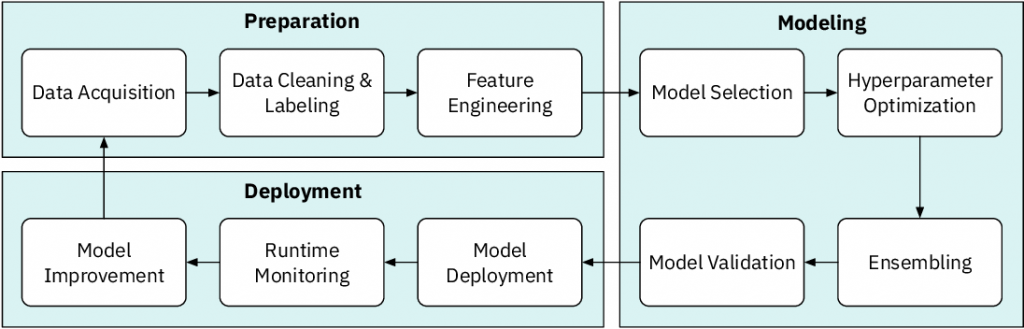
Are you tired of emailing back and forth with your team members about data science projects? Do you want to increase productivity and collaboration in your team? If so, then you need to start using data science collaboration tools. In this article, we will provide you with a list of the best data science collaboration tools that can help you and your team work smarter and more efficiently.
What are Data Science Collaboration Tools?
Data science collaboration tools are software platforms that allow data scientists and other team members to work together on data science projects. These tools provide a centralized platform for team members to share data, collaborate on code, and communicate with each other. Some of these tools also have built-in features for version control and project management, making it easier to keep track of changes and progress.
List of Data Science Collaboration Tools
- GitHub: GitHub is a web-based platform that provides version control for code and allows for collaboration on projects. It is commonly used by data scientists for code sharing and collaboration.

2. Jupyter Notebook: Jupyter Notebook is an open-source web application that allows for the creation and sharing of documents that contain live code, equations, and visualizations. It is widely used in data science for prototyping, exploration, and collaboration.
3. Google Colab: Google Colab is a cloud-based platform that allows for the creation and sharing of Jupyter Notebooks. It is a great tool for collaboration as team members can work on the same notebook simultaneously.
4. Kaggle: Kaggle is a platform that hosts data science competitions and provides a community of data scientists for collaboration and learning. It also provides tools for sharing code, data, and visualizations.
5. Slack: Slack is a messaging platform that can be used for team communication and collaboration. It allows for the creation of channels for different projects and topics, making it easier to organize conversations.
6. Trello: Trello is a project management tool that can be used for organizing tasks and tracking progress. It is great for data science collaboration as team members can assign tasks to each other and keep track of deadlines.
7. Basecamp: Basecamp is a project management tool that can be used for organizing projects and communicating with team members. It provides a centralized platform for sharing files, assigning tasks, and tracking progress.
8. Asana: Asana is a project management tool that can be used for organizing tasks and tracking progress. It provides a central platform for team members to collaborate on projects and assign tasks to each other.
9. Notion: Notion is an all-in-one workspace that can be used for note-taking, project management, and task tracking. It provides a centralized platform for team members to collaborate on projects and share files.
Conclusion
In conclusion, data science collaboration tools are essential for increasing productivity and collaboration in your team. The tools listed above are some of the best data science collaboration tools available on the market. We encourage you to try them out and see how they can improve your team’s workflow and efficiency. Remember, collaboration is key to success in data science!

👤 About the Author
Ashwani is passionate about DevOps, DevSecOps, SRE, MLOps, and AiOps, with a strong drive to simplify and scale modern IT operations. Through continuous learning and sharing, Ashwani helps organizations and engineers adopt best practices for automation, security, reliability, and AI-driven operations.
🌐 Connect & Follow:
Website: WizBrand.com
Facebook: facebook.com/DevOpsSchool
X (Twitter): x.com/DevOpsSchools
LinkedIn: linkedin.com/company/devopsschool
YouTube: youtube.com/@TheDevOpsSchool
Instagram: instagram.com/devopsschool
Quora: devopsschool.quora.com
Email– contact@devopsschool.com
Find Trusted Cardiac Hospitals
Compare heart hospitals by city and services — all in one place.
Explore Hospitals