
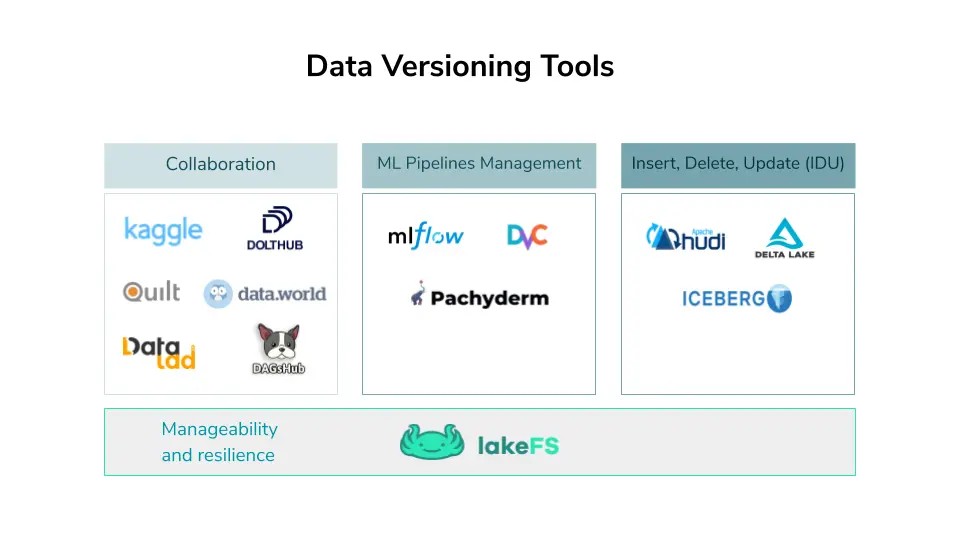
Are you tired of manually keeping track of all your data versions? Do you want an easier way to manage your data and ensure accuracy? Look no further! In this article, we will explore a list of data versioning tools that will help streamline your data management process.
What is Data Versioning?
Before we dive into the tools, let’s first understand what data versioning is. Data versioning is the process of keeping track of changes made to a dataset over time. It allows you to easily access and compare different versions of your data to ensure accuracy and consistency.
Why Use Data Versioning Tools?
Data versioning tools offer many benefits, including:
- Improved data accuracy and consistency
- Increased efficiency in managing data versions
- Easier collaboration among team members
- Better tracking and auditing of changes made to data
Now that we understand the importance of data versioning, let’s take a look at some of the top tools available.
Git

Git is a popular version control system used for software development, but it can also be used for data versioning. It allows you to track changes made to a dataset over time and easily revert back to previous versions if needed. Git also offers collaboration features, making it easy for team members to work together on a dataset.
DVC
DVC, or Data Version Control, is an open-source tool specifically designed for data versioning. It allows you to track changes made to your data and easily switch between different versions. DVC also offers integration with Git, making it easy to manage both code and data in one place.
Pachyderm

Pachyderm is a data science platform that includes data versioning as one of its key features. It allows you to easily track changes made to your data and collaborate with team members. Pachyderm also offers a versioning file system, making it easy to manage large datasets.
Quilt
Quilt is a data versioning tool that focuses on making it easy to share data between team members. It allows you to track changes made to your data and share those changes with others. Quilt also offers integration with Jupyter notebooks, making it easy to work with data in a notebook environment.
Data Version Control

Data Version Control is a commercial tool that offers advanced data versioning features. It allows you to track changes made to your data and easily switch between different versions. Data Version Control also offers collaboration features, making it easy for team members to work together on a dataset.
Wrapping Up
Data versioning is an important part of data management, and there are many tools available to help streamline the process. Whether you’re looking for an open-source solution or a commercial tool, there’s a data versioning tool out there that will meet your needs. So why wait? Start exploring these tools today and improve your data management process!

👤 About the Author
Ashwani is passionate about DevOps, DevSecOps, SRE, MLOps, and AiOps, with a strong drive to simplify and scale modern IT operations. Through continuous learning and sharing, Ashwani helps organizations and engineers adopt best practices for automation, security, reliability, and AI-driven operations.
🌐 Connect & Follow:
Website: WizBrand.com
Facebook: facebook.com/DevOpsSchool
X (Twitter): x.com/DevOpsSchools
LinkedIn: linkedin.com/company/devopsschool
YouTube: youtube.com/@TheDevOpsSchool
Instagram: instagram.com/devopsschool
Quora: devopsschool.quora.com
Email– contact@devopsschool.com
Find Trusted Cardiac Hospitals
Compare heart hospitals by city and services — all in one place.
Explore Hospitals