
Introduction
AI AR/VR Learning Coach Systems are immersive training platforms that combine artificial intelligence with augmented reality (AR) and virtual reality (VR) to deliver interactive, real-time guided learning experiences. Instead of watching videos or reading content, learners practice skills inside simulated environments while AI acts as a coach—observing behavior, giving feedback, correcting mistakes, and adapting difficulty dynamically.
In 2026, this category is gaining rapid adoption across industries where hands-on experience is critical but real-world practice is expensive, risky, or hard to scale. These systems use computer vision, spatial computing, speech recognition, and behavioral analytics to simulate real job environments and provide personalized coaching.
Common use cases include surgical training, industrial safety simulations, aviation training, retail and customer service roleplay, equipment handling, military and defense simulations, corporate leadership training, and technical skills development in engineering and manufacturing.
Key evaluation criteria include simulation realism, AI coaching accuracy, latency, hardware compatibility, spatial tracking precision, adaptability of scenarios, analytics depth, integration with LMS/LXP systems, scalability, and safety compliance.
Best for: enterprises, training organizations, universities, healthcare institutions, manufacturing companies, defense training programs, aviation academies, and high-risk skill environments.
Not ideal for: small teams with no structured training programs, organizations without AR/VR hardware access, or companies that only need simple video-based learning.
What’s Changed in AI AR/VR Learning Coach Systems in 2026+
- Shift from static VR simulations to AI-driven adaptive environments that change in real time
- AI coaches now provide contextual feedback using speech, gesture, and behavior recognition
- Integration of multimodal AI (vision + voice + spatial tracking + biometrics)
- Lightweight AR training via mobile devices is expanding beyond headset-only systems
- Digital twins of workplaces are now widely used for enterprise training
- Real-time skill scoring inside VR environments is becoming standard
- AI-generated scenarios adapt dynamically to learner performance
- Increased focus on “learning in the flow of work” using AR overlays
- Stronger safety and compliance constraints in regulated industries
- Cloud streaming of VR simulations reduces hardware dependency
- Improved haptic feedback integration for procedural training
- Better emotion and stress detection during immersive learning sessions
- Enterprise platforms now integrate AR/VR learning data into HR and LMS systems
- Generative AI is used to create new training scenarios instantly
- Reduced motion sickness through adaptive rendering and AI optimization
Quick Buyer Checklist
- Does the platform support both AR and VR environments?
- Can AI provide real-time coaching during simulations?
- Is spatial tracking accurate and low latency?
- Does it integrate with LMS or corporate training systems?
- Can scenarios adapt dynamically based on learner performance?
- Does it support multi-user collaboration in simulations?
- Is hardware support compatible with your devices (Quest, HoloLens, etc.)?
- Are analytics available for skill progression tracking?
- Can training environments be customized or built internally?
- Does it support voice and gesture recognition?
- Are safety-critical simulations validated for compliance?
- Can it run in cloud-streamed mode to reduce hardware needs?
- Does it support scenario replay and performance review?
- Is there support for skill certification or scoring?
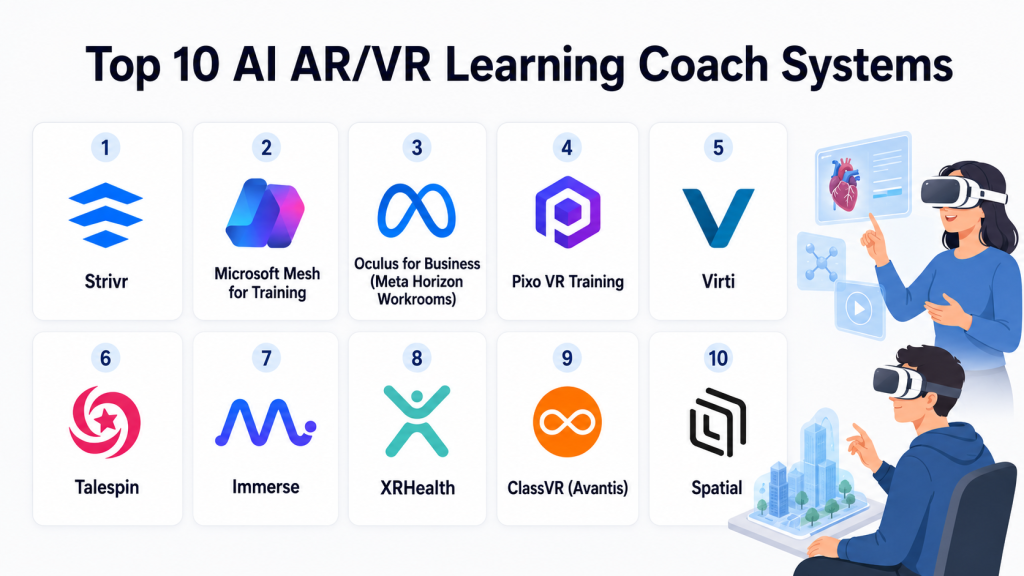
Top 10 AI AR/VR Learning Coach Systems
#1 — Strivr
One-line verdict: Best enterprise VR training platform for immersive workforce coaching and performance improvement.
Short description:
Strivr is a leading VR training platform used by enterprises to train employees in realistic simulations. It uses AI analytics and immersive environments to improve learning retention and job readiness.
Standout Capabilities
- Immersive VR training environments
- AI-driven performance analytics
- Real-world scenario simulations
- Employee skill tracking dashboards
- Safety and compliance training modules
- Retail, logistics, and enterprise use cases
- Multi-device VR compatibility
- Scalable enterprise deployment
AI-Specific Depth
- Model support: Proprietary AI analytics models
- RAG / knowledge integration: Limited / scenario-based knowledge mapping
- Evaluation: Behavioral performance scoring in VR environments
- Guardrails: Controlled simulation environments
- Observability: Training analytics dashboards
Pros
- Strong enterprise adoption
- High-quality immersive training
- Proven ROI in workforce training
Cons
- Requires VR hardware investment
- Limited flexibility for small organizations
- Enterprise-focused setup complexity
Security & Compliance
Enterprise security controls are available depending on deployment. Detailed certifications are not publicly standardized.
Deployment & Platforms
- VR headsets (Meta Quest, enterprise devices)
- Cloud-based management platform
- Enterprise training dashboards
Integrations & Ecosystem
- LMS platforms
- HR systems
- Workforce analytics tools
- Enterprise APIs
- Training content systems
Pricing Model
Enterprise subscription and deployment-based pricing; not publicly stated in detail.
Best-Fit Scenarios
- Retail workforce training
- Logistics and operations training
- Enterprise onboarding at scale
#2 — Microsoft Mesh for Training
One-line verdict: Best mixed-reality collaborative learning platform integrated with Microsoft ecosystem.
Short description:
Microsoft Mesh enables immersive AR/VR collaboration and training experiences, allowing learners to interact in shared virtual environments with AI-enhanced guidance.
Standout Capabilities
- Mixed reality collaboration
- AI-assisted immersive training
- Multi-user VR environments
- Integration with Microsoft ecosystem
- Digital twin support
- Remote training sessions
- 3D spatial learning environments
- Enterprise scalability
AI-Specific Depth
- Model support: Azure AI integration
- RAG / knowledge integration: Enterprise knowledge integration via Azure
- Evaluation: Session analytics and behavioral tracking
- Guardrails: Azure identity and access controls
- Observability: Real-time usage and engagement metrics
Pros
- Strong enterprise ecosystem integration
- Scalable collaboration features
- Flexible AR/VR hybrid learning
Cons
- Requires Microsoft ecosystem adoption
- Hardware dependency for full VR experience
- Setup complexity for training design
Security & Compliance
Enterprise-grade Azure security, identity management, and compliance controls depending on configuration.
Deployment & Platforms
- HoloLens / VR devices
- Windows ecosystem
- Cloud (Azure)
Integrations & Ecosystem
- Microsoft Teams
- Azure AI services
- Dynamics 365
- LMS platforms
- Enterprise apps
- Identity services
Pricing Model
Enterprise licensing via Microsoft ecosystem.
Best-Fit Scenarios
- Corporate collaboration training
- Remote workforce onboarding
- Digital twin-based training
#3 — Oculus for Business (Meta Horizon Workrooms)
One-line verdict: Best accessible VR training environment for immersive corporate learning experiences.
Short description:
Meta’s VR learning and collaboration ecosystem enables immersive training, simulations, and coaching environments using Quest devices.
Standout Capabilities
- Immersive VR training environments
- AI-assisted collaboration tools
- Virtual meeting rooms for training
- Gesture and voice interaction
- Scenario-based learning
- Multi-user environments
- Remote training capabilities
- VR content ecosystem
AI-Specific Depth
- Model support: Meta AI-driven spatial systems
- RAG / knowledge integration: N/A
- Evaluation: Interaction and behavior tracking in VR
- Guardrails: Device-level permissions and controls
- Observability: Usage and engagement analytics
Pros
- Accessible VR hardware ecosystem
- Strong immersive experience
- Growing enterprise adoption
Cons
- Limited enterprise training customization
- Hardware dependency (Quest devices)
- Privacy considerations in some regions
Security & Compliance
Enterprise device management and access controls available depending on deployment configuration.
Deployment & Platforms
- Meta Quest devices
- Cloud-managed VR environment
- Cross-platform VR apps
Integrations & Ecosystem
- Collaboration tools
- Enterprise training platforms
- API-based integrations
- Content development tools
- VR content marketplaces
Pricing Model
Device + subscription-based enterprise plans.
Best-Fit Scenarios
- Remote training
- Collaborative VR learning
- Soft skills simulations
#4 — Pixo VR Training
One-line verdict: Best VR training platform for industrial safety and enterprise skill simulations.
Short description:
Pixo VR provides immersive VR training experiences focused on workplace safety, compliance, and technical skills in industrial environments.
Standout Capabilities
- Industrial VR simulations
- Safety training modules
- AI-based skill tracking
- Hazard detection scenarios
- Equipment training simulations
- Workforce onboarding tools
- Performance analytics
- Scenario customization
AI-Specific Depth
- Model support: Proprietary simulation AI
- RAG / knowledge integration: Scenario-based knowledge mapping
- Evaluation: Task completion and safety compliance scoring
- Guardrails: Controlled simulation environments
- Observability: Training analytics dashboards
Pros
- Strong industrial training focus
- High realism simulations
- Good safety compliance training
Cons
- Narrow industry focus
- Requires VR hardware
- Limited general-purpose learning
Security & Compliance
Not publicly stated; typically aligned with enterprise safety training requirements.
Deployment & Platforms
- VR headsets
- Cloud training platform
- Enterprise dashboards
Integrations & Ecosystem
- LMS systems
- Industrial training systems
- Workforce management tools
- API integrations
- Enterprise reporting tools
Pricing Model
Enterprise licensing; varies by deployment.
Best-Fit Scenarios
- Manufacturing training
- Industrial safety programs
- Equipment handling simulations
#5 — Virti
One-line verdict: Best AI-powered immersive training platform for healthcare and soft skill simulation.
Short description:
Virti combines VR, AR, and AI to deliver immersive simulations for healthcare, leadership training, and communication skills development.
Standout Capabilities
- AI-driven training simulations
- Healthcare and soft skill scenarios
- Performance analytics dashboards
- Video and VR-based training
- Scenario customization tools
- Real-time feedback coaching
- Multi-device access
- Behavioral performance tracking
AI-Specific Depth
- Model support: Proprietary AI coaching models
- RAG / knowledge integration: Scenario-based knowledge mapping
- Evaluation: Behavioral and communication scoring
- Guardrails: Controlled simulation environments
- Observability: Learner analytics dashboards
Pros
- Strong healthcare training use cases
- Good for soft skills coaching
- Flexible simulation design
Cons
- VR experience depends on setup
- Limited industrial depth
- Requires structured scenario design
Security & Compliance
Not publicly stated in detail; healthcare-focused deployments may follow industry compliance practices depending on region.
Deployment & Platforms
- VR headsets
- Web-based simulation access
- Mobile AR experiences
Integrations & Ecosystem
- LMS systems
- Healthcare training platforms
- HR systems
- API integrations
- Simulation content tools
Pricing Model
Subscription-based enterprise pricing.
Best-Fit Scenarios
- Healthcare training
- Communication skills coaching
- Leadership development
#6 — Talespin
One-line verdict: Best enterprise VR platform for soft skills and workforce transformation training.
Short description:
Talespin uses immersive VR and AI simulations to train employees in leadership, communication, and workplace scenarios.
Standout Capabilities
- Soft skill VR simulations
- AI coaching feedback
- Leadership training scenarios
- Workplace interaction simulations
- Behavioral analytics
- Scenario authoring tools
- Workforce transformation programs
- Performance tracking
AI-Specific Depth
- Model support: Proprietary coaching AI
- RAG / knowledge integration: Scenario-based knowledge system
- Evaluation: Behavioral performance scoring
- Guardrails: Controlled simulation environments
- Observability: Training analytics dashboards
Pros
- Strong soft skills training
- Realistic workplace simulations
- Good enterprise focus
Cons
- Requires VR adoption
- Less technical training focus
- Enterprise setup complexity
Security & Compliance
Not publicly stated in full detail.
Deployment & Platforms
- VR headsets
- Cloud platform
- Enterprise dashboards
Integrations & Ecosystem
- LMS platforms
- HR systems
- Enterprise learning tools
- API integrations
- Training content systems
Pricing Model
Enterprise subscription model.
Best-Fit Scenarios
- Leadership training
- Communication skills
- Workplace behavior coaching
#7 — Immerse
One-line verdict: Best VR language and communication learning platform with immersive coaching.
Short description:
Immerse focuses on language learning and communication training using VR environments where learners interact with AI-driven avatars and coaches.
Standout Capabilities
- Immersive language learning environments
- AI-driven conversational coaching
- Real-time speech feedback
- Multi-user VR classrooms
- Scenario-based communication practice
- Pronunciation correction tools
- Adaptive learning paths
- Progress tracking dashboards
AI-Specific Depth
- Model support: AI conversational models
- RAG / knowledge integration: Scenario-based learning content
- Evaluation: Speech, fluency, and interaction scoring
- Guardrails: Controlled conversation environments
- Observability: Learning progress analytics
Pros
- Strong communication focus
- Highly immersive learning experience
- Good language training tool
Cons
- Narrow use case focus
- Requires VR access
- Not suitable for technical training
Security & Compliance
Not publicly stated.
Deployment & Platforms
- VR headsets
- Cloud-based learning system
- Multi-user environments
Integrations & Ecosystem
- Language learning systems
- LMS platforms
- Education tools
- API integrations
- Content systems
Pricing Model
Subscription-based.
Best-Fit Scenarios
- Language learning
- Communication training
- Soft skill development
#8 — XRHealth
One-line verdict: Best healthcare-focused AR/VR training and therapy simulation platform.
Short description:
XRHealth provides VR-based therapeutic and training environments used in healthcare, rehabilitation, and medical training contexts.
Standout Capabilities
- VR therapy environments
- Medical training simulations
- AI-based progress tracking
- Patient behavior analytics
- Rehabilitation coaching tools
- Remote healthcare training
- Immersive diagnostic simulations
- Data-driven therapy adjustments
AI-Specific Depth
- Model support: Healthcare AI models
- RAG / knowledge integration: Clinical scenario mapping
- Evaluation: Patient and learner behavior scoring
- Guardrails: Healthcare-grade controlled environments
- Observability: Clinical analytics dashboards
Pros
- Strong healthcare focus
- Evidence-based training approach
- Useful for rehabilitation
Cons
- Narrow industry focus
- Requires clinical validation
- Hardware dependency
Security & Compliance
Healthcare-grade controls vary by region and deployment.
Deployment & Platforms
- VR headsets
- Cloud platform
- Healthcare systems
Integrations & Ecosystem
- Healthcare systems
- LMS platforms
- Clinical tools
- API integrations
- Research platforms
Pricing Model
Healthcare and enterprise subscription pricing.
Best-Fit Scenarios
- Medical training
- Rehabilitation programs
- Clinical simulation learning
#9 — ClassVR (Avantis)
One-line verdict: Best classroom-focused AR/VR learning platform for schools.
Short description:
ClassVR provides AR/VR learning experiences designed for K–12 education with guided immersive lessons and teacher controls.
Standout Capabilities
- Classroom VR learning modules
- Teacher-controlled experiences
- Curriculum-aligned simulations
- Student engagement tracking
- AR and VR content library
- Multi-device classroom control
- Interactive learning experiences
- Simple deployment tools
AI-Specific Depth
- Model support: Basic AI-driven content adaptation
- RAG / knowledge integration: Curriculum-based content system
- Evaluation: Engagement and learning tracking
- Guardrails: Teacher-controlled environments
- Observability: Classroom analytics
Pros
- Easy for schools to adopt
- Curriculum-aligned content
- Strong classroom control tools
Cons
- Limited enterprise use cases
- Less advanced AI coaching
- Hardware dependency
Security & Compliance
Education-focused controls depending on region.
Deployment & Platforms
- VR headsets
- Classroom management system
- Cloud-based platform
Integrations & Ecosystem
- School LMS systems
- Education platforms
- Curriculum providers
- Content libraries
- API tools
Pricing Model
School and institutional subscription pricing.
Best-Fit Scenarios
- K–12 education
- Classroom immersive learning
- Curriculum-based VR training
#10 — Spatial
One-line verdict: Best AR/VR collaboration platform for training and immersive teamwork environments.
Short description:
Spatial provides immersive 3D collaboration environments where teams can train, present, and learn in virtual spaces using avatars and interactive objects.
Standout Capabilities
- 3D virtual collaboration spaces
- Immersive training environments
- AI-assisted interaction tools
- Multi-device access (AR/VR/web)
- Content sharing in 3D space
- Real-time collaboration
- Spatial computing workflows
- Training simulation support
AI-Specific Depth
- Model support: Platform-managed AI tools
- RAG / knowledge integration: Limited / workspace-based
- Evaluation: Interaction and engagement tracking
- Guardrails: Workspace access controls
- Observability: Collaboration analytics
Pros
- Strong immersive collaboration
- Flexible cross-device support
- Good for distributed teams
Cons
- Not a dedicated training platform
- Limited assessment depth
- Requires VR readiness
Security & Compliance
Enterprise collaboration security features vary by deployment.
Deployment & Platforms
- VR headsets
- Web browser
- Mobile AR support
Integrations & Ecosystem
- Collaboration tools
- Enterprise platforms
- Content systems
- API integrations
- Productivity tools
Pricing Model
Subscription-based SaaS.
Best-Fit Scenarios
- Remote training collaboration
- Team-based simulations
- Spatial computing learning
Comparison Table
| Tool Name | Best For | Deployment | Model Flexibility | Strength | Watch-Out | Public Rating |
|---|---|---|---|---|---|---|
| Strivr | Enterprise VR training | VR/Cloud | Hosted | Workforce simulation | Hardware dependency | N/A |
| Microsoft Mesh | Mixed reality training | Cloud/AR/VR | Azure AI | Enterprise integration | Ecosystem lock-in | N/A |
| Oculus for Business | VR collaboration training | VR | Hosted | Immersive experience | Hardware dependency | N/A |
| Pixo VR | Industrial training | VR/Cloud | Hosted | Safety simulations | Narrow scope | N/A |
| Virti | Healthcare + soft skills | VR/Web | Hosted | Behavioral coaching | Scenario design effort | N/A |
| Talespin | Soft skills training | VR | Hosted | Leadership coaching | Limited technical depth | N/A |
| Immerse | Language training | VR | Hosted | Communication coaching | Narrow use case | N/A |
| XRHealth | Medical training | VR | Hosted | Clinical simulation | Healthcare dependency | N/A |
| ClassVR | School education | VR | Hosted | Classroom control | Limited enterprise use | N/A |
| Spatial | Collaboration training | AR/VR/Web | Hosted | Immersive teamwork | Not training-specific | N/A |
Scoring & Evaluation
This scoring reflects comparative capabilities across immersive realism, AI coaching quality, adaptability, integration depth, scalability, safety controls, usability, and analytics maturity. Scores are relative and should be validated through pilots because hardware quality, latency, and content design significantly affect outcomes in AR/VR systems.
| Tool | Core | Reliability/Eval | Guardrails | Integrations | Ease | Perf/Cost | Security/Admin | Support | Weighted Total |
|---|---|---|---|---|---|---|---|---|---|
| Strivr | 9 | 9 | 9 | 9 | 7 | 7 | 9 | 9 | 8.5 |
| Microsoft Mesh | 9 | 9 | 9 | 10 | 7 | 8 | 10 | 9 | 8.8 |
| Oculus for Business | 8 | 8 | 8 | 8 | 8 | 8 | 8 | 8 | 8.0 |
| Pixo VR | 8 | 8 | 8 | 8 | 8 | 8 | 8 | 8 | 8.0 |
| Virti | 8 | 8 | 8 | 8 | 8 | 8 | 8 | 8 | 8.0 |
| Talespin | 8 | 8 | 8 | 8 | 7 | 8 | 8 | 8 | 7.9 |
| Immerse | 8 | 8 | 8 | 8 | 8 | 8 | 8 | 8 | 8.0 |
| XRHealth | 8 | 8 | 8 | 8 | 7 | 8 | 8 | 8 | 7.9 |
| ClassVR | 7 | 7 | 7 | 7 | 9 | 9 | 8 | 8 | 7.7 |
| Spatial | 8 | 8 | 7 | 8 | 8 | 8 | 8 | 8 | 7.9 |
Which AI AR/VR Learning Coach System Is Right for You?
Solo / Freelancer
AR/VR learning platforms are generally not necessary unless working in niche coaching, simulation design, or immersive content creation. Lightweight AR tools or web-based simulations are more practical.
SMB
SMBs should prioritize accessibility and ease of use. ClassVR (education), Spatial (collaboration), or basic VR training modules can be suitable without heavy infrastructure investment.
Mid-Market
Mid-sized organizations benefit from Virti, Talespin, and Strivr-style systems where structured training simulations and measurable outcomes are important for workforce development.
Enterprise
Enterprises should focus on Strivr, Microsoft Mesh, Oculus for Business, and Pixo VR due to scalability, integration capabilities, and immersive workforce training support.
Regulated Industries
Healthcare, aviation, manufacturing, and defense should prioritize platforms with validated simulations, controlled environments, and strong auditability like XRHealth, Strivr, and Microsoft Mesh.
Budget vs Premium
Budget solutions focus on basic VR training modules and classroom tools, while premium systems offer digital twins, AI coaching, real-time adaptation, and enterprise integrations.
Build vs Buy
Building AR/VR learning systems is highly complex due to hardware dependencies, spatial computing requirements, and AI simulation design. Most organizations should adopt vendor platforms unless they have dedicated XR engineering teams.
Implementation Playbook
30 Days: Setup & Pilot
- Select training scenario (safety, leadership, technical)
- Choose hardware (VR headsets or AR devices)
- Define learning objectives and KPIs
- Build initial simulation environments
- Run pilot group sessions
- Measure engagement and usability
- Validate AI coaching accuracy
60 Days: Expansion & Validation
- Integrate with LMS or training systems
- Add performance scoring models
- Expand simulation scenarios
- Introduce multi-user training sessions
- Validate learning retention improvements
- Collect feedback from trainers and learners
- Optimize latency and user experience
90 Days: Scale & Optimize
- Deploy across departments or institutions
- Implement digital twin environments
- Optimize AI coaching feedback loops
- Integrate HR and performance systems
- Improve scenario generation workflows
- Monitor cost, usage, and engagement metrics
- Establish governance and safety policies
Common Mistakes & How to Avoid Them
- Ignoring hardware readiness before rollout
- Designing unrealistic simulation scenarios
- Overloading learners with complex environments
- Failing to align VR training with real job tasks
- Skipping pilot testing for motion sickness issues
- Not integrating training data with LMS systems
- Using AR/VR without clear learning KPIs
- Ignoring latency and performance issues
- Poorly designed AI coaching feedback
- Not training instructors on VR tools
- Underestimating content creation effort
- Overlooking accessibility requirements
- Deploying without scenario validation
- Ignoring user safety guidelines in simulations
- Treating VR as entertainment instead of structured learning
FAQs
1. What are AI AR/VR Learning Coach Systems?
They are immersive training platforms that combine AI with AR/VR to simulate real-world learning environments with real-time coaching.
2. How does AI improve AR/VR learning?
AI provides adaptive feedback, behavior analysis, performance scoring, and scenario adjustments during simulations.
3. What industries use AR/VR learning systems?
Healthcare, aviation, manufacturing, retail, defense, education, and enterprise training programs.
4. Do users need VR headsets?
Yes for full VR experiences, but some platforms also support AR mobile or web-based access.
5. Can these systems replace real-world training?
No. They complement real-world training by providing safe, scalable practice environments.
6. Are AR/VR training systems expensive?
They can be expensive due to hardware, content creation, and enterprise licensing.
7. Is AI coaching accurate in VR?
It is effective but depends on scenario design, data quality, and sensor accuracy.
8. Do these systems track performance?
Yes, most platforms track behavior, decisions, task completion, and engagement metrics.
9. Can multiple users train together?
Yes, many systems support multi-user collaborative environments.
10. Are AR/VR systems safe for learners?
Yes when properly designed, though users may experience motion discomfort in some cases.
11. Can they integrate with LMS systems?
Most enterprise platforms support LMS integration and reporting.
12. What is a digital twin in VR training?
It is a virtual replica of a real environment used for realistic simulation-based learning.
13. How is progress measured?
Through behavioral analytics, task completion, scoring systems, and AI-based evaluation.
14. What is the biggest limitation?
Hardware dependency and high content creation complexity.
Conclusion
AI AR/VR Learning Coach Systems represent the next generation of experiential learning by merging immersive environments with intelligent coaching systems. They allow organizations to train employees in realistic, risk-free simulations while capturing detailed performance insights that traditional training cannot provide.Strivr, Microsoft Mesh, and Oculus for Business lead enterprise adoption, while Virti, Talespin, and Immerse focus on specialized coaching domains like healthcare, soft skills, and language learning. Industrial and safety-critical sectors benefit from platforms like Pixo VR and XRHealth, while education systems rely on ClassVR for structured classroom experiences.The most effective implementations start small, validate training outcomes through pilots, and gradually expand into fully immersive digital learning ecosystems. When aligned with real job requirements and supported by strong AI coaching and analytics, AR/VR learning systems can significantly improve skill retention, readiness, and performance outcomes.

Find Trusted Cardiac Hospitals
Compare heart hospitals by city and services — all in one place.
Explore Hospitals
A useful area to explore further is the operational scalability of AI-powered AR/VR learning platforms in real educational settings. Beyond immersive experiences, institutions often face challenges related to hardware compatibility, content maintenance, accessibility requirements, and network performance for distributed learners. It would also be valuable to discuss learning analytics, privacy considerations around behavioral data collection, and methods for measuring whether immersive coaching environments lead to sustained improvements in knowledge retention and learner engagement over time.