
Introduction
AI Code Generation Tools for Scientific Computing combine artificial intelligence, machine learning, and programming assistance to help researchers, engineers, and scientists write, optimize, and maintain scientific software faster. These tools support programming tasks involving numerical computing, simulations, data analysis, machine learning experiments, computational modeling, and scientific workflows.
Scientific computing often requires complex code involving mathematics, physics, statistics, simulations, and specialized libraries. AI-powered coding assistants can help generate code snippets, explain algorithms, automate repetitive programming tasks, identify errors, and improve development productivity.
As research organizations increasingly adopt AI-driven workflows, large-scale simulations, digital twins, and computational science platforms, AI coding assistants are becoming valuable tools for scientists and developers.
Common use cases include:
- Generating scientific Python, MATLAB, Julia, and other programming code
- Creating simulation scripts
- Automating data analysis workflows
- Debugging scientific applications
- Optimizing numerical algorithms
- Supporting machine learning research
When evaluating AI Code Generation Tools for Scientific Computing, organizations should consider programming language support, scientific library compatibility, code accuracy, mathematical reasoning capabilities, debugging assistance, security controls, data privacy, model flexibility, workflow integration, testing support, and reproducibility features.
Best for: Scientific researchers, computational scientists, data scientists, engineers, universities, AI researchers, laboratories, software developers, and organizations building simulation or scientific data applications.
Not ideal for: Teams without programming workflows, projects requiring only simple automation, or organizations expecting AI-generated code to replace expert software engineering and scientific validation.
What’s Changed in AI Code Generation for Scientific Computing in 2026+
AI-powered scientific programming is evolving as researchers demand faster development cycles, better automation, and more reliable computational workflows.
Key trends include:
- AI-assisted scientific programming: Researchers are increasingly using AI assistants to accelerate coding tasks involving mathematics, simulations, and data analysis.
- Natural language-to-code workflows: Scientists can describe computational goals in natural language and receive programming assistance for implementation.
- Multimodal coding assistance: AI tools are increasingly supporting combinations of text instructions, code, documentation, mathematical formulas, and data structures.
- AI-generated simulation scripts: Researchers are using AI assistants to create initial versions of simulation workflows and computational experiments.
- Scientific library integration: Modern coding assistants are improving support for specialized libraries used in numerical computing, machine learning, and scientific analysis.
- Automated debugging and optimization: AI tools are helping identify coding issues, suggest improvements, and optimize computational workflows.
- AI agents for research workflows: Agent-based systems are emerging to assist with multi-step coding, testing, documentation, and analysis tasks.
- Reproducible scientific coding: Research teams are focusing more on version tracking, documentation, testing, and repeatable computational experiments.
- Code validation and testing: Organizations are placing more emphasis on verifying AI-generated scientific code before using it in research environments.
- Privacy and governance for research code: Scientific organizations are increasingly evaluating how AI tools handle proprietary code, research data, and intellectual property.
Quick Buyer Checklist (Scan-Friendly)
Before selecting an AI Code Generation Tool for Scientific Computing, evaluate:
- Support for scientific programming languages
- Python, MATLAB, Julia, R, C++, and other language support
- Mathematical reasoning capabilities
- Scientific library compatibility
- Numerical computing support
- Simulation code generation
- Machine learning code assistance
- Debugging capabilities
- Code explanation features
- Testing and validation support
- Documentation generation
- Research workflow integration
- Version control compatibility
- Data privacy controls
- Code retention policies
- Model selection options
- Hosted versus self-managed deployment
- Enterprise administration controls
- Security management
- Access permissions
- Audit capabilities
- Collaboration features
- API availability
- Cost management options
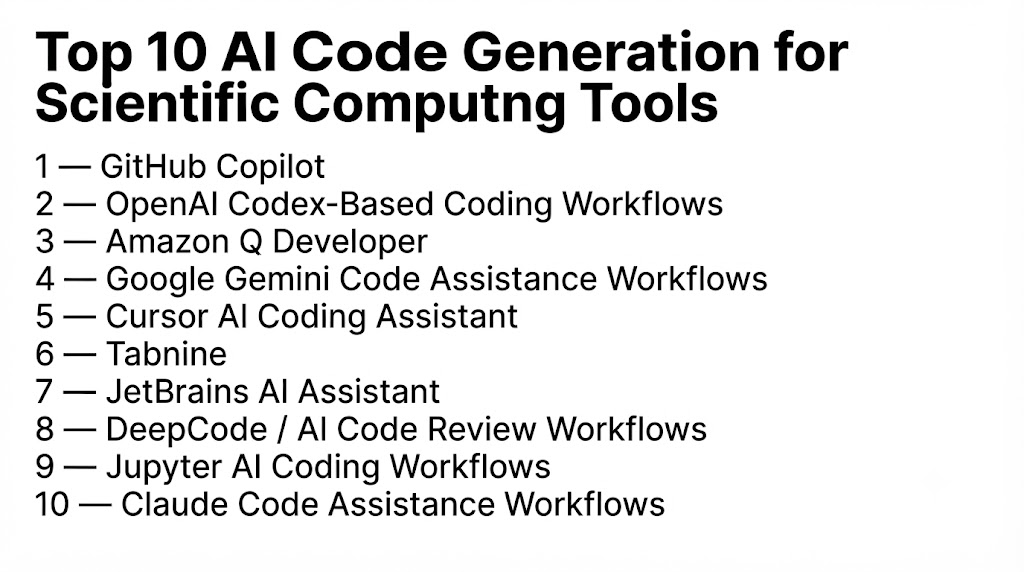
Top 10 AI Code Generation for Scientific Computing Tools
#1 — GitHub Copilot
One-line verdict: Best for developers needing AI-assisted coding across scientific and engineering applications.
Short description (2–3 lines):
GitHub Copilot is an AI coding assistant designed to help developers write, understand, and improve software code.
It can support scientific computing workflows by assisting with programming tasks, algorithms, documentation, and code optimization.
Standout Capabilities
- AI-powered code completion
- Code explanation
- Programming assistance
- Debugging support
- Documentation generation
- Multiple language support
- Developer workflow integration
AI-Specific Depth (Must Include)
- Model support: Uses AI models designed for coding assistance; available model options depend on the environment.
- RAG / knowledge integration: Depends on connected repositories, documentation, and development workflows.
- Evaluation: Developers should validate generated scientific code through testing and review.
- Guardrails: Code review, testing, and organizational policies help manage AI-generated outputs.
- Observability: Depends on available developer analytics and administration features.
Pros
- Improves developer productivity.
- Supports many programming languages.
- Useful for repetitive coding tasks.
Cons
- Generated code requires human review.
- Scientific accuracy may require expert validation.
- Depends on development environment integration.
Security & Compliance
Not publicly stated.
Deployment & Platforms
- Platforms: Development environments.
- Deployment: Cloud-based and enterprise options vary.
Integrations & Ecosystem
Supports:
- Code editors
- Development workflows
- Version control environments
- Software projects
- Programming languages
Pricing Model
Typically subscription or enterprise-based models; exact pricing varies.
Best-Fit Scenarios
- Scientific software development
- Research programming
- Engineering applications
#2 — OpenAI Codex-Based Coding Workflows
One-line verdict: Best for developers creating and understanding complex scientific computing code.
Short description (2–3 lines):
Codex-based coding workflows use AI models specialized for programming assistance, helping users generate, explain, and modify code.
They can support scientific computing tasks involving algorithms, automation, and software development.
Standout Capabilities
- Code generation
- Code explanation
- Debugging assistance
- Algorithm assistance
- Programming automation
- Software development support
- Multi-language coding help
AI-Specific Depth (Must Include)
- Model support: Supports AI coding models depending on available deployment options.
- RAG / knowledge integration: Can depend on connected files, documentation, or development environments.
- Evaluation: AI-generated code requires testing and scientific verification.
- Guardrails: Human review, testing, and coding policies help reduce risks.
- Observability: Depends on the implementation environment.
Pros
- Strong natural language coding assistance.
- Useful for complex programming tasks.
- Helps explain unfamiliar code.
Cons
- Requires developer validation.
- May not understand specialized scientific context automatically.
- Output quality depends on prompts and available context.
Security & Compliance
Not publicly stated.
Deployment & Platforms
- Platforms: Development environments and AI coding workflows.
- Deployment: Varies.
Integrations & Ecosystem
Supports:
- Programming environments
- Code repositories
- Scientific software workflows
- Development automation
- Custom applications
Pricing Model
Not publicly stated.
Best-Fit Scenarios
- Scientific programming
- Research automation
- Software development support
#3 — Amazon Q Developer
One-line verdict: Best for teams needing AI-assisted coding within enterprise development environments.
Short description (2–3 lines):
Amazon Q Developer is an AI coding assistant designed to help developers write, understand, and maintain software applications.
It can support scientific computing teams building cloud-based research applications and computational workflows.
Standout Capabilities
- Code generation
- Code explanation
- Debugging assistance
- Development productivity
- Cloud application support
- Software modernization
- Developer assistance
AI-Specific Depth (Must Include)
- Model support: AI coding capabilities depend on available service configurations.
- RAG / knowledge integration: Depends on connected development resources and organizational data.
- Evaluation: Generated scientific code requires testing and validation.
- Guardrails: Enterprise policies and developer review workflows help control outputs.
- Observability: Depends on administrative and monitoring capabilities.
Pros
- Enterprise-focused coding assistance.
- Supports developer productivity.
- Useful for cloud-based scientific applications.
Cons
- Requires engineering expertise.
- Scientific workflows may need customization.
- AI suggestions require validation.
Security & Compliance
Not publicly stated.
Deployment & Platforms
- Platforms: Cloud development environments.
- Deployment: Cloud-based options vary.
Integrations & Ecosystem
Supports:
- Cloud development workflows
- Programming environments
- Enterprise applications
- Software projects
- Development teams
Pricing Model
Not publicly stated.
Best-Fit Scenarios
- Enterprise scientific software
- Cloud research applications
- Development teams
#4 — Google Gemini Code Assistance Workflows
One-line verdict: Best for developers using AI assistance for scientific programming, analysis, and research workflows.
Short description (2–3 lines):
Google Gemini-based coding workflows provide AI assistance for software development, code understanding, and programming tasks.
They can support scientific computing by helping researchers create scripts, analyze algorithms, and work with computational workflows.
Standout Capabilities
- AI code generation
- Code explanation
- Algorithm assistance
- Programming support
- Data analysis help
- Documentation generation
- Development workflow assistance
AI-Specific Depth (Must Include)
- Model support: Uses AI models designed for coding and reasoning tasks; available options depend on the environment.
- RAG / knowledge integration: Depends on connected documentation, project files, and development resources.
- Evaluation: Scientific code requires testing, benchmarking, and expert review.
- Guardrails: Development standards and human validation help manage generated code.
- Observability: Depends on available platform monitoring and administration features.
Pros
- Strong natural language coding assistance.
- Useful for research programming tasks.
- Helps explain complex code.
Cons
- Generated code requires validation.
- Scientific domain understanding may vary.
- Requires proper prompt design.
Security & Compliance
Not publicly stated.
Deployment & Platforms
- Platforms: Development environments and cloud workflows.
- Deployment: Cloud-based options vary.
Integrations & Ecosystem
Supports:
- Coding environments
- Software development workflows
- Research applications
- Data analysis tasks
- Cloud development platforms
Pricing Model
Not publicly stated.
Best-Fit Scenarios
- Scientific software development
- Data analysis workflows
- Research programming
#5 — Cursor AI Coding Assistant
One-line verdict: Best for developers who want AI-powered coding assistance directly inside modern development workflows.
Short description (2–3 lines):
Cursor is an AI-powered coding environment designed to help developers write, modify, and understand software code.
It can support scientific computing projects by assisting with scripts, algorithms, and programming tasks.
Standout Capabilities
- AI code generation
- Code editing assistance
- Codebase understanding
- Refactoring support
- Debugging assistance
- Natural language coding
- Developer productivity improvement
AI-Specific Depth (Must Include)
- Model support: Supports AI coding models depending on configuration.
- RAG / knowledge integration: Can use project context and codebase information.
- Evaluation: Generated scientific code requires testing and validation.
- Guardrails: Developer review and coding standards help control outputs.
- Observability: Depends on development environment features.
Pros
- Strong codebase interaction.
- Useful for large programming projects.
- Improves development speed.
Cons
- Requires developer supervision.
- Scientific accuracy depends on context.
- Not specifically designed for scientific computing.
Security & Compliance
Not publicly stated.
Deployment & Platforms
- Platforms: Developer desktop environments.
- Deployment: Local and cloud-connected workflows vary.
Integrations & Ecosystem
Supports:
- Code editors
- Programming projects
- Software repositories
- Development workflows
- AI coding environments
Pricing Model
Varies.
Best-Fit Scenarios
- Research software development
- Scientific application coding
- Developer productivity
#6 — Tabnine
One-line verdict: Best for organizations seeking AI-assisted code completion with developer workflow support.
Short description (2–3 lines):
Tabnine provides AI-powered coding assistance focused on improving developer productivity through code suggestions and completion.
It can help scientific developers accelerate programming tasks across different languages.
Standout Capabilities
- AI code completion
- Code suggestions
- Developer assistance
- Multiple language support
- Productivity improvement
- Team development support
- Coding workflow integration
AI-Specific Depth (Must Include)
- Model support: Uses AI coding models based on available configurations.
- RAG / knowledge integration: Depends on connected code repositories and project context.
- Evaluation: Scientific applications require testing and verification.
- Guardrails: Organizational coding practices help manage generated outputs.
- Observability: Depends on available administration features.
Pros
- Improves coding efficiency.
- Supports multiple programming languages.
- Useful for development teams.
Cons
- Requires human review.
- Limited scientific specialization.
- Effectiveness depends on coding context.
Security & Compliance
Not publicly stated.
Deployment & Platforms
- Platforms: Development environments.
- Deployment: Cloud and enterprise options vary.
Integrations & Ecosystem
Supports:
- Code editors
- Programming workflows
- Development teams
- Software projects
- Enterprise environments
Pricing Model
Varies.
Best-Fit Scenarios
- Scientific software teams
- General programming support
- Developer productivity
#7 — JetBrains AI Assistant
One-line verdict: Best for researchers and developers using integrated development environments for scientific software.
Short description (2–3 lines):
JetBrains AI Assistant provides AI-powered coding support inside JetBrains development environments.
It helps developers write, understand, and improve code used in software and scientific applications.
Standout Capabilities
- Code generation
- Code explanation
- Refactoring assistance
- Debugging support
- Documentation creation
- IDE integration
- Programming assistance
AI-Specific Depth (Must Include)
- Model support: AI capabilities depend on available configurations.
- RAG / knowledge integration: Depends on project context and connected resources.
- Evaluation: Requires software testing and scientific validation.
- Guardrails: Developer workflows and review processes control outputs.
- Observability: Depends on IDE and administration capabilities.
Pros
- Strong IDE integration.
- Useful for professional developers.
- Supports complex software projects.
Cons
- Requires IDE familiarity.
- Scientific tasks need expert review.
- AI capabilities vary by setup.
Security & Compliance
Not publicly stated.
Deployment & Platforms
- Platforms: Integrated development environments.
- Deployment: Desktop and enterprise options vary.
Integrations & Ecosystem
Supports:
- Development environments
- Programming languages
- Software projects
- Engineering applications
- Research codebases
Pricing Model
Varies.
Best-Fit Scenarios
- Scientific application development
- Engineering software
- Research programming
#8 — DeepCode / AI Code Review Workflows
One-line verdict: Best for improving quality and reliability of scientific software code.
Short description (2–3 lines):
AI code review workflows use machine learning to analyze source code, identify potential issues, and suggest improvements.
They can support scientific computing teams by improving code quality and reducing programming errors.
Standout Capabilities
- Automated code analysis
- Bug detection
- Code quality improvement
- Security analysis
- Review assistance
- Development workflow support
- Programming feedback
AI-Specific Depth (Must Include)
- Model support: Uses AI models for code analysis and review.
- RAG / knowledge integration: Depends on connected repositories and coding standards.
- Evaluation: Code findings require developer verification.
- Guardrails: Review workflows help reduce risky changes.
- Observability: Depends on reporting and monitoring features.
Pros
- Improves code quality.
- Helps identify programming issues.
- Supports software reliability.
Cons
- Focuses more on review than generation.
- Requires developer interpretation.
- Scientific correctness still requires domain review.
Security & Compliance
Not publicly stated.
Deployment & Platforms
- Platforms: Software development environments.
- Deployment: Cloud and enterprise options vary.
Integrations & Ecosystem
Supports:
- Code repositories
- Development workflows
- Software review processes
- Engineering teams
- Programming environments
Pricing Model
Varies.
Best-Fit Scenarios
- Scientific software quality improvement
- Research code review
- Development governance
#9 — Jupyter AI Coding Workflows
One-line verdict: Best for researchers combining AI assistance with interactive scientific computing notebooks.
Short description (2–3 lines):
Jupyter AI workflows bring AI assistance into notebook-based environments used for data analysis, experiments, and scientific computing.
They help researchers generate code, explore data, and accelerate computational workflows.
Standout Capabilities
- Notebook-based coding assistance
- Data analysis support
- Scientific experimentation
- Code generation
- Interactive computing
- Research documentation
- Machine learning workflows
AI-Specific Depth (Must Include)
- Model support: Depends on connected AI models.
- RAG / knowledge integration: Depends on notebook context and connected resources.
- Evaluation: Researchers must validate generated code and results.
- Guardrails: Scientific review processes help ensure correctness.
- Observability: Depends on notebook and experiment tracking systems.
Pros
- Strong fit for researchers.
- Supports interactive experimentation.
- Works well with data science workflows.
Cons
- Requires notebook experience.
- Generated code needs validation.
- Not a complete software development platform.
Security & Compliance
Not publicly stated.
Deployment & Platforms
- Platforms: Scientific computing environments.
- Deployment: Local, cloud, and research environments.
Integrations & Ecosystem
Supports:
- Jupyter environments
- Data science workflows
- Machine learning libraries
- Scientific computing tools
- Research projects
Pricing Model
Open-source components with infrastructure costs varying.
Best-Fit Scenarios
- Scientific research
- Data analysis
- Computational experiments
#10 — Claude Code Assistance Workflows
One-line verdict: Best for developers needing AI assistance for complex scientific programming and code reasoning.
Short description (2–3 lines):
Claude-based coding workflows provide AI assistance for understanding, generating, and improving software code.
They can support scientific computing projects involving complex logic, documentation, and programming tasks.
Standout Capabilities
- Code generation
- Code explanation
- Large codebase understanding
- Debugging assistance
- Documentation support
- Programming reasoning
- Development assistance
AI-Specific Depth (Must Include)
- Model support: Uses AI models designed for reasoning and coding tasks.
- RAG / knowledge integration: Depends on connected files, documentation, and project context.
- Evaluation: Scientific code requires testing and verification.
- Guardrails: Human review and coding standards help control outputs.
- Observability: Depends on deployment environment.
Pros
- Strong reasoning capabilities.
- Useful for complex programming tasks.
- Helps explain technical code.
Cons
- Requires developer validation.
- Scientific libraries may require additional context.
- Not a specialized scientific computing platform.
Security & Compliance
Not publicly stated.
Deployment & Platforms
- Platforms: AI coding environments.
- Deployment: Cloud-based options vary.
Integrations & Ecosystem
Supports:
- Development workflows
- Programming environments
- Research codebases
- Documentation workflows
- Software projects
Pricing Model
Not publicly stated.
Best-Fit Scenarios
- Scientific software development
- Code understanding
- Research programming
Comparison Table
| Tool Name | Best For | Deployment (Cloud/Self-hosted/Hybrid) | Model Flexibility (Hosted / BYO / Multi-model / Open-source) | Strength | Watch-Out | Public Rating |
|---|---|---|---|---|---|---|
| GitHub Copilot | AI-assisted scientific software development | Cloud/Enterprise | Hosted AI models | Developer productivity | Requires code validation | N/A |
| OpenAI Codex-Based Workflows | Complex scientific programming assistance | Cloud/Integrated environments | Hosted AI models | Code reasoning and generation | Requires expert review | N/A |
| Amazon Q Developer | Enterprise coding workflows | Cloud/Enterprise | Hosted AI models | Enterprise development support | Cloud dependency | N/A |
| Google Gemini Code Workflows | Research coding assistance | Cloud | Hosted AI models | Natural language coding | Requires validation | N/A |
| Cursor AI Coding Assistant | AI-powered coding environment | Desktop/Cloud-connected | Multi-model options vary | Codebase understanding | Requires developer oversight | N/A |
| Tabnine | Team code completion | Cloud/Enterprise | AI coding models | Coding productivity | Limited scientific specialization | N/A |
| JetBrains AI Assistant | IDE-based scientific development | Desktop/Enterprise | AI-assisted coding models | IDE integration | Depends on environment | N/A |
| DeepCode AI Review Workflows | Scientific code quality improvement | Cloud/Enterprise | AI code analysis | Code review automation | Not focused on generation | N/A |
| Jupyter AI Workflows | Scientific notebook programming | Local/Cloud | Open-source/BYO models | Research experimentation | Notebook-focused | N/A |
| Claude Code Workflows | Complex code reasoning | Cloud | Hosted AI models | Large code understanding | Requires validation | N/A |
Scoring & Evaluation (Transparent Rubric)
The following evaluation compares AI Code Generation Tools for Scientific Computing based on coding capabilities, scientific workflow support, AI reliability, security, integrations, usability, performance, and ecosystem maturity.
The scoring is comparative rather than absolute. Different organizations may prioritize research productivity, enterprise security, customization, developer experience, or scientific experimentation.
| Tool | Core | Reliability/Eval | Guardrails | Integrations | Ease | Perf/Cost | Security/Admin | Support | Weighted Total |
|---|---|---|---|---|---|---|---|---|---|
| GitHub Copilot | 9 | 8 | 8 | 10 | 9 | 8 | 9 | 9 | 8.8 |
| OpenAI Codex-Based Workflows | 10 | 9 | 8 | 9 | 8 | 9 | 8 | 9 | 8.9 |
| Amazon Q Developer | 9 | 8 | 9 | 10 | 8 | 8 | 10 | 9 | 8.9 |
| Google Gemini Code Workflows | 9 | 9 | 8 | 9 | 8 | 9 | 8 | 9 | 8.8 |
| Cursor AI Coding Assistant | 9 | 8 | 8 | 9 | 9 | 8 | 8 | 9 | 8.6 |
| Tabnine | 8 | 8 | 9 | 9 | 9 | 8 | 9 | 8 | 8.5 |
| JetBrains AI Assistant | 8 | 8 | 8 | 10 | 9 | 8 | 8 | 9 | 8.6 |
| DeepCode AI Review Workflows | 8 | 9 | 9 | 9 | 8 | 8 | 9 | 8 | 8.5 |
| Jupyter AI Workflows | 9 | 8 | 8 | 9 | 8 | 9 | 7 | 9 | 8.5 |
| Claude Code Workflows | 10 | 9 | 8 | 9 | 8 | 9 | 8 | 9 | 8.9 |
Top 3 for Enterprise
1. Amazon Q Developer
Best suited for organizations requiring enterprise-oriented development workflows, cloud integration, and controlled AI-assisted coding.
2. GitHub Copilot
A strong option for organizations looking to improve developer productivity across scientific software projects.
3. OpenAI Codex-Based Workflows
Useful for teams building complex scientific applications requiring advanced code generation and reasoning assistance.
Top 3 for SMB
1. GitHub Copilot
Suitable for small and medium teams looking to accelerate programming and reduce repetitive coding work.
2. Cursor AI Coding Assistant
Useful for teams wanting AI-assisted development with strong codebase interaction.
3. Jupyter AI Workflows
A practical choice for research teams working with notebooks and computational experiments.
Top 3 for Developers
1. OpenAI Codex-Based Workflows
Best for developers building complex scientific software and automation workflows.
2. Claude Code Workflows
Useful for understanding large codebases and solving complex programming problems.
3. Cursor AI Coding Assistant
Suitable for developers wanting AI assistance directly inside coding workflows.
Which AI Code Generation Tool for Scientific Computing Is Right for You?
Solo / Freelancer
Individual developers, researchers, and students should prioritize:
- Affordable access
- Ease of learning
- Coding flexibility
- Support for scientific libraries
- Fast experimentation
Recommended options:
- Jupyter AI Workflows
- GitHub Copilot
- Cursor AI Coding Assistant
Solo users should focus on tools that improve productivity without requiring complex infrastructure.
Important considerations:
- Programming experience
- Scientific domain knowledge
- Required programming languages
- Research complexity
SMB
Small and medium organizations should focus on:
- Developer productivity
- Collaboration
- Cost efficiency
- Easy adoption
Recommended options:
- GitHub Copilot
- Tabnine
- Cursor AI Coding Assistant
SMBs should evaluate:
- Existing development workflows
- Data privacy requirements
- Team size
- Software complexity
The right solution should accelerate scientific development while maintaining code quality.
Mid-Market
Growing organizations require stronger governance and workflow integration.
Recommended options:
- GitHub Copilot
- Amazon Q Developer
- JetBrains AI Assistant
Important requirements:
- Team collaboration
- Code security
- Version control integration
- Developer management
- Testing workflows
Mid-market organizations should establish AI coding standards before expanding usage.
Enterprise
Large organizations require secure, scalable, and controlled AI coding environments.
Recommended options:
- Amazon Q Developer
- GitHub Copilot
- OpenAI Codex-Based Workflows
Enterprise buyers should prioritize:
- Source code protection
- Access controls
- Auditability
- Developer governance
- Integration with engineering systems
AI coding assistants should support developers while maintaining software quality and security.
Regulated Industries (Finance / Healthcare / Public Sector)
Organizations handling sensitive research code or regulated data should focus on:
- Code privacy
- Access management
- Audit trails
- Model transparency
- Secure deployment
Recommended approach:
- Review AI-generated code.
- Maintain coding standards.
- Track software changes.
- Protect confidential research information.
Budget vs Premium
Budget Approach
Suitable for:
- Students
- Researchers
- Small development teams
Consider:
- Open-source AI coding workflows
- Notebook-based assistants
- Developer-focused tools
Advantages:
- Lower cost
- High flexibility
- Easy experimentation
Challenges:
- Requires technical management
- Limited enterprise controls
- More manual configuration
Premium Enterprise Approach
Suitable for:
- Research organizations
- Large engineering teams
- Scientific software companies
Advantages:
- Better governance
- Enterprise security controls
- Team management
- Workflow integration
Challenges:
- Higher investment
- Requires adoption planning
Build vs Buy (When to DIY)
Build a custom AI scientific coding assistant when:
- Research workflows are highly specialized.
- Existing tools cannot meet requirements.
- Internal AI expertise exists.
- Full control over models and data is required.
Choose existing AI coding assistants when:
- Faster adoption is important.
- Standard programming support is sufficient.
- Teams need immediate productivity improvements.
A hybrid approach is often effective by combining AI coding assistants with custom scientific libraries and internal knowledge systems.
Implementation Playbook (30 / 60 / 90 Days)
First 30 Days: Pilot + Success Metrics
The first phase should identify suitable scientific programming tasks.
Key activities:
- Select repetitive coding workflows.
- Identify research programming challenges.
- Test AI-generated code.
- Establish review processes.
- Define success metrics.
AI-specific tasks:
- Compare generated code quality.
- Measure development speed.
- Evaluate debugging improvements.
- Identify limitations.
Success metrics:
- Reduced coding time
- Improved productivity
- Faster experimentation
- Better documentation
First 60 Days: Security + Evaluation
The second phase focuses on reliable AI-assisted development.
Key activities:
- Establish coding guidelines.
- Train developers.
- Review generated code.
- Document workflows.
AI-specific tasks:
- Test scientific accuracy.
- Evaluate generated algorithms.
- Monitor coding patterns.
- Improve prompting practices.
Security improvements:
- Code access controls
- Repository protection
- Review workflows
- Data privacy policies
First 90 Days: Optimization + Governance
The final phase focuses on scaling AI coding adoption.
Key activities:
- Integrate AI assistants into development processes.
- Automate repetitive tasks.
- Improve team collaboration.
- Establish governance standards.
AI-specific improvements:
- Continuous code evaluation
- Prompt standards
- Model usage monitoring
- Development workflow optimization
- Responsible AI practices
Organizations should create structured AI coding workflows where artificial intelligence improves scientific software development while maintaining accuracy, security, and reproducibility.
Common Mistakes & How to Avoid Them
AI Code Generation Tools for Scientific Computing can significantly improve research productivity, software development speed, and computational workflow automation. However, incorrect usage can introduce programming errors, unreliable results, and security concerns.
Below are common mistakes organizations should avoid:
- Using AI-generated code without scientific validation Scientific computing requires accuracy. AI-generated code should always be tested against expected mathematical, simulation, or experimental results.
- Assuming AI understands complex scientific concepts automatically AI coding assistants can generate code, but researchers must provide proper context about equations, algorithms, assumptions, and requirements.
- Skipping code review AI-generated code should follow the same review process as manually written software.
- Ignoring numerical accuracy Small coding mistakes in scientific applications can create incorrect calculations, simulation errors, or misleading research conclusions.
- Using AI without proper documentation Research teams should document AI-generated code, prompts, modifications, and validation results for reproducibility.
- Sharing sensitive research code without security consideration Proprietary algorithms, unpublished research, and confidential datasets require appropriate protection.
- Ignoring programming best practices AI-generated code should follow standards for readability, testing, maintainability, and performance.
- Expecting AI to replace scientific programmers AI assistants improve productivity but do not replace expertise in mathematics, programming, and scientific reasoning.
- Not testing edge cases Scientific applications often involve complex conditions. AI-generated solutions should be tested under different scenarios.
- Using outdated libraries or approaches AI-generated code may require review to ensure compatibility with current scientific libraries and computing environments.
- Ignoring computational performance Code that works correctly may still be inefficient for large-scale simulations or scientific workloads.
- Building custom AI coding systems without maintenance planning Custom solutions require continuous updates, monitoring, and technical resources.
- Not controlling AI usage across teams Organizations should establish guidelines for responsible AI-assisted development.
- Ignoring reproducibility requirements Scientific computing requires repeatable experiments, consistent environments, and transparent workflows.
FAQs
What are AI Code Generation Tools for Scientific Computing?
AI Code Generation Tools for Scientific Computing are AI-powered assistants that help researchers and developers create, understand, optimize, and maintain scientific software code.
They support programming tasks involving simulations, numerical analysis, data processing, and computational research.
How can AI help scientific programmers?
AI can assist with:
- Writing code snippets
- Explaining algorithms
- Debugging errors
- Generating documentation
- Optimizing workflows
- Creating data analysis scripts
It helps reduce repetitive programming effort.
Can AI generate scientific simulation code?
Yes. AI assistants can help generate simulation scripts and computational workflows.
However, researchers must validate results because scientific accuracy depends on correct formulas, assumptions, and implementation.
Are AI coding assistants replacing scientific developers?
No. AI coding tools support developers by improving productivity.
Scientific developers are still required for designing algorithms, validating results, and making technical decisions.
Which programming languages are supported by AI coding assistants?
Many AI coding assistants support popular languages such as:
- Python
- C++
- MATLAB
- Julia
- R
- Java
- JavaScript
The exact support depends on the selected tool.
Can AI coding tools help with machine learning research?
Yes. AI coding assistants can help create machine learning pipelines, data processing workflows, model training scripts, and experimentation code.
Researchers should still evaluate model performance and correctness.
Are AI coding assistants useful for universities and research labs?
Yes. They can help researchers and students accelerate programming tasks, understand code, and explore computational methods.
Proper academic and research validation practices should still be followed.
Can AI generate MATLAB and Python scientific code?
Yes. Many AI coding tools can assist with MATLAB and Python development.
Generated code should be tested with appropriate scientific datasets and validation methods.
How accurate is AI-generated scientific code?
Accuracy depends on:
- Problem complexity
- Prompt quality
- Available context
- Scientific knowledge required
- Testing and validation processes
Human review remains important.
Can AI coding tools work with scientific libraries?
Many AI assistants can help with libraries used for:
- Numerical computing
- Data analysis
- Machine learning
- Visualization
- Simulation
Researchers should verify compatibility with specific versions.
What is AI-assisted reproducible research?
AI-assisted reproducible research focuses on maintaining transparent workflows where code, experiments, environments, and results can be recreated.
Documentation and version control are important parts of this process.
Are AI-generated codes secure?
Security depends on the tool, deployment method, and organizational controls.
Teams should review generated code for vulnerabilities and protect sensitive research information.
Can developers create custom AI scientific coding assistants?
Yes. Organizations can build custom assistants using AI models, internal documentation, scientific libraries, and research databases.
This requires AI engineering and software development expertise.
What are the limitations of AI coding assistants in scientific computing?
Common limitations include:
- Limited domain understanding
- Possible coding errors
- Need for validation
- Lack of scientific context
- Performance optimization challenges
How much do AI coding tools cost?
Pricing varies depending on the platform, features, deployment model, and enterprise requirements.
Exact pricing details are not publicly stated for many tools.
Should organizations build or buy AI coding assistants?
Organizations should build custom solutions when they need specialized scientific workflows, internal knowledge integration, or strict control.
Buying existing tools is often better when teams need faster adoption and standard coding assistance.
Conclusion
AI Code Generation Tools for Scientific Computing are becoming valuable assistants for researchers, engineers, and developers working on complex computational problems. By combining artificial intelligence with programming workflows, these tools help accelerate software development, automate repetitive tasks, and improve research productivity.The best AI coding assistant depends on the organization’s programming environment, scientific requirements, security expectations, and workflow complexity. Individual researchers may prefer flexible developer tools, while enterprises may require controlled AI development environments with stronger governance.AI should be treated as a productivity enhancement tool rather than a replacement for scientific expertise. The strongest results come from combining AI-generated code with human review, software testing, scientific validation, and reproducible research practices.Organizations adopting AI coding assistants should focus on code quality, data protection, workflow integration, developer training, and responsible AI usage.

Find Trusted Cardiac Hospitals
Compare heart hospitals by city and services — all in one place.
Explore Hospitals
An important consideration that could be explored further is the challenge of verifying AI-generated scientific code before it is used in research or production. Even when generated code appears correct, it should be validated through reproducible experiments, benchmark datasets, numerical accuracy checks, and peer review. Integrating automated testing, version control, and continuous validation into scientific workflows helps ensure results remain reliable, transparent, and repeatable as models, datasets, and software dependencies evolve over time.