
Introduction
AI Production Scheduling Optimization tools help manufacturers create better production schedules by using artificial intelligence, machine learning, optimization algorithms, constraint-based planning, and real-time operational data. These tools help planners decide what to produce, when to produce it, which machines to use, which workers or resources are needed, and how to respond when production conditions change.
Traditional production scheduling often depends on spreadsheets, manual sequencing, planner experience, and disconnected systems. This approach becomes difficult when factories handle many products, frequent changeovers, urgent orders, machine downtime, material shortages, labor constraints, and changing customer demand. AI-powered scheduling tools help manufacturers build smarter, faster, and more realistic production plans.
These platforms are especially valuable for high-mix manufacturing, discrete manufacturing, process manufacturing, electronics, automotive, aerospace, food production, pharmaceuticals, industrial equipment, and consumer goods. By optimizing schedules continuously, companies can improve on-time delivery, reduce bottlenecks, increase machine utilization, lower inventory pressure, reduce overtime, and improve production flow.
Why It Matters
Production scheduling directly affects delivery performance, plant efficiency, customer satisfaction, and operating cost. A weak schedule can create idle machines, overloaded work centers, late orders, excess inventory, unnecessary changeovers, and poor labor utilization. Even when demand planning and material planning are strong, execution can fail if the production schedule is unrealistic.
AI Production Scheduling Optimization matters because modern factories operate in a highly dynamic environment. Machines break down, materials arrive late, urgent orders appear, labor availability changes, quality holds occur, and production priorities shift. AI-powered scheduling tools can quickly re-evaluate constraints and recommend better schedules when disruptions happen.
The business value is practical and measurable. Manufacturers can improve schedule adherence, reduce manual planning time, increase throughput, improve resource utilization, and respond faster to shop floor changes. For operations leaders, these tools provide a path from reactive firefighting to proactive and data-driven production control.
Real World Use Cases
- Optimizing daily and weekly production schedules
- Reducing machine idle time and production bottlenecks
- Improving on-time delivery performance
- Managing high-mix and low-volume production
- Sequencing jobs to reduce changeover time
- Replanning schedules after machine downtime
- Balancing labor, machine, and material constraints
- Coordinating production across multiple plants
- Improving capacity utilization
- Reducing overtime and expediting costs
- Prioritizing urgent customer orders
- Supporting make-to-order and engineer-to-order operations
Evaluation Criteria for Buyers
When evaluating AI Production Scheduling Optimization tools, buyers should consider:
- Constraint-based scheduling capabilities
- Real-time rescheduling support
- Machine, labor, material, and tooling constraint handling
- Integration with ERP, MES, and shop floor systems
- AI and optimization engine maturity
- Scenario planning and what-if analysis
- Support for finite capacity scheduling
- Ease of use for production planners
- Alerting and exception management
- Ability to manage changeovers and setup rules
- Multi-plant scheduling support
- Deployment flexibility
- Security and governance controls
- Reporting and schedule performance analytics
- Implementation effort and vendor support
Best For
AI Production Scheduling Optimization tools are best for manufacturers, production planners, supply chain leaders, plant managers, operations managers, industrial engineers, manufacturing IT teams, and digital transformation leaders who need better control over production flow, capacity, resources, and delivery commitments.
Not Ideal For
These tools may not be ideal for very small manufacturers with simple production flows, low order complexity, or limited scheduling constraints. If a company runs a single product line with stable demand and minimal changeovers, basic ERP scheduling or spreadsheet planning may be sufficient. These platforms deliver the most value when production complexity, demand variability, and resource constraints are high.
What’s Changing in AI Production Scheduling Optimization
- Production scheduling is moving from static plans to continuous optimization.
- AI is helping planners respond faster to shop floor disruptions.
- Real-time data from machines, materials, and labor systems is becoming more important.
- Scenario planning is becoming essential for comparing scheduling trade-offs.
- Agentic scheduling concepts are emerging to support autonomous replanning.
- AI copilots are beginning to help planners interpret schedule risks and bottlenecks.
- Integration with MES and ERP systems is becoming a core requirement.
- Manufacturers are demanding better visibility into cost, lateness, and capacity trade-offs.
- Scheduling tools are becoming more important for high-mix manufacturing.
- Cloud and hybrid deployment options are expanding.
- Schedule explainability is becoming important because planners need to trust recommendations.
- Production scheduling is increasingly connected with supply chain planning and inventory optimization.
Quick Buyer Checklist
Before selecting an AI Production Scheduling Optimization tool, verify:
- It supports your manufacturing type and scheduling rules
- It can handle finite capacity constraints
- It integrates with your ERP and MES systems
- It supports real-time schedule updates
- It can manage changeovers, setup times, and routing rules
- It provides what-if scenario planning
- It supports planner override and human review
- It offers clear schedule explanations
- It includes dashboards for bottlenecks and lateness
- It can scale across plants or production lines
- It supports security and access controls
- It can reduce manual planning effort
- It provides reporting on schedule performance
- It avoids unnecessary vendor lock-in
- It has implementation support for manufacturing environments
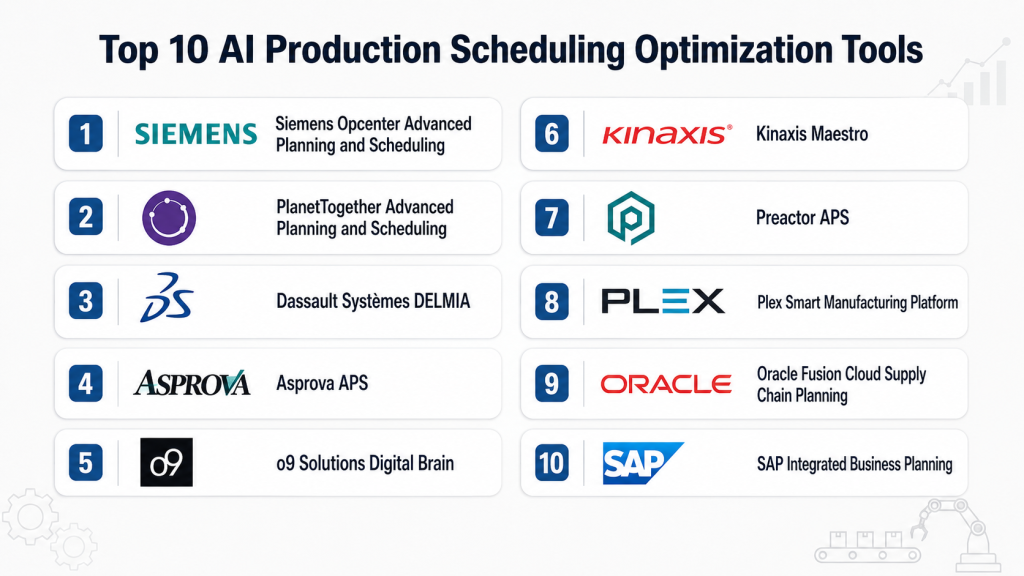
Top 10 AI Production Scheduling Optimization Tools
1- Siemens Opcenter Advanced Planning and Scheduling
One-Line Verdict: Best for manufacturers needing advanced finite capacity scheduling and production planning.
Short Description
Siemens Opcenter Advanced Planning and Scheduling helps manufacturers create realistic production plans by considering capacity, materials, resources, and operational constraints. It is widely used by production planners who need better visibility into shop floor capacity and delivery commitments.The platform is especially useful for manufacturers that deal with complex routings, changeovers, machine constraints, and frequent production changes. It helps teams improve schedule reliability and respond faster when production conditions shift.
Standout Capabilities
- Advanced planning and scheduling
- Finite capacity scheduling
- Constraint-based production planning
- Bottleneck visibility
- What-if schedule analysis
- Shop floor schedule optimization
- Integration with manufacturing systems
- Support for complex production environments
AI-Specific Depth
- Model support: Proprietary optimization and scheduling models
- Knowledge integration: Varies by implementation
- Evaluation: Schedule validation and scenario comparison
- Guardrails: Planner controls, constraints, and approval workflows
- Observability: Planning dashboards and schedule performance visibility
Pros
- Strong manufacturing scheduling depth
- Good fit for complex production environments
- Supports realistic finite capacity planning
Cons
- Implementation can require planning expertise
- Best value depends on accurate master data
- May be more complex than needed for simple operations
Security and Compliance
Enterprise security features are available. Buyers should verify role-based access, identity management, audit logging, encryption, data retention, and deployment-specific governance requirements.
Deployment and Platforms
- Cloud
- Hybrid
- Enterprise manufacturing environments
Integrations and Ecosystem
Siemens Opcenter fits into broader manufacturing execution and production planning environments.
- ERP systems
- Manufacturing execution systems
- Shop floor systems
- Production data platforms
- Industrial automation environments
- Planning and scheduling workflows
Pricing Model
Enterprise subscription and licensing models. Exact pricing is not publicly stated.
Best-Fit Scenarios
- Complex finite capacity scheduling
- High-mix manufacturing planning
- Production schedule optimization across plants
2- PlanetTogether Advanced Planning and Scheduling
One-Line Verdict: Best for manufacturers seeking practical scheduling optimization with strong ERP integration.
Short Description
PlanetTogether Advanced Planning and Scheduling helps manufacturers create optimized production schedules that account for capacity, materials, labor, equipment, and delivery priorities. It is designed for companies that want to move beyond spreadsheet scheduling and improve production planning accuracy.The platform is useful for mid-market and enterprise manufacturers that need fast schedule adjustments, planner-friendly visibility, and better coordination between production and business systems.
Standout Capabilities
- Advanced production scheduling
- Capacity planning
- Constraint-based optimization
- What-if scenario analysis
- ERP integration support
- Bottleneck identification
- Production sequencing
- Multi-resource scheduling
AI-Specific Depth
- Model support: Optimization algorithms and intelligent scheduling models
- Knowledge integration: Varies by implementation
- Evaluation: Scenario comparison and schedule feasibility review
- Guardrails: Planner approvals and configurable constraints
- Observability: Schedule dashboards and planning analytics
Pros
- Strong scheduling usability
- Good ERP integration focus
- Useful for reducing manual scheduling effort
Cons
- Requires clean production and routing data
- Advanced optimization needs configuration
- May require change management for planner adoption
Security and Compliance
Enterprise security capabilities vary by deployment. Buyers should verify access controls, audit logs, encryption, user permissions, and governance requirements.
Deployment and Platforms
- Cloud
- Hybrid
- Enterprise manufacturing environments
Integrations and Ecosystem
PlanetTogether is commonly used with ERP and manufacturing systems.
- ERP platforms
- Manufacturing execution systems
- Production planning systems
- Shop floor data systems
- Inventory and material planning workflows
- Reporting tools
Pricing Model
Subscription and enterprise licensing. Exact pricing is not publicly stated.
Best-Fit Scenarios
- Replacing spreadsheet scheduling
- ERP-connected production planning
- Capacity-constrained manufacturing environments
3- Dassault Systèmes DELMIA
One-Line Verdict: Best for manufacturers connecting production scheduling with simulation, planning, and operations.
Short Description
Dassault Systèmes DELMIA supports manufacturing planning, scheduling, simulation, and operational optimization. It helps organizations model production processes, plan manufacturing operations, and improve execution across complex production environments.For AI Production Scheduling Optimization, DELMIA is useful when scheduling must connect with process simulation, manufacturing planning, and operational execution. It is especially relevant for advanced manufacturing, aerospace, automotive, industrial equipment, and complex production networks.
Standout Capabilities
- Manufacturing planning and scheduling
- Production simulation
- Resource optimization
- Operations planning
- Process modeling
- Scenario evaluation
- Manufacturing execution support
- Production flow visibility
AI-Specific Depth
- Model support: Proprietary optimization and ecosystem-based analytics
- Knowledge integration: Varies by implementation
- Evaluation: Simulation and schedule validation workflows
- Guardrails: Planning constraints and governance workflows
- Observability: Manufacturing planning dashboards and analytics
Pros
- Strong manufacturing simulation depth
- Good for complex industrial environments
- Connects planning with operational execution
Cons
- Can be complex to implement
- Best suited for mature manufacturing organizations
- Requires strong process and data governance
Security and Compliance
Enterprise security capabilities are available. Buyers should verify access controls, identity management, audit logging, encryption, data governance, and deployment-specific requirements.
Deployment and Platforms
- Cloud
- Hybrid
- Enterprise manufacturing environments
Integrations and Ecosystem
DELMIA fits into engineering, manufacturing planning, and execution ecosystems.
- Product lifecycle management systems
- Manufacturing execution systems
- ERP platforms
- Simulation tools
- Operations planning workflows
- Industrial data systems
Pricing Model
Enterprise subscription and licensing. Exact pricing is not publicly stated.
Best-Fit Scenarios
- Complex manufacturing scheduling
- Production flow simulation
- Integrated planning and execution
4- Asprova APS
One-Line Verdict: Best for manufacturers needing high-speed advanced planning and detailed scheduling.
Short Description
Asprova APS is an advanced planning and scheduling solution designed to create detailed production schedules for complex manufacturing environments. It helps planners manage capacity, materials, lead times, routing rules, and delivery priorities.The platform is especially useful for manufacturers that need fast scheduling calculations, complex sequencing, and better alignment between production plans and factory execution.
Standout Capabilities
- Advanced planning and scheduling
- High-speed schedule generation
- Material and capacity constraints
- Detailed production sequencing
- Multi-level bill of materials support
- What-if planning
- Order and resource prioritization
- Schedule visualization
AI-Specific Depth
- Model support: Optimization and scheduling algorithms
- Knowledge integration: Varies
- Evaluation: Schedule feasibility and scenario comparison
- Guardrails: Constraint rules and planner review
- Observability: Scheduling dashboards and production visibility
Pros
- Strong scheduling engine
- Useful for complex production environments
- Supports detailed planning logic
Cons
- Requires accurate production master data
- Configuration can be technical
- AI-specific features may vary by implementation
Security and Compliance
Security and governance capabilities vary by deployment and configuration. Buyers should verify user access controls, audit logging, encryption, and data management requirements.
Deployment and Platforms
- On-premises
- Cloud options may vary
- Hybrid environments may vary
Integrations and Ecosystem
Asprova APS is commonly connected with manufacturing and enterprise systems.
- ERP systems
- Manufacturing execution systems
- Material planning systems
- Production databases
- Shop floor systems
- Reporting tools
Pricing Model
Enterprise licensing. Exact pricing is not publicly stated.
Best-Fit Scenarios
- Detailed production scheduling
- Complex bill of materials environments
- High-speed schedule planning
5- o9 Solutions Digital Brain
One-Line Verdict: Best for enterprises connecting production scheduling with end-to-end supply chain planning.
Short Description
o9 Solutions Digital Brain supports integrated business planning, supply chain planning, demand planning, supply planning, and decision intelligence. For production scheduling optimization, it is useful when manufacturers need to connect factory schedules with broader demand, inventory, procurement, and supply chain decisions.The platform is especially relevant for enterprises that want scheduling decisions to reflect demand changes, material availability, capacity limits, and business priorities.
Standout Capabilities
- Integrated planning platform
- AI-driven decision intelligence
- Demand and supply planning
- Scenario planning
- Capacity planning
- Enterprise planning workflows
- Cross-functional visibility
- Supply chain optimization
AI-Specific Depth
- Model support: AI, optimization, and decision intelligence models
- Knowledge integration: Enterprise planning knowledge graph capabilities vary by implementation
- Evaluation: Scenario comparison and planning performance review
- Guardrails: Business rules, planning controls, and governance workflows
- Observability: Planning dashboards and decision analytics
Pros
- Strong enterprise planning depth
- Connects scheduling with broader supply chain decisions
- Useful for multi-functional planning teams
Cons
- Not only a shop floor scheduling tool
- Implementation can be significant
- Best suited for larger planning organizations
Security and Compliance
Enterprise security and governance capabilities are available. Buyers should verify role-based access, audit logging, encryption, data retention, and compliance requirements.
Deployment and Platforms
- Cloud
- Enterprise planning environments
Integrations and Ecosystem
o9 Solutions connects with enterprise planning and supply chain systems.
- ERP systems
- Supply chain planning platforms
- Demand planning systems
- Procurement systems
- Inventory systems
- Manufacturing planning workflows
Pricing Model
Enterprise subscription pricing. Exact pricing is not publicly stated.
Best-Fit Scenarios
- Enterprise production planning
- Supply chain connected scheduling
- Multi-site planning optimization
6- Kinaxis Maestro
One-Line Verdict: Best for enterprises connecting production scheduling with supply chain planning and rapid scenario response.
Short Description
Kinaxis Maestro is a supply chain planning and orchestration platform that helps organizations improve planning decisions across demand, supply, inventory, capacity, and production. For AI Production Scheduling Optimization, it is useful when production schedules must respond quickly to changing demand, supply constraints, material shortages, and capacity disruptions.The platform is especially valuable for large manufacturers that need connected planning visibility across multiple teams. It helps planners evaluate scenarios, understand trade-offs, and respond faster when production or supply chain conditions change.
Standout Capabilities
- Supply chain planning orchestration
- Capacity and production planning
- Scenario planning and simulation
- Demand and supply balancing
- Constraint visibility
- Exception management
- Rapid planning response
- Multi-enterprise planning collaboration
AI-Specific Depth
- Model support: AI-assisted planning, optimization, and scenario models
- Knowledge integration: Varies by implementation
- Evaluation: Scenario comparison and planning outcome review
- Guardrails: Business rules, planner approvals, and governance workflows
- Observability: Planning dashboards, alerts, and exception tracking
Pros
- Strong enterprise planning visibility
- Useful for fast disruption response
- Connects production planning with supply chain decisions
Cons
- Not only a detailed shop floor scheduling tool
- Requires planning process maturity
- Implementation can be significant for complex enterprises
Security and Compliance
Enterprise security features are available. Buyers should verify role-based access, audit logging, encryption, data governance, identity management, and retention controls before deployment.
Deployment and Platforms
- Cloud
- Enterprise planning environments
- Hybrid data integration may vary
Integrations and Ecosystem
Kinaxis Maestro commonly connects with enterprise planning and operational systems.
- ERP systems
- Supply chain planning tools
- Demand planning platforms
- Inventory management systems
- Manufacturing planning workflows
- Analytics environments
Pricing Model
Enterprise subscription pricing. Exact pricing is not publicly stated.
Best-Fit Scenarios
- Supply chain connected production planning
- Multi-site production decision-making
- Rapid response to demand and supply disruptions
7- Preactor APS
One-Line Verdict: Best for manufacturers needing practical advanced planning and scheduling for constrained production environments.
Short Description
Preactor APS is an advanced planning and scheduling solution used by manufacturers to create more realistic production schedules. It helps planners manage production capacity, resource constraints, order priorities, and sequencing rules across complex manufacturing operations.The tool is useful for organizations moving away from manual planning and spreadsheet-based scheduling. It helps production teams improve visibility, reduce bottlenecks, and create more achievable schedules.
Standout Capabilities
- Advanced planning and scheduling
- Finite capacity scheduling
- Resource constraint management
- Production sequencing
- What-if planning
- Bottleneck visibility
- Planner-friendly scheduling views
- Shop floor schedule support
AI-Specific Depth
- Model support: Optimization and scheduling algorithms
- Knowledge integration: Varies
- Evaluation: Schedule feasibility and scenario review
- Guardrails: Configurable planning rules and planner approvals
- Observability: Schedule dashboards and capacity visibility
Pros
- Strong scheduling functionality
- Useful for capacity-constrained environments
- Helps reduce spreadsheet dependency
Cons
- Requires accurate routing and production data
- Advanced configuration may need expert support
- AI depth depends on implementation and connected systems
Security and Compliance
Security features vary by deployment and configuration. Buyers should verify role-based access, user permissions, audit logging, encryption, and governance requirements during evaluation.
Deployment and Platforms
- On-premises
- Hybrid environments may vary
- Cloud options may vary by implementation
Integrations and Ecosystem
Preactor APS typically integrates with production and enterprise systems.
- ERP systems
- Manufacturing execution systems
- Shop floor data systems
- Production databases
- Material planning workflows
- Reporting tools
Pricing Model
Enterprise licensing model. Exact pricing is not publicly stated.
Best-Fit Scenarios
- Capacity-constrained scheduling
- Detailed production sequencing
- Replacing manual production planning
8- Plex Smart Manufacturing Platform
One-Line Verdict: Best for manufacturers seeking connected production execution, scheduling visibility, and plant-level optimization.
Short Description
Plex Smart Manufacturing Platform supports manufacturing execution, quality, production control, inventory, and operational visibility. For AI Production Scheduling Optimization, Plex is useful when scheduling needs to connect closely with shop floor execution and plant operations.The platform is especially relevant for manufacturers that want better coordination between planning, production, quality, and inventory activities. It helps teams improve schedule adherence by connecting planning decisions with real manufacturing activity.
Standout Capabilities
- Manufacturing execution support
- Production control visibility
- Shop floor data integration
- Quality and inventory connection
- Plant-level operational dashboards
- Schedule execution tracking
- Manufacturing workflow automation
- Real-time production visibility
AI-Specific Depth
- Model support: Varies by connected analytics and automation workflows
- Knowledge integration: Manufacturing execution and operational data context
- Evaluation: Schedule adherence and production performance review
- Guardrails: Role-based workflows and production controls
- Observability: Plant dashboards and execution analytics
Pros
- Strong shop floor execution connection
- Useful for real-time manufacturing visibility
- Helps align schedules with actual production
Cons
- Not purely an advanced scheduling engine
- Best value depends on broader platform adoption
- Advanced AI optimization may require additional configuration
Security and Compliance
Enterprise security capabilities are available. Buyers should verify access controls, audit logs, encryption, user management, data governance, and compliance needs based on deployment.
Deployment and Platforms
- Cloud
- Manufacturing plant environments
- Hybrid data integration may vary
Integrations and Ecosystem
Plex connects production execution with manufacturing operations.
- ERP workflows
- Manufacturing execution systems
- Quality management workflows
- Inventory systems
- Shop floor equipment data
- Reporting and analytics tools
Pricing Model
Subscription and enterprise licensing. Exact pricing is not publicly stated.
Best-Fit Scenarios
- Production execution visibility
- Schedule adherence improvement
- Plant-level manufacturing optimization
9- Oracle Fusion Cloud Supply Chain Planning
One-Line Verdict: Best for enterprises aligning production schedules with supply chain, demand, and material planning.
Short Description
Oracle Fusion Cloud Supply Chain Planning helps organizations plan demand, supply, inventory, production, and capacity across complex supply chains. For AI Production Scheduling Optimization, it is useful when production plans must be aligned with procurement, inventory, logistics, customer demand, and enterprise planning priorities.The platform is well suited for organizations already using Oracle enterprise systems or those seeking a broad cloud-based planning environment with strong integration across business functions.
Standout Capabilities
- Supply chain planning
- Production and capacity planning
- Demand and supply balancing
- Scenario planning
- Inventory planning
- Enterprise planning workflows
- Exception management
- Integrated business planning support
AI-Specific Depth
- Model support: AI-assisted planning and optimization capabilities vary by module
- Knowledge integration: Enterprise planning and supply chain data context
- Evaluation: Scenario comparison and planning performance review
- Guardrails: Business rules, approvals, and governance controls
- Observability: Planning dashboards, exceptions, and performance analytics
Pros
- Strong enterprise planning ecosystem
- Good fit for Oracle-centered organizations
- Connects production planning with broader supply chain decisions
Cons
- Not a dedicated shop floor scheduling solution for every manufacturer
- Implementation can require process redesign
- Best value depends on data and system integration quality
Security and Compliance
Enterprise cloud security, identity controls, role-based access, audit capabilities, encryption, and governance features are available. Buyers should verify specific requirements for their environment.
Deployment and Platforms
- Cloud
- Enterprise planning environments
Integrations and Ecosystem
Oracle Fusion Cloud Supply Chain Planning connects with enterprise and supply chain systems.
- ERP systems
- Procurement workflows
- Inventory systems
- Demand planning tools
- Manufacturing planning workflows
- Logistics and fulfillment systems
Pricing Model
Cloud subscription pricing. Exact pricing depends on selected modules and usage.
Best-Fit Scenarios
- Enterprise supply chain planning
- Production and material planning alignment
- Oracle-centered manufacturing environments
10- SAP Integrated Business Planning
One-Line Verdict: Best for enterprises connecting production planning with demand, inventory, supply, and business priorities.
Short Description
SAP Integrated Business Planning helps organizations align demand planning, supply planning, inventory optimization, sales and operations planning, and response management. For AI Production Scheduling Optimization, it is useful when production plans need to reflect changing demand, supply constraints, inventory targets, and business priorities.The platform is especially relevant for manufacturers already operating SAP environments or large enterprises that need connected planning visibility across functions and regions.
Standout Capabilities
- Integrated business planning
- Supply and demand planning
- Inventory optimization
- Scenario planning
- Response and supply planning
- Cross-functional collaboration
- Planning analytics
- Enterprise workflow integration
AI-Specific Depth
- Model support: AI-assisted planning and optimization capabilities vary by configuration
- Knowledge integration: Enterprise planning and SAP ecosystem context
- Evaluation: Scenario planning and performance review
- Guardrails: Business rules, approvals, and governance workflows
- Observability: Planning dashboards and exception monitoring
Pros
- Strong enterprise planning foundation
- Good fit for SAP-centered organizations
- Supports cross-functional planning collaboration
Cons
- Not focused only on detailed shop floor scheduling
- Implementation can be complex
- Requires strong master data and process discipline
Security and Compliance
Enterprise security features are available. Buyers should verify access controls, audit logging, identity management, encryption, governance, and data retention requirements.
Deployment and Platforms
- Cloud
- Enterprise planning environments
Integrations and Ecosystem
SAP Integrated Business Planning connects closely with SAP and broader enterprise systems.
- ERP systems
- Manufacturing planning workflows
- Demand planning tools
- Inventory systems
- Procurement systems
- Sales and operations planning workflows
Pricing Model
Enterprise subscription pricing. Exact pricing is not publicly stated.
Best-Fit Scenarios
- SAP-connected production planning
- Demand and supply planning alignment
- Enterprise planning transformation
Comparison Table
| Tool Name | Best For | Deployment | Model Flexibility | Strength | Watch-Out | Public Rating |
|---|---|---|---|---|---|---|
| Siemens Opcenter Advanced Planning and Scheduling | Complex manufacturing scheduling | Cloud and hybrid | Proprietary optimization | Finite capacity scheduling | Needs accurate master data | N/A |
| PlanetTogether Advanced Planning and Scheduling | ERP-connected production scheduling | Cloud and hybrid | Optimization algorithms | Practical scheduling usability | Configuration effort | N/A |
| Dassault Systèmes DELMIA | Manufacturing planning and simulation | Cloud and hybrid | Proprietary and ecosystem analytics | Simulation and planning depth | Complex implementation | N/A |
| Asprova APS | Detailed production scheduling | On-premises and hybrid | Optimization algorithms | High-speed scheduling | Technical configuration | N/A |
| o9 Solutions Digital Brain | Enterprise planning orchestration | Cloud | AI and optimization models | Supply chain decision intelligence | Not only shop floor scheduling | N/A |
| Kinaxis Maestro | Rapid supply chain response | Cloud | AI-assisted planning | Scenario response | Requires planning maturity | N/A |
| Preactor APS | Constrained production scheduling | On-premises and hybrid | Scheduling algorithms | Finite capacity planning | Data accuracy required | N/A |
| Plex Smart Manufacturing Platform | Shop floor execution visibility | Cloud | Varies by workflow | Production execution connection | Not purely APS focused | N/A |
| Oracle Fusion Cloud Supply Chain Planning | Enterprise supply chain planning | Cloud | AI-assisted planning | Oracle ecosystem integration | May need process redesign | N/A |
| SAP Integrated Business Planning | Integrated enterprise planning | Cloud | AI-assisted planning | SAP planning ecosystem | Requires strong master data | N/A |
Scoring and Evaluation
The following scores are comparative and practical, not absolute. They reflect scheduling depth, AI readiness, constraint handling, integration ecosystem, ease of use, scalability, security, and enterprise planning maturity. Buyers should use this table as a starting point and validate each platform through a pilot using real production data, routing rules, constraints, and scheduling goals.
| Tool | Core Features | Reliability and Evaluation | Guardrails | Integrations | Ease of Use | Performance and Cost | Security and Admin | Support | Weighted Total |
| Siemens Opcenter Advanced Planning and Scheduling | 10 | 9 | 9 | 9 | 7 | 8 | 9 | 9 | 8.9 |
| PlanetTogether Advanced Planning and Scheduling | 9 | 8 | 8 | 9 | 8 | 8 | 8 | 8 | 8.4 |
| Dassault Systèmes DELMIA | 9 | 9 | 8 | 9 | 7 | 8 | 9 | 8 | 8.5 |
| Asprova APS | 9 | 8 | 8 | 8 | 7 | 9 | 7 | 8 | 8.2 |
| o9 Solutions Digital Brain | 9 | 8 | 9 | 9 | 7 | 8 | 9 | 8 | 8.5 |
| Kinaxis Maestro | 9 | 8 | 9 | 9 | 8 | 8 | 9 | 9 | 8.7 |
| Preactor APS | 8 | 8 | 8 | 8 | 8 | 8 | 7 | 8 | 8.0 |
| Plex Smart Manufacturing Platform | 8 | 8 | 8 | 8 | 8 | 8 | 8 | 8 | 8.0 |
| Oracle Fusion Cloud Supply Chain Planning | 8 | 8 | 9 | 9 | 7 | 8 | 9 | 8 | 8.3 |
| SAP Integrated Business Planning | 8 | 8 | 9 | 9 | 7 | 8 | 9 | 9 | 8.4 |
Top 3 for Enterprise
- Siemens Opcenter Advanced Planning and Scheduling
- Kinaxis Maestro
- o9 Solutions Digital Brain
Top 3 for SMB
- PlanetTogether Advanced Planning and Scheduling
- Preactor APS
- Plex Smart Manufacturing Platform
Top 3 for Developers
- Siemens Opcenter Advanced Planning and Scheduling
- Oracle Fusion Cloud Supply Chain Planning
- SAP Integrated Business Planning
Which AI Production Scheduling Optimization Tool Is Right for You
Solo and Freelancer
Solo consultants and independent manufacturing advisors usually do not need a full enterprise scheduling platform unless they are implementing solutions for clients. For analysis-heavy work, tools that provide scheduling visibility, scenario planning, and ERP integration support are more useful. PlanetTogether and Preactor APS can be practical choices for consulting projects focused on constrained production scheduling and spreadsheet replacement.
SMB
Small and medium manufacturers should prioritize ease of use, fast deployment, and practical scheduling improvements. PlanetTogether, Preactor APS, and Plex Smart Manufacturing Platform are strong options when teams need to reduce manual scheduling, improve capacity visibility, and connect schedules with production execution. SMBs should avoid overbuilding with broad enterprise planning systems unless they have complex supply chain requirements.
Mid-Market
Mid-market manufacturers often need a stronger balance between plant-level scheduling and enterprise planning. Siemens Opcenter Advanced Planning and Scheduling, Asprova APS, DELMIA, and Plex can help manage capacity, routing complexity, changeovers, and schedule execution. These companies should focus on tools that integrate with ERP and MES systems while still remaining usable for planners.
Enterprise
Large enterprises usually need scheduling tools that connect with multi-plant planning, supply chain visibility, capacity management, and business priorities. Siemens Opcenter, Kinaxis Maestro, o9 Solutions Digital Brain, SAP Integrated Business Planning, and Oracle Fusion Cloud Supply Chain Planning are strong candidates. The best choice depends on whether the priority is detailed finite scheduling, enterprise planning orchestration, or supply chain response.
Regulated Industries
Regulated manufacturing environments such as pharmaceuticals, aerospace, food production, and medical device manufacturing should prioritize auditability, traceability, change control, approval workflows, and data governance. Scheduling tools should support controlled changes, clear visibility into production decisions, and secure user access. Integration with quality and compliance workflows is especially important.
Budget vs Premium
Budget-conscious manufacturers should start with a focused scheduling problem such as reducing late orders, improving capacity visibility, or replacing spreadsheet planning. Practical APS tools may deliver faster value than broad enterprise planning platforms. Premium platforms are better when the organization needs multi-site coordination, deep integration, advanced scenario planning, and enterprise governance.
Build vs Buy
Building a custom scheduler can work for organizations with strong optimization engineers, manufacturing data expertise, and internal software teams. However, production scheduling is complex because it involves constraints, routings, materials, labor, machine calendars, priorities, and exceptions. Buying a proven platform is usually better when the organization needs faster deployment, vendor support, and tested scheduling logic. A hybrid approach can also work by using a commercial scheduling platform and building custom analytics around it.
Continued in Part 3 with Implementation Playbook, Common Mistakes, 15 FAQs, and Conclusion.
plerase write blog part 3
Here is Blog Part 3 for AI Production Scheduling Optimization in your locked format.
Implementation Playbook
Implementing AI Production Scheduling Optimization requires a structured approach. Production scheduling connects machines, resources, materials, labor, and orders with constraints, priorities, and real-time changes. A successful rollout starts with a focused use case, reliable data, and measurable success metrics before expanding to broader operations.
First Phase
The first phase should focus on selecting one high-value scheduling use case and preparing the foundation. A constrained production line, high-priority product, or complex process is ideal. Teams should define objectives, collect master data, and ensure connectivity with ERP, MES, and shop floor systems.
Key activities include:
- Identify one production area or line for optimization
- Collect relevant operational and resource data
- Map process constraints, machine capabilities, and labor availability
- Define scheduling objectives and KPIs
- Clean and validate master data and routing information
- Align operations, planning, IT, and leadership teams
- Document assumptions and operational rules
- Create baseline schedule for comparison
- Select pilot tool and define evaluation criteria
- Train planners on platform features
AI-specific tasks include:
- Train optimization models using historical data
- Set up what-if scenario testing
- Define early alert thresholds for resource conflicts
- Validate model outputs with planners
- Create human-in-the-loop review workflows
- Monitor initial recommendations and adjust algorithms
- Document model assumptions and constraints
Success metrics should include:
- Reduced late orders
- Increased machine utilization
- Improved capacity allocation
- Reduced overtime and expediting
- Faster planner decision-making
- Reduction in manual schedule adjustments
Second Phase
The second phase focuses on validation, integration, and controlled rollout. Teams should confirm that the AI-generated schedules are feasible, realistic, and actionable. Human oversight ensures operational trust.
Key activities include:
- Compare AI schedules with actual production outcomes
- Test multiple scenarios for feasibility
- Integrate schedules with shop floor execution systems
- Build dashboards for schedule monitoring
- Enable planners to override AI recommendations
- Set alert rules for resource conflicts
- Train users on interpreting AI recommendations
- Review access, security, and governance policies
- Collect feedback for model improvement
- Expand the pilot to similar production areas
AI-specific tasks include:
- Monitor AI schedule accuracy and deviations
- Detect model drift from changing production patterns
- Evaluate false positive or infeasible schedules
- Refine constraint handling and priorities
- Improve predictive scheduling for machine downtime
- Automate re-sequencing for urgent orders
- Implement version control for models and rules
- Test edge cases and exception handling
- Track schedule adherence improvements
Success metrics should include:
- Improved schedule feasibility
- Reduction in manual adjustments
- Faster response to urgent orders
- Planner adoption rate
- Improved on-time delivery performance
- Reduced bottlenecks and idle resources
Third Phase
The third phase focuses on scaling, optimization, and continuous improvement. After a successful pilot, expand to multiple lines, plants, or facilities, standardize workflows, and connect to enterprise planning systems.
Key activities include:
- Expand AI scheduling across production lines and facilities
- Standardize constraint and priority rules
- Build reusable templates for scheduling
- Integrate with ERP, MES, and supply chain systems
- Monitor KPIs and business outcomes
- Automate alerts and exception handling
- Train additional planning teams
- Document best practices and standard operating procedures
- Review and improve model performance continuously
- Track ROI, efficiency gains, and resource utilization
AI-specific tasks include:
- Automate schedule recalculations for real-time changes
- Monitor AI recommendations for accuracy and efficiency
- Implement feedback loops from planners
- Optimize AI parameters for better capacity usage
- Expand AI capabilities for multi-site scheduling
- Track historical data to improve predictive accuracy
- Evaluate scenario simulations regularly
- Monitor performance, cost, and latency of scheduling algorithms
- Strengthen security and governance controls
Common Mistakes and How to Avoid Them
- Starting with a broad enterprise rollout before validating a pilot.
- Ignoring master data quality and inaccurate resource definitions.
- Treating AI schedules as absolute without human review.
- Overlooking shop floor constraints, maintenance, and downtime.
- Focusing only on machine scheduling, ignoring materials and labor.
- Neglecting planner training and change management.
- Ignoring integration with ERP, MES, and inventory systems.
- Failing to evaluate AI schedule feasibility or performance regularly.
- Not handling exceptions or urgent orders properly.
- Overcomplicating the model without clear business objectives.
- Ignoring security, access control, and auditability.
- Measuring success only by AI adoption, not business outcomes.
- Scaling too quickly before pilot success.
- Underestimating implementation and configuration effort.
FAQs
1. What is AI Production Scheduling Optimization?
AI Production Scheduling Optimization uses AI and optimization algorithms to create efficient production schedules, accounting for constraints, priorities, resources, and real-time changes. It helps planners improve delivery performance, capacity utilization, and operational efficiency.
2. Why is AI important for production scheduling?
AI can quickly analyze complex constraints, predict conflicts, and generate realistic schedules. It reduces manual planning effort, improves responsiveness to disruptions, and supports scenario analysis to balance resources, materials, and production priorities.
3. Which industries benefit most from AI production scheduling?
Discrete and process manufacturing, automotive, electronics, pharmaceuticals, consumer goods, industrial equipment, aerospace, food production, and high-mix manufacturing industries benefit most. Organizations with complex operations and dynamic demand see the most value.
4. How does AI handle capacity constraints?
AI scheduling tools consider machine, labor, material, and tooling constraints to produce feasible schedules. They prioritize tasks, sequence operations, and optimize resource utilization, ensuring schedules respect real-world limitations.
5. Can AI respond to real-time disruptions?
Yes. AI tools can dynamically re-sequence operations when machines break down, materials are delayed, urgent orders appear, or labor availability changes, providing updated schedules quickly.
6. Does AI replace human planners?
No. AI supports planners by generating optimized schedules and highlighting potential conflicts. Planners still review recommendations, approve changes, and handle exceptions. Human-in-the-loop ensures practical and feasible scheduling.
7. How does AI improve on-time delivery?
By optimizing sequences, considering resource availability, and continuously adjusting schedules based on real-time data, AI reduces bottlenecks and idle time, improving the likelihood that orders are completed on time.
8. What data is required for AI scheduling?
Data includes production orders, machine capabilities, labor availability, setup and changeover times, material availability, routing rules, historical production data, and operational priorities.
9. Can AI handle multiple plants or lines?
Yes. Enterprise-grade AI scheduling platforms can coordinate production across multiple plants, lines, or facilities while respecting local constraints, material availability, and delivery priorities.
10. How does AI improve efficiency?
AI schedules minimize idle time, reduce changeovers, balance workload across resources, optimize capacity, and ensure better coordination between machines, labor, and materials.
11. Is AI scheduling useful for high-mix manufacturing?
Yes. AI is especially useful when there are many products, short runs, frequent changeovers, and complex sequencing requirements. It reduces planner workload while improving schedule feasibility.
12. What is finite capacity scheduling?
Finite capacity scheduling considers the actual availability of machines, labor, and materials, rather than assuming infinite capacity. AI tools can produce schedules that are feasible and realistic based on resource constraints.
13. Can AI optimize for multiple objectives?
Yes. AI can optimize for on-time delivery, resource utilization, cost, changeovers, overtime, or priority orders. Multiple objectives can be balanced using configurable weights or scenario analysis.
14. How long does implementation take?
Implementation depends on the number of lines, plants, data readiness, complexity of rules, and integration requirements. A pilot may take weeks, while full enterprise deployment may take months.
15. What is the ROI of AI production scheduling?
ROI can be measured through improved on-time delivery, reduced overtime, higher capacity utilization, fewer changeovers, lower inventory costs, faster response to urgent orders, and reduced manual planning effort. Exact ROI depends on operational complexity and adoption.
Conclusion
AI Production Scheduling Optimization helps manufacturers move from manual, reactive planning to efficient, data-driven scheduling. The right tool depends on manufacturing type, plant complexity, resource constraints, data quality, and integration needs. Tools such as Siemens Opcenter, PlanetTogether, DELMIA, Asprova APS, o9 Solutions Digital Brain, Kinaxis Maestro, Preactor APS, Plex Smart Manufacturing, Oracle Fusion Cloud Supply Chain Planning, and SAP Integrated Business Planning serve different needs across finite capacity, enterprise planning, scenario analysis, and production execution.The recommended approach is to start with a focused pilot, validate AI-generated schedules, integrate with shop floor and ERP systems, measure business outcomes, and scale gradually with clear workflows, governance, and continuous improvement. Properly implemented, AI Production Scheduling Optimization can improve on-time delivery, resource utilization, and overall manufacturing efficiency.

Find Trusted Cardiac Hospitals
Compare heart hospitals by city and services — all in one place.
Explore Hospitals
AI production scheduling tools are only as effective as the accuracy of routing, constraint data, and real-time shop-floor updates feeding them.