
Introduction
AI Thumbnail Optimization Tools are platforms that use artificial intelligence to automatically generate, evaluate, and optimize thumbnails for videos, live streams, and digital content. By analyzing visual elements, text overlays, and viewer behavior data, these tools select the most engaging frames, enhance colors, and apply composition rules to maximize click-through rates (CTR) and audience retention. In 2026, with video dominating online platforms and content competition intensifying, optimized thumbnails have become critical for content discoverability and engagement.
Real-world use cases include:
- YouTube and streaming videos: Automatically generating attractive thumbnails that boost CTR.
- Social media posts: Optimizing images for engagement across Instagram, TikTok, and Facebook.
- E-learning content: Creating visually appealing thumbnails for courses and lessons.
- Marketing campaigns: Rapid generation of branded thumbnails for ads and promos.
- News and media outlets: Automating high-volume content thumbnail creation.
- Gaming and esports videos: Enhancing visual appeal for attention-grabbing thumbnails.
What buyers should evaluate:
- AI quality for frame selection and enhancement
- Visual composition, text overlay, and branding capabilities
- A/B testing and engagement prediction
- Integration with video platforms (YouTube, Vimeo, social media)
- Batch processing for high-volume content
- Multi-resolution export for different platforms
- Customization and brand consistency
- Security and privacy of content
- Observability and analytics for performance
- Ease of use and learning curve
Best for: YouTubers, social media marketers, video production studios, e-learning platforms, and media companies.
Not ideal for: Projects with static, non-video content or platforms where manual thumbnail design is sufficient.
What’s Changed in AI Thumbnail Optimization Tools in 2026+
- AI-powered frame analysis for detecting the most engaging scene
- Automated composition and cropping based on attention models
- Predictive click-through rate scoring for thumbnail variants
- Integration with A/B testing pipelines to select top performers
- Style transfer for branding consistency across thumbnails
- Multi-resolution and platform-specific export formats
- Batch generation for high-volume content creators
- Cloud-based or hybrid AI processing with collaborative access
- Real-time thumbnail preview during video uploads
- Observability dashboards for engagement metrics
- Guardrails for inappropriate content detection
- Multi-language support for overlay text and captions
Quick Buyer Checklist
- AI engagement prediction and CTR scoring
- Thumbnail visual composition analysis
- Text overlay and branding support
- Platform-specific sizing and format export
- Real-time vs batch thumbnail generation
- Integration with YouTube, Vimeo, or social media APIs
- Analytics dashboards for performance
- Guardrails for safe content generation
- Multi-language overlay support
- Collaboration features and access control
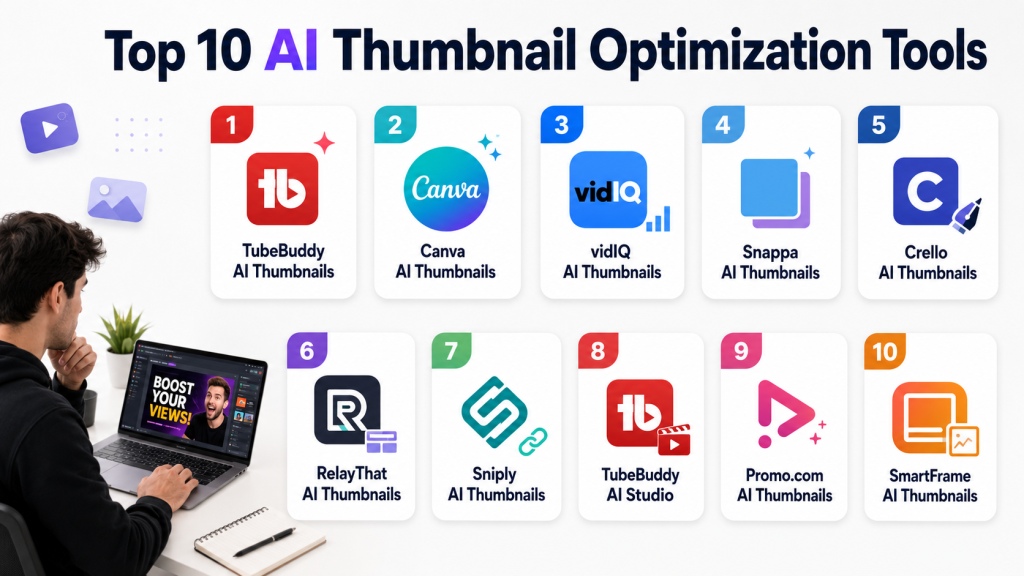
Top 10 AI Thumbnail Optimization Tools
1- TubeBuddy AI Thumbnails
One-line verdict: Best for YouTubers seeking automated thumbnail creation with CTR optimization insights.
Short description: TubeBuddy generates AI-optimized thumbnails, recommends text overlays, and predicts engagement metrics for YouTube videos.
Standout Capabilities
- AI-powered frame selection
- Click-through rate prediction
- Customizable templates
- Batch thumbnail generation
- Branding overlays and logos
- Platform-specific export
- Performance analytics
- Integration with YouTube dashboard
AI-Specific Depth
- Model support: Proprietary
- RAG / knowledge integration: N/A
- Evaluation: Engagement prediction and A/B testing
- Guardrails: Inappropriate content filter
- Observability: Analytics dashboard
Pros
- Easy for content creators
- Optimizes for CTR
- Seamless YouTube integration
Cons
- YouTube-focused
- Cloud subscription required
- Limited for other platforms
Security & Compliance
Varies / N/A
Deployment & Platforms
Web, Cloud
Integrations & Ecosystem
YouTube APIs, Chrome extension
Pricing Model
Subscription-based
Best-Fit Scenarios
- Individual YouTubers
- Small content teams
- Marketing campaigns
2- Canva AI Thumbnails
One-line verdict: Ideal for social media marketers needing quick, branded thumbnail generation.
Short description: Canva AI generates thumbnail variations with text, brand logos, and style templates for social and video content.
Standout Capabilities
- AI-assisted design suggestions
- Multi-platform export
- Pre-built templates and text overlays
- Branding consistency enforcement
- Batch processing
- Real-time preview
AI-Specific Depth
- Model support: Proprietary
- RAG / knowledge integration: N/A
- Evaluation: A/B testing suggestions
- Guardrails: Safe content checks
- Observability: Analytics for generated thumbnails
Pros
- Beginner-friendly interface
- Fast generation
- Supports multiple platforms
Cons
- Limited AI engagement prediction
- Cloud-dependent
- Less video integration
Security & Compliance
SSO/RBAC; Certifications: Not publicly stated
Deployment & Platforms
Web, Cloud, iOS, Android
Integrations & Ecosystem
Social media export, APIs
Pricing Model
Subscription tiers
Best-Fit Scenarios
- Marketing videos
- Social media campaigns
- E-learning content
3- vidIQ AI Thumbnails
One-line verdict: Suited for creators who want AI suggestions plus YouTube SEO insights.
Short description: vidIQ generates AI thumbnails and suggests titles, tags, and text overlays for maximum engagement.
Standout Capabilities
- AI thumbnail selection
- CTR prediction
- Text overlay recommendations
- Platform-specific sizing
- Batch creation
AI-Specific Depth
- Model support: Proprietary
- RAG / knowledge integration: N/A
- Evaluation: Engagement scoring and A/B analysis
- Guardrails: Inappropriate content moderation
- Observability: Analytics dashboard
Pros
- Improves video discoverability
- Batch processing
- Integrated with SEO insights
Cons
- Limited outside YouTube
- Cloud subscription
- Basic design customization
Security & Compliance
Varies / N/A
Deployment & Platforms
Web, Cloud
Integrations & Ecosystem
YouTube, Chrome extension
Pricing Model
Subscription-based
Best-Fit Scenarios
- YouTube channels
- Marketing campaigns
- Small creative teams
4- Snappa AI Thumbnails
One-line verdict: Best for social marketers and creators needing quick, platform-optimized thumbnails.
Short description: Snappa AI generates thumbnails with templates, text overlays, and AI color/contrast adjustments.
Standout Capabilities
- AI composition suggestions
- Multi-platform export
- Batch thumbnail generation
- Customizable templates
- Branding overlays
AI-Specific Depth
- Model support: Proprietary
- RAG / knowledge integration: N/A
- Evaluation: Engagement prediction
- Guardrails: Safe content filter
- Observability: Analytics metrics
Pros
- Fast thumbnail creation
- Simple interface
- Templates for multiple platforms
Cons
- Limited AI scoring
- Cloud-only
- Smaller library than Canva
Security & Compliance
Varies / N/A
Deployment & Platforms
Web, Cloud
Integrations & Ecosystem
Social platforms, CMS APIs
Pricing Model
Subscription
Best-Fit Scenarios
- Social content
- Marketing campaigns
- Small teams
5- Crello AI Thumbnails
One-line verdict: Ideal for creators seeking visually appealing thumbnails quickly.
Short description: Crello AI assists in generating AI-optimized thumbnails with style recommendations and batch processing.
Standout Capabilities
- AI design recommendations
- Multi-platform export
- Custom templates
- Color and contrast optimization
AI-Specific Depth
- Model support: Proprietary
- RAG / knowledge integration: N/A
- Evaluation: A/B suggestions
- Guardrails: Content moderation
- Observability: Usage metrics
Pros
- Fast, beginner-friendly
- Multiple design templates
- Branding options
Cons
- Limited predictive CTR
- Cloud-dependent
- Less integration with YouTube
Security & Compliance
Varies / N/A
Deployment & Platforms
Web, Cloud, iOS, Android
Integrations & Ecosystem
Social media export, API
Pricing Model
Subscription
Best-Fit Scenarios
- Marketing videos
- Social media campaigns
- Small-scale creators
6- RelayThat AI Thumbnails
One-line verdict: Best for teams producing high-volume marketing and social content.
Short description: RelayThat AI creates consistent thumbnails across campaigns, applying brand styles and layout rules automatically.
Standout Capabilities
- Brand consistency enforcement
- Batch thumbnail generation
- AI layout suggestions
- Multi-platform output
- Template reuse
AI-Specific Depth
- Model support: Proprietary
- RAG / knowledge integration: N/A
- Evaluation: A/B testing analytics
- Guardrails: Safe content checks
- Observability: Performance dashboards
Pros
- High-volume automation
- Branding consistency
- Multi-platform templates
Cons
- Limited creative flexibility
- Cloud-based
- Premium cost
Security & Compliance
Varies / N/A
Deployment & Platforms
Web, Cloud
Integrations & Ecosystem
CMS, social APIs
Pricing Model
Subscription
Best-Fit Scenarios
- Corporate social campaigns
- Ad campaigns
- Large creator teams
7- Sniply AI Thumbnails
One-line verdict: Suited for marketers needing automated thumbnails with analytics feedback.
Short description: Sniply AI generates AI-enhanced thumbnails with predictive engagement scoring and A/B testing recommendations.
Standout Capabilities
- Predictive engagement scoring
- Batch thumbnail generation
- AI layout suggestions
- Platform export
AI-Specific Depth
- Model support: Proprietary
- RAG / knowledge integration: N/A
- Evaluation: Engagement analytics
- Guardrails: Inappropriate content filter
- Observability: Performance dashboard
Pros
- A/B testing included
- Batch workflow
- Engagement prediction
Cons
- Cloud-only
- Limited design flexibility
- Smaller template library
Security & Compliance
Varies / N/A
Deployment & Platforms
Web, Cloud
Integrations & Ecosystem
Social media, YouTube, API
Pricing Model
Subscription
Best-Fit Scenarios
- Marketing campaigns
- YouTube creators
- High-volume social media
8- TubeBuddy AI Studio
One-line verdict: Ideal for YouTube creators seeking AI thumbnail optimization and analytics integration.
Short description: TubeBuddy AI Studio generates thumbnail options, applies brand styling, and predicts performance metrics for YouTube videos.
Standout Capabilities
- AI thumbnail generation
- Brand and text overlays
- Engagement prediction
- Batch processing
AI-Specific Depth
- Model support: Proprietary
- RAG / knowledge integration: N/A
- Evaluation: CTR analytics
- Guardrails: Inappropriate content detection
- Observability: Analytics dashboards
Pros
- YouTube-focused
- Batch options
- Engagement insights
Cons
- Limited to YouTube
- Cloud subscription
- Less flexibility for other platforms
Security & Compliance
Varies / N/A
Deployment & Platforms
Web, Cloud
Integrations & Ecosystem
YouTube API, analytics export
Pricing Model
Subscription
Best-Fit Scenarios
- YouTube creators
- Marketing videos
- Individual channels
9- Promo.com AI Thumbnails
One-line verdict: Great for marketers generating fast social media thumbnails with branding overlays.
Short description: Promo.com AI generates optimized thumbnails with text, logo, and color enhancements for multiple social platforms.
Standout Capabilities
- Automated frame selection
- Branding and text overlay
- Multi-platform export
- Template library
AI-Specific Depth
- Model support: Proprietary
- RAG / knowledge integration: N/A
- Evaluation: Engagement prediction
- Guardrails: Content moderation
- Observability: Performance analytics
Pros
- Quick generation
- Social media ready
- Brand consistent
Cons
- Cloud-only
- Limited predictive analytics
- Smaller batch capability
Security & Compliance
Varies / N/A
Deployment & Platforms
Web, Cloud
Integrations & Ecosystem
Social platforms, CMS
Pricing Model
Subscription
Best-Fit Scenarios
- Social campaigns
- Marketing videos
- Ads
10- SmartFrame AI Thumbnails
One-line verdict: Best for creators wanting AI-powered thumbnail recommendations with data-backed optimization.
Short description: SmartFrame AI analyzes video content, generates thumbnail variations, and ranks them for predicted engagement.
Standout Capabilities
- AI frame selection
- Click-through prediction
- Multiple platform export
- Branding overlays
AI-Specific Depth
- Model support: Proprietary
- RAG / knowledge integration: N/A
- Evaluation: CTR scoring
- Guardrails: Inappropriate content filtering
- Observability: Analytics dashboard
Pros
- Data-driven suggestions
- Multi-platform
- Easy-to-use UI
Cons
- Cloud-only
- Subscription required
- Limited manual adjustments
Security & Compliance
Varies / N/A
Deployment & Platforms
Web, Cloud
Integrations & Ecosystem
YouTube, Facebook, Instagram, API
Pricing Model
Subscription
Best-Fit Scenarios
- YouTube channels
- Social campaigns
- E-learning thumbnails
Comparison Table
| Tool Name | Best For | Deployment | Model Flexibility | Strength | Watch-Out | Public Rating |
|---|---|---|---|---|---|---|
| TubeBuddy AI | YouTube creators | Web/Cloud | Proprietary | AI CTR prediction | Limited to YouTube | N/A |
| Canva AI | Social marketers | Web/iOS/Cloud | Proprietary | Template + AI | Limited YouTube analytics | N/A |
| vidIQ AI | YouTube + SEO | Web/Cloud | Proprietary | Engagement prediction | YouTube-only | N/A |
| Snappa AI | Social campaigns | Web/Cloud | Proprietary | Fast AI thumbnails | Cloud-only | N/A |
| Crello AI | Marketing creators | Web/Cloud | Proprietary | Visual style suggestions | Limited AI scoring | N/A |
| RelayThat AI | Teams | Web/Cloud | Proprietary | Branding consistency | Premium | N/A |
| Sniply AI | Marketers | Web/Cloud | Proprietary | Analytics-driven | Cloud-only | N/A |
| TubeBuddy AI Studio | YouTube creators | Web/Cloud | Proprietary | YouTube integration | Limited cross-platform | N/A |
| Promo.com AI | Social campaigns | Web/Cloud | Proprietary | Quick branded thumbnails | Batch limits | N/A |
| SmartFrame AI | Creators | Web/Cloud | Proprietary | Data-driven CTR | Limited manual edits | N/A |
Scoring & Evaluation
| Tool | Core | Reliability/Eval | Guardrails | Integrations | Ease | Perf/Cost | Security/Admin | Support | Weighted Total |
|---|---|---|---|---|---|---|---|---|---|
| TubeBuddy AI | 9 | 8 | 8 | 8 | 8 | 8 | 7 | 7 | 8.0 |
| Canva AI | 8 | 7 | 7 | 8 | 9 | 8 | 7 | 7 | 7.8 |
| vidIQ AI | 8 | 7 | 7 | 8 | 8 | 7 | 7 | 7 | 7.6 |
| Snappa AI | 8 | 7 | 7 | 7 | 9 | 8 | 6 | 7 | 7.6 |
| Crello AI | 8 | 7 | 7 | 7 | 8 | 7 | 6 | 7 | 7.4 |
| RelayThat AI | 8 | 7 | 8 | 7 | 8 | 8 | 7 | 7 | 7.6 |
| Sniply AI | 8 | 7 | 7 | 7 | 8 | 8 | 7 | 7 | 7.4 |
| TubeBuddy AI Studio | 9 | 8 | 8 | 8 | 7 | 7 | 7 | 7 | 7.9 |
| Promo.com AI | 8 | 7 | 7 | 7 | 8 | 7 | 6 | 7 | 7.3 |
| SmartFrame AI | 8 | 8 | 8 | 7 | 8 | 7 | 6 | 7 | 7.5 |
Top 3 for Enterprise: TubeBuddy AI, TubeBuddy AI Studio, RelayThat AI
Top 3 for SMB: Canva AI, Snappa AI, Crello AI
Top 3 for Developers/Creators: vidIQ AI, SmartFrame AI, Sniply AI
Which AI Thumbnail Optimization Tool Is Right for You?
Solo / Freelancer
Use Canva AI, Snappa AI, or Crello AI for quick, easy thumbnail creation for social media and YouTube.
SMB
TubeBuddy AI, vidIQ AI, or SmartFrame AI provide analytics-driven optimization for small business campaigns.
Mid-Market
RelayThat AI and TubeBuddy AI Studio allow batch generation, branding consistency, and multi-user collaboration.
Enterprise
TubeBuddy AI Studio, SmartFrame AI, or Sniply AI provide enterprise-grade features, predictive analytics, and large-scale thumbnail automation.
Regulated industries
Choose platforms with SSO/RBAC and cloud security like TubeBuddy AI Studio or SmartFrame AI.
Budget vs Premium
Budget: Canva AI, Snappa AI, Crello AI
Premium: TubeBuddy AI Studio, RelayThat AI, SmartFrame AI
Build vs Buy
Building a custom AI thumbnail optimization pipeline is complex; pre-built tools are more cost-effective and faster to deploy.
Implementation Playbook (30 / 60 / 90 Days)
- 30 days: Pilot with 10–20 videos, test engagement prediction, A/B performance.
- 60 days: Integrate into content workflow, establish branding templates, monitor analytics.
- 90 days: Scale for full video library, automate batch processing, enforce guardrails, optimize platform selection.
Common Mistakes & How to Avoid Them
- Ignoring predictive analytics for CTR
- Over-reliance on templates without testing
- Poor platform integration with YouTube or social media
- No batch workflow setup
- Skipping A/B testing for thumbnail selection
- Ignoring brand consistency
- Overlooking analytics dashboards
- Choosing YouTube-only tools for multi-platform campaigns
- Underestimating learning curve for AI optimization
- Not monitoring cloud costs
- Not validating AI-generated thumbnails visually
FAQs
H3: Can AI thumbnails improve video engagement?
Yes, AI selects frames and applies composition rules to maximize CTR and retention.
H3: Do these tools support multi-platform export?
Most support YouTube, Facebook, Instagram, TikTok, and custom sizes.
H3: Can I batch-generate thumbnails?
Yes, most enterprise tools allow batch processing for high-volume content.
H3: Is branding customization available?
Yes, AI tools allow logo, color palette, and font overlays.
H3: Can AI predict click-through rates?
Some platforms, like TubeBuddy AI, provide engagement scoring for thumbnail options.
H3: Are these tools secure?
Enterprise platforms include SSO/RBAC and cloud encryption.
H3: Do I need design experience?
Basic experience is sufficient; templates and AI guidance simplify creation.
H3: Can I integrate thumbnails with video editors?
Yes, most tools export SRT-like overlays or direct integration with YouTube/creative workflows.
H3: Are thumbnails generated in real-time?
Some tools support real-time thumbnail suggestions during upload.
H3: Can AI recommend text overlays?
Yes, many tools suggest optimized titles and calls to action.
H3: Can I use AI thumbnails for live streams?
Some platforms support live frame capture and optimization for stream previews.
H3: Do these tools support analytics feedback?
Yes, performance dashboards track engagement metrics for each thumbnail.
Conclusion
AI Thumbnail Optimization Tools in 2026 accelerate content discoverability, enhance visual engagement, and provide predictive analytics to guide video marketing strategy. From freelancers to enterprise teams, these assistants reduce manual workload, ensure brand consistency, and optimize CTR. Key next steps: shortlist tools that match your platform and workflow, pilot with representative content, verify predictive and visual performance, and scale batch processes with analytics, guardrails, and collaboration in place.

Find Trusted Cardiac Hospitals
Compare heart hospitals by city and services — all in one place.
Explore Hospitals
One aspect that deserves deeper discussion is the operational side of thumbnail optimization beyond generation quality. Most teams focus on “which tool creates the best-looking thumbnail,” but in production content workflows, the bigger challenge is avoiding creative convergence—where AI starts generating thumbnails that all look algorithmically optimized but visually identical. Over time, this can reduce brand distinctiveness and even hurt click-through rates as audiences become desensitized to repetitive visual patterns. Community feedback from creators increasingly suggests that AI works best as a fast ideation layer, not a fully autonomous design replacement.
From an engineering and growth perspective, thumbnail optimization should be treated like an experimentation system, not a design task. Teams should think about A/B testing frameworks, audience-segment performance, rollback strategies for underperforming creatives, and observability around metrics like CTR decay over time, watch-time retention after clicks, and audience fatigue. A thumbnail that improves clicks but lowers retention may actually create negative downstream impact on recommendation systems. The future evolution here is likely not “better generators,” but closed-loop AI systems that continuously learn from channel-specific performance data while preserving brand identity and avoiding generic AI aesthetics.