
What are High-Performance Computing Clusters?

High-Performance Computing (HPC) Clusters are powerful computing systems comprised of multiple interconnected computers or nodes, designed to work together to perform highly complex and computationally intensive tasks. These clusters are used to solve large-scale scientific, engineering, and data analysis problems that require significant computational resources and parallel processing capabilities.
Top 10 use cases of High-Performance Computing Clusters:
- Scientific Simulations: Performing complex simulations in fields like physics, chemistry, climate modeling, and astrophysics.
- Genomics and Bioinformatics: Analyzing and processing large genomic datasets for biological research.
- Financial Modeling: Performing advanced financial simulations and risk analysis.
- Weather Forecasting: Running complex numerical weather prediction models.
- Oil and Gas Exploration: Processing seismic data for oil and gas exploration.
- Drug Discovery: Running molecular modeling simulations for drug discovery.
- Computational Fluid Dynamics: Simulating fluid flow and heat transfer in engineering applications.
- Machine Learning Training: Training large-scale machine learning models on big data.
- Quantum Computing: Simulating quantum systems and algorithms.
- Cryptanalysis: Breaking cryptographic codes and algorithms.
What are the feature of High-Performance Computing Clusters?
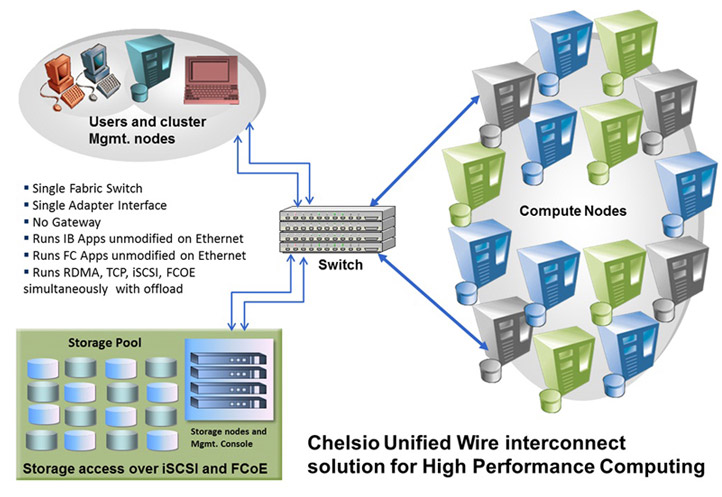
- Parallel Processing: Clusters can process multiple tasks simultaneously, dividing the workload among nodes.
- Distributed Memory: Each node has its memory, and data is exchanged between nodes during computation.
- High Bandwidth Interconnect: Clusters use high-speed interconnects like InfiniBand or Ethernet for efficient communication between nodes.
- Resource Management: HPC clusters use job schedulers and resource managers to allocate computing resources to different tasks.
How High-Performance Computing Clusters Work and Architecture?
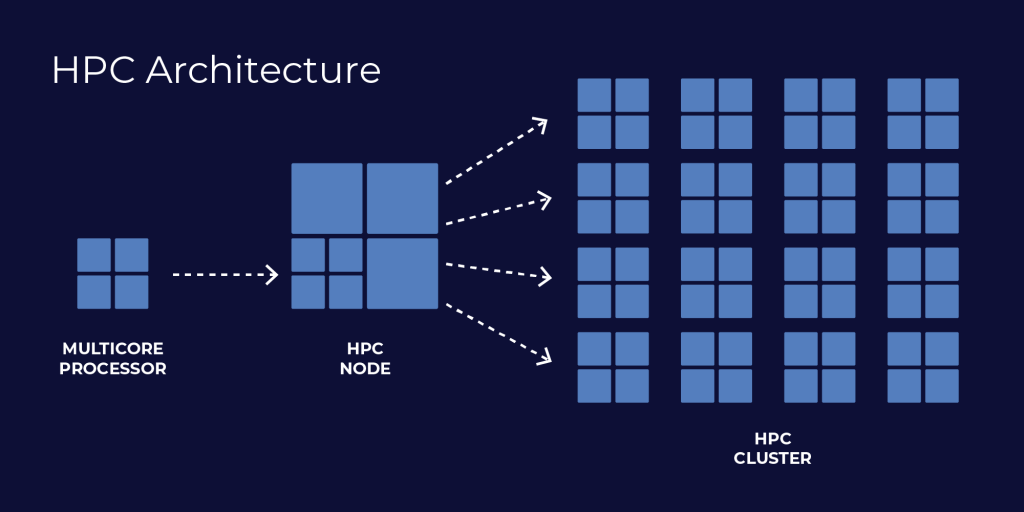
The architecture of HPC clusters involves the following components:
- Compute Nodes: The individual computers (nodes) that perform the computations.
- Interconnect: High-speed network connections that enable data communication between nodes.
- Storage: Shared storage systems (e.g., Network-Attached Storage – NAS) to store data and results.
- Cluster Management Software: Software that manages job scheduling, resource allocation, and monitoring.
How to Install High-Performance Computing Clusters?
Installing and setting up an HPC cluster is a complex process that requires specialized knowledge and expertise. Here are general steps involved in setting up an HPC cluster:
- Select Hardware: Choose appropriate hardware components for the compute nodes, interconnect, and storage.
- Install Operating System: Install a suitable operating system (often Linux) on each compute node.
- Network Configuration: Set up the high-speed interconnect network for efficient communication between nodes.
- Cluster Software: Install and configure cluster management software like Slurm, PBS, or Torque.
- Shared Storage: Set up shared storage systems for data access across nodes.
- Test and Troubleshoot: Test the cluster’s performance and troubleshoot any issues.
Please note that installing an HPC cluster requires a deep understanding of system administration, networking, and parallel programming. Many organizations choose to work with specialized vendors or experts who can assist in building and configuring HPC clusters tailored to their specific needs.
Basic Tutorials of High-Performance Computing Clusters: Getting Started
Setting up a High-Performance Computing (HPC) cluster is a complex task that involves advanced technical knowledge and expertise. It typically requires a team of experienced system administrators and IT professionals. Below are the high-level steps involved in creating an HPC cluster.

Step-by-Step Basic Tutorial for High-Performance Computing Clusters:
- Hardware Selection:
- Choose appropriate hardware components for compute nodes, interconnect, and storage. Consider factors like CPU, RAM, networking, and storage capabilities.
2. Networking Setup:
- Configure a high-speed interconnect network (e.g., InfiniBand or high-speed Ethernet) to ensure efficient communication between compute nodes.
3. Operating System Installation:
- Install a suitable operating system (often Linux-based) on each compute node. Choose a distribution that supports HPC environments, such as CentOS, Ubuntu, or Red Hat Enterprise Linux.
4. Network Configuration:
- Configure the network settings for each node, including hostname resolution and IP address allocation.
5. SSH Setup:
- Set up SSH (Secure Shell) for secure communication between the nodes.
6. Cluster Management Software Installation:
- Install and configure a cluster management software like Slurm, PBS, or Torque. This software helps manage job scheduling, resource allocation, and monitoring.
7. Shared File System:
- Set up a shared file system (e.g., Network-Attached Storage – NAS) to provide shared access to data across nodes.
8. Node Provisioning:
- Add compute nodes to the cluster by connecting them to the network and configuring them with the appropriate operating system.
9. Test and Verify:
- Test the cluster’s communication and functionality. Run simple tests and ensure that all nodes are correctly connected and accessible.
10. Job Submission and Execution:
Please note that these steps are a basic outline of setting up an HPC cluster and do not cover all the complexities and details involved in building a production-ready cluster. Building a real-world HPC cluster often requires expertise in networking, storage configuration, parallel programming, and cluster management. If you are not familiar with these concepts, it is advisable to seek assistance from experienced HPC administrators or consult with HPC vendors for a customized and optimized solution that suits your specific requirements.

👤 About the Author
Ashwani is passionate about DevOps, DevSecOps, SRE, MLOps, and AiOps, with a strong drive to simplify and scale modern IT operations. Through continuous learning and sharing, Ashwani helps organizations and engineers adopt best practices for automation, security, reliability, and AI-driven operations.
🌐 Connect & Follow:
Website: WizBrand.com
Facebook: facebook.com/DevOpsSchool
X (Twitter): x.com/DevOpsSchools
LinkedIn: linkedin.com/company/devopsschool
YouTube: youtube.com/@TheDevOpsSchool
Instagram: instagram.com/devopsschool
Quora: devopsschool.quora.com
Email– contact@devopsschool.com
Find Trusted Cardiac Hospitals
Compare heart hospitals by city and services — all in one place.
Explore Hospitals