
What is Azure Media Services?
We are in a world where the pandemic situation forcing white-collar jobs to work from home and there is a surge in the number of online meetings. There is a bigger challenge to host these meetings and stream for a larger audience hassle-free with the best Audio/Video quality irrespective of the user’s internet speed.
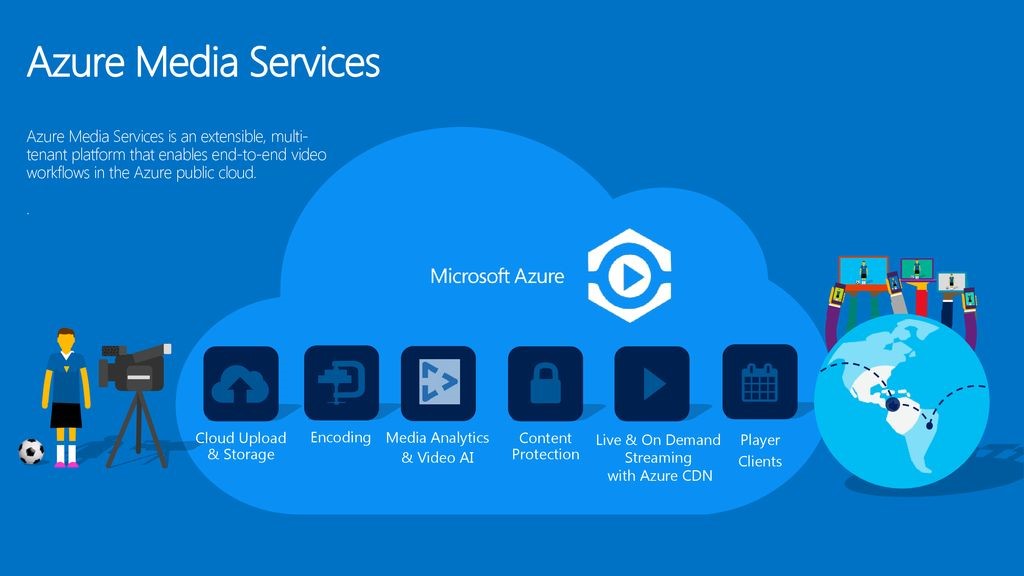
Azure Media Services is a platform developed by Microsoft that is built on the sidelines of cloud computing. It provide you the services that helps the developers to create scalable media management and delivery applications. Azure Media Services provide all these important features like data management, execution, analytics, and high-performance computing. It provides these features in a versatile mobile cloud-based environment.
What are the prerequisites for using Azure Media Services?
It is always vital to take into account the prospect of Azure Media Services and the requirements of the installation process. If you do not consider the possibility of prerequisites, you will end up installing the wrong versions that can result in the faulty outputs. Here is the list of requirements while utilizing the Azure Media Services.
- You must have an Azure Media Services account. Without an account, you would end up deactivating your services that can be detrimental to your work productivity.
- It is also vital to set up a developmental environment. You can select .NET or REST API so that you can efficiently develop the developmental environment. For more information, you should always check the official site of Microsoft.
- You should also have access to premium streaming endpoints in the started state. In other words, for more information, you can view the managing streaming parameters that have been mentioned on the official Microsoft site.
- Should have an Azure Media Services account. And if you do not have an account, you can always create a free trial. If you do not know about the details of creating a free account, you can always consult the Azure Free Trial services.
Business Benefits of Azure Media Services
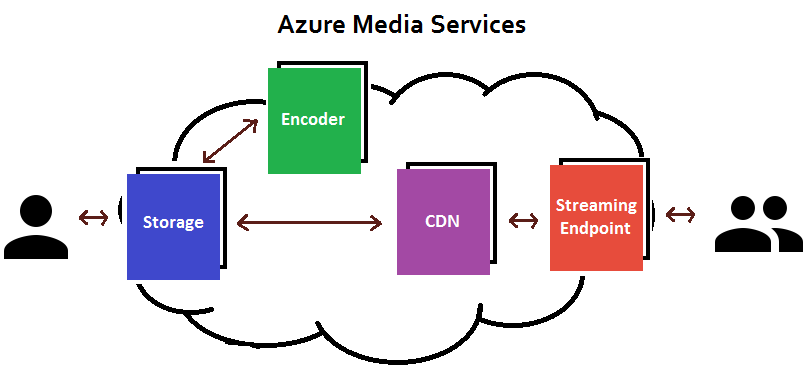
Azure Media Services a versatile solution that promises to save money without sacrificing productivity and functionality. Video content, live streaming, push notifications and applying multiple languages are made simple with Azure Media Services development. Some of the benefits are of Azure Media Service are:
- Fast and secure content ingest
One of the biggest challenge is to transfer content to cloud storage and from there it can easily use by media services. Customers can use live streaming service to stream live events and broadcast content in real time.
- Encoding
Azure Media Services provides different ways to encode videos in different formats, and also provides ability to run parallel encoding jobs elastically to encode multiple videos at a time.
- Content Protection
It works on privacy, if someone want that videos are only seen by the people you want. Azure media helps with this, it uses AES Clear Key encryption to encrypt the streams from AMS to the end user.
- Dynamic Packaging
When videos are uploaded in media service platform then it is encoded in the formats that supported by all the devices and protocols. Azure Media Service provides a solution to this problem with dynamic packaging feature.
- Live and Video On Demand streaming
Azure Media Service support both live and on demand video streaming on almost all type of devices in a secure way. And different devices supports different protocols and Azure Media Service helps to encode videos to different formats using dynamic packaging.
- CDN
AMS support Azure and third party CDNs to provide fast access to media.
- Content Management
Azure media services provides you a way to manage content from the portal by itself, all the content gets stored in Azure Storage.
- Indexing
Azure Media Index offer you to make content of your media files searchable and to generate a full-text transparent script for closed captioning and keywords. With this feature audio of the videos is converted to text in format which can be used for captioning videos and provide search capability.
How Azure Media Services benefits small business?
In today’s Era, Multimedia is an essential tool for getting your message across in the online world. Microsoft’s offering from Azure is one of the best platforms available to stream video content. Azure Media Services provides broadcast-quality video streaming services to help you reach large audiences, your workforce or your customers, on mobile devices. Today, it is quicker, cheaper and easier to achieve professional video content than it has ever been, also big data have emerged as one of the most difficult propositions that have to be managed by an organization. However, as the Azure Media Services operate on a cloud-based and digital platform, it makes sure that the number of huge amounts of data can be tackled effectively.
Azure Media Services a versatile solution that promises to save money without sacrificing productivity and functionality. Video content, live streaming, push notifications and applying multiple languages are made simple with Azure Media Services development.
Thank you!

I’m Rajesh Kumar, a DevOps, SRE, DevSecOps, Cloud, and Platform Engineering expert passionate about sharing practical knowledge, real-world experiences, and industry best practices. I have worked at Cotocus and regularly write about technology, travel, investing, health, product reviews, and digital marketing through my various platforms.
I publish technical articles at DevOps School, travel stories at Holiday Landmark, stock market insights at Stocks Mantra, health and fitness guidance at My Medic Plus, product reviews at TrueReviewNow, and SEO and digital marketing strategies at Wizbrand.
Find Trusted Cardiac Hospitals
Compare heart hospitals by city and services — all in one place.
Explore Hospitals




