
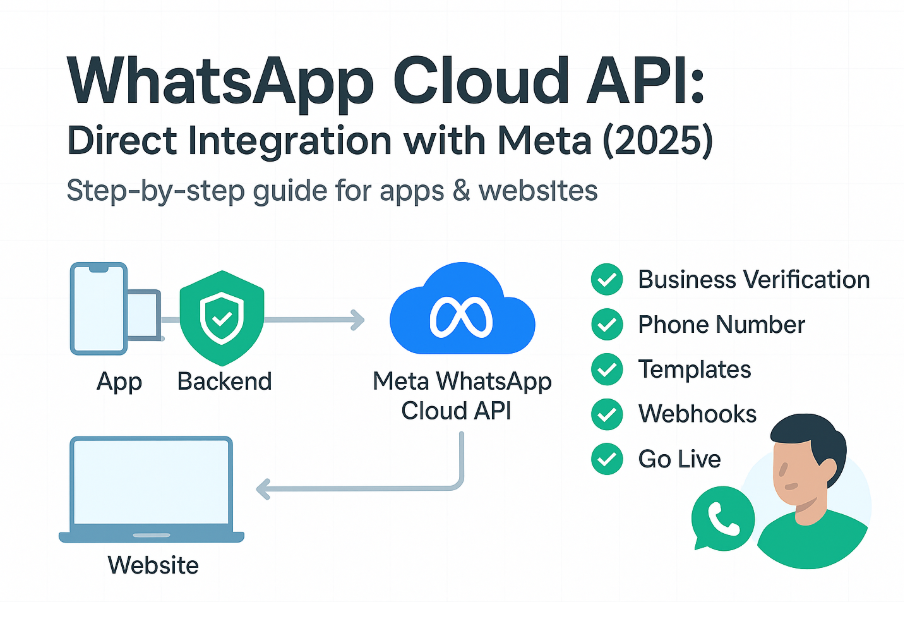
You can do this directly with Meta’s WhatsApp Business Platform (Cloud API) from your own app/website. Below is a complete, no-BSP, end-to-end checklist you can follow. I’ve included short code samples and the exact places in Meta where each step lives.
Prerequisites (before you start)
- A Meta Business account (Business Manager) with admin access.
- A Meta Developer account.
- A phone number that can receive SMS/voice for verification (new number is easiest; existing numbers can be onboarded or migrated).
- A public HTTPS endpoint for webhooks (e.g., yourdomain.com/whatsapp/webhook).
- Basic server (Node, PHP, etc.) to store tokens safely and call the Graph API (never call it from the browser). ()
Step-by-step setup (Cloud API, hosted by Meta)
1) Create a Meta App & add the WhatsApp product
- Go to Meta for Developers → My Apps → Create App (choose “Business”).
- In your app, Add Product → WhatsApp.
- Open the WhatsApp product’s Getting Started page.
This creates the base assets and guides you through initial test-message steps. ()
2) Create/confirm your WhatsApp Business Account (WABA)
- In Business Manager → Accounts → WhatsApp Accounts (WhatsApp Manager) you’ll see or create your WABA and manage numbers, templates, metrics, etc. ()
3) Verify your business in Business Manager (Production requirement)
- Business Settings → Security Center → Start Verification.
- Submit legal details and documents. Admin privilege is required.
Business verification unlocks production sending at scale and higher limits. (, )
4) Request Display Name approval
- Your WA display name must follow Meta’s rules (no “official”, no Meta brands in the name, must reflect your business).
- Submit/approve in WhatsApp Manager when adding the number. ()
5) Add a phone number (new number) or onboard/migrate an existing one
A. New number (simplest):
- In App Dashboard → WhatsApp → Configuration → Add phone number, verify via SMS/voice, and you’ll receive a Phone Number ID. (, )
B. Existing number options:
- Embedded Signup supports numbers already used with the WhatsApp Business App (special flow).
- Migrate a number from one WABA/BSP to another with Embedded Signup; you keep display name, quality rating, and limits. (, )
You’ll end up with two IDs you’ll use everywhere: your WABA ID and your Phone Number ID. Keep both.
6) Generate a permanent access token (server-side only)
- In Business Settings → Users → System Users, create a system user, assign your app + WhatsApp permissions, then Generate Token.
- Store the token in your backend secrets manager; do not embed in client code. ()
7) Set up your Webhook endpoint & subscribe
- Build an HTTPS endpoint that can respond to the verification handshake with
hub.challengewhen Meta calls it. - In App Dashboard → WhatsApp → Configuration, add your Callback URL and Verify Token and Verify & Save.
- Subscribe to message and status events; use the “Send test” button to check delivery to your endpoint. (, , )
Tip (verification): your endpoint must echo back the
hub.challengewhen it receives the GET verification call. After saving, you’ll start receiving JSON webhooks for inbound messages, delivery/read receipts, and errors. ()
8) Create Message Templates (Marketing / Utility / Authentication)
- Create in WhatsApp Manager or via the Business Management API; wait for approval.
- You’ll reference templates by name (+ language) when sending. (, )
9) Understand 2026 pricing & free windows (so your flows are cost-efficient)
- As of July 1, 2026, Meta charges per delivered message for template categories (Marketing, Utility, Authentication) with country-based rate cards and volume tiers (discounts for Utility & Authentication).
- Service replies during the 24-hour customer service window are free; Utility templates sent inside that window are free.
- Free Entry Point (FEP): Messages are free for 72 hours when the user comes from Click-to-WhatsApp Ads or Page CTA and you reply within 24h. (, )
10) Send your first message (from your backend)
cURL (text message)
curl -X POST "https://graph.facebook.com/v19.0/PHONE_NUMBER_ID/messages"
  -H "Authorization: Bearer YOUR_PERMANENT_ACCESS_TOKEN"
  -H "Content-Type: application/json"
  -d '{
    "messaging_product":"whatsapp",
    "to":"<E164_RECIPIENT>",
    "type":"text",
    "text":{"body":"Hello from the WhatsApp Cloud API!"}
  }'
Code language: PHP (php)
Use /{PHONE_NUMBER_ID}/messages; same endpoint for text, media, interactive, or template sends. ()
Prefer testing with Meta’s official Postman collection—it has ready-made calls for send, template, media, etc. ()
11) Handle delivery, read, and errors (webhooks)
- Update your DB on sent / delivered / read / failed; implement retries with backoff for transient errors (e.g., throughput 130429).
- Keep webhook response times fast (<200 ms) to avoid drops. (, )
12) Go from test to production
- After business verification, display name approval, and approved templates, you can send to any opt-in user (not just test recipients).
- Remove test tokens and use the system user token in production. ()
Compliance & policy must-dos
Opt-in & content rules
- You must have clear user opt-in (on your site/app, form, or chat) and follow WhatsApp’s Business Messaging Policy. Store consent (time/IP/method).
- Respect the template categories and avoid spammy content; users can block/report—low quality hurts your limits. ()
Rate limits & messaging limits
- Throughput: Cloud API supports ~80 messages/sec per number by default; eligible accounts auto-upgrade up to 1,000 mps.
- Messaging limits (by phone number): new numbers start low (e.g., 250/1k), and scale to 10k → 100k → unlimited based on quality & volume. ()
Minimal production architecture
Client (web/app) → Your Backend API (stores token, picks template, logs send) → Meta Graph API (Cloud API)
Meta Webhooks → Your Backend Webhook (updates message status, triggers retries, analytics). ()
Key objects to store
waba_id,phone_number_id,display_name,permanent_access_token- Templates (
name,category,language,status) - Messages (
to,template/text,meta_message_id,status,error_code)
Common pitfalls & fixes
- Webhook verification fails → ensure you echo
hub.challengeexactly and verify token matches the one configured. () - 130429 throughput reached → you’re sending too fast; throttle below 80 mps or request/qualify for higher tiers. ()
- Template rejected → align with policy; avoid promotional content in Utility/Auth; include sample variables. ()
- Display name not showing → confirm display name approved and number in Connected state in WhatsApp Manager. ()
Optional, money-saving add-ons (direct with Meta)
- Click-to-WhatsApp Ads / Page CTA to trigger 72-hour free messaging windows (great for onboarding & flows).
- Use Service + Utility (inside CSW) wherever possible; reserve Marketing for necessary promos. (, )
Quick checklist
- Create Meta App & add WhatsApp product. ()
- Ensure WABA exists in WhatsApp Manager. ()
- Complete Business Verification. ()
- Submit Display Name for approval. ()
- Add/migrate phone number → get Phone Number ID. ()
- Create System User & generate permanent token. ()
- Build & verify Webhook; subscribe to events. ()
- Create templates (Marketing/Utility/Auth) & get approval. ()
- Send test message via
/{PHONE_NUMBER_ID}/messages. () - Go live (respect pricing windows & limits). ()
Short & clear
- WhatsApp Cloud API: Direct Integration with Meta (2026)
- Send WhatsApp Messages Directly via Meta (No BSP)
- WhatsApp Business Platform: End-to-End Setup Guide
- Meta WhatsApp Cloud API: Step-by-Step for Apps & Websites
- WhatsApp Business Messaging: Direct Meta Setup
Step-by-step / how-to
- How to Enable WhatsApp Messaging Directly with Meta (Cloud API)
- From Zero to Live: WhatsApp Business Cloud API Setup (2026)
- Implement WhatsApp Messaging in Your App—No Third-Party Needed
- WhatsApp Business Platform Setup: Templates, Webhooks, Tokens & Go-Live
- Direct WhatsApp Messaging with Meta: A Complete Developer Guide
Business/India-focused
- Cheapest Path to WhatsApp Messaging in India: Go Direct with Meta
- Scale WhatsApp Messaging for SMBs & Enterprises—Direct with Meta
- Meta WhatsApp Cloud API for OTP, Alerts & Marketing (India Guide)
- Enterprise-Ready WhatsApp Messaging: Direct Integration Blueprint
- WhatsApp Business Messaging Compliance & Setup (No BSP)
Premium/evergreen
- The Definitive Guide to Meta’s WhatsApp Business Platform (2026)
- Production-Ready WhatsApp Cloud API: Architecture, Limits, Pricing
- WhatsApp Messaging via Meta: Secure, Scalable, and Cost-Efficient

I’m Rajesh Kumar, a DevOps, SRE, DevSecOps, Cloud, and Platform Engineering expert passionate about sharing practical knowledge, real-world experiences, and industry best practices. I have worked at Cotocus and regularly write about technology, travel, investing, health, product reviews, and digital marketing through my various platforms.
I publish technical articles at DevOps School, travel stories at Holiday Landmark, stock market insights at Stocks Mantra, health and fitness guidance at My Medic Plus, product reviews at TrueReviewNow, and SEO and digital marketing strategies at Wizbrand.
Find Trusted Cardiac Hospitals
Compare heart hospitals by city and services — all in one place.
Explore Hospitals
