
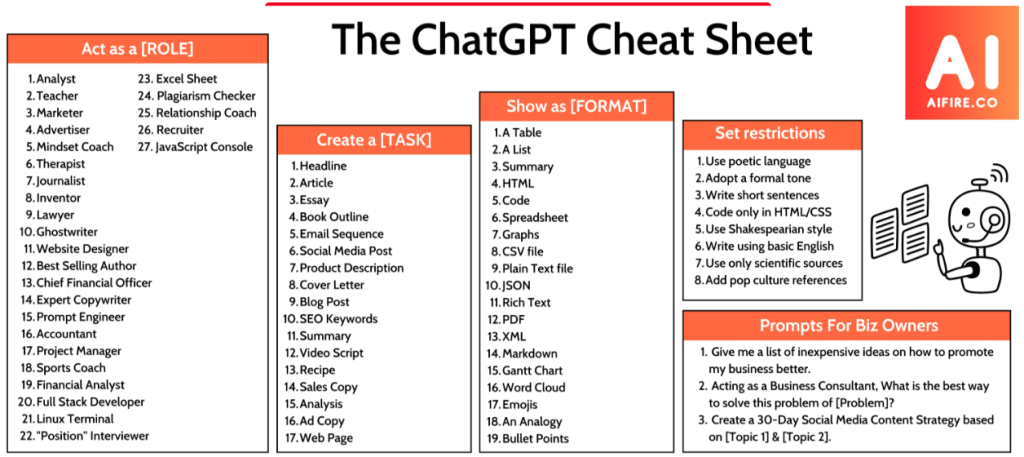
Using ChatGPT: Understanding the Benefits and Limitations
Using applications like ChatGPT requires careful consideration due to their human-like conversation abilities, which can sometimes be misleading. Unlike humans, large language models (LLMs) like ChatGPT may produce fluent but incorrect answers because they lack the metacognitive ability to recognize what they don’t know. Additionally, verbal fluency in LLMs doesn’t necessarily indicate other forms of intelligence, making it risky to treat them as if they were highly knowledgeable people.
Despite these limitations, ChatGPT can be extremely useful in various contexts. Simon Willison suggests thinking of LLMs as a “calculator for words”—a tool for processing text rather than a replacement for human intelligence.
Ten Useful Learning Strategies with ChatGPT:
- Socratic Tutor: Use ChatGPT as a personal tutor to explain complex concepts, code, or problems, especially when combined with a primary source like a textbook.
- Language Practice: Engage in conversations to practice new languages, using the AI for both practice and explanations.
- Text Summarization: Generate summaries of longer texts to help digest substantial reading material.
- Dialog with Documents: Ask questions about long documents to quickly extract key information, while fact-checking the responses.
- Simplify Explanations: Request explanations of complex concepts at different levels of depth to make expert-level content more accessible.
- Clarify Jargon: Use ChatGPT to understand unfamiliar jargon and terms within specific communities.
- Study Plans: Create personalized study plans and schedules, breaking down complex learning goals.
- Programming Help: Get refreshers on unfamiliar programming tools and languages, using AI to draft code and troubleshoot.
- Flashcard Generation: Generate flashcards based on text input to aid in memorization and review.
- Organize Notes: Use LLMs to organize and search notes by meaning rather than exact keywords, improving research efficiency.
Things to Avoid:
- Fact Reliability: Do not rely on ChatGPT for accurate facts, as it may produce incorrect information or “hallucinations.”
- Citations: Avoid using ChatGPT for generating accurate citations, as it often invents references.
- Math Accuracy: Be cautious with mathematical tasks, as LLMs frequently struggle with even basic calculations.
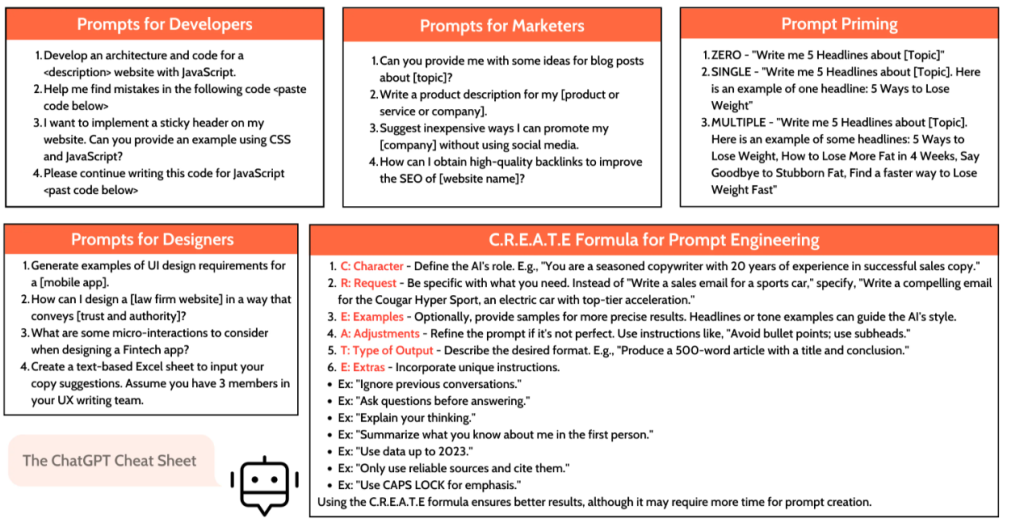
Here are 21 ways to use ChatGPT effectively, with examples for each scenario:
1. Content Creation
- Example: “Can you write a 500-word blog post on the benefits of remote work?”
- ChatGPT can generate content like blog posts, articles, or even creative stories, helping you save time and effort.
2. Code Writing and Debugging
- Example: “Write a Python script to sort a list of dictionaries by a key.”
- ChatGPT can write and debug code in multiple programming languages, making it a great tool for developers.
3. Learning New Skills
- Example: “Explain the basics of machine learning in simple terms.”
- Use ChatGPT to learn new skills by asking it to explain concepts, suggest resources, or provide step-by-step tutorials.
4. Language Translation
- Example: “Translate ‘Hello, how are you?’ to Spanish.”
- ChatGPT can translate text between languages, making it useful for communication and learning new languages.
5. Email Drafting
- Example: “Draft an email to follow up on a job application.”
- Use ChatGPT to draft professional emails quickly, ensuring clarity and tone are appropriate.
6. Research Assistance
- Example: “Summarize the key points from this research paper on climate change.”
- ChatGPT can summarize complex documents, saving time and helping you understand key points quickly.
7. Brainstorming Ideas
- Example: “I need ideas for a new marketing campaign targeting millennials.”
- Use ChatGPT to brainstorm creative ideas for projects, campaigns, or problem-solving.
8. Writing Assistance
- Example: “Can you help me improve the flow of this paragraph?”
- ChatGPT can help improve the structure, grammar, and style of your writing.
9. Personalized Learning Plans
- Example: “Create a study plan to learn JavaScript in 3 months.”
- Get tailored learning plans that suit your pace and goals.
10. Career Advice
- Example: “What skills should I learn to become a data scientist?”
- ChatGPT can provide advice on career paths, required skills, and job market trends.
11. Social Media Management
- Example: “Write a series of tweets to promote a new product launch.”
- Use ChatGPT to generate social media content that engages your audience.
12. Technical Writing
- Example: “Write a user manual for a new mobile app.”
- ChatGPT can create detailed technical documentation, such as user guides, FAQs, and manuals.
13. Recipe Creation
- Example: “Give me a recipe for a healthy vegan breakfast.”
- Get creative recipe ideas based on specific dietary requirements or available ingredients.
14. Business Plan Development
- Example: “Outline a business plan for a new e-commerce startup.”
- ChatGPT can help you develop a business plan by outlining key sections and providing detailed content.
15. Personal Finance Advice
- Example: “How can I create a budget to save more money?”
- Get tips on budgeting, saving, and managing personal finances effectively.
16. Daily Planning
- Example: “Help me plan my daily schedule to maximize productivity.”
- Use ChatGPT to organize your day with a balanced schedule that includes work, breaks, and personal time.
17. Travel Planning
- Example: “Plan a 7-day itinerary for a trip to Japan.”
- ChatGPT can help you plan travel itineraries, including places to visit, activities, and accommodations.
18. Customer Support
- Example: “Provide a response template for common customer inquiries.”
- Create templates or automated responses for common customer service queries.
19. Educational Content Creation
- Example: “Create a multiple-choice quiz on world history.”
- Generate educational content, such as quizzes, flashcards, and lesson plans.
20. Creative Writing Prompts
- Example: “Give me a writing prompt for a short science fiction story.”
- Get inspired with creative prompts for writing exercises or projects.
21. Mental Health Check-ins
- Example: “What are some mindfulness exercises I can do to reduce stress?”
- ChatGPT can suggest mindfulness exercises, coping strategies, and resources for mental well-being.

I’m Rajesh Kumar, a DevOps, SRE, DevSecOps, Cloud, and Platform Engineering expert passionate about sharing practical knowledge, real-world experiences, and industry best practices. I have worked at Cotocus and regularly write about technology, travel, investing, health, product reviews, and digital marketing through my various platforms.
I publish technical articles at DevOps School, travel stories at Holiday Landmark, stock market insights at Stocks Mantra, health and fitness guidance at My Medic Plus, product reviews at TrueReviewNow, and SEO and digital marketing strategies at Wizbrand.
Find Trusted Cardiac Hospitals
Compare heart hospitals by city and services — all in one place.
Explore Hospitals





