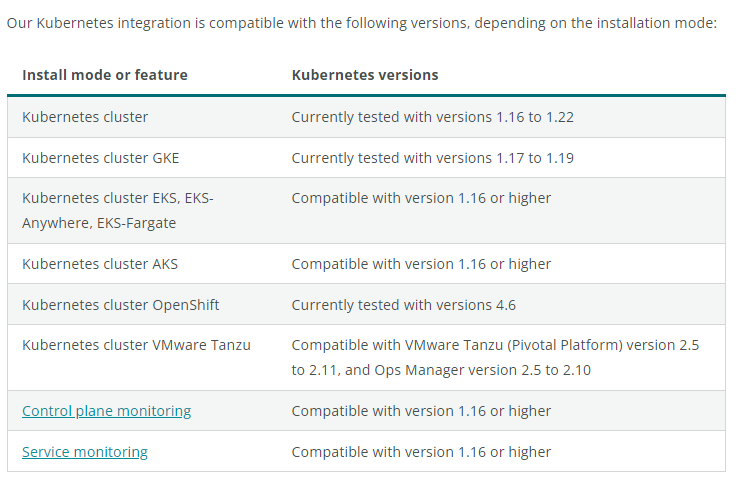
Compatibility and requirements
Prerequisite
The easiest way to install the Kubernetes integration is to use our automated installer to generate a manifest. It bundles not just the integration DaemonSets, but also other New Relic Kubernetes configurations, like
- Kubernetes events
- Prometheus OpenMetrics, and
- New Relic log monitoring.
What is “Kubernetes cluster explorer”?
Visualize your cluster, from the control plane to nodes and pods. Check the health of each entity, explore logs, and see how your apps are performing.
How to install helm in Linux
$ curl -fsSL -o get_helm.sh https://raw.githubusercontent.com/helm/helm/master/scripts/get-helm-3
$ chmod 700 get_helm.sh
$ ./get_helm.sh
Code language: JavaScript (javascript)
How to set up and start seeing Kubernetes data in Newrelic?
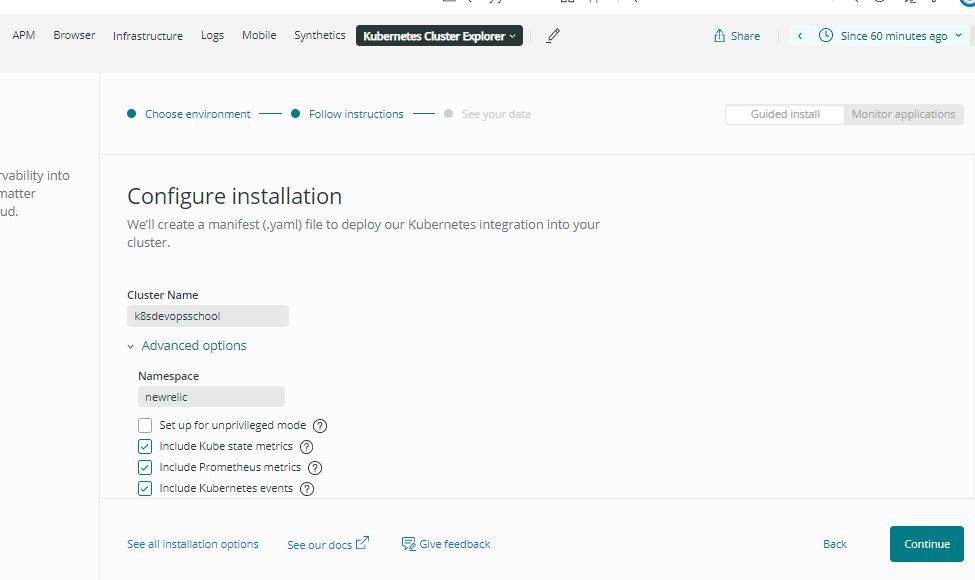
Step 1 – Select your setup options
Select what data sources you need (Kube state and Prometheus metrics, events, logs).
List of data Source:
- Kube state metrics: – kube-state-metrics is a kubernetes projects that provides additional metadata about the cluster. You might already have it configured in your cluster. In that case, no need to select this options.
- Prometheus metrics: – Many services expose promtheus compatiable endpoints. This optiosn would enable the collection of the metrics exposed by these services.
- Kubernetes Events:- kubernetes events provide a details of event happening inside of the cluster and help you to troubleshoot an issues. Selecting this option will send Kubernetes Events to newRelic.
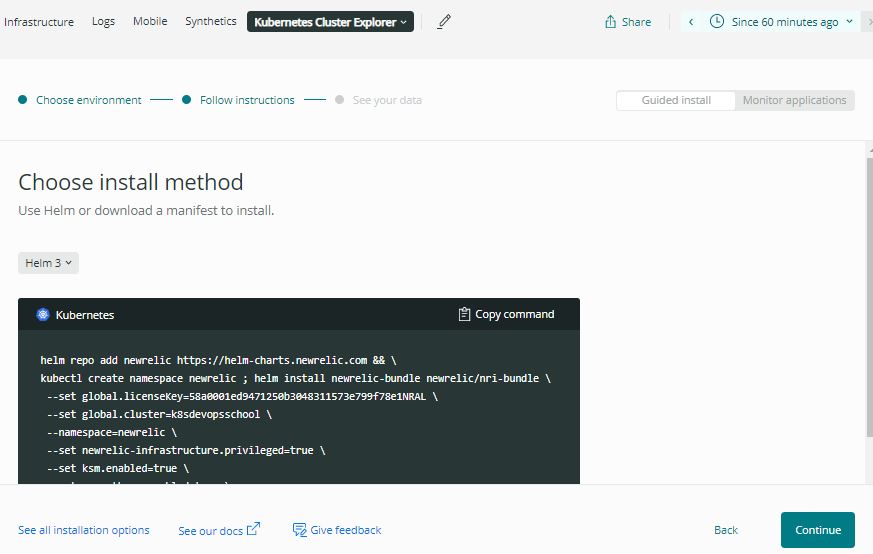
Step 2 – Pick the install method
Choose what works best for you: download a pre-configured manifest file or use Helm.
helm repo add newrelic https://helm-charts.newrelic.com && \
kubectl create namespace newrelic ; helm install newrelic-bundle newrelic/nri-bundle \
 --set global.licenseKey=58a0001ed941573e799f78e1NRAL \
 --set global.cluster=k8sdevopsschool \
 --namespace=newrelic \
 --set newrelic-infrastructure.privileged=true \
 --set ksm.enabled=true \
 --set prometheus.enabled=true \
 --set kubeEvents.enabled=true \
 --set logging.enabled=true Code language: JavaScript (javascript)
Step 3 – Deploy the integration
Apply the manifest, and in minutes you’ll see your data in the cluster explorer.
Notes for your managed services or platforms:
Amazon EKS
The Kubernetes integration monitors worker nodes. In Amazon EKS, master nodes are managed by Amazon and abstracted from the Kubernetes platforms. Before starting our automated installer to deploy the Kubernetes integration in Amazon EKS, make sure you are using the version of kubectl provided by AWS.
Azure Kubernetes Service(AKS)
The Kubernetes integration monitors worker nodes. In Azure Kubernetes Service, master nodes are managed by Azure and abstracted from the Kubernetes platforms. To deploy in Azure Kubernetes Service (AKS), complete the steps in our automated installer.
How to activate the Kubernetes integration Custom or Manual way
If the Kubernetes automated installer doesn’t provide the settings you need, you can download our manifest template and install the integration manually. you must deploy the newrelic-infra agent onto a Kubernetes cluster as a DaemonSet:
https://docs.newrelic.com/docs/integrations/kubernetes-integration/installation/kubernetes-integration-install-configure/#customized-manifest
Reference
- https://docs.newrelic.com/docs/integrations/kubernetes-integration/installation/kubernetes-integration-install-configure/

I’m Rajesh Kumar, a DevOps, SRE, DevSecOps, Cloud, and Platform Engineering expert passionate about sharing practical knowledge, real-world experiences, and industry best practices. I have worked at Cotocus and regularly write about technology, travel, investing, health, product reviews, and digital marketing through my various platforms.
I publish technical articles at DevOps School, travel stories at Holiday Landmark, stock market insights at Stocks Mantra, health and fitness guidance at My Medic Plus, product reviews at TrueReviewNow, and SEO and digital marketing strategies at Wizbrand.
Find Trusted Cardiac Hospitals
Compare heart hospitals by city and services — all in one place.
Explore Hospitals