
What is pfile in oracle?
In Oracle, a “pfile” is a text-based configuration file that contains initialization parameters for an Oracle instance. The term “pfile” stands for “parameter file.”
When an Oracle instance is started up, it requires certain initialization parameters to be set. These parameters specify things like the location of database files, the size of the database buffer cache, and the number of database connections that can be made concurrently.
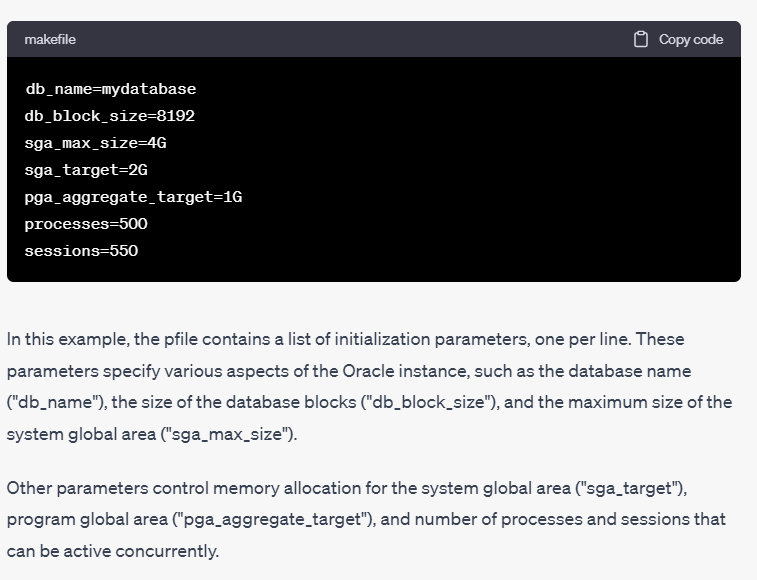
The pfile is used to specify these initialization parameters. It is a plain text file that contains a list of parameter-value pairs, one per line. The file is typically named init{SID}.ora, where {SID} is the system identifier of the instance.
When an Oracle instance is started up, it reads the pfile to determine the initialization parameters that should be used. If a pfile is not specified, the instance will use a default set of parameters.
Note that in recent versions of Oracle, pfiles have largely been replaced by “spfiles” (server parameter files), which are binary files that offer some additional advantages over pfiles.
What is spfile in oracle?
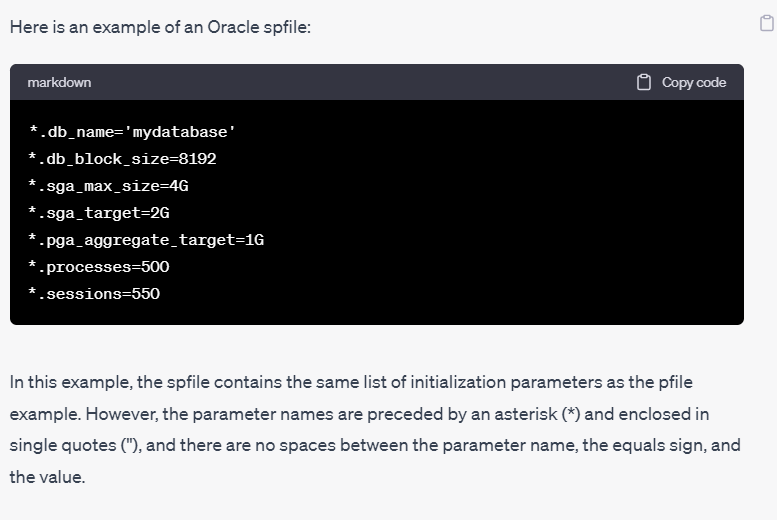
In Oracle, an SPFILE (Server Parameter File) is a binary file that contains initialization parameters for an Oracle instance. The SPFILE is a more advanced and flexible way to specify initialization parameters than the older pfile (parameter file) format.
Like a pfile, an SPFILE contains a set of initialization parameters that determine how an Oracle instance runs. However, unlike a pfile, the SPFILE can be modified dynamically, while the instance is running. This means that changes made to the SPFILE take effect immediately, without requiring a database restart.
An SPFILE is typically named “spfileSID.ora”, where “SID” is the system identifier of the Oracle instance. The file is stored in a location specified by the “SPFILE” initialization parameter.
One of the key advantages of using an SPFILE is that it allows you to manage initialization parameters more easily. For example, you can view and modify the current values of initialization parameters using the ALTER SYSTEM command, without having to modify a text-based configuration file. In addition, the SPFILE supports parameter settings for individual instances, or for all instances in a clustered environment.
In summary, an SPFILE is a binary file that contains initialization parameters for an Oracle instance, and provides a more advanced and flexible way to manage these parameters compared to the older pfile format.
Differnce between pfile vs spfile
The main difference between an Oracle pfile and spfile is that a pfile is a text-based configuration file that contains initialization parameters for an Oracle instance, whereas an spfile is a binary file that contains the same initialization parameters.
Here are some additional differences between pfile and spfile:
- Format: The pfile is a text file, while the spfile is a binary file.
- Flexibility: The pfile can be edited manually with a text editor, while the spfile can be modified dynamically using the ALTER SYSTEM command.
- Persistence: Changes to the pfile are not persistent and require a database restart to take effect, whereas changes to the spfile are persistent and take effect immediately.
- Security: The pfile can be easily modified by anyone with access to the file, while the spfile is more secure because it is a binary file and can be protected by file system permissions.
- Clustering: The spfile supports parameter settings for individual instances or all instances in a clustered environment, while the pfile does not.
- Performance: The spfile can offer improved performance because it is read by the Oracle server in binary format, which can be faster than parsing a text-based pfile.
In summary, while both pfile and spfile are used to specify initialization parameters for an Oracle instance, the spfile is a more advanced and flexible way to manage these parameters, with advantages in terms of flexibility, persistence, security, clustering, and potentially performance.
Example of pfile
Example of spfile
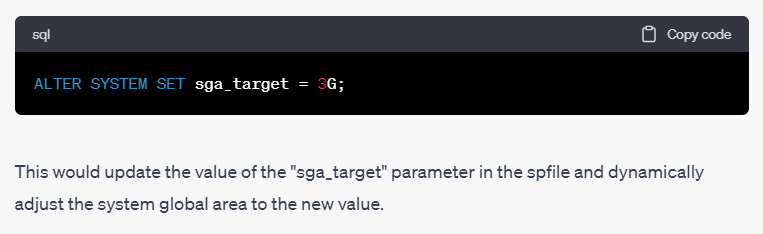
How to change spfile?
One important advantage of an spfile over a pfile is that you can modify the parameter values using the “ALTER SYSTEM” command, and the changes will be saved to the spfile and take effect immediately. For example, to change the value of the “sga_target” parameter to 3G, you could use the following command:

I’m Rajesh Kumar, a DevOps, SRE, DevSecOps, Cloud, and Platform Engineering expert passionate about sharing practical knowledge, real-world experiences, and industry best practices. I have worked at Cotocus and regularly write about technology, travel, investing, health, product reviews, and digital marketing through my various platforms.
I publish technical articles at DevOps School, travel stories at Holiday Landmark, stock market insights at Stocks Mantra, health and fitness guidance at My Medic Plus, product reviews at TrueReviewNow, and SEO and digital marketing strategies at Wizbrand.
Find Trusted Cardiac Hospitals
Compare heart hospitals by city and services — all in one place.
Explore Hospitals