
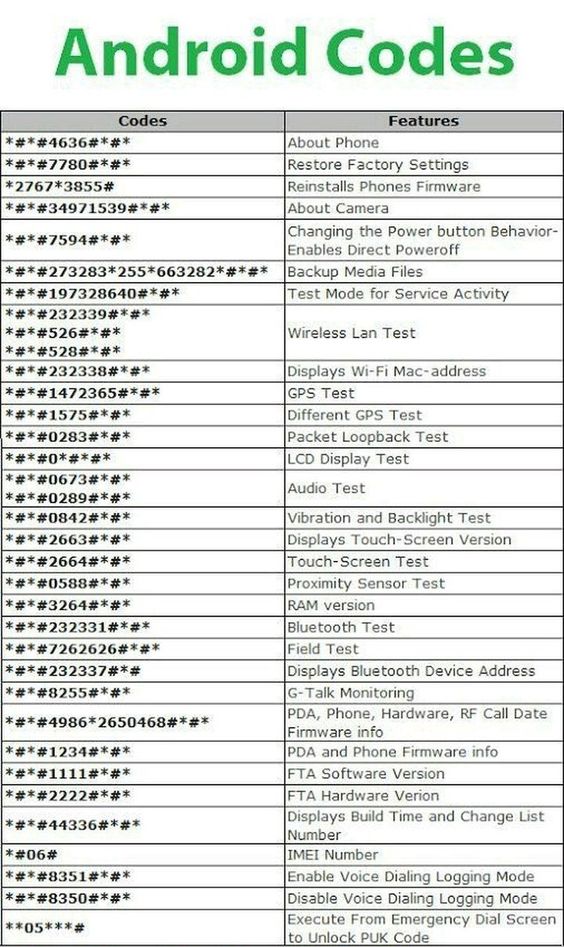
Android devices come equipped with a variety of secret codes—also known as USSD (Unstructured Supplementary Service Data) or MMI (Man-Machine Interface) codes—that allow users to access hidden features, perform diagnostics, and retrieve information. These codes are entered directly into the phone’s dialer and can execute specific functions without the need for additional applications. Below is a comprehensive list of these codes, updated as of 2026:
General Information Codes:
*#06#– Display the device’s IMEI number.*#07#– Show the device’s SAR (Specific Absorption Rate) information.*#*#225#*#*– Access calendar storage information.*#*#426#*#*– View Google Play Services diagnostics.*#*#759#*#*– Open the Rlz Debug UI.
Testing and Diagnostic Codes:
*#*#4636#*#*– Access detailed phone information, usage statistics, and battery status.*#*#0*#*#*– Initiate LCD display test.*#*#2664#*#*– Perform a touchscreen test.*#*#232331#*#*– Conduct a Bluetooth test.*#*#1472365#*#*– Run a quick GPS test.*#*#1575#*#*– Execute a full GPS test.*#*#0289#*#*or*#*#0673#*#*– Initiate an audio test.*#*#0842#*#*– Test vibration and backlight functions.*#*#0588#*#*– Assess the proximity sensor.*#*#0589#*#*– Evaluate the light sensor.
Firmware and Software Information Codes:
*#*#1234#*#*– Display PDA software version.*#*#1111#*#*– Show FTA software version.*#*#2222#*#*– Reveal FTA hardware version.*#12580*369#– Provide software and hardware information.*#7465625#– Check device lock status.*#*#232338#*#*– Display Wi-Fi MAC address.*#*#232337#*#– Show Bluetooth address.*#*#44336#*#*– View software version and update information.
Configuration and Debugging Codes:
*#9090#– Access diagnostic configuration.*#301279#– Modify HSDPA/HSUPA settings.*#872564#– Control USB logging.*#9900#– Enter system dump mode.*#746#– Open debug dump menu.
SIM and Network Codes:
*#*#7780#*#*– Perform a factory data reset (soft reset).*2767*3855#– Initiate a full factory reset (hard reset).*#*#273282*255*663282*#*#*– Back up all media files.*#*#526#*#*or*#*#232339#*#*– Conduct a WLAN test.*#*#7262626#*#*– Enter field test mode.*#*#0283#*#*– Perform a packet loopback test.
Manufacturer-Specific Codes:
Note: These codes may vary depending on the device model and manufacturer.
- Samsung:
*#0*#– Access the general test mode.*#1234#– Display software version information.*#12580*369#– Show software and hardware information.*#0228#– Check battery status.*#0011#– View GSM status information.*#0283#– Perform audio loopback control.*#9090#– Access diagnostic configuration.*#0808#– Set USB settings.*#2663#– Display touch screen version.*#34971539#– Access camera firmware menu.*#0589#– Test light sensor.*#0588#– Test proximity sensor.
- Xiaomi:
*#*#64663#*#*– Enter hardware test mode.- `##6484

I’m Rajesh Kumar, a DevOps, SRE, DevSecOps, Cloud, and Platform Engineering expert passionate about sharing practical knowledge, real-world experiences, and industry best practices. I have worked at Cotocus and regularly write about technology, travel, investing, health, product reviews, and digital marketing through my various platforms.
I publish technical articles at DevOps School, travel stories at Holiday Landmark, stock market insights at Stocks Mantra, health and fitness guidance at My Medic Plus, product reviews at TrueReviewNow, and SEO and digital marketing strategies at Wizbrand.
Find Trusted Cardiac Hospitals
Compare heart hospitals by city and services — all in one place.
Explore Hospitals