
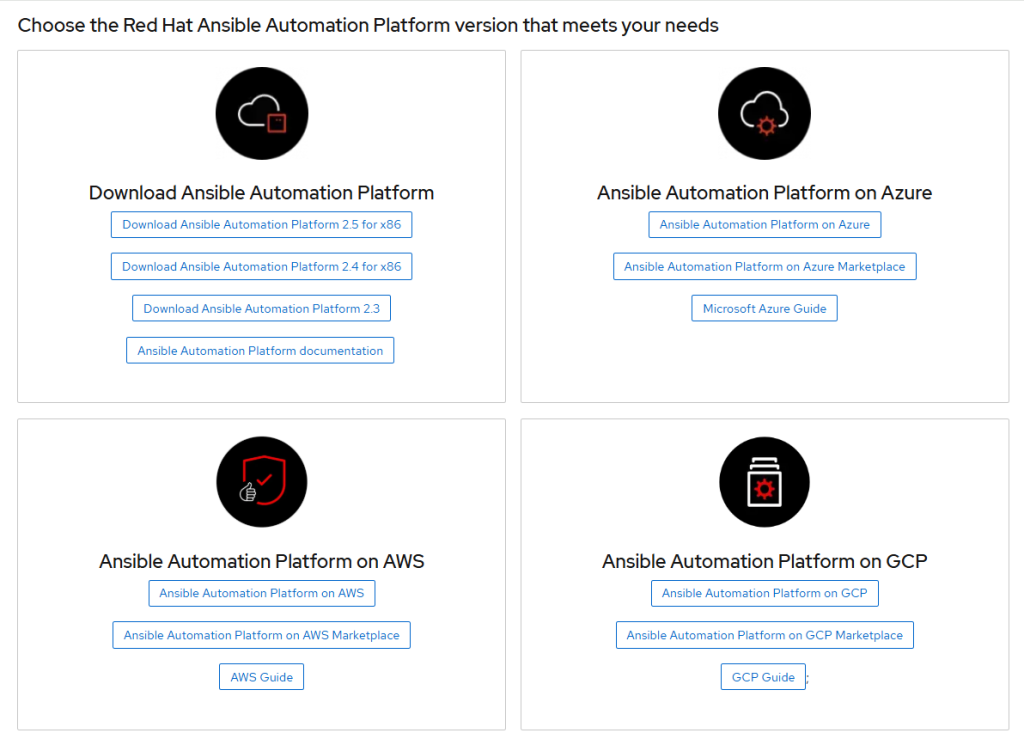
How to download?
- https://developers.redhat.com/products/ansible/download
- TIME – 1 hour. Size – Approax 4G
Here’s a detailed and up-to-date conclusion for installing the latest Ansible Automation Platform (AAP) 2.5+ with the RPM/bundle installer—including the minimum requirements and what’s possible (and not) for learning/lab setups as of 2024–2026.
Minimal System Requirements for AAP 2.5+ Setup-Bundle
Key Points
- The RPM/bundle installer for AAP 2.4/2.5+ is now designed for enterprise, multi-node deployments.
- You cannot run all major AAP components (Controller, Execution Node, Automation Hub, Gateway, etc.) on a single VM.
- For learning or lab: You will need at least three VMs (can be small), each with its own hostname or IP, to install AAP using the bundle.
- If you absolutely need an all-in-one lab, use AWX (upstream) or the AAP Operator on OpenShift instead.
1. Minimal Topology Required for AAP 2.5+ Bundle Install
| Component | Host Requirement | Notes |
|---|---|---|
| Controller | 1 VM | (Required) |
| Automation Hub | 1 VM | (Required) |
| Automation Gateway | 1 VM | (Required in 2.5+) |
| Execution Node | Can share with Gateway | (Optional, but often separated in prod) |
| Database | Can share with others | (Default: installer-managed PostgreSQL) |
- Total: 3 separate VMs/hosts, minimum, for a “minimal” supported learning deployment.
2. System Requirements (Per VM)
- OS: RHEL 8.6+ or RHEL 9.2+ (recommended/supported). Rocky/AlmaLinux for lab, with possible tweaks.
- vCPU: 2+ (4 preferred for Controller/Hub)
- RAM: 4 GB minimum (8 GB recommended)
- Disk: 40 GB+ (Hub needs more if storing lots of collections/content)
- Network: All VMs must reach each other over the network.
3. Minimal Example Inventory (Three VMs)
Suppose your hosts are:
- Controller:
controller.lab.local - Hub:
hub.lab.local - Gateway:
gateway.lab.local
[automationcontroller]
controller.lab.local

[automationhub]
hub.lab.local

[automationgateway]
gateway.lab.local

[database]
controller.lab.local

[all:vars]
admin_password=MyStrongAdminPass123!
pg_host=controller.lab.local
pg_port=5432
pg_database=awx
pg_username=awx
pg_password=MyStrongDBPass123!

automationhub_admin_password=MyStrongHubPass123!
automationhub_pg_host=controller.lab.local
automationhub_pg_port=5432
automationhub_pg_database=automationhub
automationhub_pg_username=automationhub
automationhub_pg_password=MyStrongHubDBPass123!

automationgateway_admin_password=MyStrongGatewayPass123!
automationgateway_pg_host=controller.lab.local
automationgateway_pg_port=5432
automationgateway_pg_database=gateway
automationgateway_pg_username=gateway
automationgateway_pg_password=MyStrongGatewayDBPass123!- You can point all PG (
pg_host) to one node for simplicity.
4. What is NOT Allowed (as of AAP 2.5+)?
- No all-in-one (everything on one VM) installs using the RPM/bundle installer.
- No multiple components with the same hostname/IP in the inventory.
5. If You Absolutely Want All-in-One for Learning:
- Use AWX (open source, Docker/Podman/Kubernetes, easy to run for demo/lab)
- Or use Red Hat AAP Operator in a single-node OpenShift/OKD/minikube cluster.
6. Download/Install Steps Overview
- Prepare 3 VMs with RHEL 8/9 (same major version).
- Set static hostnames and ensure they can resolve each other (via DNS or
/etc/hosts). - Prepare your inventory file as above.
- Unpack the setup bundle and run:
./setup.sh - Access the web UI on your Controller VM after installation.
7. References and Best Practices
Conclusion Table
| Scenario | Supported by RPM Bundle? | Recommended For Labs? | Notes |
|---|---|---|---|
| Single node/VM all-in-one | ❌ No | ❌ Use AWX/Operator | Not supported by AAP 2.5+ bundle |
| 3-node minimal cluster | ✅ Yes | ✅ Yes (labs, PoC) | Each component on separate VM/hostname |
| Full prod cluster | ✅ Yes | ✅ | For enterprise/prod use |
| AWX all-in-one | N/A (not AAP) | ✅ Yes (labs) | Open source only |
| AAP Operator (OpenShift) | ✅ Yes | ✅ Yes (labs/prod) | Supported with Operator |
In Short:
- For minimal AAP 2.5+ bundle install:
You need three VMs/hosts—Controller, Hub, and Gateway—each with a unique hostname/IP. - All-in-one on one VM is NOT supported (use AWX or Operator for that).
- Each VM: RHEL 8.6+/9.2+, 2+ vCPU, 4+ GB RAM, 40+ GB disk, network reachable.
- Best for labs and learning:
Smallest supported cluster is 3 VMs. Use local DNS or/etc/hostsfor name resolution.
You Only Run setup.sh on ONE Machine (the “Installer Node”)
- You do NOT run
setup.shon all 3 VMs. - You run it once, from a “control” or “installer” machine (usually your controller node, but it can be any of the 3, or even a 4th admin node).
- The installer will SSH to all the other nodes listed in your inventory and perform the setup automatically on them.
- All nodes must be accessible via SSH from the installer node (usually as root or a sudo user).
Typical Workflow
- Choose one node to act as your installer node—usually the Controller (
controller.lab.local). - Place the setup bundle and the completed
inventoryfile on this machine. - Ensure you can SSH (passwordless, with key) from this machine to all others as root or a user with passwordless sudo.
- e.g.,
ssh root@hub.lab.local - e.g.,
ssh root@gateway.lab.local
- e.g.,
- From the installer node (e.g.,
controller.lab.local), run:./setup.sh - The installer connects to all hosts listed in the inventory (including itself), installs packages, configures the software, and sets up the cluster.
You Need to Prepare Each Node:
- RHEL 8.6+ or 9.2+ installed, fully updated
- Hostname set and resolvable by the others (use
/etc/hostsor DNS) - SSH server running
- The user running
setup.shmust be able to SSH to all nodes as root (or as a user with passwordless sudo) - Optional: Set up
ssh-copy-idto distribute your SSH key
Summary Table
| Node | Needs Setup Bundle? | Run setup.sh? | Needs to Accept SSH? | Needs Hostname? |
|---|---|---|---|---|
| controller | Yes (installer) | ✅ Yes | ✅ Yes | Yes |
| hub | No | ❌ No | ✅ Yes | Yes |
| gateway | No | ❌ No | ✅ Yes | Yes |
In Short:
- Only run
setup.shon one node (commonly the controller) - That machine must be able to SSH to all others using the user you run the installer as
- All other setup is done by the installer over SSH!

I’m Rajesh Kumar, a DevOps, SRE, DevSecOps, Cloud, and Platform Engineering expert passionate about sharing practical knowledge, real-world experiences, and industry best practices. I have worked at Cotocus and regularly write about technology, travel, investing, health, product reviews, and digital marketing through my various platforms.
I publish technical articles at DevOps School, travel stories at Holiday Landmark, stock market insights at Stocks Mantra, health and fitness guidance at My Medic Plus, product reviews at TrueReviewNow, and SEO and digital marketing strategies at Wizbrand.
Find Trusted Cardiac Hospitals
Compare heart hospitals by city and services — all in one place.
Explore Hospitals





