
Thanks for pointing that out! The AWS EKS authentication method has changed in 2026, and the aws-auth ConfigMap is no longer used for adding IAM roles. Instead, IAM Access entries are managed under the Access tab in the AWS Console.
Here are the updated steps to manually grant your Federated IAM User access to kubectl in AWS EKS.
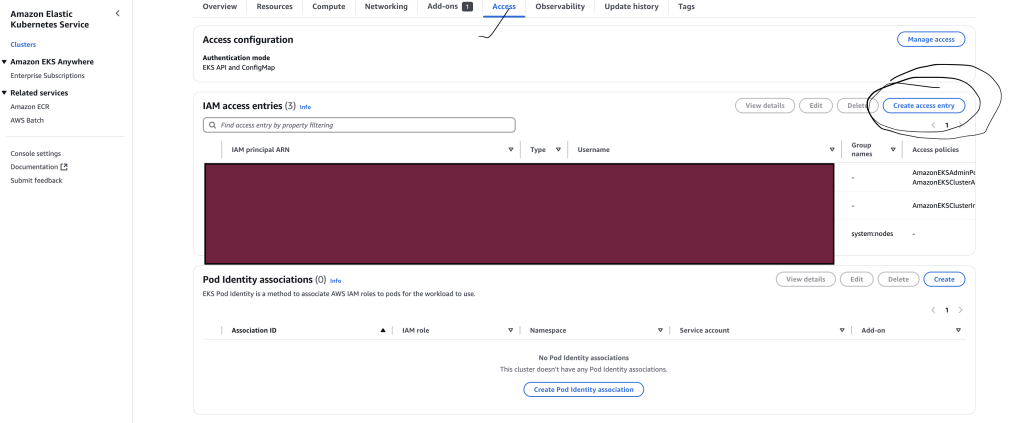
✅ Step 1: Identify Your Federated IAM Role
- Go to AWS Console → IAM → Roles
- Find the IAM Role associated with your Federated User (SSO/Federated Access).
- Copy the Role ARN, which looks like:
arn:aws:iam::329599659644:role/<Federated-Role-Name>
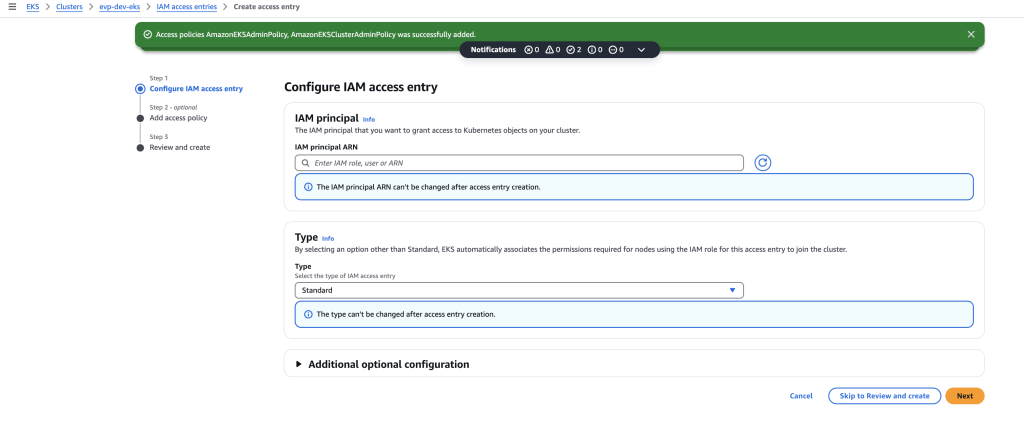
✅ Step 2: Add the Federated IAM Role in EKS “Access” Tab
- Go to AWS Console → EKS → Your Cluster (
evp-dev-eks) - Click the Access tab.
- Click “Add IAM access entry”.
- Select IAM Role.
- Paste your Federated Role ARN (
arn:aws:iam::329599659644:role/<Federated-Role-Name>). - Assign a Cluster Role:
- Choose Administrator Access (Full
kubectlpermissions) →system:masters - Alternatively, choose Read-Only Access (
View-Onlyrole).
- Choose Administrator Access (Full
- Click “Save Changes”.
✅ Step 3: Attach Required IAM Policies to the Federated Role
Your Federated IAM Role must have the following policies:
Attach Policies to Your Role
- Go to AWS Console → IAM → Roles →
<Federated-Role-Name> - Click Permissions → Attach Policies
- Add the following policies:
- ✅
AmazonEKSClusterPolicy - ✅
AmazonEKSWorkerNodePolicy - ✅
AmazonEKSServicePolicy - ✅
eks:AccessKubernetesApi
- ✅
- Click Attach Policy.
✅ Step 4: Update kubeconfig for Federated User
Once IAM access is set, update your local kubeconfig to reflect the changes:
aws eks update-kubeconfig --name evp-dev-eks --region ap-northeast-1 --role-arn arn:aws:iam::329599659644:role/<Federated-Role-Name>
Code language: HTML, XML (xml)
Then test access:
kubectl get nodes
Code language: JavaScript (javascript)
✅ Step 5: Verify Access
If kubectl get nodes still fails, check:
kubectl auth can-i list nodes --all-namespaces --verbose
Code language: PHP (php)- If “yes”, you have access.
- If “no”, IAM role or permissions need adjustment.
🎯 Summary of AWS 2026 EKS Changes
✅ The aws-auth ConfigMap is no longer used.
✅ IAM roles/users are now added via EKS “Access” Tab.
✅ Federated users need IAM role-based access via IAM access entries.

I’m Rajesh Kumar, a DevOps, SRE, DevSecOps, Cloud, and Platform Engineering expert passionate about sharing practical knowledge, real-world experiences, and industry best practices. I have worked at Cotocus and regularly write about technology, travel, investing, health, product reviews, and digital marketing through my various platforms.
I publish technical articles at DevOps School, travel stories at Holiday Landmark, stock market insights at Stocks Mantra, health and fitness guidance at My Medic Plus, product reviews at TrueReviewNow, and SEO and digital marketing strategies at Wizbrand.
Find Trusted Cardiac Hospitals
Compare heart hospitals by city and services — all in one place.
Explore Hospitals





