
Comparison between System Processes and Inherited Processes
Here is a comparison between System Processes and Inherited Processes in Azure DevOps in a tabular format:
| Aspect | System Process | Inherited Process |
|---|---|---|
| Definition | Default process templates provided by Azure DevOps, like Agile, Scrum, or CMMI. | Customized versions of system processes created by users to fit specific project needs. |
| Customization | Cannot be customized directly. Fields, states, and workflows are fixed. | Fully customizable. You can add custom fields, states, rules, and workflows. |
| Examples | Agile, Scrum, CMMI (default templates). | Custom Agile, Custom Scrum (inherited versions). |
| Creation | Created by Azure DevOps and applied by default. | Created by users by inheriting from a system process. |
| Modifying Work Items | No modifications allowed. | Allows modifications such as adding custom fields, workflows, and layout changes. |
| Control over Fields | Pre-defined fields only. | Can add, edit, or remove fields based on project requirements. |
| Control over States/Workflows | Pre-defined states and workflows. | Can modify states (e.g., adding new states) and workflows for custom requirements. |
| Assigning to Projects | Assigned by default when creating new projects unless otherwise specified. | Must be manually assigned to a project after creation. |
| Suitability | Suitable for standard workflows without customization needs. | Ideal for organizations needing customization for specific project workflows. |
| Versioning | System processes are maintained and updated by Microsoft, and updates are applied automatically. | Inherited processes are maintained by the user, and they won’t receive updates unless modified manually. |
| Security/Permissions | Default system permissions. | Permissions and rules can be adjusted for custom processes. |
| Typical Use Case | Teams that follow industry-standard methodologies like Agile, Scrum, or CMMI. | Teams that need specific modifications to standard methodologies. |
| Upgrade Path | Cannot be upgraded or changed directly. | Inherited processes can be modified as project needs evolve. |
Key Takeaway:
- System Processes are rigid and predefined, ideal for teams that do not need any customizations.
- Inherited Processes are flexible and customizable, allowing teams to tailor the process to their specific needs.
Steps to Enable Custom Fields in Azure DevOps:
The ability to add custom fields is disabled in Azure DevOps, it is likely because your project is using a System Process (like Agile, Scrum, or CMMI), and you cannot modify system processes directly. Azure DevOps only allows you to customize work items in Inherited Processes.
Here’s how you can enable customization by creating an Inherited Process:
Steps to Enable Custom Fields in Azure DevOps:
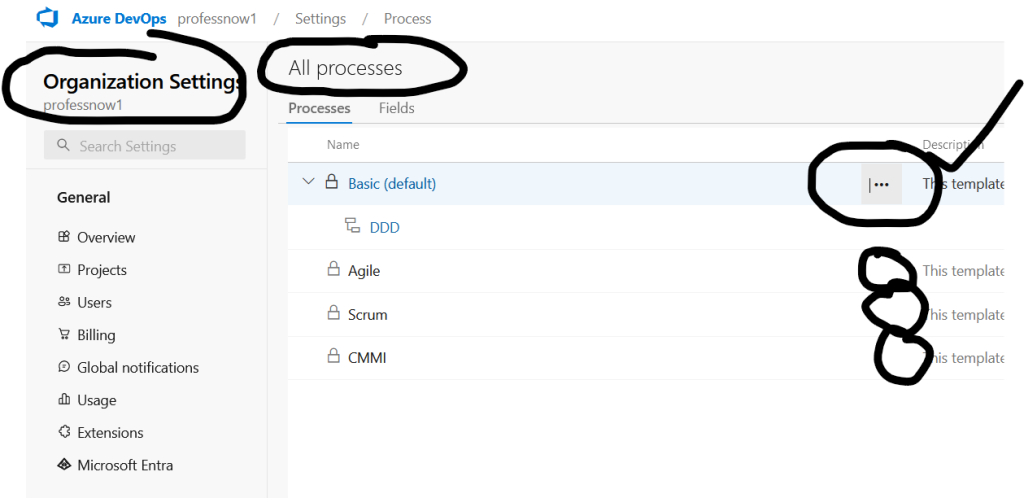
- Go to Organization Settings:
- Navigate to your Azure DevOps organization, and in the top-right corner, click on the user icon and select Organization settings.
- Navigate to Process:
- In the Settings menu on the left-hand side, under the Boards section, click on Process.
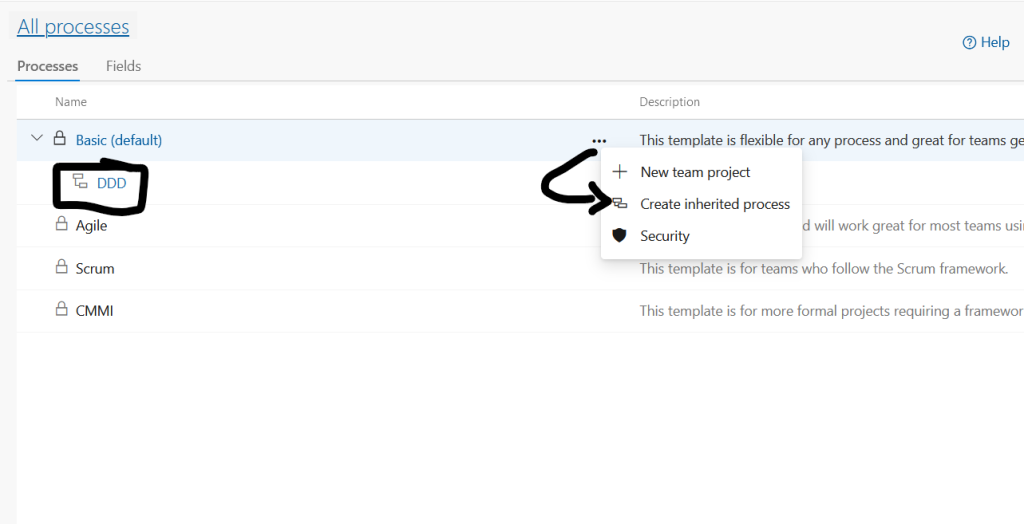
- Create an Inherited Process:
- Find the process that your project is using (for example, Agile, Scrum, or CMMI).
- Click the three dots (
...) next to the process and select Create inherited process. - Name your inherited process and save it.
- Assign the Inherited Process to Your Project:
- After creating the inherited process, go to the Project Settings of your project.
- Click on Boards > Project configuration.
- Find the section that allows you to change the process and assign your project to the newly created inherited process.
- Add Custom Fields:
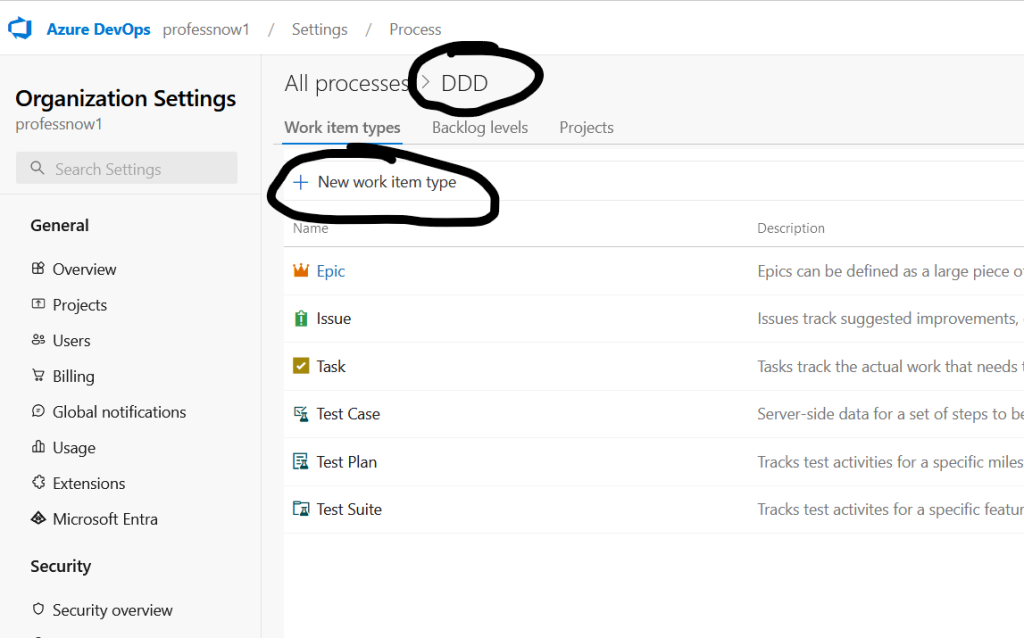
- Once your project is associated with the inherited process, go back to Organization Settings > Processes.
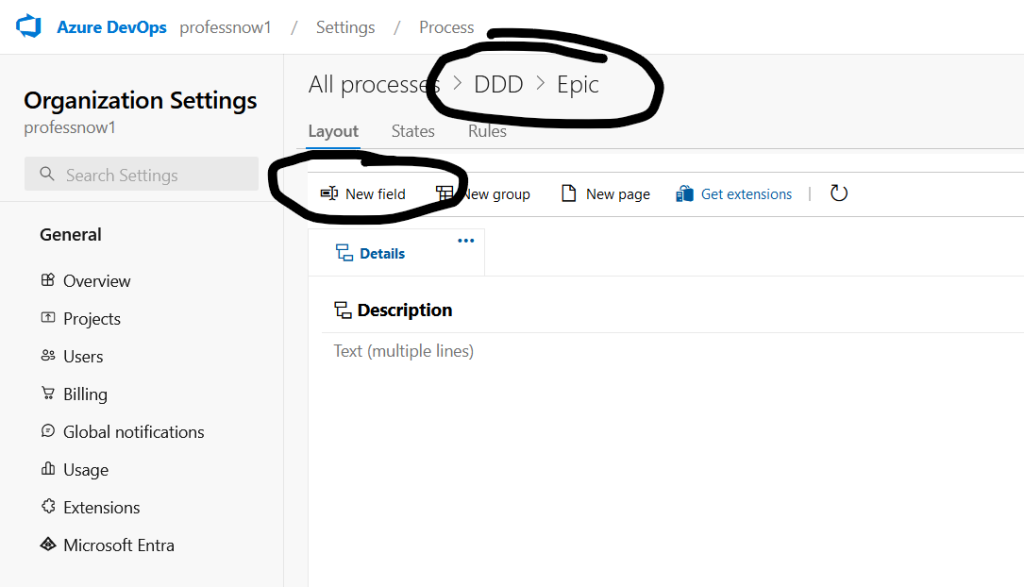
- Click on the inherited process, then navigate to the Work Item Types where you can now add custom fields by following the steps outlined earlier.
By creating an Inherited Process, you’ll be able to unlock the customization options, including adding custom fields, modifying work item forms, and tailoring the process to fit your project’s needs.

I’m Rajesh Kumar, a DevOps, SRE, DevSecOps, Cloud, and Platform Engineering expert passionate about sharing practical knowledge, real-world experiences, and industry best practices. I have worked at Cotocus and regularly write about technology, travel, investing, health, product reviews, and digital marketing through my various platforms.
I publish technical articles at DevOps School, travel stories at Holiday Landmark, stock market insights at Stocks Mantra, health and fitness guidance at My Medic Plus, product reviews at TrueReviewNow, and SEO and digital marketing strategies at Wizbrand.
Find Trusted Cardiac Hospitals
Compare heart hospitals by city and services — all in one place.
Explore Hospitals





