
Why DevOps in game development is different
DevOps in game development is not just a faster way to compile code. A game build is a moving bundle of engine code, gameplay scripts, shaders, 3D assets, UI files, audio, localization, platform settings, certificates, backend services, and live configuration. If one part changes without discipline, the whole build can become unstable.
That is why game studios need DevOps practices that understand both software delivery and content production. A gameplay feature may depend on animation states, texture memory, asset bundles, UI prefabs, server rules, and store-platform requirements at the same time. The DevOps team’s job is to make those moving parts visible, repeatable, testable, and safe to release.
Decomposing game DevOps: code, assets, builds, and live operations
A useful way to understand DevOps in game development is to split it into several connected pipelines. Code is only one of them. A playable build also depends on visual assets, audio, localization, configuration, backend services, platform packaging, and live operations. DevOps work becomes valuable when these parts move through one traceable release system instead of separate informal handoffs.
Code pipeline
The code pipeline covers engine code, gameplay scripts, tools, build scripts, backend services, test suites, and configuration schemas. CI should compile the project, run fast tests, detect broken dependencies, enforce branch rules, and create artifacts that can be reproduced from a specific commit.
Asset pipeline
The asset pipeline is where game DevOps differs most from ordinary software delivery. Game developers usually integrate content rather than author every model themselves: they pick up characters, props, vehicles, environment kits, VFX elements, or UI textures from a 3D game art studio and move them through engine import settings, prefab setup, asset bundles, automated validation, and release packaging. That handoff is where CI should catch topology problems, oversized textures, missing LODs, broken material references, bad pivots, absent collision meshes, or platform-specific memory issues before the asset reaches QA.
Build and release pipeline
The build and release pipeline turns code and assets into platform-specific packages. It handles build farm scheduling, dependency caching, build target selection, signing, artifact storage, symbols, version metadata, store packaging, release channels, and rollback readiness. This is where Unity, Unreal, Jenkins, Azure DevOps, Unity Build Automation, or cloud build workers become operational tools rather than abstract DevOps labels.
Backend, configuration, and live-ops pipeline
The backend and live-ops pipeline covers matchmaking, accounts, commerce, telemetry, remote configuration, feature flags, economy tuning, seasonal events, CDN delivery, monitoring, alerts, crash reports, and incident response. In live games, a release is not finished when a binary is uploaded. It is finished when the new version behaves safely for real players.
Core responsibilities of a game DevOps team
In a web application, DevOps usually focuses on services, deployment, infrastructure, and monitoring. In games, those responsibilities remain, but the pipeline also has to serve designers, artists, QA testers, release managers, platform engineers, community teams, and live-ops producers.
Typical responsibilities include:
- Source control structure: branching, permissions, large-file storage, locking rules, and repository layout for code and assets.
- Build automation: headless Unity or Unreal builds, build farm scheduling, dependency caching, and artifact versioning.
- Content validation: checks for missing references, broken bundles, shader errors, texture limits, naming rules, and platform-specific asset budgets.
- Automated testing: unit tests, smoke tests, playmode tests, server API tests, save-game compatibility tests, and performance checks.
- Release engineering: packaging, signing, store uploads, staged rollout, rollback plans, and patch notes support.
- Live operations: telemetry, alerting, crash reporting, server capacity, configuration flags, seasonal events, and emergency hotfixes.
Good DevOps for game development removes uncertainty. Designers should know whether the latest build is playable. QA should know which build contains which fixes. Engineers should see why a build failed without digging through guesswork. Producers should be able to tell whether a feature is ready for a test channel, a regional release, or a full production launch.
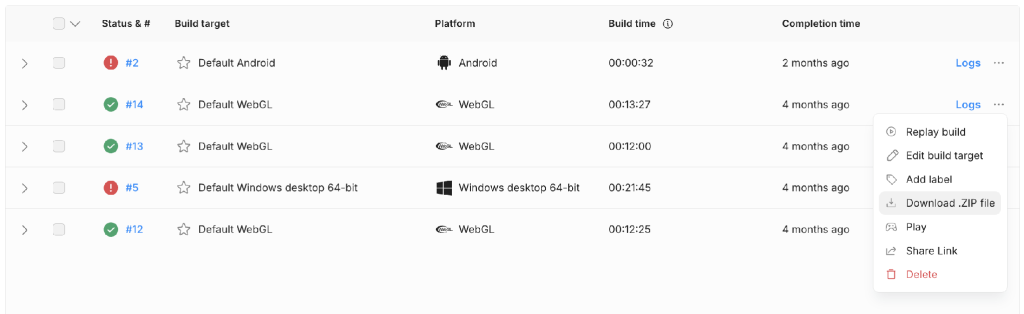
This is also why game CI/CD interfaces need to expose more than a pass or fail result. Build target, platform, build duration, logs, artifacts, replay actions, and sharing controls help teams understand whether a build is ready for QA, external testing, or release promotion.
How game DevOps compares with web, desktop, and mobile pipelines
Game DevOps overlaps with other software pipelines, but the delivery unit is different. Web teams mostly ship service changes. Desktop teams ship installers and update packages. Mobile teams ship signed store builds. Game teams often ship all of that plus large binary assets, engine-specific content, platform packages, backend services, and live configuration.
| Product type | Pipeline unit | Release bottleneck | Operational focus |
| Games | Engine code, content, assets, bundles, backend services, platform builds | Build farm time, asset validation, platform SDKs, certification, save compatibility | Crashes, latency, matchmaking, economy, events, patch adoption |
| Web apps | Service code, APIs, database migrations, static assets | Deployment safety, schema changes, feature flags, traffic routing | Availability, latency, errors, conversion, rollback speed |
| Desktop apps | Installer packages, auto-updaters, native dependencies, OS variants | Signing, installer reliability, backward compatibility, offline states | Crash reports, update adoption, OS-specific support |
| Mobile apps | Signed iOS/Android builds, device-specific behavior, store metadata | App review, certificates, provisioning, device coverage, staged rollout | Crash-free sessions, ANRs, purchases, version fragmentation |
Table: The same DevOps principles behave differently once the delivery unit changes.
What a practical game CI/CD pipeline looks like
A mature pipeline usually has three related lanes: client builds, backend services, and content updates. Client builds cover PC, console, mobile, or WebGL packages. Backend pipelines cover game servers, matchmaking, commerce, accounts, telemetry, and admin tools. Content pipelines cover addressable assets, localization, balance data, store assets, downloadable content, and live events.
A common flow looks like this:
- A developer, designer, or artist submits a change through Git, Perforce, or another version control system.
- The CI service detects the change and selects the right build target, branch, engine version, and platform profile.
- The build farm compiles code, imports or cooks assets, creates bundles, and produces installable artifacts.
- Automated checks validate tests, memory budgets, package size, asset references, save compatibility, and platform rules.
- The successful build is archived with version metadata, commit hash, release channel, and changelog context.
- The build moves to internal QA, external beta, regional rollout, or production, depending on the release plan.
- Live telemetry and crash data feed back into the next sprint, hotfix, or content drop.
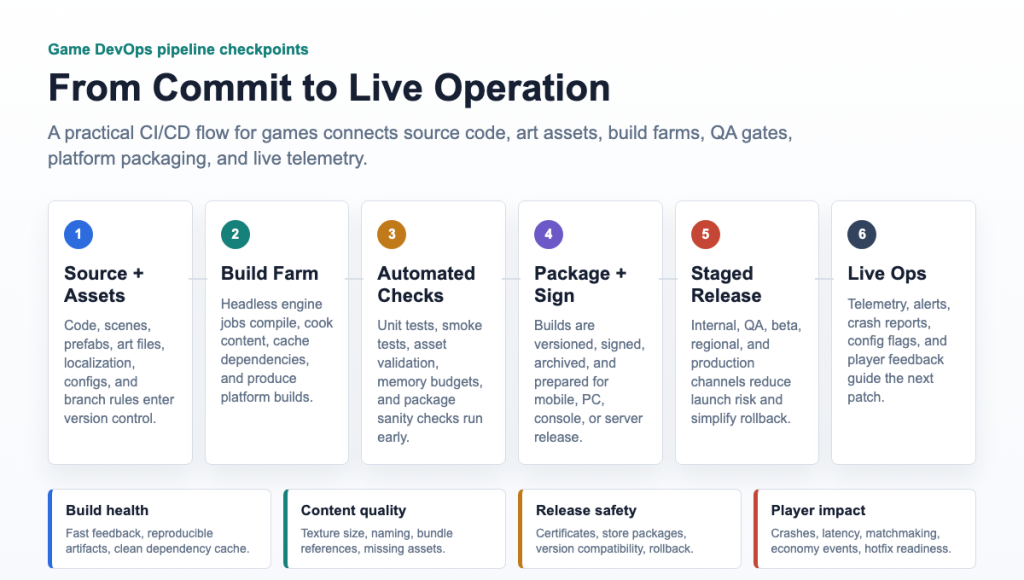
Image: Game DevOps pipeline checkpoints from source control to live operations.
CI/CD tool choices for Unity game builds
Unity Cloud vs. Azure DevOps for game CI/CD
When teams compare Unity Cloud vs. Azure DevOps for game CI/CD, the real question is specialization. Unity Build Automation is designed around Unity projects and cloud-based multi-platform builds. It is a good fit when the team wants a managed path for continuous integration and CI/CD for the Unity game engine, especially for smaller teams that do not want to maintain their own build machines.
Azure DevOps is broader. Azure Pipelines can orchestrate many languages, repositories, test stages, artifact flows, approval gates, and deployment environments. It makes sense when the studio already uses Microsoft tooling, needs custom YAML pipelines, has backend services beside the game client, or wants one delivery system for game services, infrastructure, and tools.
In practice, many studios combine a game-aware build tool with a general CI/CD platform. For example, Unity-specific build automation can produce the client artifact, while Azure DevOps manages backend deployments, approval gates, release notes, dashboards, and infrastructure workflows.
Unity Cloud vs. Jenkins for game build CI/CD
In a Unity Cloud vs. Jenkins comparison for game builds and CI/CD, the tradeoff is control versus maintenance. Jenkins is flexible and works well when a studio needs custom build agents, self-hosted hardware, console SDK constraints, private network access, or unusual build scripts. The cost is ownership: the team must maintain plugins, agents, credentials, logs, scaling, and security updates.
Unity Cloud is more opinionated and managed. It can reduce setup time for Unity teams, but it may not cover every studio-specific requirement. A small mobile team may prefer managed Unity builds. A large cross-platform studio with Perforce, console branches, custom tools, and heavy binary assets may prefer Jenkins, TeamCity, Horde, or another build-farm approach.
| Tool | Best fit | Strengths | Watchouts |
| Unity Cloud Build Automation | Unity-first teams that want managed multi-platform builds without owning build machines. | Integrated Unity workflow, cloud builds, source-control triggers, platform targets, build sharing. | Less flexible for unusual console, network, SDK, or custom build-farm requirements. |
| Azure DevOps | Studios that need one CI/CD system for client builds, backend services, approvals, artifacts, and infrastructure. | YAML pipelines, hosted or self-hosted agents, approvals, artifacts, test reporting, Azure integrations. | Unity specifics still need custom scripts, licensing setup, caching strategy, and agent maintenance. |
| Jenkins | Teams that need maximum control over private build farms, custom hardware, console SDKs, Perforce-heavy projects, or unusual scripts. | Highly customizable, plugin-rich, self-hosted, good for complex build graphs and local infrastructure. | Requires more administration: controller health, plugins, credentials, agents, security, scaling, and logs. |
Table: Unity Cloud, Azure DevOps, and Jenkins compared for Unity game build pipelines.
DevOps tools for game tech: choosing the stack
The best DevOps tools for game tech depend on the studio’s engine, platform targets, team size, and release model. A useful stack usually includes version control, build orchestration, artifact storage, secret management, automated testing, device testing, telemetry, monitoring, and incident response.
Unity teams may use Unity Build Automation, GitHub Actions, GitLab CI, Azure DevOps, Jenkins, or GameCI. Unreal teams often need tooling that understands BuildGraph, Unreal Automation Tool, derived data cache, Perforce streams, and distributed build agents. Cloud-based studios may automate game development with AWS DevOps by using cloud build workers, artifact storage, secrets management, device testing, CDN distribution, and infrastructure as code.
Searches for Epic Games DevOps practices or Rockstar Games DevOps strategy usually point to the same underlying lesson: large studios invest heavily in build reliability, content pipelines, automation, and release control. Smaller teams do not need to copy AAA infrastructure, but they should copy the habit of making every build traceable, testable, and recoverable.
How to become a game DevOps engineer
A person moving into game DevOps should not start by memorizing every CI tool. The stronger path is to learn what makes game delivery fragile: large binary assets, long build times, engine version drift, platform SDK constraints, non-code contributors, and live-service compatibility. The job sits between build engineering, release engineering, backend operations, and technical production.
The most useful learning path looks like this:
- Learn one engine’s build model deeply. For Unity, understand batchmode builds, project settings, Addressables, platform targets, signing, and automated test runs. For Unreal, understand UnrealBuildTool, AutomationTool, cooking, packaging, BuildGraph, derived data cache, and Perforce-heavy workflows.
- Get comfortable with source control for large teams. Game studios often use Perforce, Git LFS, Unity Version Control, branch streams, file locking, binary diff limits, and strict workspace rules.
- Practice scripting the pipeline. Python, PowerShell, Bash, YAML pipelines, Jenkinsfiles, and build scripts are more important than any single dashboard.
- Learn artifact discipline. Every build needs a version, changelog, commit reference, symbols, config version, asset-bundle manifest, and a place to be downloaded or promoted.
- Understand platform packaging. Mobile signing, iOS provisioning, Android keystores, console SDKs, Steam depots, launcher builds, and store metadata all affect release timing.
- Add live-ops fundamentals. Monitoring, crash reporting, feature flags, remote config, server deploys, incident response, and rollback planning make the role player-facing.
For job searches, look beyond the exact title. Relevant roles may be called build engineer, release engineer, DevOps engineer, infrastructure engineer, tools engineer, automation engineer, or live-ops engineer. The interview signal is usually practical: can you reduce build time, make broken builds diagnosable, protect credentials, automate packaging, and explain how a bad patch would be rolled back?
DevOps best practices for game studios
The strongest DevOps best practices for game studios are practical rather than fashionable.
- Keep client, server, and content versioning explicit. A build should always reveal its commit, asset version, config version, and backend compatibility.
- Treat assets as production inputs. Validate naming, references, texture sizes, bundle groups, localization keys, and platform limits before QA discovers them manually.
- Separate fast checks from slow checks. Run quick validation on every change, then schedule longer platform builds, device tests, and performance checks where they make sense.
- Archive every release candidate. Store the binary, symbols, configuration, manifest, changelog, and build logs so rollback and debugging are possible.
- Make live configuration reversible. Feature flags, economy tuning, matchmaking rules, and event schedules should have review, history, and rollback paths.
- Monitor player impact, not only server health. Crashes, latency, failed purchases, disconnects, matchmaking wait time, frame-time spikes, and patch adoption matter more than a green server dashboard.
A good technical benchmark is to frame game delivery as source-control storage, network connectivity, build compute, automated testing, secure signing, artifact delivery, and device testing rather than a plain compile-and-deploy flow.
Live game operations: where DevOps becomes player-facing
Live operations begin when the release pipeline meets real players. For online games, DevOps covers server scaling, deployment windows, observability, alert routing, incident response, and rollback. For mobile and PC games, it also includes content delivery, remote configuration, store package management, staged rollouts, crash triage, and compatibility between client versions.
The hardest problems are often coordination problems. A backend hotfix must not break older clients. A live event must match the app version, asset bundle version, store region, and localization state. A patch should not invalidate saves or change economy behavior without a migration plan. A regional rollout should be measured before a full release.
Live teams see how DevOps practices influence the gaming industry whenever continuous deployment, automated testing, infrastructure automation, and fast release cycles determine whether a patch feels smooth or disruptive to players.
Final production checks
DevOps in game development is ultimately about protecting creative speed. Artists, designers, engineers, QA, and live-ops teams can move faster when the pipeline catches mistakes early and gives everyone the same source of truth.
Before scaling a game pipeline, a studio should answer a few operational questions: Can we reproduce yesterday’s build? Can QA install the right artifact without asking an engineer? Can we see which asset or code change broke the build? Can we roll back a bad configuration? Can we ship a hotfix without turning it into a full production fire drill?
If the answer is yes, DevOps is doing its real job. It is not just automating builds. It is making game development more reliable, more collaborative, and safer for live players.

I’m Rajesh Kumar, a DevOps, SRE, DevSecOps, Cloud, and Platform Engineering expert passionate about sharing practical knowledge, real-world experiences, and industry best practices. I have worked at Cotocus and regularly write about technology, travel, investing, health, product reviews, and digital marketing through my various platforms.
I publish technical articles at DevOps School, travel stories at Holiday Landmark, stock market insights at Stocks Mantra, health and fitness guidance at My Medic Plus, product reviews at TrueReviewNow, and SEO and digital marketing strategies at Wizbrand.
Find Trusted Cardiac Hospitals
Compare heart hospitals by city and services — all in one place.
Explore Hospitals
A valuable addition to this discussion would be the operational side of managing live games after a release reaches production. A successful deployment is only the beginning—development teams also need controlled rollout strategies such as feature flags, phased releases, canary deployments, and reliable rollback plans to reduce the risk of widespread player issues. Equally important is combining infrastructure monitoring with in-game analytics, including crash rates, player disconnects, latency, and gameplay performance, so problems can be identified before they affect a large audience. Modern game delivery also involves handling large asset packages, supporting multiple platforms, and efficiently distributing updates worldwide, making release governance, artifact management, and CDN optimization essential parts of an effective DevOps strategy.