
Incidents
It has been implicated in activity which resembles scanning remote hosts on the internet for security vulnerabilities. Activity of this nature is forbidden in the AWS Acceptable Use Policy (https://aws.amazon.com/aup/). We’ve included the original report below for your review.
This is a notification of unauthorized uses of systems or networks.
We have observed IP addresses from your network probing my servers for TCP open ports. Due to their dubious behavior, they are suspected to be compromised botnet computers.
If you regularly collect IP traffic information of your network, you will see the IPs listed connected to various TCP ports of my server at the time logged, and I suspect that they also connected to TCP ports of many other IPs.
If a Linux system was at the attacker’s IP, you might want to use the command “netstat -ntp” to list its active network connections. If there is still some suspicious connection, find out what PID/program/user ID they belong to as you might find something to help you solve this problem.
In addition to the above, kindly notify the victims (owners of those botnet computers) as this will assist them in taking the appropriate action to clean their computers. Once this action is completed, not only will it prevent severe incidents such as data leakage and DDos but, it will also stand off botnets from taking up your network bandwidth.
Solution
Step – 1 – Investigate the Process
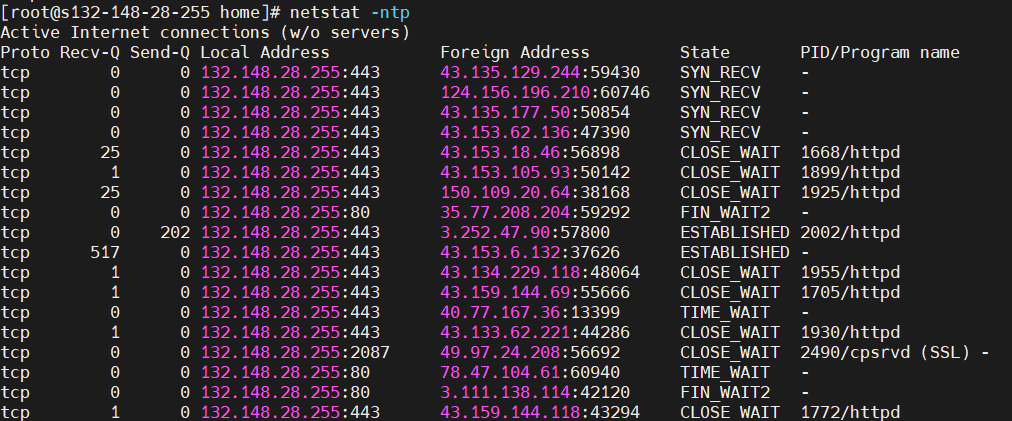
$ netstat -ntp
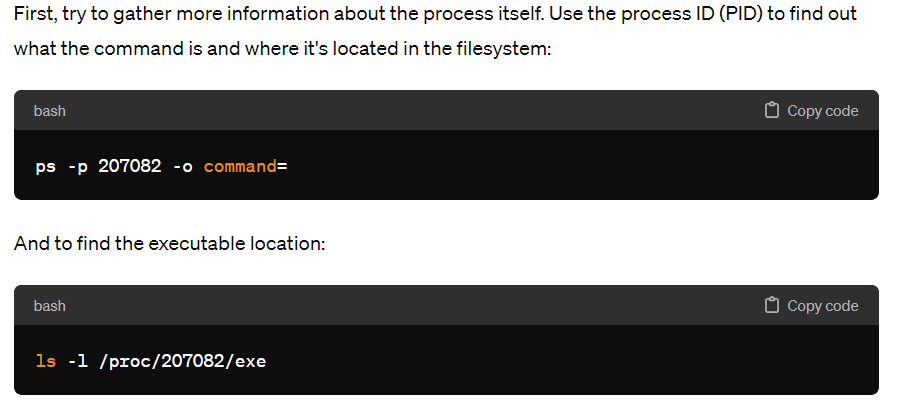
$ ps -p 207082 -o command=
$ ls -l /proc/207082/exe
Step 2 – Check for Service Units or Cron Jobs
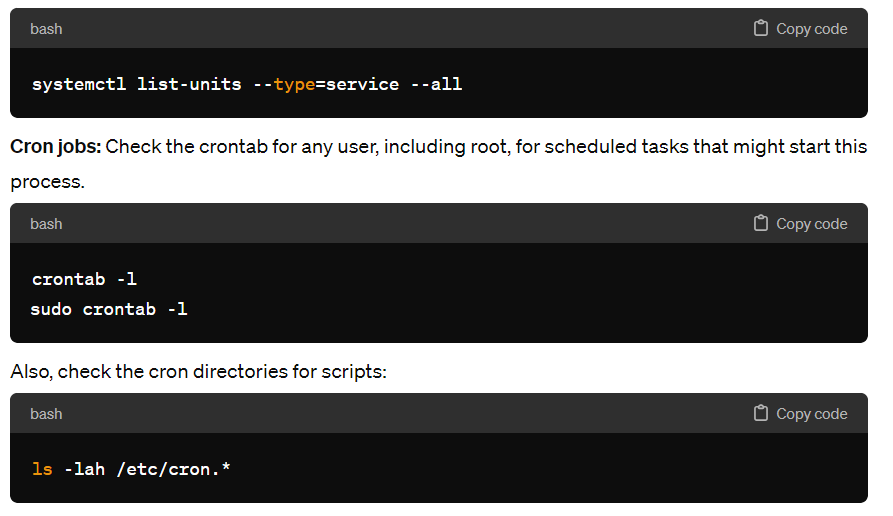
The process might be started by a systemd service or a cron job:
- Systemd service: Check for custom systemd service files in
/etc/systemd/system/or/lib/systemd/system/and usesystemctlto list all services to see if any custom or suspicious service is running.
Step 3 – Stop and Disable the Process
If the process is managed by a systemd service, disable and stop it:


$ sudo systemctl stop servicename.service
$ sudo systemctl disable servicename.service

If it's a cron job, remove or comment out the line in the crontab.
Step 4 – Remove Executable and Clean Up
After identifying the executable, consider carefully removing it if it's confirmed to be malicious or not needed:

$ sudo rm /path/to/executable

Be cautious, as removing system files or legitimate processes can harm your system.
5. Further Security Measures
- Rootkit Check: Since this process appears suspicious, it’s a good idea to run a tool like
rkhunterorchkrootkitto check for rootkits. - Malware Scan: Use a Linux-based antivirus tool to scan your system for malware.
- Audit Logs: Check
/var/log/auth.log,/var/log/syslog, or relevant system logs for any unusual activity, especially around the times the process was started. - System Updates: Ensure your system and all applications are up-to-date with the latest security patches.
- Firewall Review: Verify your
iptablesrules and ensure no unwanted rules are allowing traffic through. - Network Monitoring: Monitor outbound and inbound connections for further suspicious activities.
CULPRIT#1
I see the process was getting created by daemon user and through crontab

file /var/tmp/bash18
file /var/tmp/sh18
file /var/tmp/init18

file /var/bash18
file /var/sh18
file /var/init18

file /var/lock/bash18
file /var/lock/sh18
file /var/lock/init18Code language: JavaScript (javascript)
Investigation Further -> How this code was added in Crontab?
I am wondering how these executable such as bash18, sh18 and init18 is set in user daemon crontab using XAMPP. Any clue?
To search through your JavaScript (.js) and PHP (.php) codebase for patterns that might indicate code responsible for adding cron jobs, you can use the grep command in Linux.
Basic grep Search
This searches all PHP and JS files for the word "crontab":

$ grep -r --include=\*.{php,js} "crontab" .

Search for Shell Execution Functions

Many malicious scripts use PHP's shell execution capabilities (exec, shell_exec, system, passthru, and backticks) to run system commands.


$ grep -r --include=\*.php "\(exec\|shell_exec\|system\|passthru\|`\)" .

This command will search for any of the mentioned functions in PHP files. Note the use of backslashes to escape certain characters and the use of \| to indicate an "OR" condition.

Searching for Suspicious Base64 Encodings

Malicious code is often encoded in Base64 to obfuscate its presence. Searching for Base64 encoded strings can sometimes uncover hidden malicious code.


$ grep -r --include=\*.{php,js} "base64_decode" .Code language: PHP (php)
List Crontabs for All Users
To view the crontab entries for all users, you can check the crontab files stored in /var/spool/cron/crontabs/ (for most Linux distributions). Use the following commands:
for user in $(cut -f1 -d: /etc/passwd); do
  echo "Crontab for user: $user";
  sudo crontab -l -u $user 2>/dev/null;
doneCode language: JavaScript (javascript)
I’m Rajesh Kumar, a DevOps, SRE, DevSecOps, Cloud, and Platform Engineering expert passionate about sharing practical knowledge, real-world experiences, and industry best practices. I have worked at Cotocus and regularly write about technology, travel, investing, health, product reviews, and digital marketing through my various platforms.
I publish technical articles at DevOps School, travel stories at Holiday Landmark, stock market insights at Stocks Mantra, health and fitness guidance at My Medic Plus, product reviews at TrueReviewNow, and SEO and digital marketing strategies at Wizbrand.
Find Trusted Cardiac Hospitals
Compare heart hospitals by city and services — all in one place.
Explore Hospitals





