
📌 Introduction
Docker remains the most popular container runtime for developers and sysadmins, but starting from Docker Engine v29.x, significant internal architecture changes have emerged. These changes impact how container images are stored, where layered filesystems exist, and how Docker integrates with its underlying containerd runtime.
This guide covers:
- Major differences between Docker ≤28 and v29+
- Internal storage layout changes
- Impacts on developers and administrators
- How to inspect image and container layers now
- Migration and compatibility guidance
🧱 Docker Architecture — Before v29
In earlier Docker versions (up to v28.x):
| Feature | Description |
|---|---|
| Image Storage | Docker used its “GraphDriver” model, storing image layers under /var/lib/docker/overlay2/ or similar (e.g., aufs, btrfs) |
| Container Storage | Containers used a writable layer on top of the image root filesystem, served by the same driver (overlay2) |
| Image Metadata | Found under /var/lib/docker/image/<driver>/layerdb/ |
| Docker Internal Runtime | Docker used its own embedded runtime (dockerd), talking directly to container execution (runc) |
| Networking | Docker relied on iptables to manage NAT, firewall rules, port forwarding, and DOCKER-USER chains |
| Minimum API Versions | Docker Engine accepted older client versions (v1.24+) depending on the server version |
🆕 What’s New in Docker 29.x?
🎯 Key Changes
| Area | What’s Changed in Docker v29+ | Why It Matters |
|---|---|---|
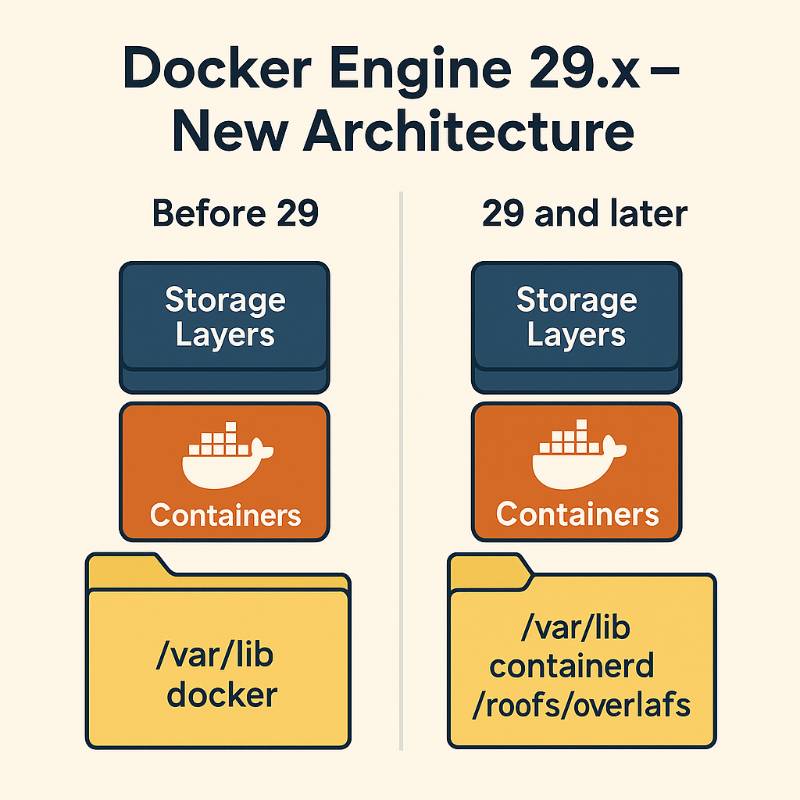
| Storage Model | Docker adopts containerd’s native image store + snapshotter as default | Massive change: image layers are no longer under /var/lib/docker/image/... but under /var/lib/containerd/... |
| Image Layer Paths | Layers are stored in: /var/lib/containerd/io.containerd.snapshotter.v1.overlayfs/snapshots/<id>/fs/ | If you’re looking for layer data for forensic or debug, this path is now standard |
| Container RootFS Path | Merged runtime container filesystem is now under: /var/lib/docker/rootfs/overlayfs/<container-id>/ | A clean split between image storage (containerd) and runtime (docker) |
| Networking Support | Experimental support for nftables (in addition to iptables) | Future-proofing for systems where iptables is deprecated |
| API Version | Minimum Docker API version is now 1.44 | Older clients or tools using old SDKs will need updates |
| Go Module Migration | Docker Engine (moby) fully migrated to Go modules | Easier version tracking and imports for developers |
| Legacy Storage Driver Deprecation | Direct usage of overlay2/aufs “graph drivers” is being phased out | All new installs use containerd snapshotters by default |
🔍 Storage Layout – Then vs Now
Before Docker v29:
/var/lib/docker/
  ├── overlay2/               # Data for layers and containers
  ├── containers/
  ├── image/
  │    └── overlay2/
  │         └── layerdb/
Code language: PHP (php)
Docker v29 and after:
/var/lib/docker/
  ├── rootfs/overlayfs/       # Merged rootfs for active containers
  ├── containers/
  ├── volumes/

# Image layers are now here:

/var/lib/containerd/
  ├── io.containerd.content.v1.content/
  ├── io.containerd.snapshotter.v1.overlayfs/
  │    └── snapshots/<id>/fs    # Physical image layer content
Code language: PHP (php)
🧠 Developer Notes
- Image Developers: Image layers are now under
/var/lib/containerd/...— not/var/lib/docker/.... - Container Debuggers: Live container filesystems are still under
/var/lib/docker/rootfs/.... - Storage Tools: Tools that scanned
/var/lib/docker/image/will need updates for Docker 29+. - DevOps Pipelines: Docker API version must be ≥1.44 — update older SDKs or CI automation.
- Advanced Users: Use
ctrornerdctlto inspect containerd-managed snapshots.
🛠️ Practical Examples
🧾 Retrieve Image Snapshot Info via ctr:
ctr -n moby images ls | grep <image>
ctr -n moby image info docker.io/<image>:tag
ctr -n moby snapshots ls
Code language: HTML, XML (xml)
🗂️ View Image Layer Contents:
cd /var/lib/containerd/io.containerd.snapshotter.v1.overlayfs/snapshots/<id>/fs
ls -al
Code language: JavaScript (javascript)
🧾 Inspect Container RootFS:
cd /var/lib/docker/rootfs/overlayfs/<container-id>/
ls -al
Code language: JavaScript (javascript)
⚠️ Impact and Migration Guidance
- Existing Hosts:
- Docker v29 does not force migration — your existing overlay2/aufs data is retained.
- Plan carefully if manually moving to containerd storage backend.
- New Installations:
- Automatically use containerd image store and snapshotter — follow the new paths.
- Tools & Plugins:
- Ensure compatibility with API 1.44+ and the containerd layout.
- Update scanning, backup, and forensic tools accordingly.
- CI/CD Agents:
- Ensure Docker SDK versions, client libraries, and API calls are upgraded.
🧭 Conclusion
Docker v29 is a major evolutionary jump, aligning Docker more deeply with containerd’s architecture, cleaning up storage models, modernizing networking, and improving modularity.
This change benefits the ecosystem — but requires awareness and adaptation from developers, administrators, and tool maintainers.
Key paths to remember:
- Image Layers:
/var/lib/containerd/io.containerd.snapshotter.v1.overlayfs/snapshots/<snapshot-id>/fs - Container Filesystems:
/var/lib/docker/rootfs/overlayfs/<container-id>/

I’m Rajesh Kumar, a DevOps, SRE, DevSecOps, Cloud, and Platform Engineering expert passionate about sharing practical knowledge, real-world experiences, and industry best practices. I have worked at Cotocus and regularly write about technology, travel, investing, health, product reviews, and digital marketing through my various platforms.
I publish technical articles at DevOps School, travel stories at Holiday Landmark, stock market insights at Stocks Mantra, health and fitness guidance at My Medic Plus, product reviews at TrueReviewNow, and SEO and digital marketing strategies at Wizbrand.
Find Trusted Cardiac Hospitals
Compare heart hospitals by city and services — all in one place.
Explore Hospitals
This blog post on Docker Engine v29.x provides a thorough and insightful overview of the significant changes in the new release, making it an essential read for anyone managing Docker in production. The article highlights key updates, such as the shift to containerd’s native image store and the new directory structure for image layers and container filesystems. It also emphasizes the importance of the raised minimum API version and the migration to Go modules, which improve Docker’s maintainability and compatibility. Additionally, the experimental support for nftables in container networking is an important change that reflects Docker’s move toward modern Linux networking tools. Overall, the post is a valuable resource for DevOps professionals and system administrators, offering clear explanations of what has changed in Docker v29.x, why these changes matter, and how to successfully navigate the migration process.
Loved how you broke down the v29.x changes — it honestly made the upgrade feel way less scary. The way you explain things feels super down-to-earth and easy to follow. Really great read