
This is relatively new Test Cases feature in GitLab 18.x (cloud) that brings native manual test case management into the GitLab ecosystem — part of their push towards end-to-end DevOps.
✅ What Test Cases in GitLab Actually Are
GitLab’s Test Cases are structured manual tests designed to:
- Define what should be tested (the test step)
- Record how to verify it (expected result)
- Track test coverage, planning, and execution
- Link with issues, requirements, and test runs
They are not automated tests, but they complement them by managing manual testing workflows, often needed in:
- UI/UX validation
- Exploratory testing
- Compliance/regression audits (e.g., healthcare, finance)
- User acceptance testing (UAT)
📌 Real Use Cases for GitLab Test Cases
| Use Case | Description |
|---|---|
| Manual QA | QA teams can define and run manual regression tests during releases |
| UAT for Clients | PMs can create test cases, and clients can execute/verify functionality before go-live |
| Compliance Audits | Required manual validation steps (e.g., for ISO 26262, HIPAA, etc.) can be documented and traceable |
| Linking with Requirements | Trace test cases back to specific requirements using Requirements Management |
| Defect Tracking | Link failed test cases directly to issues/bugs |
| Exploratory Testing Logs | Document steps performed during a test session that isn’t fully scripted |
🧠 How to Visualize It in Workflow
Let’s say your team is building a Login Module.
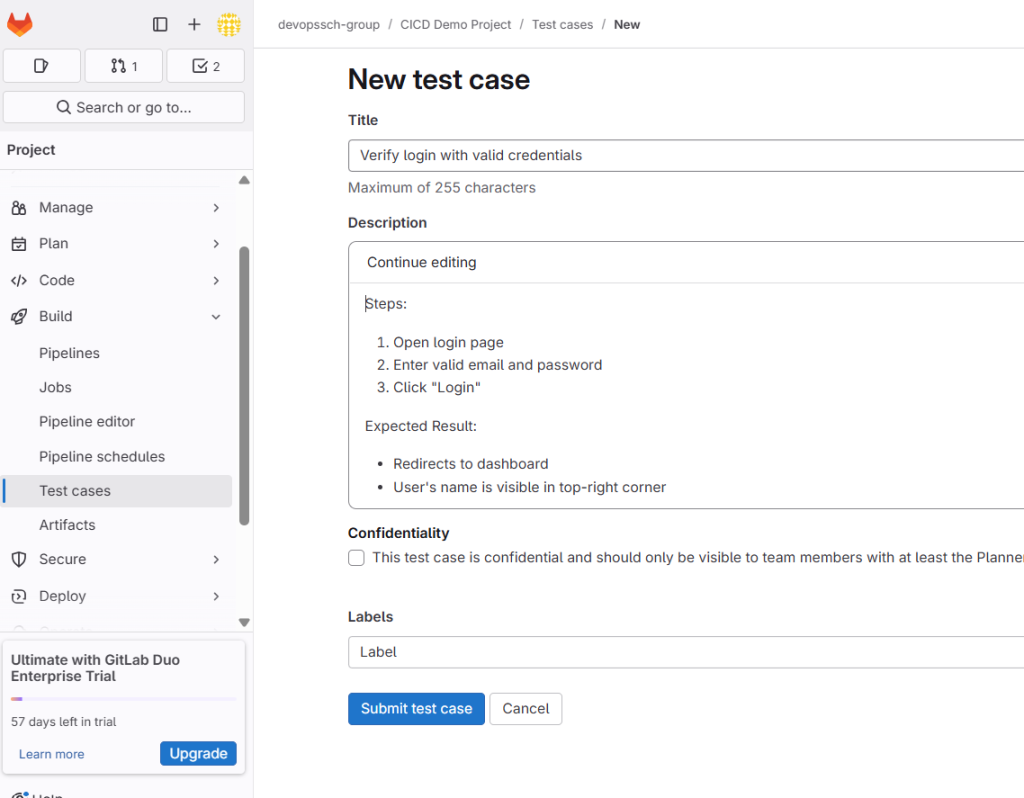
1. Create a Test Case:
- Title: Verify login with valid credentials
- Description:
Steps: 1. Open login page 2. Enter valid email and password 3. Click "Login" Expected Result: - Redirects to dashboard - User's name is visible in top-right corner
2. Link It:
- Link to:
- Related Issue:
#123 Login Feature - Related Requirement:
REQ-01-Login
- Related Issue:
3. Run It:
- From a test run, mark the test case as:
- ✅ Passed
- ❌ Failed (can create bug)
- ⏸️ Blocked
- ⚠️ Skipped
4. Report:
- Use Test Reports to see pass/fail trends, test coverage, and compliance readiness
🔧 Where You’ll Find It in GitLab UI
Navigate to your Project → Build → Test Cases or via
https://gitlab.com/<group>/<project>/-/quality/test_cases
🧩 How to Best Use It in Agile/DevOps
- Sprint Planning
- QA writes test cases for stories/tickets
- Links each test case to the related issue/requirement
- CI/CD Integration
- Even though test cases are manual, they sit next to pipelines and MRs, giving unified visibility
- Release Testing
- Create a Test Run per release or milestone
- Execute selected test cases and record results
- Post-Deployment
- Run test cases as part of UAT checklist or rollback decision flow
🧠 Pro Tips
- Use labels (e.g.,
smoke,regression,v18.0) to filter/group test cases - Combine with Test Runs and Requirements for traceability
- Automate generation of issues on test failure (e.g., with scripts or API)
📈 When Not to Use It
If your team is fully automated in CI/CD and doesn’t require formal manual validation, this feature may feel redundant. However, for product teams, QA testers, regulated industries, and enterprise clients, it fills a crucial gap.

I’m Rajesh Kumar, a DevOps, SRE, DevSecOps, Cloud, and Platform Engineering expert passionate about sharing practical knowledge, real-world experiences, and industry best practices. I have worked at Cotocus and regularly write about technology, travel, investing, health, product reviews, and digital marketing through my various platforms.
I publish technical articles at DevOps School, travel stories at Holiday Landmark, stock market insights at Stocks Mantra, health and fitness guidance at My Medic Plus, product reviews at TrueReviewNow, and SEO and digital marketing strategies at Wizbrand.
Find Trusted Cardiac Hospitals
Compare heart hospitals by city and services — all in one place.
Explore Hospitals