
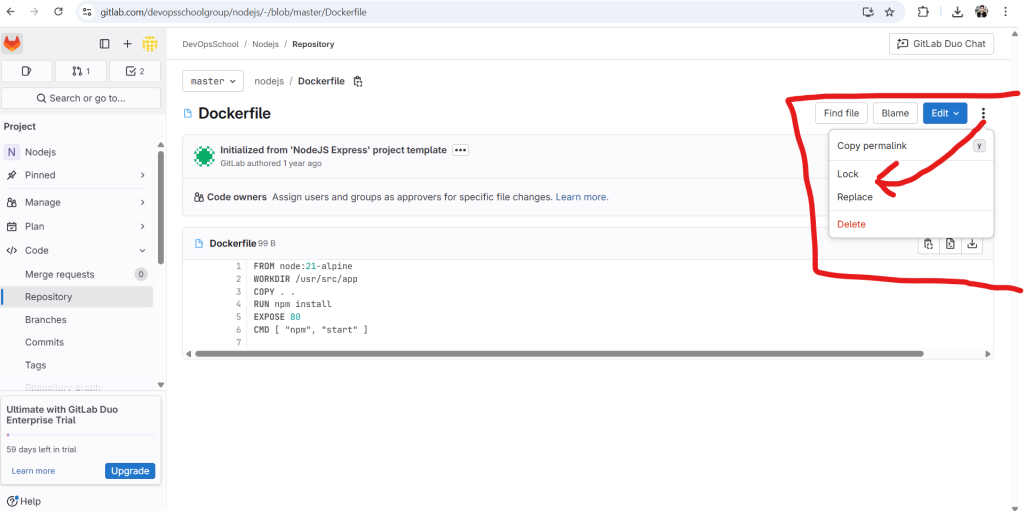
In GitLab 18.0, the “Locked Files” feature under the Code section is specifically designed to help teams working with binary files or non-mergeable assets (e.g., images, CAD drawings, videos, large design files) where Git’s default merge model doesn’t work well.
🔐 What are Locked Files in GitLab?
✅ Definition:
Locked files are specific files in your repository that are locked by a user to prevent others from modifying them until the lock is released.
This is useful when concurrent editing would cause conflicts or corruption — especially for binary or non-text files.
📌 Key Use Cases
| Use Case | Why Lock? |
|---|---|
Graphic design files (.psd, .ai, .fig) | Prevent designers from overwriting each other’s changes |
| Game development (Unity assets) | Avoid asset merge conflicts |
CAD/3D modeling files (.dwg, .blend) | Prevent corruption due to parallel edits |
| Audio/Video files | Version control without collisions |
| Any large binary file | Git can’t merge them cleanly — one editor at a time is safest |
🧭 How It Works in GitLab (18.0)
- Navigate to Project → Code → Locked Files
- Click “Lock a file”
- Browse or search for the file you want to lock (must be in the default branch or your working branch)
- Once locked:
- Only the locker can commit changes to that file
- Others will get a commit error or merge conflict warning
- To unlock:
- The same user (or a Maintainer) can release the lock
🚦 Permission Rules
| Role | Can Lock? | Can Unlock? |
|---|---|---|
| Developer | ✅ Own locks | ❌ Other user’s locks |
| Maintainer | ✅ Any file | ✅ Any lock |
| Guest/Reporter | ❌ | ❌ |
💡 CLI Git Integration (Git LFS)
If you’re using Git LFS (Large File Storage):
# Lock a file via Git CLI
git lfs lock path/to/file.psd

# Unlock
git lfs unlock path/to/file.psd

# View locks
git lfs locks
Code language: PHP (php)
GitLab integrates with Git LFS locking if it’s enabled in the repository.
🚫 What Locked Files Do Not Do
- ❌ They don’t prevent read access (just writing).
- ❌ They don’t encrypt or hide files.
- ❌ They don’t apply to all files automatically — you must lock intentionally.
🔄 Where It Fits in Workflow
- Integrates well in teams using design review pipelines, game pipelines, or documentation with binary artifacts.
- You might combine it with:
- Branch protection rules
- File-specific approval rules
- Web IDE / VS Code integrations
📦 Summary
| Feature | Details |
|---|---|
| What it does | Prevents edits to non-mergeable files by multiple users |
| Where to find it | Code > Locked Files |
| Who can use it | Developers (own), Maintainers (any) |
| Works best for | Binary assets, media, game files, CAD, design |
| Git integration | Git LFS (git lfs lock/unlock) |

I’m Rajesh Kumar, a DevOps, SRE, DevSecOps, Cloud, and Platform Engineering expert passionate about sharing practical knowledge, real-world experiences, and industry best practices. I have worked at Cotocus and regularly write about technology, travel, investing, health, product reviews, and digital marketing through my various platforms.
I publish technical articles at DevOps School, travel stories at Holiday Landmark, stock market insights at Stocks Mantra, health and fitness guidance at My Medic Plus, product reviews at TrueReviewNow, and SEO and digital marketing strategies at Wizbrand.
Find Trusted Cardiac Hospitals
Compare heart hospitals by city and services — all in one place.
Explore Hospitals