Find the Best Cosmetic Hospitals

Explore trusted cosmetic hospitals and make a confident choice for your transformation.

“Invest in yourself — your confidence is always worth it.”

Explore Cosmetic Hospitals

Start your journey today — compare options in one place.

Handy Tips: How to connect on WhatsApp without saving phone numbers in your directory?

If you are a person who use to prefer whatsapp to share information or for conversation with your clients or if you want to reach out to a new person who recently called you and asked you to share the info over the wahtsapp, currently you need to first save phone numbers to your contact list on your phone, either refresh the whatsapp contact or wait for WhatsApp to sync so that new contact shows up inside the app. Then only you can start a chat with them.

This usually takes minutes and really irritating ?if you use to chat over whatsapp frequently.

This post will help you to delete? those irritating steps from your life.

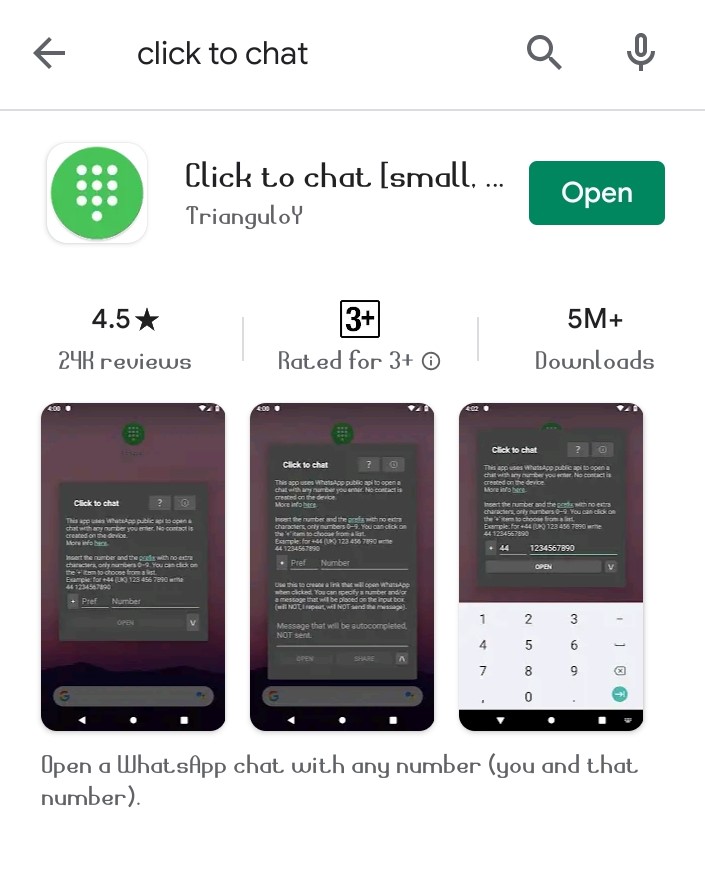
There is one APP in the Google play store.

“Click to Chat”

  • Free app
  • No ADS
  • Requires no permissions to speak of
  • Lightweight (113KB only)
message-on-whatsapp-without-saving-number

This app uses WhatsApp public API to open a chat with any numbers you enter. No contact is created in the device.

How to use it?

Simply copy and paste the contact number which you want to chat over whatsapp

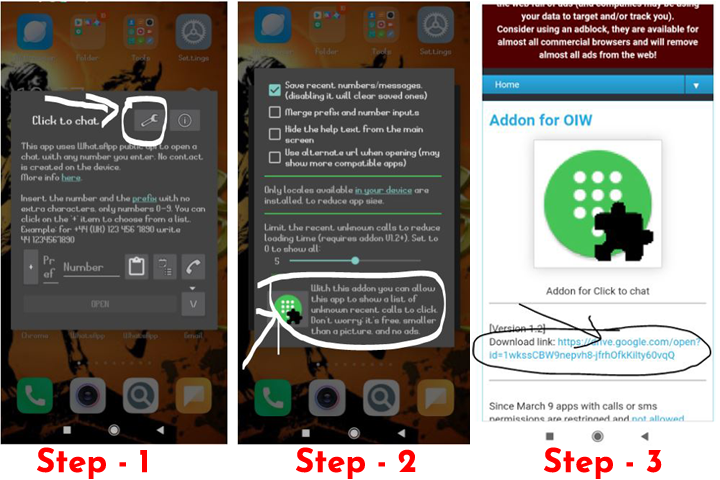
Note:- If you don’t want to copy-paste numbers then you can simply download an add on file which will help you to pick up numbers from call log.

By installing this add-on (find instructions from below image) you will get the option to show a list of recent unknown numbers to select.
I am not sure why this barrier is there in whatsapp. They should have this feature to simply type a number and message them like on any SMS app. But, no worries this app will be handy if you frequently have short-term chats with strangers.

Find Trusted Cardiac Hospitals

Compare heart hospitals by city and services — all in one place.

Explore Hospitals
MotoShare.in delivers cost-effective bike rental solutions, empowering users to save on transportation while enjoying reliable two-wheelers. Ideal for city commutes, sightseeing, or adventure rides.

Related Posts

What is a GitHub App?

🧠 What is a GitHub App? A GitHub App is a first-class actor in the GitHub ecosystem. Unlike OAuth apps which act on behalf of a user,…

Read More

Team Foundation Server 2015 Installation Guide (SQL Express + Update 3)

Install Team Foundation Server 2015 using the original Microsoft download paths, with clear guidance for online, offline, and ISO-based setup. This revised guide also includes an installation workflow, command example, and practical pitfalls to avoid.

Read More

How to Access a Running Docker Container Shell: docker exec vs docker attach

Need a shell inside a running container that is already in detached mode? This updated guide shows the correct workflow, compares docker exec and docker attach, and explains when SSH does and does not make sense.

Read More

Host Your Own NuGet Feed: Local Source vs NuGet.Server vs NuGetGallery

Learn how to host a private NuGet feed using three practical approaches: a local folder source, NuGet.Server, and NuGetGallery. This revised guide includes setup steps, command examples, and a workflow diagram to help you choose the right model.

Read More

Publish NuGet Packages to NuGet.org: CLI Steps, Workflow, and CI Example

Learn how to publish a NuGet package to NuGet.org using either nuget.exe or the dotnet CLI. This revised guide includes a workflow diagram, command comparison, and a CI-friendly example.

Read More

How to Create NuGet Packages with nuget.exe (Assembly, .nuspec, and .csproj Methods)

Learn three practical ways to build NuGet packages using nuget.exe: from an existing assembly, from a convention-based folder layout, or directly from a Visual Studio project. This guide includes commands, folder conventions, token behavior, and common pitfalls.

Read More