Find the Best Cosmetic Hospitals

Explore trusted cosmetic hospitals and make a confident choice for your transformation.

“Invest in yourself — your confidence is always worth it.”

Explore Cosmetic Hospitals

Start your journey today — compare options in one place.

How to setup Kubernetes AWS Gateway API Controller on Amazon EKS?

Step – Setup Dedicated AWS VPC

Step – Deploy EKS

Step – Installing a Kubernetes Gateway API

$ kubectl apply -f https://github.com/kubernetes-sigs/gateway-api/releases/download/v1.2.0/standard-install.yaml

$ kubectl api-resources | grep gateway
Code language: JavaScript (javascript)

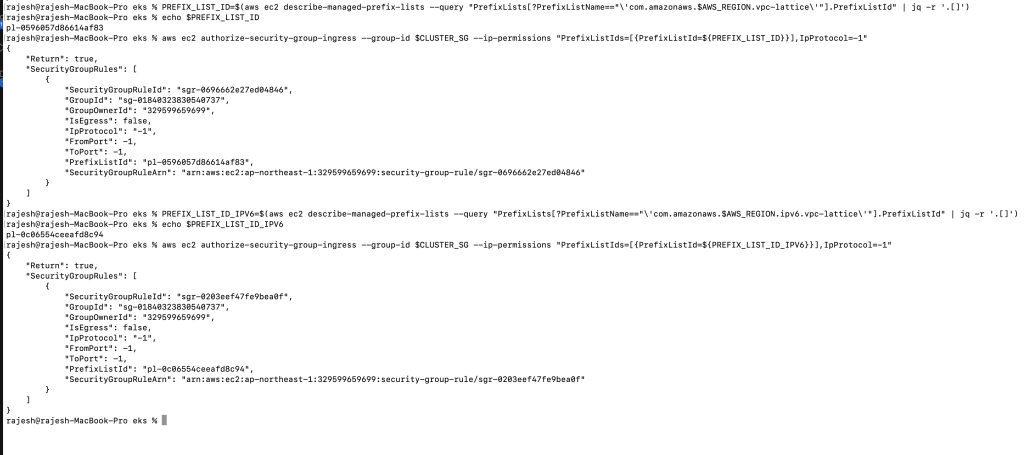
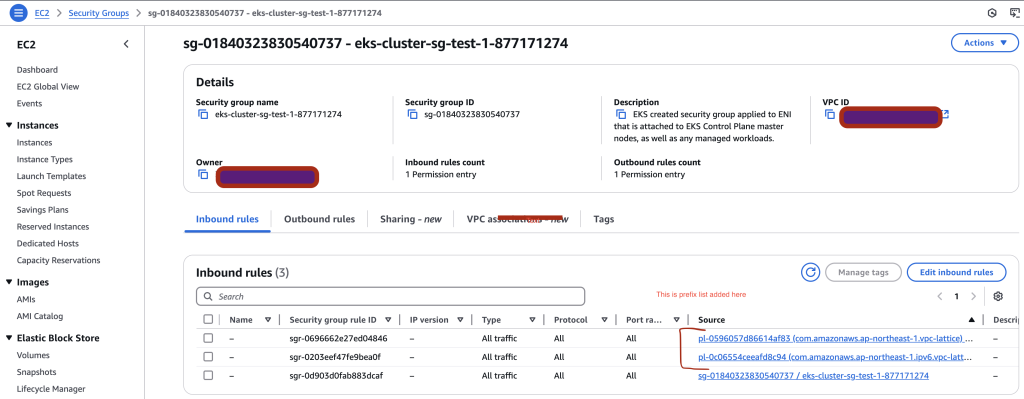
Step – AWS Security group Change Requirement

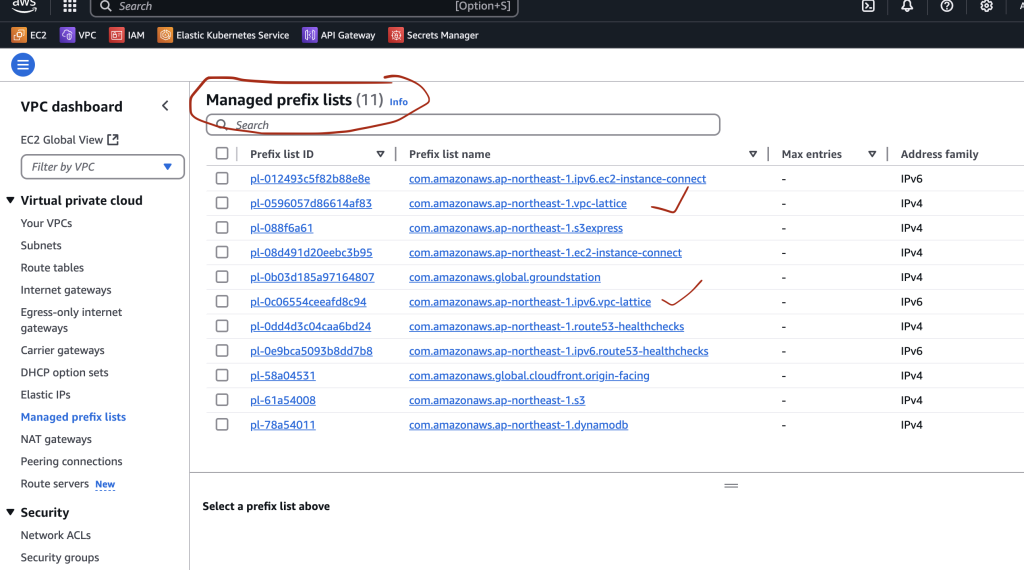
Amazon VPC Lattice is a fully managed service by AWS that simplifies service-to-service communication across VPCs and accounts. The CIDR blocks used by VPC Lattice are assigned and managed by AWS and are available through managed prefix lists for both IPv4 and IPv6.

To allow communication between your workloads (e.g., Pods in EKS) and VPC Lattice services, you must configure security groups, network ACLs, or resource policies to allow traffic from these AWS-managed prefix lists

Prefix List: A prefix list is a set of CIDR blocks (e.g., 192.0.2.0/24 for IPv4 or 2001:db8::/32 for IPv6) that represent a group of IP addresses.

AWS-managed prefix lists for services like VPC Lattice can be used in:

  • ✅ Security Groups
  • ✅ Route Tables
  • ✅ Network ACLs
  • ✅ Resource Policies

Security Groups Created by AWS for EKS

  • Cluster Security Group (Control Plane to Worker Nodes)
  • Node Security Group (Worker Nodes)
  • Fargate Profile Security Group (if using AWS Fargate)
Find Trusted Cardiac Hospitals

Compare heart hospitals by city and services — all in one place.

Explore Hospitals
I'm Rajesh Kumar, a DevOps, SRE, DevSecOps, Cloud, and Platform Engineering expert passionate about sharing practical knowledge, real-world experiences, and industry best practices. I have worked at Cotocus and regularly write about technology, travel, investing, health, product reviews, and digital marketing through my various platforms. I publish technical articles at DevOps School, travel stories at Holiday Landmark, stock market insights at Stocks Mantra, health and fitness guidance at My Medic Plus, product reviews at TrueReviewNow, and SEO and digital marketing strategies at Wizbrand.

Related Posts

Team Foundation Server 2015 Installation Guide (SQL Express + Update 3)

Install Team Foundation Server 2015 using the original Microsoft download paths, with clear guidance for online, offline, and ISO-based setup. This revised guide also includes an installation workflow, command example, and practical pitfalls to avoid.

Read More

How to Access a Running Docker Container Shell: docker exec vs docker attach

Need a shell inside a running container that is already in detached mode? This updated guide shows the correct workflow, compares docker exec and docker attach, and explains when SSH does and does not make sense.

Read More

Host Your Own NuGet Feed: Local Source vs NuGet.Server vs NuGetGallery

Learn how to host a private NuGet feed using three practical approaches: a local folder source, NuGet.Server, and NuGetGallery. This revised guide includes setup steps, command examples, and a workflow diagram to help you choose the right model.

Read More

Publish NuGet Packages to NuGet.org: CLI Steps, Workflow, and CI Example

Learn how to publish a NuGet package to NuGet.org using either nuget.exe or the dotnet CLI. This revised guide includes a workflow diagram, command comparison, and a CI-friendly example.

Read More

How to Create NuGet Packages with nuget.exe (Assembly, .nuspec, and .csproj Methods)

Learn three practical ways to build NuGet packages using nuget.exe: from an existing assembly, from a convention-based folder layout, or directly from a Visual Studio project. This guide includes commands, folder conventions, token behavior, and common pitfalls.

Read More

Virtualization in DevOps: Using Vagrant, Docker, and Cloud Platforms Together

This guide explains how VM-based workflows, containers, and cloud platforms complement each other in DevOps. It includes a practical workflow, trade-off table, and command examples for day-to-day use.

Read More
Subscribe
Notify of
guest
0 Comments
Newest
Oldest Most Voted
0
Would love your thoughts, please comment.x
()
x