
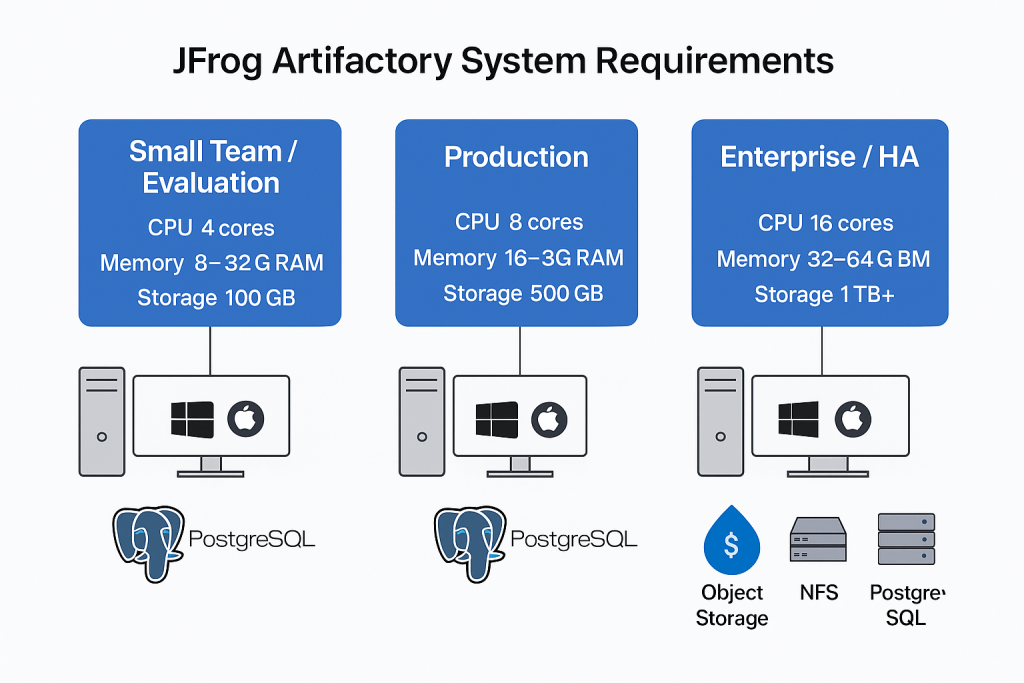
Here are the system requirements for running JFrog Artifactory, based on JFrog’s official documentation (latest versions):
✅ 1. Hardware Requirements
Minimum for Small Teams / Evaluation:
- CPU: 4 cores
- RAM: 8 GB
- Disk: 100 GB SSD
- Network: 1 Gbps recommended
Recommended for Production:
- CPU: 8+ cores
- RAM: 16–32 GB
- Disk: 500 GB+ (SSD preferred for performance)
- Network: 1 Gbps or higher
Enterprise-Grade (HA/Heavy Load):
- CPU: 16–32 cores
- RAM: 32–64 GB
- Disk: 1 TB+ (SSD/NVMe)
- Network: 10 Gbps recommended
✅ 2. Operating System
- Linux: RHEL/CentOS 7+, Ubuntu 18.04+, Debian 10+, Amazon Linux 2
- Windows Server: 2016, 2019, 2022
- macOS: Supported for development/testing only, not for production.
✅ 3. Java Runtime
- Artifactory bundles its own OpenJDK (Java 11 or 17).
- External Java installation is not required unless running custom plugins.
✅ 4. Databases
- Bundled: Derby (for evaluation only, not production)
- Production Databases Supported:
- PostgreSQL (recommended)
- MySQL/MariaDB
- Oracle
- MS SQL Server
✅ 5. Storage
- File Storage:
- Local file system (ext4/xfs recommended)
- NFS v4 (for HA setups)
- Object Storage (AWS S3, GCP Storage, Azure Blob)
- Recommendation: Use SSD/NVMe for artifact filestore for optimal performance.
✅ 6. Application Server
- Runs as a standalone Java service.
- Can be deployed via:
- RPM/DEB packages
- Docker containers
- Kubernetes/Helm charts
- Zip/Tar distribution for manual setup.
✅ 7. High Availability (HA) Requirements
- Cluster Nodes: Minimum 3 nodes for HA.
- Shared Filestore: NFS or object storage.
- Load Balancer: Required for HA front-end traffic.
- Database: External RDS/PostgreSQL recommended for HA.
✅ 8. Ports
- 8081: Default HTTP port for Artifactory.
- 8082: JFrog Access service.
- 443/80: For SSL/TLS termination (if configured).
📌 Summary:
- Start with 4 cores, 8 GB RAM for small use.
- Use 8+ cores, 16–32 GB RAM, SSD storage for production.
- Always use PostgreSQL and avoid Derby for production.
- Use object storage or NFS for HA setups.
JFrog Artifactory System Requirements
1. Hardware Sizing (Based on Number of Active Clients)
| Number of Active Clients | CPU Cores | RAM |
|---|---|---|
| 0–20 | 4 | 6GB |
| 20–100 | 6 | 12GB |
| 100–200 | 8 | 18GB |
| 200+ | Contact JFrog Support for a tailored recommendation |
For advanced workloads or highly available (HA) setups—especially with Xray or Pipelines integrations—higher specs or cluster sizing may be required 1234.
2. Disk and Storage
- Artifactory Base Disk: Minimum 200–300GB of fast disk (SSD recommended, ≥3,000 IOPS) for binaries.
- Sizing Guidance: JFrog suggests storage at least 3× your total artifact dataset to accommodate system backups and metadata. For very large setups (>10TB storage), custom consultation is advised 536.
3. Operating System and Platform Support
| OS / Platform | Supported Versions |
|---|---|
| Debian | 11.x, 12.x |
| Ubuntu | 20.04, 22.04, 24.04 |
| RHEL | 8.x, 9.x |
| Amazon Linux | Amazon Linux 2023 |
| Windows Server | 2016, 2019 |
| Rocky Linux | 9.x |
| Kubernetes | 1.27+, OpenShift 4.14+ (Helm Charts v3+) |
| Architectures | x86-64, ARM64 (K8s/Docker only; external DB required for ARM64) |
Debian 12.x and Ubuntu 24.04 support begins from Artifactory 7.104.x 1278.
4. Database Requirements
- Default (Bundled for single node): H2 Database
- Production/HA: External database required (PostgreSQL highly recommended; also supports MySQL, MariaDB, Oracle, MS SQL Server)
- Database Sizing: Should be powerful enough to accommodate all cluster nodes for HA; must consistently provide the same view to all nodes. Eventual consistency/write-behind sync are not supported for HA 93.
- Disk Recommendation: Use SSD for DB storage for best performance.
5. Java
- Required Java Version: OpenJDK 17+ (varies by installation method/Artifactory version) 7.
- Some older Artifactory versions (6.x) compatible with OpenJDK 8.
6. Network and Connectivity
- Reserved Ports: 8000–8100 internally (additionally, 8081, 8082 external for access) 106.
- High Availability: Static, high-throughput network recommended between nodes.
- Time Sync: All nodes/services require system time synchronization to avoid authentication/token issues
7. File System
- Application: Install Artifactory on directly attached local disk, NOT on NFS (NFS only acceptable for binary storage, not the application itself).
- Filestore: Can use local FS, NFS, or cloud object storage (S3, Azure Blob, Google Cloud Storage) 3.
8. Other General Recommendations
- Dedicated Server: Each JFrog component (Artifactory, Xray, Pipelines, etc.) should run on its own server to optimize performance and avoid conflicts .
- Privileges: Root/admin access required for installation and management.
- SELinux: If enabled, ensure it is correctly configured for artifact paths and required ports 7.
Summary Table
| Requirement Area | Minimum / Recommended | Notes |
|---|---|---|
| CPU | 4–8 cores | Scale up for more users/HA |
| RAM | 6–18GB | Scale up for >200 users or heavy use |
| Disk | 200–300GB SSD (~3× artifact size) | Use high IOPS SSD for best performance |
| OS/Platform | Ubuntu 20.04+/Debian 11+/RHEL 8+/Win 2016+/K8s 1.27+/ARM64 | See above platform support table |
| Java | OpenJDK 17+ | Check your Artifactory version |
| Database | PostgreSQL (recommended), MySQL, MariaDB, Oracle, MS SQL | HA always requires external DB |
| Filestore | Local FS/NFS/Cloud (S3/Azure/GCS) | Not supported: install app on NFS |
| Ports | 8000–8100 (internal), 8081/8082 (external) | Plus DB and other service ports as needed |
| Privileges | Linux root/Windows Admin | For setup/config/upgrade |
| System Time | Synchronized | Recommended for all nodes in cluster |
These requirements cover Artifactory OSS, Pro, Pro X, Enterprise X, and Enterprise+ installation scenarios (single node, cluster, or SaaS) and apply to both on-premises and cloud VM deployments. Production use, especially for HA/Enterprise, often requires more robust resources and tighter configuration.

I’m Rajesh Kumar, a DevOps, SRE, DevSecOps, Cloud, and Platform Engineering expert passionate about sharing practical knowledge, real-world experiences, and industry best practices. I have worked at Cotocus and regularly write about technology, travel, investing, health, product reviews, and digital marketing through my various platforms.
I publish technical articles at DevOps School, travel stories at Holiday Landmark, stock market insights at Stocks Mantra, health and fitness guidance at My Medic Plus, product reviews at TrueReviewNow, and SEO and digital marketing strategies at Wizbrand.
Find Trusted Cardiac Hospitals
Compare heart hospitals by city and services — all in one place.
Explore Hospitals
Thanks for this clear overview of JFrog Artifactory system requirements! 📦 I like how the article explains what’s needed to set up Artifactory properly — it makes planning and installation much easier. Very helpful — thanks for sharing!