
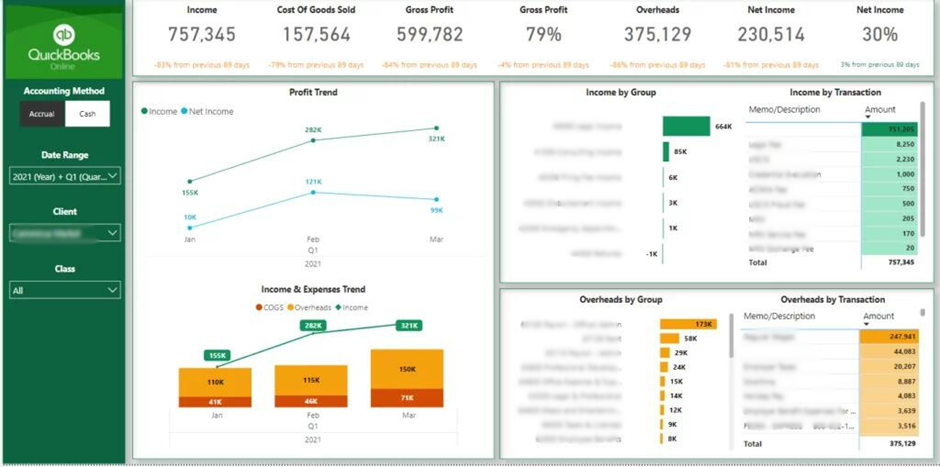
As an accountant, managing multiple client accounts and maintaining accurate financial reporting can be a daunting task. Traditionally it involves exporting the data from every QuickBooks Online account that you manage into Excel and then preparing the analysis separately for every client. This process takes around 1 hour per client per month and accountancies often have dozens of clients!
The modern way is to automate this process by building Power BI financial dashboards. These dashboards usually extract the data from accounting data sources automatically, visualise it effectively and enable easy sharing of dashboards to clients.
Let’s explore how you can leverage these technologies to enhance your accounting processes and deliver insightful, data-driven insights to your clients.
QuickBooks Online Power BI Integration
QuickBooks Online is a widely used accounting software that allows businesses to manage their financial data with ease. However, for accountants who work with numerous clients, the native QuickBooks Online connector in Power BI can present some challenges. The inability to connect to multiple QuickBooks accounts simultaneously and the fragmented data structure can make it difficult to consolidate and analyse the information you need.
To overcome these limitations, we’ll introduce an alternative solution: a third-party Power BI QuickBooks Online Connector.
Data Extraction and Consolidation
The Power BI QuickBooks Online connector enables accounting firms to efficiently extract and consolidate financial data from multiple client accounts. This feature is particularly valuable for practices managing numerous clients or dealing with complex corporate structures
By centralizing data from various QuickBooks Online accounts, accountants can:
- Create consolidated financial reports across multiple entities
- Perform comparative analysis between different clients or subsidiaries
- Identify trends and patterns across their client portfolio
Customized Financial Statements
This Power BI connector returns tables like P&L, Balance Sheet and Cash Flow which means that no complex data modelling is needed to visualise the financial statements. Accountants can also develop tailored financial statements that cater to specific client needs or industry requirements.
The connector also comes with a free Power BI QuickBooks Online Templates can be installed in 5 minutes. This ultimately helps accountants to get started with financial reporting quickly.
These reports can be designed to provide more granular insights or to present data in formats that are more intuitive for clients to understand.
Real-Time Analytics
The connector refreshes the data every 30 minutes, enabling accounting firms to offer up-to-date financial analytics to their clients. This feature is crucial for:
- Monitoring key performance indicators (KPIs) in near real-time
- Providing timely financial advice based on current data
- Alerting clients to potential issues or opportunities as they arise
Automated Reporting Processes
By utilizing the Power BI QuickBooks Online connector, accounting firms can automate much of their reporting processes. Consider the following case study:
Recently we worked with a fractional CFO company with 35 active clients who kept their data in QuickBooks Online. Extracting data manually into Excel used to take 6 hours per month, resulted in manual errors and the process wasn’t scalable.
The Power BI QuickBooks Online connector by Vidi was used to extract data automatically from all the clients and combine it in a single database. The free QuickBooks Power BI template was used to visualise the data immediately after purchase.
Custom Power BI QuickBooks Online Connector
Vidi Corp Ltd, a UK-based Power BI consultancy offering a custom Power BI QuickBooks Online connector revolutionizing how accounting firms analyse and present financial data.
This powerful tool enables you to seamlessly integrate data from multiple QuickBooks Online accounts into a centralized SQL database, making it easier to connect to Power BI and create comprehensive financial reports.
By taking advantage of this connector, accounting firms can offer more value to their clients through enhanced reporting, real-time insights, and advanced analytics.
Conclusion
As the accounting industry continues to evolve, leveraging tools like the Power BI QuickBooks Online connector will be crucial for firms looking to stay competitive and provide cutting-edge services to their clients.
Accountants can improve their practice, drive client success, and stay ahead of the curve in the ever-evolving world of financial management by embracing this powerful integration.

I’m Rajesh Kumar, a DevOps, SRE, DevSecOps, Cloud, and Platform Engineering expert passionate about sharing practical knowledge, real-world experiences, and industry best practices. I have worked at Cotocus and regularly write about technology, travel, investing, health, product reviews, and digital marketing through my various platforms.
I publish technical articles at DevOps School, travel stories at Holiday Landmark, stock market insights at Stocks Mantra, health and fitness guidance at My Medic Plus, product reviews at TrueReviewNow, and SEO and digital marketing strategies at Wizbrand.
Find Trusted Cardiac Hospitals
Compare heart hospitals by city and services — all in one place.
Explore Hospitals