
Here’s a complete guide to running Ansible Playbooks using Rundeck, covering all supported methods, including what you’ve done, plus troubleshooting options and best practices.
✅ Goal
Run an Ansible Playbook (web.yaml) on remote hosts from Rundeck.
🧰 Prerequisites
- Ansible installed on Rundeck server (
ansible,ansible-playbook) - Playbook and inventory exist, e.g.:
/tmp/ansible/web.yaml/tmp/ansible/inventory
- Hosts reachable via SSH (key-based preferred)
- Rundeck has access to private key
✅ Methods to Run Ansible from Rundeck
✅ Method 1: Ansible Plugin (Node Step or Workflow Step)
Rundeck Plugin: Ansible Plugin for Rundeck
Best for: Structured jobs with SSH auth and node filtering.
Configuration
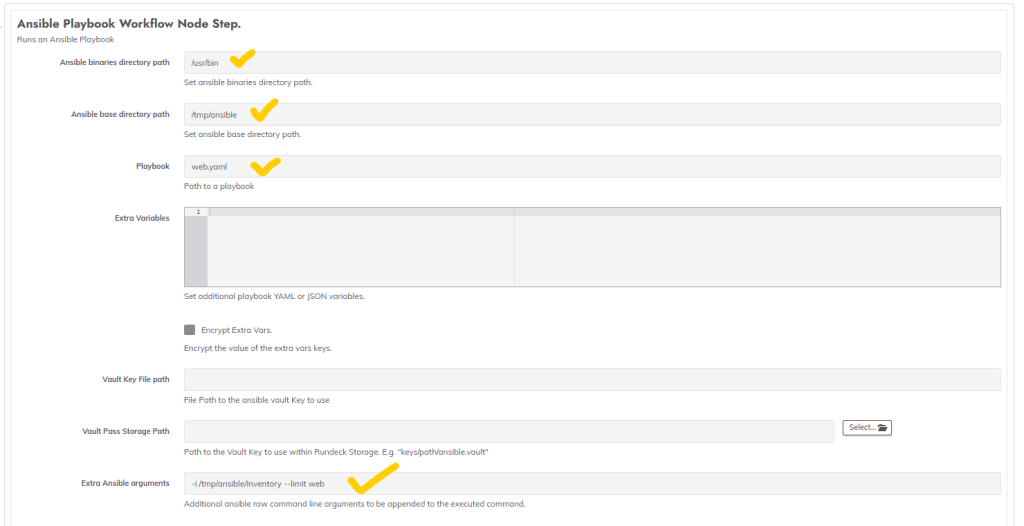
- Plugin Step Type: Ansible Playbook Workflow Node Step
- Playbook:
web.yaml - Inventory:
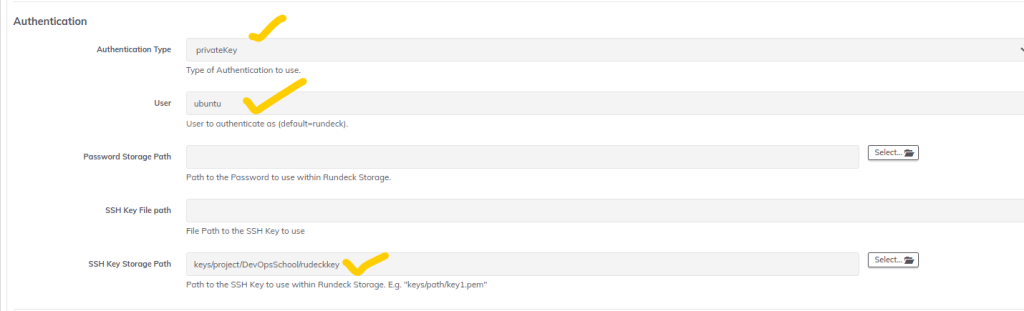
-i /tmp/ansible/inventory - Auth: Private key or SSH password
- User:
ubuntu - Extra vars (optional):
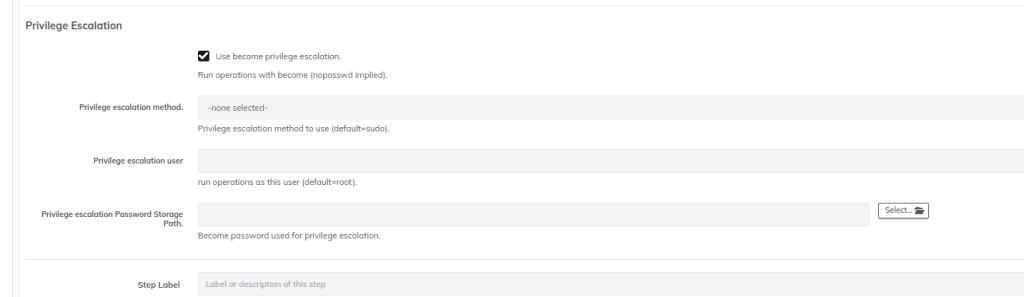
foo=bar - Set:
Use become: Yes(if needed)
🔍 Troubleshooting
- Set Node Filter to
.*(orname: .*) to apply job globally - Rundeck will pass
--limit <node>unless you’re careful - Inventory must include same hostnames/IPs as Rundeck nodes
Scree -1
#inventory code
more inventory
[web]
65.2.153.2
52.66.236.156
13.232.137.62
13.201.133.240

[db]
3.7.65.62

#web.yaml
---
- name: Update web servers
  hosts: web

  tasks:
  - name: Install Apache in ubuntu
    ansible.builtin.apt:
      name: "git"
      state: latest
  - name: Copy index.html
    ansible.builtin.copy:
      src: index.html
      dest: /tmp/index.html
Code language: PHP (php)
✅ Method 2: Ansible as Command Step (Central Execution)
Run centrally from Rundeck server (not per node). This avoids node filtering issues.
Example
ansible-playbook -i /tmp/ansible/inventory /tmp/ansible/web.yaml -u ubuntu -b --private-key=/tmp/ansible/key.pem
Code language: JavaScript (javascript)
Steps
- Add a Command Step
- Shell command as above
- Optional: Make key available using Secure Option
✅ When to Use
- You don’t need per-node execution
- Want Rundeck to just centrally launch playbooks
✅ Method 3: Script Step with Arguments
Same as Method 2, but using a bash script.
Example
Create script /tmp/run_ansible.sh:
#!/bin/bash
ansible-playbook -i /tmp/ansible/inventory /tmp/ansible/web.yaml -u ubuntu -b --private-key=/tmp/ansible/key.pem
Code language: JavaScript (javascript)
Set Rundeck step type: Script file or inline
✅ Method 4: Ansible Ad-Hoc Step (Ansible Plugin)
You can also use:
Ansible Ad-Hoc Command Node Step- For one-liner tasks (e.g.,
apt update,ping,copy)
Example module: ping, shell, copy
✅ Method 5: Job with Embedded Inventory (YAML)
In Rundeck Project configuration, embed static inventory.
Example:
[web]
192.168.1.10 ansible_user=ubuntu
Then playbook can use hosts: web, and Rundeck calls it with --limit to match that.
✅ Method 6: Dynamic Inventory Integration
Use AWS/GCP inventory plugin or a custom dynamic inventory script.
Steps:
- Create a script like
aws_ec2.pyor a custom script - In Ansible arguments:
-i /tmp/ansible/my_dynamic_inventory.py - Make sure script is executable and returns correct JSON
🧪 Bonus: Add a Debug Step Before Playbook
Add a shell step before Ansible call:
ansible -i /tmp/ansible/inventory web --list-hosts
Code language: PHP (php)
This lets you verify what Ansible sees at runtime.
🧾 Sample Rundeck Job YAML (Centrally Executed)
- defaultTab: nodes
  description: Run Ansible playbook centrally
  executionEnabled: true
  id: 1234-ansible-job
  loglevel: INFO
  name: run-ansible-central
  nodeFilterEditable: false
  scheduleEnabled: true
  sequence:
    commands:
    - description: Run Ansible centrally
      exec: ansible-playbook -i /tmp/ansible/inventory /tmp/ansible/web.yaml -u ubuntu -b --private-key=/tmp/ansible/key.pem
  nodefilters:
    dispatch:
      threadcount: 1
      keepgoing: false
    filter: ".*"
Code language: JavaScript (javascript)
✅ Summary Table
| Method | Description | Best Use Case |
|---|---|---|
| 🔌 Plugin (Node Step) | Uses Rundeck Ansible plugin to run playbook on matched nodes | When your inventory matches Rundeck nodes |
| 🖥️ Command Step | Runs Ansible centrally from Rundeck server | For single control execution |
| 🧾 Script Step | Shell script wraps Ansible call | Repeatable, customizable |
| ⚡ Ad-Hoc Step | Use Ansible module like ping or shell | For one-time actions |
| 📂 Embedded Inventory | Static inventory within project | When inventory doesn’t change |
| 🔁 Dynamic Inventory | External inventory script (AWS, GCP, etc.) | For cloud infra or frequent host changes |

I’m Rajesh Kumar, a DevOps, SRE, DevSecOps, Cloud, and Platform Engineering expert passionate about sharing practical knowledge, real-world experiences, and industry best practices. I have worked at Cotocus and regularly write about technology, travel, investing, health, product reviews, and digital marketing through my various platforms.
I publish technical articles at DevOps School, travel stories at Holiday Landmark, stock market insights at Stocks Mantra, health and fitness guidance at My Medic Plus, product reviews at TrueReviewNow, and SEO and digital marketing strategies at Wizbrand.
Find Trusted Cardiac Hospitals
Compare heart hospitals by city and services — all in one place.
Explore Hospitals