
Introduction
AI STEM Coding Coach Tools are intelligent learning platforms that help students, developers, and professionals learn programming, science, technology, engineering, and mathematics through guided practice, adaptive feedback, and real-time AI coaching. These systems go beyond static tutorials by actively observing code, identifying mistakes, explaining concepts, generating hints, and adapting difficulty based on learner progress.
In 2026, STEM education is rapidly shifting toward personalized, AI-assisted learning environments. Instead of one-size-fits-all coding courses, learners now interact with AI coaches that behave like mentors—reviewing code, suggesting improvements, simulating debugging scenarios, and even creating project-based learning paths aligned with real-world engineering tasks.
Common use cases include learning programming languages, practicing algorithms, preparing for technical interviews, teaching computer science in schools, upskilling software engineers, STEM bootcamps, robotics learning, and math/science problem-solving support.
Key evaluation criteria include code understanding accuracy, feedback quality, real-time debugging support, curriculum alignment, multi-language coding support, adaptive learning capability, integration with IDEs and LMS platforms, safety guardrails, and performance tracking.
Best for: students, coding bootcamps, universities, EdTech platforms, software engineers, upskilling professionals, and STEM educators.
Not ideal for: organizations without structured learning programs, non-technical teams, or users who only need simple documentation or static tutorials.
What’s Changed in AI STEM Coding Coach Tools in 2026+
- Shift from static coding tutorials to interactive AI mentor-based learning
- Real-time code review and debugging assistance inside IDEs and browsers
- AI-generated personalized learning paths based on skill gaps
- Strong adoption of agent-based coding assistants for STEM education
- Multi-language programming support (Python, JavaScript, Java, C++, Rust, etc.)
- Integration of visual programming for younger learners and beginners
- Automated detection of conceptual misunderstandings in code logic
- Simulation-based STEM labs for physics, math, and engineering concepts
- Increased use of generative AI for step-by-step problem solving
- Strong alignment with interview preparation and job-ready coding skills
- AI-driven curriculum adaptation based on learner performance
- Coding sandbox environments with real-time feedback loops
- Better plagiarism detection and originality scoring for assignments
- Integration with LMS, IDEs, and cloud development environments
- Focus on explainability in AI feedback (why code is wrong, not just correction)
Quick Buyer Checklist
- Does the tool provide real-time coding feedback or only post-submission evaluation?
- Can it support multiple programming languages and frameworks?
- Does it integrate with IDEs (VS Code, JetBrains, browser IDEs)?
- Is learning adaptive based on student performance?
- Does it support STEM beyond coding (math, physics, engineering)?
- Can instructors customize curriculum and exercises?
- Does it include debugging explanations, not just corrections?
- Is there an AI tutor or conversational assistant?
- Does it support project-based learning workflows?
- Can it detect plagiarism or AI-generated submissions?
- Does it offer LMS or classroom integration?
- Is progress tracking available for educators and learners?
- Does it support beginner-to-advanced progression paths?
- Is the system safe, explainable, and bias-controlled?
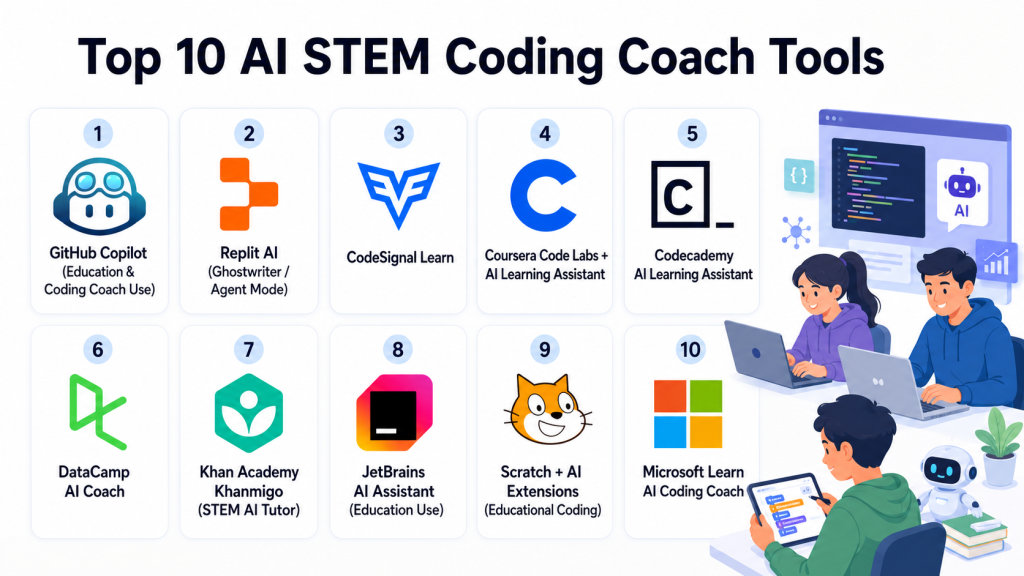
Top 10 AI STEM Coding Coach Tools
#1 — GitHub Copilot (Education & Coding Coach Use)
One-line verdict: Best AI coding assistant for real-time programming support and skill acceleration.
Short description:
GitHub Copilot acts as an AI coding partner that helps learners write, debug, and understand code. It is widely used in both professional development and STEM learning environments.
Standout Capabilities
- Real-time code suggestions in IDEs
- AI-powered debugging assistance
- Multi-language coding support
- Context-aware code completion
- Explanation of code snippets
- Algorithm and function generation
- Integration with development environments
- Supports project-based learning
AI-Specific Depth
- Model support: Proprietary large language models (OpenAI-based architecture)
- RAG / knowledge integration: Uses repository context for suggestions
- Evaluation: Indirect (developer feedback + code quality signals)
- Guardrails: Safety filters for insecure code patterns
- Observability: Limited usage analytics (IDE-level tracking varies)
Pros
- Excellent real-time coding support
- Works across multiple programming languages
- Strong developer ecosystem integration
Cons
- Not fully structured as a teaching curriculum
- Can encourage over-reliance on AI suggestions
- Limited built-in pedagogy features
Security & Compliance
Enterprise controls may include access management and data handling policies, but detailed certifications vary by deployment and plan.
Deployment & Platforms
- VS Code
- JetBrains IDEs
- GitHub ecosystem
- Cloud-based coding environments
Integrations & Ecosystem
- GitHub repositories
- IDE extensions
- CI/CD workflows
- Developer tools ecosystem
- API-based integrations
Pricing Model
Subscription-based, with student and enterprise plans.
Best-Fit Scenarios
- Learning real-world software development
- Coding practice in IDEs
- Accelerated programming skill development
#2 — Replit AI (Ghostwriter / Agent Mode)
One-line verdict: Best browser-based AI coding coach for interactive STEM learning and project building.
Short description:
Replit AI provides a browser-based coding environment with AI assistance for writing, debugging, and explaining code, making it ideal for learners and educators.
Standout Capabilities
- Browser-based coding environment
- AI-assisted code generation
- Real-time debugging support
- Instant project deployment
- Collaborative coding
- Step-by-step explanations
- Multi-language support
- Beginner-friendly interface
AI-Specific Depth
- Model support: Multi-model AI integration
- RAG / knowledge integration: Workspace-aware context system
- Evaluation: Code correctness + runtime behavior analysis
- Guardrails: Safe execution sandbox
- Observability: Session-based coding analytics
Pros
- No setup required
- Great for beginners and classrooms
- Fast prototyping environment
Cons
- Limited offline capabilities
- Advanced enterprise features require upgrades
- Not deep in STEM beyond coding
Security & Compliance
Sandboxed execution environment with access controls; detailed certifications not publicly stated.
Deployment & Platforms
- Web-based IDE
- Cloud execution environment
- Mobile-friendly interface
Integrations & Ecosystem
- GitHub integration
- Cloud deployment tools
- Collaboration features
- API support
- Classroom environments
Pricing Model
Freemium with subscription-based upgrades.
Best-Fit Scenarios
- Beginner coding education
- STEM classrooms
- Project-based learning
#3 — CodeSignal Learn
One-line verdict: Best structured AI-powered coding education and assessment hybrid platform.
Short description:
CodeSignal combines coding education with skill assessment, using AI-driven evaluation and adaptive learning paths to help users improve programming skills.
Standout Capabilities
- AI-based coding exercises
- Adaptive learning paths
- Real-time coding feedback
- Skill benchmarking
- Interview preparation modules
- Coding assessment engine
- Progress tracking dashboards
- Structured curriculum
AI-Specific Depth
- Model support: Proprietary evaluation AI
- RAG / knowledge integration: Curriculum-based knowledge mapping
- Evaluation: Code correctness, efficiency, and logic
- Guardrails: Anti-plagiarism and integrity systems
- Observability: Learning analytics dashboards
Pros
- Strong structured learning approach
- Good for interview preparation
- Adaptive difficulty scaling
Cons
- Less flexible for open-ended projects
- Focused more on coding than broader STEM
- Requires structured learning flow
Security & Compliance
Enterprise-grade testing controls; detailed certifications vary by plan.
Deployment & Platforms
- Web-based platform
- Cloud coding environment
Integrations & Ecosystem
- ATS systems
- LMS platforms
- Developer tools
- HR systems
- API integrations
Pricing Model
Subscription-based for individuals and enterprises.
Best-Fit Scenarios
- Coding interview preparation
- Structured programming education
- Bootcamp training programs
#4 — Coursera Code Labs + AI Learning Assistant
One-line verdict: Best academic-grade STEM learning platform with structured AI guidance.
Short description:
Coursera combines university-level STEM courses with interactive coding labs and AI-assisted explanations to support structured learning.
Standout Capabilities
- Structured STEM curriculum
- Interactive coding labs
- AI explanations for concepts
- Guided programming assignments
- University-level courses
- Skill-based learning paths
- Progress tracking
- Certification programs
AI-Specific Depth
- Model support: Platform AI assistant
- RAG / knowledge integration: Course-based knowledge system
- Evaluation: Assignment grading + quizzes
- Guardrails: Academic integrity controls
- Observability: Learning progress tracking
Pros
- Strong academic credibility
- Structured STEM learning paths
- Certification-ready programs
Cons
- Less real-time coding coaching
- Limited IDE integration
- Not fully interactive like dev tools
Security & Compliance
Academic integrity systems and platform security controls; certifications vary.
Deployment & Platforms
- Web-based platform
- Mobile apps
- Cloud labs
Integrations & Ecosystem
- University partners
- LMS integrations
- Certification systems
- API support
- Content libraries
Pricing Model
Subscription-based with course-level pricing options.
Best-Fit Scenarios
- Academic STEM learning
- Structured programming courses
- Certification preparation
#5 — Codecademy AI Learning Assistant
One-line verdict: Best beginner-friendly interactive coding coach for structured STEM learning.
Short description:
Codecademy offers interactive coding lessons with AI-powered hints, explanations, and guided exercises for beginners and intermediate learners.
Standout Capabilities
- Interactive coding lessons
- AI-generated hints and explanations
- Step-by-step learning paths
- Practice projects
- Skill progression tracking
- Browser-based coding
- Beginner-friendly curriculum
- Quiz-based reinforcement
AI-Specific Depth
- Model support: Platform AI assistant
- RAG / knowledge integration: Course content system
- Evaluation: Exercise completion and correctness
- Guardrails: Controlled learning environment
- Observability: Learner progress analytics
Pros
- Very beginner-friendly
- Structured curriculum
- Easy to start learning
Cons
- Limited advanced engineering depth
- Not suited for enterprise development workflows
- Less customization flexibility
Security & Compliance
Platform-level controls; details vary.
Deployment & Platforms
- Web platform
- Mobile support
Integrations & Ecosystem
- Learning platforms
- LMS tools
- Developer tools (limited)
- API integrations
Pricing Model
Freemium with subscription upgrade.
Best-Fit Scenarios
- Beginner coding learners
- School STEM education
- Structured self-learning
#6 — DataCamp AI Coach
One-line verdict: Best AI-powered STEM learning platform for data science and analytics coding.
Short description:
DataCamp focuses on Python, R, SQL, and data science skills using interactive coding exercises and AI-assisted coaching.
Standout Capabilities
- Data science coding exercises
- AI-powered learning assistant
- Real-world datasets
- Skill tracking dashboards
- Hands-on coding environments
- Project-based learning
- Adaptive difficulty learning
- Career path guidance
AI-Specific Depth
- Model support: Platform AI coaching system
- RAG / knowledge integration: Dataset and course-based knowledge
- Evaluation: Code correctness + data output validation
- Guardrails: Controlled exercise environments
- Observability: Skill progression tracking
Pros
- Strong focus on data science
- Real-world datasets
- Structured career paths
Cons
- Limited general software engineering depth
- Focused primarily on analytics STEM
- Requires subscription for full access
Security & Compliance
Platform-based security; enterprise details vary.
Deployment & Platforms
- Web-based platform
- Cloud coding environment
Integrations & Ecosystem
- Data tools ecosystem
- LMS platforms
- API integrations
- Enterprise learning systems
Pricing Model
Subscription-based.
Best-Fit Scenarios
- Data science learning
- Analytics training
- STEM career upskilling
#7 — Khan Academy Khanmigo (STEM AI Tutor)
One-line verdict: Best AI tutor for foundational STEM learning and guided education.
Short description:
Khanmigo is an AI tutor that supports STEM education by guiding students through math, science, and coding concepts step-by-step.
Standout Capabilities
- AI tutoring for STEM subjects
- Step-by-step problem solving
- Math and science guidance
- Beginner coding support
- Interactive explanations
- Personalized learning assistance
- Classroom-friendly tools
- Concept reinforcement
AI-Specific Depth
- Model support: Proprietary AI tutoring system
- RAG / knowledge integration: Educational curriculum-based knowledge
- Evaluation: Concept understanding tracking
- Guardrails: Strict educational safety filters
- Observability: Learning progress tracking
Pros
- Excellent for beginners
- Strong educational foundation
- Safe learning environment
Cons
- Limited advanced coding features
- Not suitable for professional developers
- Narrow technical depth
Security & Compliance
Strong education safety controls; details vary by region.
Deployment & Platforms
- Web-based platform
- Mobile apps
Integrations & Ecosystem
- School systems
- LMS platforms
- Educational content systems
Pricing Model
Freemium or institutional subscription model.
Best-Fit Scenarios
- School STEM education
- Beginner math and coding
- Foundational learning
#8 — JetBrains AI Assistant (Education Use)
One-line verdict: Best AI coding coach inside professional-grade IDE environments.
Short description:
JetBrains AI Assistant integrates directly into JetBrains IDEs to provide intelligent coding help, debugging, and explanations for STEM learners and developers.
Standout Capabilities
- AI code completion
- Debugging assistance
- Code explanation tools
- Multi-language support
- IDE-native integration
- Refactoring suggestions
- Project-level awareness
- Developer workflow coaching
AI-Specific Depth
- Model support: Multi-model AI integration (varies)
- RAG / knowledge integration: Project-aware context system
- Evaluation: Code quality and correctness feedback
- Guardrails: IDE security policies
- Observability: Usage analytics (IDE-based)
Pros
- Deep integration into professional IDEs
- Great for advanced learners
- Strong coding workflow support
Cons
- Not beginner-friendly
- Requires IDE setup
- Less structured curriculum
Security & Compliance
Enterprise IDE security policies; details depend on licensing.
Deployment & Platforms
- JetBrains IDEs
- Desktop applications
Integrations & Ecosystem
- Developer toolchains
- Version control systems
- CI/CD pipelines
- Plugin ecosystem
Pricing Model
Subscription-based.
Best-Fit Scenarios
- Advanced coding learners
- Software engineering training
- STEM professionals
#9 — Scratch + AI Extensions (Educational Coding)
One-line verdict: Best visual programming and STEM introduction tool for beginners and kids.
Short description:
Scratch with AI extensions introduces block-based programming combined with AI-guided learning support for early STEM education.
Standout Capabilities
- Visual block-based coding
- Beginner-friendly interface
- AI-assisted guidance (extensions)
- Game and animation creation
- STEM concept introduction
- Interactive storytelling tools
- Classroom support
- Creative coding environment
AI-Specific Depth
- Model support: External AI extensions (varies)
- RAG / knowledge integration: Curriculum-based learning content
- Evaluation: Project output-based assessment
- Guardrails: Strict educational sandbox
- Observability: Learning progress tracking
Pros
- Perfect for beginners and kids
- Highly engaging visual learning
- Strong classroom adoption
Cons
- Not suitable for advanced coding
- Limited real-world programming exposure
- Extension-based AI capabilities vary
Security & Compliance
Education-safe environment with controlled learning content.
Deployment & Platforms
- Web-based platform
- Educational deployments
Integrations & Ecosystem
- School systems
- Classroom tools
- Educational extensions
- LMS integrations
Pricing Model
Free for most educational use cases.
Best-Fit Scenarios
- Early STEM education
- Kids learning programming
- Classroom coding activities
#10 — Microsoft Learn AI Coding Coach
One-line verdict: Best enterprise-aligned STEM coding coach integrated with Microsoft ecosystem.
Short description:
Microsoft Learn provides structured STEM and coding learning with AI-assisted explanations and integration into Azure and developer ecosystems.
Standout Capabilities
- Structured STEM learning paths
- AI-assisted explanations
- Cloud-based coding labs
- Azure integration
- Skill certification paths
- Developer-focused tutorials
- Hands-on exercises
- Enterprise alignment
AI-Specific Depth
- Model support: Azure AI services
- RAG / knowledge integration: Microsoft documentation ecosystem
- Evaluation: Exercise completion and skill validation
- Guardrails: Enterprise learning controls
- Observability: Learning analytics dashboards
Pros
- Strong enterprise integration
- Good for cloud and software skills
- Structured learning paths
Cons
- Less beginner-friendly
- Focused on Microsoft ecosystem
- Limited gamified learning
Security & Compliance
Enterprise-grade Microsoft security controls depending on configuration.
Deployment & Platforms
- Web-based platform
- Cloud labs
- Microsoft ecosystem tools
Integrations & Ecosystem
- Azure services
- GitHub
- Microsoft Learn ecosystem
- LMS platforms
- Developer tools
Pricing Model
Freemium and enterprise-linked learning model.
Best-Fit Scenarios
- Cloud and software engineering training
- Enterprise STEM upskilling
- Developer certification paths
Comparison Table
| Tool Name | Best For | Deployment | Model Flexibility | Strength | Watch-Out | Public Rating |
|---|---|---|---|---|---|---|
| GitHub Copilot | Real-world coding | IDE/Cloud | Hosted | Coding speed | Not structured learning | N/A |
| Replit AI | Browser coding | Cloud | Hosted | Beginner projects | Limited enterprise depth | N/A |
| CodeSignal | Structured coding | Web | Hosted | Skill assessment | Less open-ended | N/A |
| Coursera | Academic STEM | Web/Cloud | Hosted | University learning | Less interactive coding | N/A |
| Codecademy | Beginners | Web | Hosted | Guided learning | Limited advanced depth | N/A |
| DataCamp | Data science | Web | Hosted | Analytics learning | Narrow domain | N/A |
| Khanmigo | STEM tutoring | Web | Hosted | Foundational learning | Not advanced coding | N/A |
| JetBrains AI | Advanced coding | IDE/Desktop | Multi-model | Developer workflow | Not beginner-friendly | N/A |
| Scratch AI | Kids STEM | Web | Hosted | Visual coding | Limited depth | N/A |
| Microsoft Learn | Enterprise STEM | Cloud/Web | Azure AI | Structured paths | Ecosystem lock-in | N/A |
Scoring & Evaluation
This scoring reflects comparative capability across AI tutoring quality, coding accuracy, adaptability, STEM coverage, usability, integration depth, and learning effectiveness. These scores are not absolute and should be validated through real learner pilots because outcomes depend heavily on curriculum design, learner level, and implementation context.
| Tool | Core | Reliability/Eval | Guardrails | Integrations | Ease | Perf/Cost | Security/Admin | Support | Weighted Total |
|---|---|---|---|---|---|---|---|---|---|
| GitHub Copilot | 9 | 8 | 8 | 10 | 9 | 9 | 8 | 9 | 8.7 |
| Replit AI | 8 | 8 | 8 | 8 | 10 | 9 | 8 | 8 | 8.4 |
| CodeSignal | 9 | 9 | 9 | 8 | 8 | 8 | 9 | 8 | 8.6 |
| Coursera | 9 | 8 | 9 | 9 | 8 | 8 | 9 | 9 | 8.6 |
| Codecademy | 8 | 8 | 8 | 8 | 10 | 9 | 8 | 8 | 8.3 |
| DataCamp | 8 | 8 | 8 | 8 | 9 | 8 | 8 | 8 | 8.2 |
| Khanmigo | 8 | 8 | 9 | 8 | 10 | 9 | 9 | 9 | 8.5 |
| JetBrains AI | 9 | 9 | 8 | 10 | 7 | 8 | 9 | 8 | 8.6 |
| Scratch AI | 7 | 7 | 9 | 7 | 10 | 10 | 9 | 8 | 8.0 |
| Microsoft Learn | 9 | 8 | 9 | 10 | 8 | 8 | 10 | 9 | 8.7 |
Which AI STEM Coding Coach Tool Is Right for You?
Solo / Freelancer
GitHub Copilot, Replit AI, and Codecademy are best for individual learners building practical coding skills quickly.
SMB
Replit AI, CodeSignal, and DataCamp work well for small teams needing structured learning and practice environments.
Mid-Market
Coursera, JetBrains AI, and CodeSignal provide strong balance between structured learning and professional coding workflows.
Enterprise
Microsoft Learn, GitHub Copilot, and CodeSignal are ideal for enterprise training, developer upskilling, and certification paths.
Regulated / Academic Institutions
Khanmigo, Coursera, and CodeSignal are best suited due to structured curricula, safety controls, and explainability.
Budget vs Premium
Budget tools focus on beginner learning and browser-based environments, while premium tools provide IDE integration, enterprise analytics, and adaptive AI coaching.
Build vs Buy
Most organizations should buy. Building a STEM coding coach requires deep integration of code execution engines, AI tutoring logic, curriculum mapping, and safety controls.
Implementation Playbook
30 Days: Setup & Pilot
- Select learner group (students or developers)
- Choose coding coach platform
- Define learning outcomes
- Set baseline skill assessments
- Run structured pilot sessions
- Evaluate feedback quality
- Track engagement metrics
60 Days: Expansion & Integration
- Integrate with LMS or IDE tools
- Add adaptive learning paths
- Introduce project-based tasks
- Enable progress tracking dashboards
- Validate AI feedback accuracy
- Expand learner groups
90 Days: Scale & Optimize
- Deploy across courses or teams
- Optimize learning pathways
- Improve AI feedback precision
- Add certification or assessment layers
- Monitor skill improvement outcomes
- Tune curriculum alignment
Common Mistakes & How to Avoid Them
- Using AI tools without structured learning goals
- Over-relying on code generation instead of understanding
- Ignoring curriculum alignment in education settings
- Not validating AI feedback accuracy
- Skipping beginner-friendly onboarding design
- Using tools without tracking progress metrics
- Ignoring plagiarism or over-assistance risks
- Not integrating with LMS or IDE systems
- Overloading learners with too many features
- Treating AI as replacement for instructors
- Failing to adapt difficulty levels over time
- Not measuring real skill improvement outcomes
- Choosing tools without considering learner age or level
- Ignoring accessibility and usability needs
FAQs
1. What are AI STEM coding coach tools?
They are platforms that use AI to teach coding and STEM subjects through interactive feedback, debugging help, and adaptive learning.
2. How do AI coding coaches work?
They analyze code, detect errors, provide explanations, and suggest improvements in real time.
3. Are AI coding coaches suitable for beginners?
Yes, many platforms like Codecademy, Replit AI, and Khanmigo are designed for beginners.
4. Can these tools replace teachers?
No, they assist learning but do not replace structured teaching or mentorship.
5. Do they support multiple programming languages?
Yes, most support Python, JavaScript, Java, C++, and other common languages.
6. Can they help with interviews?
Yes, platforms like CodeSignal and GitHub Copilot assist in interview preparation and practice.
7. Do they work offline?
Most require internet access due to cloud-based AI processing.
8. Are they safe for students?
Yes, when used in controlled educational environments with proper safeguards.
9. Can they track progress?
Yes, most platforms include dashboards for tracking skill development.
10. Do they support STEM beyond coding?
Some platforms also support math, science, and engineering simulations.
11. Are these tools expensive?
Pricing varies from free (Scratch) to enterprise subscription models.
12. Can schools use them?
Yes, many platforms are designed specifically for educational institutions.
13. Do they integrate with LMS systems?
Most enterprise tools support LMS integration.
14. What is the biggest limitation?
Over-reliance on AI without deep conceptual understanding.
Conclusion
AI STEM Coding Coach Tools are reshaping how programming and technical subjects are learned by turning static education into interactive, personalized, and adaptive learning experiences. They combine real-time coding feedback, AI tutoring, and structured learning paths to help learners progress faster and with better understanding.GitHub Copilot and JetBrains AI dominate professional developer workflows, while Replit AI and Codecademy excel in beginner learning. CodeSignal and DataCamp provide structured, skill-based progression, and Coursera and Microsoft Learn offer academic and enterprise-grade pathways. Khanmigo and Scratch focus on foundational STEM education.The most effective strategy is to match the tool with learner level and learning objective, start with a pilot program, and continuously measure skill improvement. When implemented correctly, these tools significantly reduce learning time, improve retention, and prepare learners for real-world technical challenges.

Find Trusted Cardiac Hospitals
Compare heart hospitals by city and services — all in one place.
Explore Hospitals
An area that could provide additional value is examining how AI coding coaches support long-term skill development rather than simply generating solutions. Students can quickly become dependent on auto-generated code, making it important for these platforms to encourage problem-solving, debugging practices, and conceptual understanding. It would also be worthwhile to discuss progress tracking, personalized learning paths, integration with version control systems, and mechanisms for verifying code correctness so learners build practical engineering skills that translate effectively to academic projects and real-world software development environments.