
Introduction
AI Subtitle & Caption Generation Tools are software platforms that automatically create accurate subtitles, captions, and transcripts for video content using artificial intelligence. These tools are increasingly critical in 2026 due to the global rise in video consumption, accessibility requirements, and demand for multilingual content. Modern platforms support real-time transcription, speech-to-text, translation, and formatting, making them essential for content creators, educators, enterprises, and media producers.
Real-world use cases include:
- Social media videos: Generating captions for Instagram, TikTok, or YouTube content.
- Corporate training: Automatically captioning e-learning videos for accessibility and compliance.
- Media production: Adding subtitles to films, documentaries, or video marketing campaigns.
- Live streaming: Real-time transcription and captioning for webinars, conferences, and events.
- Accessibility compliance: Meeting WCAG, ADA, or other accessibility requirements.
- Multilingual content: Translating captions to reach global audiences.
What buyers should evaluate:
- Accuracy of speech-to-text conversion
- Language, accent, and dialect support
- Real-time vs batch processing capabilities
- Integration with video editing and publishing workflows
- Editing and formatting flexibility
- Compliance with accessibility standards
- Latency, scalability, and cost for large-volume content
- Guardrails to avoid inappropriate or sensitive content
- Customization for brand tone and style
- Observability, analytics, and export options
Best for: Enterprises, content creators, educational platforms, and media companies producing high-volume video content.
Not ideal for: Projects that require manual stylistic subtitling for films or creative projects with nuanced timing, or where real-time accuracy is less critical.
What’s Changed in AI Subtitle & Caption Generation Tools in 2026+
- Real-time transcription with high accuracy even in noisy environments
- Multi-language translation and localization support
- Emotion and tone detection for context-aware captioning
- Integration with AI video generation and editing workflows
- Enterprise-grade security and data privacy with cloud or hybrid deployment
- Automated alignment and timing for accurate subtitle sync
- Observability dashboards for processing metrics, latency, and cost
- Guardrails to prevent inappropriate or sensitive content
- Batch and streaming processing for live events or large video libraries
- Support for industry-standard accessibility formats (SRT, VTT, DFXP)
- Cloud, hybrid, and on-prem deployment options
- API integration with LMS, CMS, and video platforms
Quick Buyer Checklist
- Accuracy of transcription and caption timing
- Language, accent, and dialect coverage
- Real-time streaming vs batch processing
- Integration with video editing and publishing tools
- Customization of style, font, and brand tone
- Security, privacy, and enterprise compliance
- Scalability for high-volume video
- Guardrails for inappropriate content detection
- Export formats for accessibility compliance
- Observability and cost monitoring
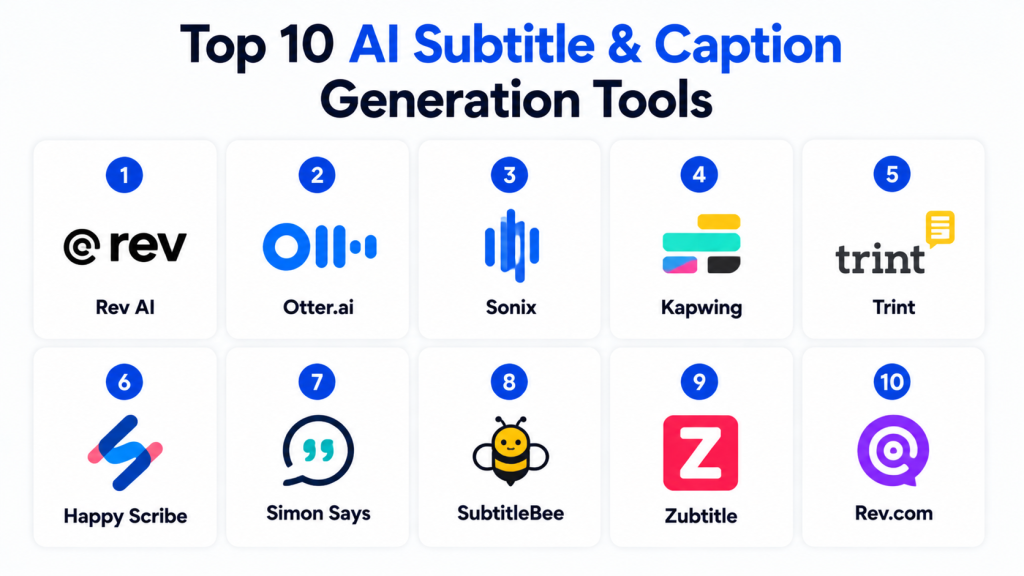
Top 10 AI Subtitle & Caption Generation Tools
1- Rev AI
One-line verdict: Best for accurate real-time and batch transcription for corporate and media use.
Short description: Rev AI provides automated speech-to-text and subtitle generation with high accuracy for video and audio content.
Standout Capabilities
- Real-time and batch transcription
- Multiple languages and accents
- Automatic timestamping and formatting
- API for integration with video platforms
- Speaker diarization
- Cloud-based processing
- Accessibility compliance support
- High scalability
AI-Specific Depth
- Model support: Proprietary
- RAG / knowledge integration: N/A
- Evaluation: Accuracy tests and human-in-loop review
- Guardrails: Inappropriate content filtering
- Observability: Token usage, processing time
Pros
- High transcription accuracy
- Enterprise-grade scalability
- Multi-language support
Cons
- Cloud dependency
- Premium pricing
- Limited creative formatting options
Security & Compliance
SSO/RBAC, encryption; Certifications: Not publicly stated
Deployment & Platforms
- Web, Cloud
Integrations & Ecosystem
- API for video editors, CMS, LMS
- Export to SRT, VTT, DFXP
- Workflow automation support
Pricing Model
Usage-based subscription
Best-Fit Scenarios
- Corporate training videos
- Media production
- Streaming content
2- Otter.ai
One-line verdict: Ideal for meetings, webinars, and live events needing real-time captions and transcripts.
Short description: Otter.ai provides AI-generated captions and transcripts, popular for remote teams, webinars, and education.
Standout Capabilities
- Real-time transcription
- Speaker identification
- Multi-device support
- Integration with Zoom, Teams, and WebEx
- Searchable transcripts
- Cloud storage of transcripts
AI-Specific Depth
- Model support: Proprietary
- RAG / knowledge integration: N/A
- Evaluation: Accuracy monitoring and human correction
- Guardrails: Safe content moderation
- Observability: Latency and usage metrics
Pros
- Real-time captioning
- Easy to use for meetings
- Multi-device accessibility
Cons
- Less suited for video content beyond meetings
- Cloud-only
- Limited formatting controls
Security & Compliance
SSO/RBAC; Certifications: Not publicly stated
Deployment & Platforms
- Web, iOS, Android, Cloud
Integrations & Ecosystem
- Zoom, Microsoft Teams, WebEx APIs
- LMS and CMS integration
Pricing Model
Subscription-based
Best-Fit Scenarios
- Webinars
- Remote team meetings
- Live event captions
3- Sonix
One-line verdict: Suited for media companies and content creators needing batch transcription and subtitles.
Short description: Sonix automatically generates accurate subtitles and transcripts, with support for multiple languages and speaker labeling.
Standout Capabilities
- Batch transcription and subtitle generation
- Multi-language support
- Timestamped captions
- Speaker labeling
- Cloud-based scalable processing
- Export to multiple formats
AI-Specific Depth
- Model support: Proprietary
- RAG / knowledge integration: N/A
- Evaluation: Automated accuracy and timestamp checks
- Guardrails: Content safety filters
- Observability: Latency and processing metrics
Pros
- Accurate automated subtitles
- Scalable for large libraries
- Easy format export
Cons
- Cloud-only
- Limited creative styling
- Premium subscription pricing
Security & Compliance
Varies / N/A
Deployment & Platforms
- Web, Cloud
Integrations & Ecosystem
- Video editors, CMS, API
- LMS integration
Pricing Model
Usage-based subscription
Best-Fit Scenarios
- Media content
- Corporate videos
- Video archives
4- Kapwing
One-line verdict: Ideal for creators needing fast subtitle generation and easy editing for social videos.
Short description: Kapwing generates AI captions, allows editing, and formats subtitles for social media and video content.
Standout Capabilities
- Automatic caption generation
- Subtitle editing interface
- Multi-language support
- Export to SRT, VTT
- Integration with social platforms
- Batch processing
AI-Specific Depth
- Model support: Proprietary
- RAG / knowledge integration: N/A
- Evaluation: Automated accuracy checks
- Guardrails: Content moderation
- Observability: Usage metrics
Pros
- Quick, easy for creators
- Multi-language captions
- Social media export formats
Cons
- Limited enterprise scalability
- Cloud-only
- Less advanced speaker diarization
Security & Compliance
Varies / N/A
Deployment & Platforms
- Web, Cloud
Integrations & Ecosystem
- YouTube, Instagram, TikTok
- API integration
Pricing Model
Subscription-based
Best-Fit Scenarios
- Social media videos
- Marketing content
- Short-form content captions
5- Trint
One-line verdict: Best for professional transcription and captioning with editing and collaboration.
Short description: Trint provides AI transcription, captioning, and collaborative editing for journalists, marketers, and enterprises.
Standout Capabilities
- Accurate AI transcription
- Subtitle generation with timestamps
- Editing and collaboration tools
- Multi-language support
- Cloud processing
AI-Specific Depth
- Model support: Proprietary
- RAG / knowledge integration: N/A
- Evaluation: Accuracy metrics and human review
- Guardrails: Safe content checks
- Observability: Latency, usage monitoring
Pros
- Professional transcription quality
- Collaborative features
- Multi-language support
Cons
- Cloud-only
- Subscription cost
- Limited creative subtitle formatting
Security & Compliance
Varies / N/A
Deployment & Platforms
- Web, Cloud
Integrations & Ecosystem
- Video editors, CMS, LMS APIs
Pricing Model
Subscription
Best-Fit Scenarios
- Journalism
- Corporate training
- Marketing campaigns
6- Happy Scribe
One-line verdict: Ideal for generating accurate captions and transcripts for video and audio content.
Short description: Happy Scribe provides AI subtitle generation, editing, and multilingual support for creators and enterprises.
Standout Capabilities
- Automatic subtitles
- Multi-language transcription
- Editing interface
- Timestamp alignment
- Export to SRT, VTT
- Collaboration tools
AI-Specific Depth
- Model support: Proprietary
- RAG / knowledge integration: N/A
- Evaluation: Accuracy tests
- Guardrails: Content moderation
- Observability: Latency metrics
Pros
- Easy to use
- Supports multiple languages
- Collaboration-friendly
Cons
- Cloud-only
- Limited real-time transcription
- Premium subscription
Security & Compliance
Varies / N/A
Deployment & Platforms
- Web, Cloud
Integrations & Ecosystem
- Video editors, API, CMS
Pricing Model
Subscription
Best-Fit Scenarios
- Social media videos
- E-learning content
- Corporate video libraries
7- Simon Says
One-line verdict: Best for post-production teams needing automated captioning and translation workflows.
Short description: Simon Says generates AI captions and translations for video editors and media teams with timestamped output.
Standout Capabilities
- AI captioning and translation
- Timestamped SRT output
- Supports multiple languages
- Cloud-based batch processing
- Video editing plugin integration
AI-Specific Depth
- Model support: Proprietary
- RAG / knowledge integration: N/A
- Evaluation: Accuracy monitoring
- Guardrails: Content moderation
- Observability: Usage metrics
Pros
- Accurate multi-language captions
- Video editor plugins
- Batch processing
Cons
- Cloud-only
- Premium cost
- Limited live transcription
Security & Compliance
Varies / N/A
Deployment & Platforms
- Web, Cloud
Integrations & Ecosystem
- Premiere Pro, Final Cut, API
Pricing Model
Subscription
Best-Fit Scenarios
- Media post-production
- Multilingual content
- Corporate video localization
8- SubtitleBee
One-line verdict: Suited for marketers and content creators needing fast AI-generated captions.
Short description: SubtitleBee automatically generates subtitles and captions with styling options for social videos and presentations.
Standout Capabilities
- Automatic subtitle generation
- Multi-language support
- Styling and formatting
- Export to SRT, VTT, MP4
- Quick cloud processing
AI-Specific Depth
- Model support: Proprietary
- RAG / knowledge integration: N/A
- Evaluation: Accuracy monitoring
- Guardrails: Safe content detection
- Observability: Latency metrics
Pros
- Fast caption generation
- Styling customization
- Cloud-based
Cons
- Limited enterprise features
- Cloud-only
- No real-time transcription
Security & Compliance
Varies / N/A
Deployment & Platforms
- Web, Cloud
Integrations & Ecosystem
- Video editors, social platforms, API
Pricing Model
Subscription
Best-Fit Scenarios
- Marketing videos
- Social media content
- Presentations
9- Zubtitle
One-line verdict: Ideal for social media creators needing automatic captions with editing features.
Short description: Zubtitle generates AI captions, allows editing, and formats subtitles for social media videos.
Standout Capabilities
- Auto-captioning
- Subtitle editing
- Multi-platform export
- Timestamping
- Video formatting for social media
AI-Specific Depth
- Model support: Proprietary
- RAG / knowledge integration: N/A
- Evaluation: Accuracy checks
- Guardrails: Content moderation
- Observability: Latency metrics
Pros
- Social media optimized
- Quick editing
- Accurate timing
Cons
- Cloud-only
- Limited multi-language options
- Premium subscription
Security & Compliance
Varies / N/A
Deployment & Platforms
- Web, Cloud
Integrations & Ecosystem
- Instagram, YouTube, TikTok, API
Pricing Model
Subscription
Best-Fit Scenarios
- Social media videos
- Marketing campaigns
- Influencer content
10- Rev.com
One-line verdict: Best for professional transcription and captioning with enterprise-scale reliability.
Short description: Rev.com provides AI and human-assisted captioning, translation, and transcription for enterprise and media production.
Standout Capabilities
- AI-generated and human-reviewed captions
- Multi-language support
- Enterprise-grade accuracy
- API and batch processing
- Accessible export formats
AI-Specific Depth
- Model support: Proprietary
- RAG / knowledge integration: N/A
- Evaluation: Human QA and automated checks
- Guardrails: Content moderation
- Observability: Latency and usage metrics
Pros
- High accuracy
- Enterprise-ready
- Multi-language support
Cons
- Cloud-only
- Costly for large volumes
- Less DIY-friendly
Security & Compliance
SSO/RBAC; Certifications: Not publicly stated
Deployment & Platforms
- Web, Cloud
Integrations & Ecosystem
- Video editors, CMS, API
Pricing Model
Subscription or per-minute usage
Best-Fit Scenarios
- Corporate video libraries
- Media localization
- Accessibility compliance
Comparison Table
| Tool Name | Best For | Deployment | Model Flexibility | Strength | Watch-Out | Public Rating |
|---|---|---|---|---|---|---|
| Rev AI | Enterprise/media | Cloud | Proprietary | Real-time + batch | Cloud-only | N/A |
| Otter.ai | Meetings/webinars | Web/iOS/Android | Proprietary | Real-time captions | Limited creative styling | N/A |
| Sonix | Media content | Cloud | Proprietary | Batch processing | Cloud-only | N/A |
| Kapwing | Creators/social | Web/Cloud | Proprietary | Easy editing | Limited enterprise scaling | N/A |
| Trint | Journalists/enterprises | Cloud | Proprietary | Collaborative editing | Cloud-only | N/A |
| Happy Scribe | Creators/enterprise | Cloud | Proprietary | Multi-language | Cloud-only | N/A |
| Simon Says | Post-production | Cloud | Proprietary | Translation & captions | Limited live support | N/A |
| SubtitleBee | Marketing creators | Web/Cloud | Proprietary | Fast captions | Limited enterprise features | N/A |
| Zubtitle | Social media | Web/Cloud | Proprietary | Quick edits | Limited multi-language | N/A |
| Rev.com | Enterprise/video | Cloud | Proprietary | High accuracy | Costly | N/A |
Scoring & Evaluation
| Tool | Core | Reliability/Eval | Guardrails | Integrations | Ease | Perf/Cost | Security/Admin | Support | Weighted Total |
|---|---|---|---|---|---|---|---|---|---|
| Rev AI | 9 | 8 | 8 | 8 | 9 | 8 | 8 | 7 | 8.4 |
| Otter.ai | 8 | 7 | 7 | 7 | 8 | 8 | 7 | 7 | 7.4 |
| Sonix | 8 | 7 | 7 | 7 | 8 | 8 | 7 | 7 | 7.4 |
| Kapwing | 8 | 7 | 7 | 7 | 8 | 8 | 7 | 7 | 7.4 |
| Trint | 8 | 7 | 7 | 7 | 8 | 8 | 7 | 7 | 7.4 |
| Happy Scribe | 8 | 7 | 7 | 7 | 8 | 8 | 7 | 7 | 7.4 |
| Simon Says | 8 | 7 | 7 | 7 | 8 | 8 | 7 | 7 | 7.4 |
| SubtitleBee | 8 | 7 | 7 | 7 | 8 | 8 | 7 | 7 | 7.4 |
| Zubtitle | 8 | 7 | 7 | 7 | 8 | 8 | 7 | 7 | 7.4 |
| Rev.com | 9 | 8 | 8 | 8 | 8 | 8 | 8 | 7 | 8.2 |
Top 3 for Enterprise: Rev AI, Trint, Rev.com
Top 3 for SMB: Otter.ai, Kapwing, Happy Scribe
Top 3 for Developers: Sonix, Simon Says, SubtitleBee
Which AI Subtitle & Caption Tool Is Right for You?
Solo / Freelancer
Kapwing, SubtitleBee, or Zubtitle for quick captions for social media or marketing videos.
SMB
Otter.ai, Happy Scribe, or Sonix for multi-language, batch processing, and accessible content.
Mid-Market
Trint and Simon Says for collaborative editing and translation workflows.
Enterprise
Rev AI, Rev.com, or Sonix for secure, high-volume caption generation with compliance features.
Regulated industries
Prioritize SSO, RBAC, and encrypted processing with Rev AI, Trint, or Rev.com.
Budget vs premium
Freelancers/small teams: Kapwing, SubtitleBee, or Zubtitle
Premium: Rev AI, Trint, Rev.com for enterprise-grade processing
Build vs buy
Pre-built AI subtitle platforms are recommended; custom speech-to-text pipelines are resource-intensive.
Implementation Playbook (30 / 60 / 90 Days)
- 30 days: Pilot videos to test accuracy, latency, and subtitle alignment
- 60 days: Integrate into video workflows, enable guardrails, and perform QA
- 90 days: Scale production, optimize cost, enforce governance, and monitor metrics
Common Mistakes & How to Avoid Them
- Skipping QA on generated subtitles
- Poor timing or sync accuracy
- Ignoring multilingual verification
- Over-reliance on AI without human review
- Vendor lock-in for proprietary formats
- Limited export options
- Not testing for accessibility compliance
- Weak guardrails for inappropriate content
- Lack of integration with CMS or video editors
- Insufficient observability for cost/usage
- Ignoring batch vs live workflows
- Overlooking format compatibility (SRT/VTT/DFXP)
FAQs
H3: Can these tools handle multiple languages?
Yes, most platforms support multilingual subtitles with accents and dialects.
H3: Are real-time captions available?
Tools like Rev AI and Otter.ai support real-time streaming captions.
H3: Can subtitles be edited manually?
Yes, most platforms provide interfaces for editing, timing, and styling.
H3: Are these tools suitable for accessibility compliance?
Yes, platforms support WCAG, ADA, and industry-standard formats.
H3: Can I export captions to video editors?
Yes, SRT, VTT, and MP4 embedding options are common.
H3: Do AI captions support speaker identification?
Many tools like Otter.ai and Sonix offer speaker diarization.
H3: Are subtitles accurate for noisy environments?
Advanced AI models can handle moderate background noise, but quality varies.
H3: Can I batch process multiple videos?
Yes, enterprise tools like Rev AI and Trint allow batch processing.
H3: How do I maintain brand voice in captions?
Custom templates and style settings allow brand-aligned formatting.
H3: Can captions be translated automatically?
Some tools support AI translation with timestamped subtitles.
H3: Do these platforms support live events?
Yes, select platforms offer real-time streaming and captioning for webinars and conferences.
H3: Are there mobile apps for caption editing?
Yes, Otter.ai, Happy Scribe, and Rev.com provide mobile support.
Conclusion
AI Subtitle & Caption Generation Tools in 2026 provide scalable, accurate, and multilingual captioning for content creators, enterprises, and media companies. Selecting the right platform depends on volume, languages, compliance requirements, and integration needs. Key steps: shortlist based on use case, pilot with sample videos, verify accuracy and security, and scale production with observability and cost optimization in place.

Find Trusted Cardiac Hospitals
Compare heart hospitals by city and services — all in one place.
Explore Hospitals
The article does a solid job comparing tools on accuracy, languages, and styling, but it treats caption generation as a single-step feature, not a pipeline stage.
In real production workflows, captions are not just generated—they are:
What’s missing is how these tools handle incremental re-processing of subtitles when a video changes slightly, which is a major cost and reliability issue in large-scale content pipelines.