
Introduction
AI ticket triage and routing systems help support teams automatically classify incoming requests, detect urgency, assign ownership, suggest next steps, and route tickets to the right queue, team, or agent. These systems use natural language understanding, machine learning, workflow automation, and large language models to reduce manual sorting and speed up response times across customer support, IT service desks, HR service centers, and enterprise operations.
Why it matters: support teams often lose time before work even begins. Tickets may arrive through email, chat, web forms, apps, phone transcripts, social channels, or internal portals. Without automation, teams manually read, tag, prioritize, and reassign tickets, which creates delays, inconsistent service quality, missed SLAs, and frustrated customers. AI triage improves speed, consistency, and visibility by understanding issue type, sentiment, customer tier, product area, risk level, and required expertise.
Real-world use cases include customer support ticket classification, IT help desk routing, incident prioritization, SLA risk detection, refund request routing, bug report categorization, HR request assignment, escalation detection, multilingual ticket sorting, agent skill-based routing, and automated ticket enrichment.
Evaluation criteria for buyers should include classification accuracy, routing flexibility, workflow automation, SLA management, sentiment detection, escalation rules, integration depth, multilingual support, human override, audit logs, admin controls, data privacy, model transparency, reporting, cost predictability, and ease of change management.
Best for: customer support teams, IT service desks, SaaS companies, ecommerce brands, BPOs, managed service providers, enterprise service teams, and organizations handling high ticket volume across multiple products, regions, or departments. Not ideal for: very small teams with low ticket volume, businesses with highly customized one-off requests that always require human judgment, or teams without clear routing rules, ownership structure, or service categories.
What’s Changed in AI Ticket Triage & Routing Systems
- AI triage has moved from simple keyword tagging to intent understanding, sentiment detection, and context-aware routing.
- Modern systems can classify tickets using customer history, product area, account value, SLA status, and previous interactions.
- Generative AI is increasingly used to summarize tickets, suggest next actions, and prepare agents before they respond.
- Many platforms now support automated enrichment, such as adding tags, priority, language, issue type, and likely resolution path.
- Enterprise service teams are asking for stronger auditability because routing decisions can affect compliance and service obligations.
- Human override has become important because AI routing must be correctable and explainable.
- Integration depth now matters more because triage needs CRM, help desk, ITSM, product, billing, and identity context.
- Multilingual ticket routing is becoming essential for global customer support and shared service teams.
- AI systems are increasingly used to predict SLA breaches before they happen.
- Buyers are paying closer attention to model governance, data retention, and privacy settings.
- Automated routing is being connected to agent skills, workload balancing, and workforce planning.
- Ticket triage systems are now expected to support both customer-facing service and internal enterprise service requests.
Quick Buyer Checklist
Use this checklist to shortlist AI ticket triage and routing systems quickly:
- Confirm whether the tool supports your main ticket sources such as email, chat, forms, phone transcripts, and messaging.
- Test classification accuracy using real historical tickets.
- Check whether the platform can identify intent, urgency, sentiment, language, and customer tier.
- Verify whether routing rules can combine AI predictions with business logic.
- Confirm support for SLA-aware prioritization and escalation.
- Check whether agents can override AI tags, queues, and priorities.
- Review how the system explains or audits routing decisions.
- Confirm integration with CRM, help desk, ITSM, product, billing, and knowledge systems.
- Check if admins can customize categories, queues, workflows, and permissions.
- Review data retention, encryption, role access, and audit logging.
- Confirm multilingual support if you serve multiple regions.
- Test how the tool handles ambiguous, duplicate, or incomplete tickets.
- Evaluate reporting for routing accuracy, reassignment rate, SLA risk, and backlog trends.
- Check pricing around seats, ticket volume, AI usage, and automation features.
- Confirm data export and migration options to reduce vendor lock-in.
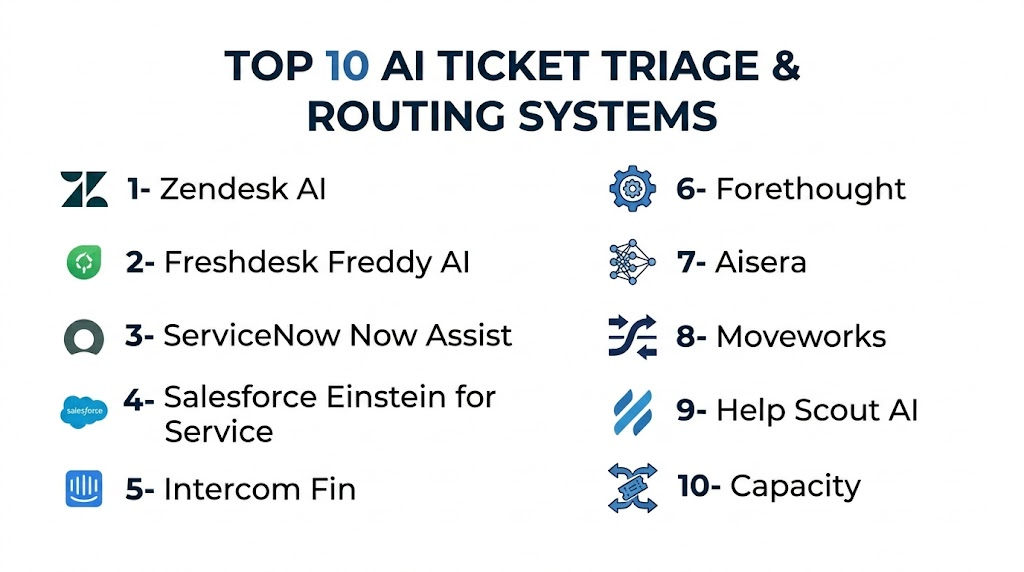
Top 10 AI Ticket Triage & Routing Systems
1- Zendesk AI
One-line verdict: Best for support teams needing AI triage inside a mature omnichannel service platform.
Short description:
Zendesk AI helps customer service teams classify tickets, detect intent, suggest replies, prioritize requests, and route issues through Zendesk support workflows. It is especially useful for organizations already using Zendesk for ticketing, knowledge base, and customer communication.
Standout Capabilities
- AI-powered ticket classification and intent detection
- Automated routing based on customer issue and context
- Suggested responses and agent assistance
- Omnichannel support across multiple customer channels
- SLA-aware workflow automation
- Help center and knowledge base alignment
- Reporting for support operations
- Large marketplace and integration ecosystem
AI-Specific Depth
- Model support: Hosted AI model approach
- RAG / knowledge integration: Native help center and support content integration
- Evaluation: Ticket analytics, QA review, and performance reporting
- Guardrails: Admin rules, escalation controls, permissions, and workflow policies
- Observability: Dashboards for ticket volume, routing, automation, and support performance
Pros
- Strong fit for existing Zendesk environments
- Mature support workflow and routing capabilities
- Broad integrations and marketplace ecosystem
Cons
- Advanced AI features may require higher plans or add-ons
- Setup can be complex for large support operations
- Smaller teams may not need the full platform depth
Security & Compliance
Zendesk provides enterprise security features such as SSO, role permissions, encryption, audit capabilities, and admin controls depending on plan. Buyers should verify data retention, regional hosting, and compliance requirements directly. Unknown certifications or compliance details should be treated as Not publicly stated.
Deployment & Platforms
- Web-based platform
- Cloud deployment
- Mobile apps available
- Self-hosted deployment: N/A
Integrations & Ecosystem
Zendesk AI works well when ticket triage needs to connect with customer records, knowledge content, internal collaboration, and operational reporting.
- CRM integrations
- Help center integration
- Collaboration tools
- Ecommerce platforms
- Product and engineering tools
- APIs and webhooks
- Marketplace apps
Pricing Model
Zendesk generally uses seat-based SaaS pricing with AI and automation features depending on plan and add-ons. Exact pricing varies by package.
Best-Fit Scenarios
- High-volume customer support ticket triage
- Zendesk-based support operations
- Omnichannel service teams needing routing automation
2- Freshdesk Freddy AI
One-line verdict: Best for SMB and mid-market teams wanting practical AI triage inside an easy help desk platform.
Short description:
Freshdesk Freddy AI helps teams classify tickets, suggest responses, automate workflows, and route support requests inside the Freshdesk environment. It is useful for support teams that want AI-powered ticket handling without heavy enterprise complexity.
Standout Capabilities
- AI-powered ticket categorization
- Priority and intent detection
- Automated ticket assignment workflows
- Suggested replies and agent assistance
- Knowledge base integration
- SLA and escalation automation
- Omnichannel support workflows
- Support analytics and dashboards
AI-Specific Depth
- Model support: Hosted AI model approach
- RAG / knowledge integration: Native knowledge base and support content integration
- Evaluation: Ticket reporting, workflow analytics, and support review
- Guardrails: Routing rules, admin controls, and escalation paths
- Observability: Dashboards for ticket trends, response performance, and automation
Pros
- Easier setup than many enterprise platforms
- Good value for SMB and mid-market teams
- Strong blend of ticketing, automation, and AI assistance
Cons
- Enterprise customization may be limited compared with larger suites
- AI feature depth can vary by plan
- Complex routing logic may need extra configuration
Security & Compliance
Freshdesk offers security and admin capabilities such as encryption, user roles, access management, and account controls depending on plan. Buyers should verify SSO, audit logs, retention, residency, and compliance details directly.
Deployment & Platforms
- Web-based platform
- Cloud deployment
- Mobile apps available
- Self-hosted deployment: N/A
Integrations & Ecosystem
Freshdesk Freddy AI fits support teams that need ticket triage connected to customer service, collaboration, and business workflows.
- CRM integrations
- Collaboration tools
- Ecommerce systems
- Jira and project tools
- Knowledge base tools
- APIs and marketplace apps
- Workflow automation tools
Pricing Model
Freshdesk generally uses tiered SaaS pricing with AI features depending on edition and add-ons.
Best-Fit Scenarios
- SMB customer support triage
- Mid-market help desk automation
- Teams needing easy ticket routing and SLA workflows
3- ServiceNow Now Assist
One-line verdict: Best for enterprise IT and shared services teams needing AI triage inside ServiceNow workflows.
Short description:
ServiceNow Now Assist brings generative AI and workflow automation into ServiceNow service management environments. It helps enterprises summarize requests, categorize incidents, route work, assist agents, and automate service operations across IT, HR, customer service, and enterprise workflows.
Standout Capabilities
- AI-powered incident and request classification
- Service workflow automation across departments
- Ticket summarization and agent assistance
- Enterprise-grade routing and escalation
- Knowledge integration for service operations
- SLA and priority management
- Strong workflow orchestration
- Broad ITSM and enterprise service capabilities
AI-Specific Depth
- Model support: Hosted enterprise AI capabilities and configurable platform options
- RAG / knowledge integration: ServiceNow knowledge, service catalog, and enterprise data integration
- Evaluation: Workflow analytics, service performance reporting, and review processes
- Guardrails: Enterprise governance, permissions, workflow policies, and admin controls
- Observability: Service analytics, ticket trends, SLA dashboards, and operational reporting
Pros
- Strong for enterprise ITSM and shared services
- Deep workflow and routing flexibility
- Suitable for complex service environments
Cons
- Implementation can be complex
- Requires ServiceNow expertise
- May be excessive for smaller support teams
Security & Compliance
ServiceNow provides enterprise security and governance features including role controls, identity integrations, audit capabilities, encryption, and platform administration depending on configuration. Buyers should verify specific compliance, retention, and data residency requirements directly.
Deployment & Platforms
- Web-based enterprise platform
- Cloud deployment
- Mobile access available
- Hybrid integrations supported
- Self-hosted deployment: Varies / N/A
Integrations & Ecosystem
ServiceNow Now Assist is strongest when ticket triage needs to connect with enterprise workflows, service catalogs, assets, users, and approvals.
- ITSM workflows
- HR service delivery
- Customer service management
- Asset and CMDB systems
- Identity and access tools
- APIs and integration hub
- Enterprise applications
Pricing Model
Enterprise subscription pricing varies by modules, users, workflows, and AI capabilities. Exact pricing is Not publicly stated.
Best-Fit Scenarios
- Enterprise IT ticket triage
- Shared service routing across departments
- SLA-heavy incident and request management
4- Salesforce Einstein for Service
One-line verdict: Best for CRM-centric enterprises needing AI case classification, prioritization, and routing.
Short description:
Salesforce Einstein for Service helps teams classify cases, recommend next actions, summarize customer issues, and route work using Salesforce customer data. It is especially strong for enterprises already using Salesforce Service Cloud and related customer data workflows.
Standout Capabilities
- AI-powered case classification
- CRM-aware routing and prioritization
- Case summarization and agent assistance
- Customer context from Salesforce records
- Workflow automation across service processes
- Knowledge recommendations
- Strong reporting through Salesforce analytics
- Enterprise customization and permissions
AI-Specific Depth
- Model support: Hosted AI and configurable enterprise AI ecosystem options
- RAG / knowledge integration: Salesforce knowledge, CRM records, and data platform context
- Evaluation: Case performance analytics and service review workflows
- Guardrails: Permission controls, workflow policies, and governance settings
- Observability: CRM dashboards, service analytics, case trends, and performance reporting
Pros
- Strong integration with Salesforce customer data
- Excellent for account-aware routing
- Highly customizable for enterprise workflows
Cons
- Requires Salesforce administration expertise
- Can be costly and complex for smaller teams
- Best value appears in Salesforce-centered organizations
Security & Compliance
Salesforce provides enterprise security capabilities such as SSO, RBAC, encryption, audit logging, permission controls, and governance tools depending on product configuration. Buyers should verify compliance, retention, and regional requirements directly.
Deployment & Platforms
- Web-based platform
- Cloud deployment
- Mobile access through Salesforce apps
- Hybrid integrations supported
- Self-hosted deployment: N/A
Integrations & Ecosystem
Salesforce Einstein for Service is best when triage depends on CRM history, customer value, account ownership, and cross-functional workflows.
- Salesforce Service Cloud
- Salesforce Data Cloud
- Slack
- MuleSoft
- App marketplace ecosystem
- APIs and automation tools
- Enterprise system integrations
Pricing Model
Salesforce uses enterprise subscription pricing with AI and data usage elements depending on plan, edition, and configuration.
Best-Fit Scenarios
- CRM-driven case triage
- Enterprise customer support routing
- Account-aware escalation and prioritization
5- Intercom Fin
One-line verdict: Best for SaaS teams needing AI support automation, ticket routing, and customer conversation context.
Short description:
Intercom Fin helps SaaS and digital support teams automate customer conversations, answer questions, summarize issues, and route unresolved cases to human agents. It is useful when ticket triage needs to work closely with live chat, help center content, and customer messaging.
Standout Capabilities
- AI customer conversation automation
- Support issue detection and escalation
- Human handoff with context
- Help center based answer generation
- Inbox and workflow automation
- Customer messaging and ticketing alignment
- AI summaries for agent review
- Modern support experience for SaaS teams
AI-Specific Depth
- Model support: Hosted AI model approach
- RAG / knowledge integration: Native help center and support content integration
- Evaluation: Conversation analytics, resolution reporting, and support review
- Guardrails: Escalation rules, admin controls, and answer grounding
- Observability: Conversation reporting, resolution tracking, and support analytics
Pros
- Strong for SaaS and product-led support teams
- Good customer experience and agent handoff
- Works well with chat-first support operations
Cons
- Best value for teams using Intercom broadly
- Costs can grow with usage and scale
- Less suited for traditional ITSM workflows
Security & Compliance
Intercom provides enterprise security capabilities such as access controls, encryption, SSO options, and admin permissions depending on plan. Buyers should verify retention, residency, audit logs, and compliance requirements directly.
Deployment & Platforms
- Web-based platform
- Cloud deployment
- Mobile apps available
- Customer messaging channels
- Self-hosted deployment: N/A
Integrations & Ecosystem
Intercom Fin works well when triage is part of a broader customer communication and product support workflow.
- Help center integrations
- CRM integrations
- Slack
- Billing tools
- Customer data platforms
- APIs and webhooks
- Support workflow tools
Pricing Model
Intercom generally uses SaaS subscription pricing with AI usage and advanced support features depending on plan.
Best-Fit Scenarios
- SaaS support ticket triage
- Chat-first customer support
- Product-led customer service workflows
6- Forethought
One-line verdict: Best for AI-first support teams focused on ticket deflection, routing, and resolution automation.
Short description:
Forethought is an AI support automation platform that helps teams classify tickets, resolve common issues, assist agents, and route support requests. It is designed for organizations that want AI to improve both customer self-service and internal support operations.
Standout Capabilities
- AI ticket classification and routing
- Automated resolution for repetitive issues
- Agent assistance and response suggestions
- Knowledge-based support automation
- Deflection and escalation workflows
- Support platform integrations
- Conversation intelligence
- Performance analytics for automation
AI-Specific Depth
- Model support: Hosted and configurable AI capabilities may vary
- RAG / knowledge integration: Knowledge base and support system integrations
- Evaluation: AI performance analytics and ticket review workflows
- Guardrails: Escalation controls, response boundaries, and workflow rules
- Observability: Automation dashboards, resolution analytics, and ticket insights
Pros
- Strong focus on AI-native support automation
- Useful for reducing repetitive tickets
- Good fit for high-volume support teams
Cons
- Enterprise-focused packaging may not fit very small teams
- Requires good knowledge content and workflow design
- Integration depth should be tested with existing stack
Security & Compliance
Forethought provides enterprise security features depending on plan and agreement. Buyers should verify SSO, RBAC, audit logs, encryption, data retention, residency, and compliance requirements directly.
Deployment & Platforms
- Web-based platform
- Cloud deployment
- Support platform integrations
- Self-hosted deployment: Varies / N/A
Integrations & Ecosystem
Forethought works as an AI layer connected to customer support systems, knowledge sources, and ticketing platforms.
- Help desk platforms
- CRM systems
- Knowledge bases
- APIs
- Support workflow tools
- Analytics systems
- Agent assistance environments
Pricing Model
Enterprise SaaS pricing typically depends on usage, automation scope, support volume, and implementation needs.
Best-Fit Scenarios
- High-volume ticket triage
- AI-first support automation
- Support teams seeking deflection and routing improvement
7- Aisera
One-line verdict: Best for enterprise service teams automating ticket triage across IT, HR, and customer operations.
Short description:
Aisera is an AI service management platform focused on automating enterprise service requests across IT, HR, customer support, and business operations. It helps classify tickets, automate resolutions, route work, and support self-service through conversational AI and workflow automation.
Standout Capabilities
- AI-powered service request classification
- Automated ticket routing and resolution
- ITSM and enterprise service automation
- Conversational self-service support
- Workflow automation across departments
- Knowledge and service catalog integration
- Employee and customer support use cases
- Analytics for service performance
AI-Specific Depth
- Model support: Hosted and configurable enterprise AI capabilities
- RAG / knowledge integration: Enterprise knowledge, service catalog, and workflow integrations
- Evaluation: Service analytics, automation review, and ticket performance reporting
- Guardrails: Workflow controls, approvals, escalation rules, and admin governance
- Observability: Dashboards for automation, ticket volume, SLA performance, and resolution trends
Pros
- Strong enterprise service automation focus
- Useful across IT, HR, and customer support
- Good fit for high-volume repetitive requests
Cons
- May require implementation planning
- Best value appears in larger organizations
- Buyers should validate integrations carefully
Security & Compliance
Aisera offers enterprise security and admin features depending on deployment and agreement. Buyers should verify identity integrations, RBAC, audit logs, encryption, data retention, and compliance details directly.
Deployment & Platforms
- Web-based platform
- Cloud deployment
- Enterprise service integrations
- Self-hosted deployment: Varies / N/A
Integrations & Ecosystem
Aisera is designed for organizations that need AI ticket triage connected to enterprise service systems and knowledge sources.
- ITSM platforms
- HR systems
- CRM tools
- Knowledge bases
- Service catalogs
- APIs and workflow automation
- Collaboration tools
Pricing Model
Enterprise pricing is typically custom and depends on automation scope, service domains, usage, and integration requirements.
Best-Fit Scenarios
- Enterprise IT and HR request routing
- Automated service desk triage
- Cross-functional service operations
8- Moveworks
One-line verdict: Best for employee support teams automating IT, HR, and workplace ticket routing.
Short description:
Moveworks is an AI platform for employee support automation. It helps employees get answers, resolve common requests, and route issues across IT, HR, finance, facilities, and workplace systems through conversational AI and enterprise integrations.
Standout Capabilities
- Employee support automation
- IT and HR ticket triage
- Conversational workplace assistant
- Enterprise search and knowledge access
- Workflow automation for common requests
- Ticket creation, routing, and escalation
- Integration with workplace systems
- Analytics for employee service operations
AI-Specific Depth
- Model support: Hosted enterprise AI approach
- RAG / knowledge integration: Enterprise knowledge and workplace system integrations
- Evaluation: Automation analytics and support performance tracking
- Guardrails: Enterprise policy controls, workflow restrictions, and escalation paths
- Observability: Dashboards for request volume, automation, resolution, and employee experience
Pros
- Strong for internal employee support
- Good enterprise integration focus
- Helps reduce repetitive IT and HR tickets
Cons
- Less focused on external customer support
- Enterprise deployment requires planning
- Best fit depends on connected workplace systems
Security & Compliance
Moveworks provides enterprise security features depending on deployment and contract. Buyers should verify SSO, RBAC, audit logs, encryption, retention controls, data residency, and compliance requirements directly.
Deployment & Platforms
- Web and collaboration-based access
- Cloud deployment
- Enterprise workplace integrations
- Self-hosted deployment: Varies / N/A
Integrations & Ecosystem
Moveworks is built to connect employee support requests with workplace systems and service management workflows.
- ITSM platforms
- HR systems
- Collaboration tools
- Identity systems
- Knowledge bases
- Enterprise applications
- Workflow automation tools
Pricing Model
Enterprise pricing is generally custom based on employee population, service domains, integrations, and automation scope.
Best-Fit Scenarios
- IT help desk triage
- HR and workplace service routing
- Enterprise employee support automation
9- Help Scout AI
One-line verdict: Best for small and growing support teams needing simple AI-assisted ticket organization and replies.
Short description:
Help Scout AI supports customer service teams with AI-assisted drafting, summarization, organization, and support workflow improvements inside Help Scout. It is a practical option for teams that want human-centered support with lightweight automation.
Standout Capabilities
- AI-assisted support replies
- Conversation summarization
- Customer support inbox organization
- Simple workflow automation
- Knowledge base alignment
- Team collaboration around customer conversations
- Reporting for support performance
- Clean user experience for small teams
AI-Specific Depth
- Model support: Hosted AI model approach
- RAG / knowledge integration: Knowledge base and support content integration varies by setup
- Evaluation: Support review, reporting, and manual validation workflows
- Guardrails: Workspace permissions, support workflows, and human review
- Observability: Reporting for conversations, response time, and team performance
Pros
- Easy for small teams to use
- Human-friendly support workflow design
- Good fit for simple customer support operations
Cons
- Less advanced than enterprise AI routing systems
- Limited deep ITSM or complex routing features
- Advanced AI governance may be limited
Security & Compliance
Help Scout provides business security and admin controls depending on plan. Buyers should verify SSO, RBAC, retention, audit logs, encryption, and compliance requirements directly.
Deployment & Platforms
- Web-based platform
- Cloud deployment
- Customer support inbox workflows
- Self-hosted deployment: N/A
Integrations & Ecosystem
Help Scout AI is useful for teams that want simple support workflows connected to customer communication and knowledge content.
- CRM integrations
- Knowledge base tools
- Collaboration tools
- Ecommerce platforms
- APIs
- Reporting tools
- Workflow integrations
Pricing Model
Help Scout generally uses SaaS pricing based on users, support features, and plan level. AI capabilities may vary by package.
Best-Fit Scenarios
- Small customer support teams
- Lightweight ticket organization
- Human-led support with AI assistance
10- Capacity
One-line verdict: Best for service teams needing AI-powered support automation, routing, and knowledge access.
Short description:
Capacity is an AI-powered support automation platform focused on answering questions, automating workflows, and routing service requests. It can support customer service, employee support, and internal operations through knowledge access and automation.
Standout Capabilities
- AI-powered support automation
- Ticket routing and request handling
- Knowledge base and document access
- Workflow automation for repetitive tasks
- Conversational support experiences
- Human handoff and escalation
- Service desk and support integrations
- Analytics for automation performance
AI-Specific Depth
- Model support: Hosted AI model approach with configurable capabilities
- RAG / knowledge integration: Knowledge base and enterprise content integration
- Evaluation: Automation analytics and support performance review
- Guardrails: Escalation rules, workflow controls, and admin settings
- Observability: Dashboards for tickets, automation, usage, and resolution trends
Pros
- Useful for both customer and employee support
- Strong knowledge access focus
- Helps reduce repetitive service requests
Cons
- Complex workflows may require setup support
- Buyers should validate routing depth against needs
- Enterprise controls vary by package and agreement
Security & Compliance
Capacity provides security and admin features depending on plan and deployment. Buyers should verify SSO, RBAC, encryption, audit logs, data retention, and compliance details directly.
Deployment & Platforms
- Web-based platform
- Cloud deployment
- Service desk and support integrations
- Self-hosted deployment: Varies / N/A
Integrations & Ecosystem
Capacity works well when service teams need ticket triage connected to knowledge, automation, and internal systems.
- Help desk platforms
- CRM systems
- Knowledge bases
- Collaboration tools
- APIs
- Workflow tools
- Enterprise applications
Pricing Model
Pricing is generally custom or tiered based on users, automation volume, integrations, and enterprise requirements.
Best-Fit Scenarios
- Customer support automation
- Employee service request routing
- Knowledge-driven ticket triage
Comparison Table
| Tool Name | Best For | Deployment | Model Flexibility | Strength | Watch-Out | Public Rating |
|---|---|---|---|---|---|---|
| Zendesk AI | Customer support triage | Cloud | Hosted | Mature ticketing ecosystem | Advanced AI may require add-ons | N/A |
| Freshdesk Freddy AI | SMB and mid-market help desks | Cloud | Hosted | Easy adoption | AI depth varies by plan | N/A |
| ServiceNow Now Assist | Enterprise IT and shared services | Cloud | Hosted and configurable | Deep workflow automation | Complex implementation | N/A |
| Salesforce Einstein for Service | CRM-centric case routing | Cloud | Hosted and configurable | Customer data context | Requires Salesforce expertise | N/A |
| Intercom Fin | SaaS support workflows | Cloud | Hosted | Chat-first support automation | Best inside Intercom | N/A |
| Forethought | AI-first ticket automation | Cloud | Hosted and configurable | Deflection and routing | Needs quality knowledge content | N/A |
| Aisera | Enterprise service automation | Cloud | Hosted and configurable | Cross-department service routing | Enterprise setup effort | N/A |
| Moveworks | Employee support routing | Cloud | Hosted | IT and HR automation | Less external support focus | N/A |
| Help Scout AI | Small support teams | Cloud | Hosted | Simple human-friendly workflows | Limited enterprise routing | N/A |
| Capacity | Knowledge-driven service automation | Cloud | Hosted | Support automation and routing | Routing depth should be tested | N/A |
Scoring & Evaluation
This scoring is comparative, not absolute. It reflects ticket triage capability, workflow depth, AI reliability, integrations, ease of use, governance readiness, cost practicality, and support ecosystem strength. Scores should help buyers shortlist tools, not replace a pilot. Every organization should test platforms with real tickets, real queues, real routing rules, historical SLA issues, multilingual examples, and edge cases before committing to a system.
| Tool | Core | Reliability and Eval | Guardrails | Integrations | Ease | Perf and Cost | Security and Admin | Support | Weighted Total |
|---|---|---|---|---|---|---|---|---|---|
| Zendesk AI | 9 | 8 | 8 | 10 | 8 | 7 | 9 | 9 | 8.6 |
| Freshdesk Freddy AI | 8 | 7 | 7 | 8 | 9 | 9 | 7 | 8 | 8.0 |
| ServiceNow Now Assist | 10 | 9 | 9 | 10 | 6 | 7 | 10 | 9 | 8.9 |
| Salesforce Einstein for Service | 10 | 9 | 9 | 10 | 6 | 7 | 10 | 9 | 8.9 |
| Intercom Fin | 8 | 8 | 8 | 9 | 9 | 7 | 8 | 8 | 8.3 |
| Forethought | 9 | 9 | 8 | 8 | 7 | 8 | 8 | 7 | 8.3 |
| Aisera | 9 | 8 | 9 | 9 | 7 | 7 | 9 | 8 | 8.3 |
| Moveworks | 9 | 8 | 9 | 9 | 8 | 7 | 9 | 8 | 8.5 |
| Help Scout AI | 7 | 7 | 7 | 7 | 9 | 9 | 7 | 8 | 7.5 |
| Capacity | 8 | 7 | 8 | 8 | 8 | 8 | 8 | 7 | 7.9 |
Top 3 for Enterprise
- ServiceNow Now Assist
- Salesforce Einstein for Service
- Zendesk AI
Top 3 for SMB
- Freshdesk Freddy AI
- Help Scout AI
- Intercom Fin
Top 3 for Developers
- ServiceNow Now Assist
- Salesforce Einstein for Service
- Forethought
Which AI Ticket Triage & Routing System Is Right for You
Solo / Freelancer
Solo operators usually do not need a dedicated AI ticket triage system unless they manage multiple inboxes or a high volume of customer requests. Help Scout AI or Freshdesk Freddy AI can be practical if the goal is simple ticket organization, reply assistance, and basic workflow automation. A lightweight inbox with clear tags may be enough for very small operations.
SMB
SMBs should prioritize ease of use, fast setup, simple routing rules, affordable pricing, and practical reporting. Freshdesk Freddy AI, Help Scout AI, Intercom Fin, and Capacity are strong options depending on whether the team is help desk focused, chat focused, or knowledge automation focused. SMBs should avoid overly complex platforms before they have clear queues, categories, and SLAs.
Mid-Market
Mid-market teams usually need stronger automation, CRM integration, SLA handling, agent workload routing, and reporting. Zendesk AI, Intercom Fin, Forethought, Freshdesk Freddy AI, and Capacity are worth evaluating. These teams should test ticket classification accuracy, reassignment rate, and escalation logic using real historical tickets.
Enterprise
Enterprises should prioritize governance, auditability, workflow depth, integration ecosystem, SLA risk detection, admin controls, and scalability. ServiceNow Now Assist is strongest for ITSM and shared service environments. Salesforce Einstein for Service is strongest for CRM-centric customer service. Zendesk AI is strong for mature customer support operations. Aisera and Moveworks are strong for enterprise service automation and employee support.
Regulated industries
Finance, healthcare, insurance, telecom, and public sector teams should focus on access control, audit logs, data retention, encryption, routing explainability, escalation rules, and compliance review. ServiceNow Now Assist, Salesforce Einstein for Service, Zendesk AI, Aisera, and Moveworks are stronger candidates for regulated evaluations. Buyers should verify all compliance claims directly before deployment.
Budget vs premium
Budget-focused teams should start with Freshdesk Freddy AI, Help Scout AI, or Intercom Fin if their workflows are relatively simple. Premium buyers with complex routing needs should evaluate ServiceNow Now Assist, Salesforce Einstein for Service, Zendesk AI, Forethought, Aisera, or Moveworks. The right choice depends on whether ticket triage is mainly customer support, IT service management, employee support, or enterprise workflow automation.
Build vs buy
Building your own AI ticket triage system may make sense if you have strong AI engineering resources, custom workflows, strict data control needs, and large ticket volumes. Most teams should buy because ticket ingestion, classification, workflow automation, permissions, audit logs, reporting, and integrations take significant effort to build and maintain. A hybrid approach can work well if you use a vendor help desk or ITSM platform and build custom AI classifiers only for specialized workflows.
Implementation Playbook 30 / 60 / 90 Days
First 30 Days
- Define the main ticket categories, queues, teams, and ownership rules.
- Collect historical tickets across channels and clean duplicate or incomplete examples.
- Identify high-volume ticket types that are safe for initial automation.
- Define success metrics such as first response time, reassignment rate, SLA breach rate, backlog age, and routing accuracy.
- Test AI classification against a sample of real tickets.
- Create manual review workflows for low-confidence routing decisions.
- Map escalation rules for VIP customers, billing issues, security problems, legal matters, and urgent incidents.
- Configure basic tags, priorities, and queues.
- Train agents and supervisors on how to override AI decisions.
- Start with a small pilot team before expanding.
Days 31 to 60
- Refine routing rules based on false positives and false negatives.
- Add SLA-aware prioritization and escalation triggers.
- Connect CRM, ITSM, help desk, product, billing, and knowledge systems where needed.
- Add multilingual routing if tickets arrive in multiple languages.
- Build dashboards for routing accuracy, reassignment trends, backlog, and SLA risk.
- Create an audit process for AI-assigned tags and queues.
- Add human review for high-risk or high-value customer tickets.
- Standardize category naming and workflow definitions.
- Train teams on ticket hygiene and knowledge base updates.
- Review privacy, retention, and access settings.
Days 61 to 90
- Expand AI triage to more teams, regions, products, or departments.
- Use routing insights to improve knowledge base articles and self-service content.
- Add predictive SLA risk detection and workload balancing.
- Review agent skill-based routing and capacity rules.
- Automate ticket enrichment with customer tier, product area, sentiment, and likely issue type.
- Create governance for changes to categories, prompts, rules, and automation logic.
- Monitor cost by ticket volume, users, and AI usage.
- Build executive reporting around response time, resolution time, backlog reduction, and customer experience.
- Review vendor lock-in and export options.
- Establish a continuous improvement cycle across support, operations, product, and IT teams.
Common Mistakes and How to Avoid Them
- Automating routing before defining clear ownership and categories.
- Training AI on messy historical tickets with inconsistent tags.
- Ignoring low-confidence predictions and ambiguous requests.
- Failing to let agents override incorrect AI routing.
- Measuring automation volume but not routing accuracy.
- Not tracking reassignment rate after AI triage.
- Ignoring SLA risk and customer priority signals.
- Treating ticket triage as only a support operations problem instead of a cross-functional workflow.
- Not connecting CRM or customer tier data to routing logic.
- Allowing AI to route sensitive tickets without review.
- Overbuilding too many categories and confusing agents.
- Failing to update workflows when products, teams, or policies change.
- Choosing a tool based on demo accuracy instead of real ticket testing.
- Ignoring data retention, audit logs, and permission controls.
FAQs
1. What is an AI ticket triage and routing system?
An AI ticket triage and routing system automatically reviews incoming support requests, classifies them, assigns priority, adds tags, and routes them to the right team or agent. It helps reduce manual sorting and speeds up service response.
2. How is AI ticket triage different from rule-based routing?
Rule-based routing depends on fixed keywords, forms, or manual selections. AI triage can understand intent, context, sentiment, language, customer history, and issue complexity, making routing more flexible and accurate when configured well.
3. Can AI ticket triage reduce response time?
Yes, AI triage can reduce response time by routing tickets faster, assigning priority automatically, and reducing manual reassignment. The improvement depends on workflow quality, integration depth, and classification accuracy.
4. Is AI ticket routing accurate enough for enterprise support?
It can be accurate enough when trained and tested on real tickets with clear categories and review workflows. Enterprises should use human review, calibration, and routing audits before relying on full automation.
5. Can AI triage detect urgent or sensitive tickets?
Many systems can detect urgency, sentiment, VIP customers, SLA risk, and sensitive keywords. However, high-risk tickets should still have escalation rules and human review to avoid missed issues.
6. Does AI ticket triage work for IT service desks?
Yes, AI triage is useful for IT service desks because it can classify incidents, service requests, access issues, hardware problems, software errors, and password-related tickets. ServiceNow, Aisera, and Moveworks are strong examples for IT and employee support workflows.
7. Can these tools route tickets based on agent skills?
Many platforms support skill-based routing through rules, queues, agent groups, or contact center integrations. Buyers should test whether routing can account for language, product expertise, workload, region, and customer tier.
8. What data is needed to train or configure AI triage?
Useful data includes historical tickets, existing tags, categories, routing rules, resolution outcomes, customer tiers, SLA rules, knowledge base content, and agent assignments. Clean historical data improves performance.
9. Are AI ticket triage systems secure?
Security varies by vendor and configuration. Buyers should verify encryption, SSO, RBAC, audit logs, retention controls, data residency, and compliance requirements before routing sensitive customer or employee requests.
10. Can AI triage work across multiple channels?
Yes, many systems support tickets from email, chat, web forms, messaging, phone transcripts, and customer portals. Buyers should confirm channel coverage and whether AI classification works consistently across all sources.
11. What is the biggest risk of AI ticket triage?
The biggest risk is incorrect routing that delays resolution or sends sensitive tickets to the wrong team. This can be reduced through confidence thresholds, human review, escalation rules, audits, and continuous calibration.
12. Should teams build or buy an AI triage system?
Most teams should buy because help desk workflow, permissions, reporting, routing, and integrations are complex to build. Building may make sense for organizations with strong engineering teams, unique workflows, and strict internal AI requirements.
Conclusion
AI ticket triage and routing systems help support and service teams reduce manual sorting, improve response speed, protect SLAs, and send requests to the right people faster. The best choice depends on whether your workflow is customer support, IT service management, employee support, CRM-driven case management, or cross-functional enterprise service automation. Zendesk AI and Freshdesk Freddy AI are strong for customer support, ServiceNow Now Assist and Moveworks are strong for enterprise and employee service, Salesforce Einstein for Service is strong for CRM-centric teams, and Forethought, Aisera, Intercom Fin, Help Scout AI, and Capacity each fit different automation needs. The smartest path is to shortlist tools based on your real ticket flows, pilot them with historical tickets, verify routing accuracy and security controls, then scale gradually with human review, governance, and continuous workflow improvement.

Find Trusted Cardiac Hospitals
Compare heart hospitals by city and services — all in one place.
Explore Hospitals
Great overview of AI ticket triage systems—very helpful to understand how intelligent routing and automation are improving support efficiency and reducing manual workload.