
Introduction
AI VFX Scene Cleanup Tools are advanced software platforms that use artificial intelligence to automate post-production cleanup for visual effects (VFX). These tools help artists remove unwanted elements, fix frame inconsistencies, refine compositing shots, and stabilize sequences with minimal manual effort.
In 2026, VFX pipelines manage high-resolution, multi-layered footage for film, TV, commercials, and digital media. Manual cleanup is slow and costly. AI-powered tools accelerate production, reduce errors, and maintain consistency across sequences, making them essential for studios, indie filmmakers, and post-production teams.
Real-world use cases:
- Wire and rig removal: Automatically remove rigs, wires, and markers from live-action shots.
- Background reconstruction: Fill in missing or removed areas seamlessly.
- Frame stabilization: Correct camera shake and jitter.
- Artifact and noise removal: Clean CG elements or restore degraded footage.
- Batch shot processing: Automate cleanup across multiple frames or sequences.
- Scene continuity: Maintain lighting, shadows, and textures for consistency.
Evaluation criteria buyers should consider:
- Accuracy and realism of cleanup
- Support for multi-layer and high-resolution shots
- Processing speed and batch capabilities
- Integration with Nuke, Houdini, After Effects
- Balance of automation and manual control
- Custom AI model support for studio pipelines
- Security and IP protection
- Observability dashboards for GPU and CPU usage
- Guardrails to prevent over-cleaning
- Real-time preview and frame interpolation
- Licensing clarity
Best for: VFX artists, compositors, post-production studios, indie filmmakers, and pipeline developers.
Not ideal for: Small projects where setup overhead outweighs benefits, or ultra-fine artistic adjustments beyond AI capabilities.
What’s Changed in AI VFX Scene Cleanup Tools in 2026
- Real-time removal of rigs, wires, and unwanted objects
- Frame interpolation and stabilization for high-frame-rate footage
- Scene-aware AI preserves lighting, reflections, and shadows
- Cloud rendering for accelerated batch processing
- Advanced object tracking and automated masking
- Real-time previews in Nuke, Houdini, and After Effects
- Guardrails prevent over-cleaning or unnatural edits
- Custom AI models for studio-specific style
- Observability dashboards track performance and GPU usage
- Multi-layer compositing support
- BYO and open-source model support
- Licensing and IP compliance
Quick Buyer Checklist
- Accuracy of object and artifact removal
- Motion tracking and masking
- Automation vs manual control balance
- Batch processing for multiple shots
- Nuke, Houdini, After Effects integration
- GPU/compute observability dashboards
- Custom AI model flexibility
- Security and IP compliance
- Licensing clarity
- Real-time vs batch processing
- Multi-layer support
- Cost and compute efficiency
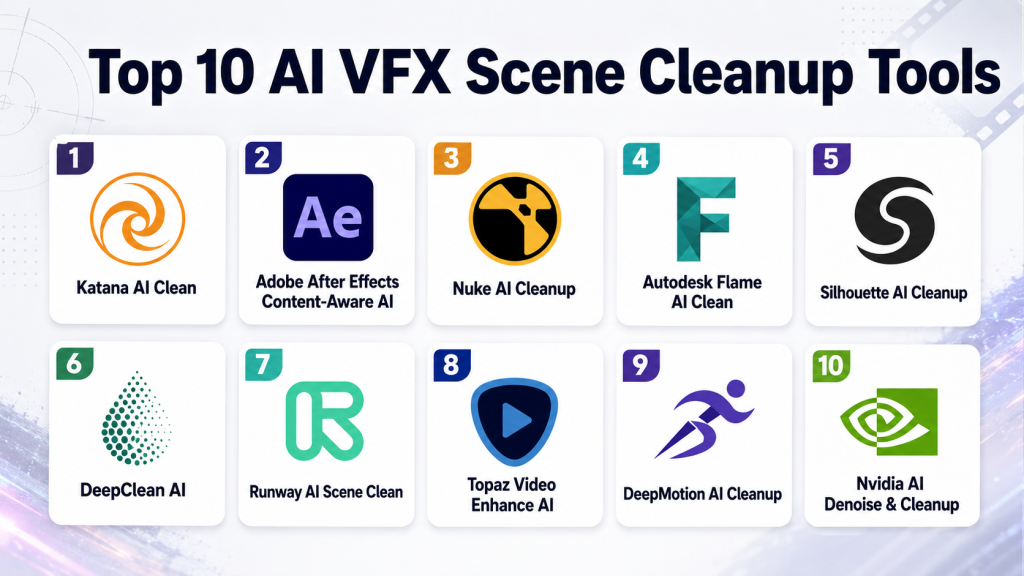
Top 10 AI VFX Scene Cleanup Tools
1- Katana AI Clean
One-line verdict: Enterprise-grade cleanup integrated into Katana pipelines for studios.
Short description:
Katana AI Clean automates rig removal, background reconstruction, and frame stabilization with multi-layer support for high-end feature film workflows.
Standout Capabilities
- Automated wire and rig removal
- Frame stabilization and interpolation
- Multi-layer shot handling
- Real-time preview
- Batch processing
AI-Specific Depth
- Model support: Proprietary
- RAG / knowledge integration: N/A
- Evaluation: Alignment and consistency checks
- Guardrails: Over-cleaning prevention
- Observability: GPU and latency dashboards
Pros
- Seamless pipeline integration
- High-resolution multi-layer support
- Accurate cleanup
Cons
- High cost
- Proprietary workflow
- Learning curve
Security & Compliance
Not publicly stated
Deployment & Platforms
- Windows, macOS, Linux
- Cloud/Studio pipelines
Integrations & Ecosystem
- Nuke, Houdini
- Render farm support
- API for batch automation
Pricing Model
Enterprise subscription
Best-Fit Scenarios
- Feature film VFX pipelines
- High-resolution batch cleanup
- Multi-shot studio sequences
2- Adobe After Effects Content-Aware AI
One-line verdict: AI cleanup directly in After Effects for fast removal of wires and background objects.
Short description:
Adobe’s AI tools provide real-time cleanup inside After Effects, ideal for indie filmmakers, content creators, and small studios.
Standout Capabilities
- Object and background removal
- Scene reconstruction
- Frame interpolation
- Batch layer processing
- Integration with After Effects effects pipeline
AI-Specific Depth
- Model support: Proprietary
- RAG / knowledge integration: N/A
- Evaluation: Auto-consistency checks
- Guardrails: Preserves scene textures
- Observability: Processing metrics
Pros
- Fast inside AE
- Batch layer processing
- Easy for small teams
Cons
- Limited outside AE
- May require touch-ups
- Subscription required
Security & Compliance
Not publicly stated
Deployment & Platforms
- Windows, macOS
- Cloud-enabled
Integrations & Ecosystem
- After Effects native
- Plugin support
- API for automation
Pricing Model
Subscription
Best-Fit Scenarios
- Marketing videos
- Indie films
- Online content cleanup
3- Nuke AI Cleanup
One-line verdict: Studio-standard AI cleanup with frame-accurate object removal.
Short description:
Nuke AI Cleanup automates multi-layered VFX cleanup integrated into Nuke pipelines, suitable for professional studios.
Standout Capabilities
- Frame-by-frame cleanup
- Object tracking and masking
- Background reconstruction
- Multi-resolution support
- Node-based integration
AI-Specific Depth
- Model support: Proprietary
- RAG / knowledge integration: N/A
- Evaluation: Automated quality scoring
- Guardrails: Artifact prevention
- Observability: GPU usage metrics
Pros
- Accurate for complex sequences
- Supports multi-layered shots
- Integrates with Nuke
Cons
- Steep learning curve
- Enterprise cost
- Cloud optional
Security & Compliance
Not publicly stated
Deployment & Platforms
- Windows, macOS, Linux
- Cloud/local pipelines
Integrations & Ecosystem
- Katana, Houdini, Flame
- Render farm support
- Batch API
Pricing Model
Enterprise licensing
Best-Fit Scenarios
- Feature film cleanup
- Multi-layer compositing
- Broadcast pipelines
4- Autodesk Flame AI Clean
One-line verdict: AI cleanup for broadcast and high-end film pipelines.
Short description:
Flame AI Clean automates rig removal, stabilization, and background repair, optimized for multi-layered VFX workflows.
Standout Capabilities
- Rig/wire removal
- Stabilization
- Background reconstruction
- Batch shot handling
- Node-based compositing
AI-Specific Depth
- Model support: Proprietary
- Evaluation: AI consistency metrics
- Guardrails: Artifact prevention
- Observability: GPU and latency dashboards
Pros
- Studio-quality output
- Multi-layer support
- Batch processing
Cons
- Expensive
- Learning curve
- Cloud optional
Deployment & Platforms
- Windows, Linux
- Cloud/studio pipelines
Integrations & Ecosystem
- Flame, Nuke, Katana
- Render farm integration
- API for automation
Pricing Model
Enterprise subscription
Best-Fit Scenarios
- Broadcast commercials
- Feature film VFX
- Multi-shot sequences
5- Silhouette AI Cleanup
One-line verdict: Automated rotoscoping, matte refinement, and scene cleanup.
Short description:
Silhouette AI Cleanup assists with roto, wire removal, and background restoration integrated into compositing pipelines.
Standout Capabilities
- Automated rotoscoping
- Wire/object removal
- Background restoration
- Batch processing
- Multi-layer support
AI-Specific Depth
- Model support: Proprietary
- Evaluation: Automated QA
- Guardrails: Prevents over-cleaning
- Observability: Usage dashboards
Pros
- Saves rotoscoping time
- Multi-resolution support
- Pipeline integration
Cons
- Learning curve
- Cloud optional
- Limited standalone functionality
Deployment & Platforms
- Windows, macOS, Linux
- Cloud/local pipelines
Pricing Model
Enterprise licensing
Best-Fit Scenarios
- Complex roto cleanup
- Multi-layered CG
- Broadcast/commercial VFX
6- DeepClean AI
One-line verdict: Real-time cleanup for indie filmmakers and small studios.
Short description:
DeepClean AI automates object removal, frame stabilization, and artifact cleanup for smaller projects.
Standout Capabilities
- Real-time cleanup
- Frame stabilization
- Batch processing
- Multi-resolution support
- Scene consistency checks
AI-Specific Depth
- Model support: Proprietary
- Evaluation: Automated consistency metrics
- Guardrails: Over-smoothing prevention
- Observability: Processing logs
Pros
- Fast for small projects
- Cloud/local processing
- Easy to use
Cons
- Limited multi-layer support
- Not enterprise-grade
- Advanced control limited
Deployment & Platforms
- Windows, macOS, Cloud
Pricing Model
Subscription
Best-Fit Scenarios
- Indie films
- Short commercials
- Online content
7- Runway AI Scene Clean
One-line verdict: Real-time cleanup for social media and rapid-turnaround content.
Short description:
Runway AI Scene Clean automates object and background removal, suitable for small studios and social content creators.
Standout Capabilities
- Object/background removal
- Real-time previews
- Batch processing
- Stabilization
- Scene consistency
AI-Specific Depth
- Model support: Proprietary
- Evaluation: Frame consistency metrics
- Guardrails: Prevents unnatural smoothing
- Observability: Latency and usage dashboards
Pros
- Fast processing
- Multi-resolution support
- Online collaboration
Cons
- Limited enterprise capabilities
- Not for feature films
- Advanced control limited
Deployment & Platforms
- Web, Cloud
Pricing Model
Subscription
Best-Fit Scenarios
- Social media content
- Indie VFX
- Marketing videos
8- Topaz Video Enhance AI
One-line verdict: AI artifact removal and frame enhancement for legacy and high-resolution footage.
Short description:
Topaz AI specializes in denoising, artifact removal, and frame stabilization for restoration and post-production cleanup.
Standout Capabilities
- Denoising and artifact removal
- Frame interpolation
- Scene stabilization
- Multi-resolution support
- Batch processing
AI-Specific Depth
- Model support: Proprietary
- Evaluation: Quality metrics
- Guardrails: Over-sharpening prevention
- Observability: Processing logs
Pros
- Restores archival footage
- Supports high-resolution
- Batch-ready
Cons
- Limited compositing features
- Not full VFX pipeline
- Cloud optional
Deployment & Platforms
- Windows, macOS
Pricing Model
Subscription
Best-Fit Scenarios
- Archive restoration
- Indie projects
- Marketing content
9- DeepMotion AI Cleanup
One-line verdict: Motion cleanup for CG and live-action sequences.
Short description:
DeepMotion AI Cleanup automates motion tracking, artifact removal, and stabilization for VFX sequences.
Standout Capabilities
- Motion cleanup
- Artifact removal
- Real-time preview
- Stabilization
- Scene consistency
AI-Specific Depth
- Model support: Proprietary
- Evaluation: Motion tracking accuracy
- Guardrails: Artifact prevention
- Observability: Usage dashboards
Pros
- Real-time motion cleanup
- Multi-layer support
- Fast processing
Cons
- Cloud-only
- Limited customization
- Not full compositing solution
Deployment & Platforms
- Web, Cloud
Pricing Model
Subscription
Best-Fit Scenarios
- Motion-heavy sequences
- Indie VFX
- CG cleanup
10- Nvidia AI Denoise & Cleanup
One-line verdict: GPU-accelerated cleanup for high-resolution VFX pipelines.
Short description:
Nvidia AI Denoise & Cleanup removes noise, stabilizes frames, and cleans artifacts using GPU acceleration.
Standout Capabilities
- GPU-accelerated denoising
- Artifact removal
- Stabilization
- Batch processing
- Scene-aware corrections
AI-Specific Depth
- Model support: Proprietary / GPU
- Evaluation: Automated metrics
- Guardrails: Preserves textures
- Observability: GPU logs
Pros
- High-res GPU optimization
- Fast batch processing
- Multi-layer support
Cons
- Requires Nvidia hardware
- Not full compositing
- Cloud optional
Deployment & Platforms
- Windows, Linux
- GPU pipelines
Pricing Model
Enterprise licensing
Best-Fit Scenarios
- High-res VFX cleanup
- Feature films
- Motion-intensive sequences
Comparison Table
| Tool | Best For | Deployment | Model Flexibility | Strength | Watch-Out | Public Rating |
|---|---|---|---|---|---|---|
| Katana AI Clean | Studio pipelines | Win/Mac/Linux | Proprietary | Rig/wire removal + stabilization | Enterprise cost | N/A |
| Adobe AE Content-Aware AI | After Effects compositors | Win/Mac | Proprietary | Fast cleanup in AE | Cloud subscription | N/A |
| Nuke AI Cleanup | Feature film VFX | Win/Mac/Linux | Proprietary | Frame-accurate cleanup | Learning curve | N/A |
| Autodesk Flame AI Clean | Broadcast & film | Win/Linux | Proprietary | Multi-layered cleanup | Expensive | N/A |
| Silhouette AI Cleanup | Roto & matte refinement | Win/Mac/Linux | Proprietary | Automated roto cleanup | High learning curve | N/A |
| DeepClean AI | Indie filmmakers | Win/Mac | Proprietary | Real-time cleanup | Limited multi-layer support | N/A |
| Runway AI Scene Clean | Social/indie content | Web/Cloud | Proprietary | Fast cleanup + previews | Not enterprise-grade | N/A |
| Topaz Video Enhance AI | Legacy footage | Win/Mac | Proprietary | Artifact removal & denoise | Limited compositing | N/A |
| DeepMotion AI Cleanup | Motion-heavy sequences | Web/Cloud | Proprietary | Real-time motion cleanup | Cloud-only | N/A |
| Nvidia AI Denoise & Cleanup | GPU-accelerated pipelines | Win/Linux | Proprietary/GPU | High-res GPU cleanup | Requires Nvidia hardware | N/A |
Scoring & Evaluation
Weighted scoring:
| Tool | Core | Reliability | Guardrails | Integrations | Ease | Perf/Cost | Security/Admin | Support | Weighted Total |
|---|---|---|---|---|---|---|---|---|---|
| Katana AI Clean | 9 | 9 | 9 | 9 | 7 | 8 | 7 | 7 | 8.4 |
| Adobe AE Content-Aware AI | 8 | 8 | 8 | 8 | 8 | 7 | 7 | 7 | 7.7 |
| Nuke AI Cleanup | 9 | 9 | 9 | 8 | 7 | 8 | 7 | 7 | 8.2 |
| Autodesk Flame AI Clean | 9 | 8 | 8 | 8 | 7 | 8 | 7 | 7 | 7.9 |
| Silhouette AI Cleanup | 8 | 8 | 8 | 8 | 7 | 7 | 7 | 7 | 7.5 |
| DeepClean AI | 7 | 7 | 7 | 7 | 8 | 7 | 6 | 7 | 7.0 |
| Runway AI Scene Clean | 7 | 7 | 7 | 7 | 8 | 7 | 6 | 7 | 7.0 |
| Topaz Video Enhance AI | 7 | 7 | 7 | 7 | 8 | 7 | 6 | 7 | 7.0 |
| DeepMotion AI Cleanup | 8 | 7 | 7 | 7 | 7 | 7 | 6 | 7 | 7.1 |
| Nvidia AI Denoise & Cleanup | 9 | 8 | 8 | 8 | 7 | 9 | 7 | 7 | 8.0 |
Top 3 for Enterprise: Katana AI Clean, Nuke AI Cleanup, Autodesk Flame AI Clean
Top 3 for SMB: DeepClean AI, Runway AI Scene Clean, Topaz Video Enhance AI
Top 3 for Developers: Nvidia AI Denoise & Cleanup, Silhouette AI Cleanup, DeepMotion AI Cleanup
Which Tool Is Right for You?
- Solo / Indie Filmmakers: DeepClean AI, Runway AI Scene Clean, Topaz Video Enhance AI
- Small Studios: Silhouette AI Cleanup, DeepMotion AI Cleanup, Runway AI Scene Clean
- Mid-Market Studios: Autodesk Flame AI Clean, Nuke AI Cleanup, Katana AI Clean
- Enterprise / Large Studios: Katana AI Clean, Nuke AI Cleanup, Autodesk Flame AI Clean
- IP / Regulated Workflows: Katana AI Clean, Autodesk Flame AI Clean, Silhouette AI Cleanup
- Budget vs Premium: Budget — DeepClean AI, Runway AI, Topaz AI; Premium — Katana, Nuke, Flame
Implementation Playbook (30 / 60 / 90 Days)
30 Days – Pilot
- Test 2–3 selected tools on sample shots.
- Define success metrics: accuracy of object removal, frame stabilization, artifact reduction.
- Collect artist feedback and compare outputs.
60 Days – Integrate & Harden
- Embed the AI cleanup tools into your existing VFX pipeline (Nuke, Katana, Flame).
- Configure batch processing and guardrails to prevent over-cleaning.
- Establish observability dashboards for GPU usage, latency, and frame processing metrics.
- Train VFX artists and compositors on AI-assisted workflows.
90 Days – Scale & Optimize
- Deploy AI cleanup across full production sequences.
- Monitor performance, GPU/compute costs, and processing times.
- Maintain version-controlled AI models and scene backups.
- Verify licensing compliance, intellectual property protections, and studio standards.
Common Mistakes & How to Avoid Them
- Over-reliance on AI without human review.
- Ignoring frame consistency and artifact checks.
- Not integrating tools into compositing pipelines properly.
- Failing to monitor GPU usage or cost metrics.
- Over-cleaning, which can create unnatural frames.
- Skipping version control for AI-processed scenes.
- Neglecting licensing and intellectual property compliance.
- Not optimizing batch processing for multi-shot sequences.
- Using tools not designed for multi-layered or high-resolution footage.
- Ignoring guardrails that prevent over-smoothing or texture loss.
- Underestimating the learning curve for enterprise tools.
- Relying on cloud-only tools without offline fallback options.
FAQs
1— Can AI remove wires and rigs automatically?
Yes, top tools like Katana AI Clean and Nuke AI Cleanup remove unwanted rigs, wires, and markers with high accuracy.
2— Are AI-cleaned outputs ready for professional studios?
Enterprise-grade tools produce broadcast-quality outputs; indie-focused tools are suitable for web content and short films.
3— Do these tools work with Nuke, Houdini, or After Effects?
Yes, all Top 10 tools integrate with major compositing and VFX software.
4— Is GPU acceleration required?
High-resolution and batch processing benefit from GPU acceleration. Tools like Nvidia AI Denoise & Cleanup are optimized for GPU pipelines.
5— Can AI restore legacy or archival footage?
Yes, Topaz Video Enhance AI specializes in denoising, artifact removal, and frame repair for older footage.
6— Do these tools support batch processing?
Yes, enterprise and cloud-enabled solutions provide batch processing capabilities.
7— Are real-time previews available?
Some tools like DeepClean AI and Runway AI Scene Clean provide real-time previews for immediate feedback.
8— Do AI tools include guardrails?
Yes, most platforms include safeguards to prevent over-cleaning, unnatural smoothing, or artifact introduction.
9— Are these tools cloud-based or on-premise?
Many provide cloud or hybrid deployment options; some require local GPU hardware for high-resolution pipelines.
10— Are these tools affordable for small studios?
Yes, DeepClean AI, Runway AI Scene Clean, and Topaz AI are cost-effective for small teams or indie productions.
11— Do these tools support multi-layer shots?
Yes, enterprise solutions handle multi-layered VFX pipelines for complex compositing.
12— Can AI cleanup integrate into existing pipelines?
Yes, most tools offer APIs or batch integration to fit seamlessly into Nuke, Katana, or Flame workflows.
Conclusion
AI VFX Scene Cleanup Tools in 2026 revolutionize post-production by enabling accurate, fast, and scalable removal of unwanted elements, frame stabilization, and artifact correction. From solo creators to enterprise studios, selecting the right tool depends on project scale, pipeline integration, and budget.

Find Trusted Cardiac Hospitals
Compare heart hospitals by city and services — all in one place.
Explore Hospitals
The comparison does a good job of listing capabilities, but it largely treats “AI cleanup” as a feature layer rather than a production system. In real studio pipelines, the bigger constraint isn’t tool capability—it’s determinism and reproducibility across renders. Most of these tools don’t clearly expose how model versions are pinned per shot, which becomes critical when a sequence is re-rendered months later and results subtly drift.
Another missing dimension is pipeline failure recovery. If a batch cleanup job fails mid-sequence (common with GPU-heavy workloads), there’s no discussion of checkpointing, partial reruns, or idempotent job design. In practice, studios need cleanup tools to behave more like render-farm jobs with resumability and validation hooks.
Finally, the “guardrails” section is mentioned, but not operationalized. Teams usually need auditable decision logs (why a pixel region was reconstructed a certain way) for downstream QC, especially in VFX-heavy compliance workflows.