
Introduction
Computer Vision Edge Deployment Tooling refers to platforms, frameworks, and software solutions that help organizations build, optimize, deploy, and manage AI vision models directly on edge devices. Instead of sending every image or video stream to centralized cloud systems, these tools enable AI inference closer to where data is generated, such as cameras, industrial machines, robots, vehicles, and embedded devices.
The importance of computer vision edge deployment is increasing as organizations require faster decisions, lower latency, improved privacy, and reduced cloud processing costs. Modern AI systems are moving toward real-time visual intelligence where cameras and devices can detect, classify, track, and analyze events without relying entirely on remote servers.
AI-powered edge vision workflows are becoming important for industries adopting automation, robotics, smart infrastructure, and connected devices. Organizations are also focusing more on efficient model deployment, evaluation, security controls, observability, and governance.
Real-world use cases include:
- Manufacturing quality inspection using cameras and edge AI systems to detect defects in production lines.
- Autonomous robots using vision models for navigation, object detection, and environmental understanding.
- Retail analytics using smart cameras for customer behavior analysis and inventory monitoring.
- Transportation systems using computer vision for traffic monitoring, safety analysis, and vehicle intelligence.
- Healthcare environments using AI vision solutions for monitoring and operational assistance.
- Security and surveillance systems using real-time object detection and event recognition.
When evaluating Computer Vision Edge Deployment Tooling, buyers should consider:
- Support for different AI frameworks and model formats.
- Hardware compatibility across edge devices.
- Model optimization capabilities.
- Inference speed and latency performance.
- Support for GPUs, NPUs, CPUs, and accelerators.
- Deployment automation and lifecycle management.
- AI model evaluation and monitoring capabilities.
- Security controls and device management.
- Privacy-focused processing options.
- Cloud, edge, and hybrid deployment flexibility.
- Developer ecosystem and integrations.
- Cost management and operational scalability.
Best for: AI engineering teams, robotics companies, manufacturers, autonomous technology developers, smart city operators, healthcare technology organizations, and enterprises requiring real-time visual intelligence with reduced dependence on cloud processing.
Not ideal for: Organizations with simple image processing requirements, teams without AI infrastructure needs, or projects where real-time processing is unnecessary. Traditional cloud-based computer vision APIs or basic analytics tools may be more suitable for simpler workloads.
What’s Changed in Computer Vision Edge Deployment Tooling in 2026+
Computer vision edge deployment is evolving from basic model execution into complete AI lifecycle management systems. Organizations increasingly need tools that support efficient deployment, monitoring, security, and scalable AI operations.
Key trends include:
- AI model optimization for edge devices: Deployment tools are increasingly focused on reducing model size, improving inference speed, and adapting AI models for resource-limited hardware.
- Multimodal AI at the edge: Modern systems are combining vision data with audio, sensor information, location signals, and operational data for better context-aware decisions.
- Edge AI agents: Organizations are exploring AI agents that can analyze visual events, trigger workflows, and assist operators without continuous cloud communication.
- Hardware-aware optimization: Tools are becoming better at optimizing models for specific chips, GPUs, accelerators, and embedded computing platforms.
- Improved AI evaluation: Companies are demanding stronger testing methods to measure accuracy, reliability, bias, and performance before deployment.
- Privacy-first computer vision: Processing sensitive visual data locally helps organizations reduce unnecessary data transfers and improve privacy control.
- Automated model lifecycle management: Teams are adopting workflows for version control, model updates, deployment tracking, and rollback management.
- Real-time observability: Enterprises need visibility into inference performance, device health, latency, errors, and resource usage.
- Low-power AI deployment: Edge tooling is improving support for battery-powered and resource-constrained devices.
- Cloud-edge collaboration: Hybrid architectures are becoming common, where edge devices handle immediate decisions while cloud systems manage training and analytics.
- AI security and governance: Organizations are increasing focus on model protection, secure deployment, access controls, and operational monitoring.
- Open model ecosystem growth: Support for multiple AI frameworks and model formats is becoming important to avoid vendor lock-in.
Quick Buyer Checklist (Scan-Friendly)
Use this checklist before selecting a Computer Vision Edge Deployment Tooling platform:
- Check support for your required hardware platforms.
- Verify compatibility with AI frameworks and model formats.
- Evaluate model optimization features.
- Review inference speed and latency performance.
- Check GPU, CPU, NPU, and accelerator support.
- Confirm edge device management capabilities.
- Evaluate deployment automation workflows.
- Review model testing and evaluation options.
- Check monitoring and observability features.
- Verify security controls for devices and models.
- Evaluate privacy and local processing capabilities.
- Review API and SDK availability.
- Check cloud and hybrid deployment support.
- Understand pricing and infrastructure requirements.
- Evaluate vendor lock-in risks.
- Confirm scalability across multiple edge locations.
AI-specific evaluation areas:
- Data privacy and retention: Understand where images and video data are processed and stored.
- Model choice: Check support for hosted models, custom models, open-source models, or multiple AI frameworks.
- Evaluation: Verify support for accuracy testing, regression testing, and deployment validation.
- Guardrails: Review options for controlling unsafe or incorrect AI behavior.
- Observability: Confirm visibility into model performance, latency, and device health.
- Cost controls: Evaluate hardware requirements and operational expenses.
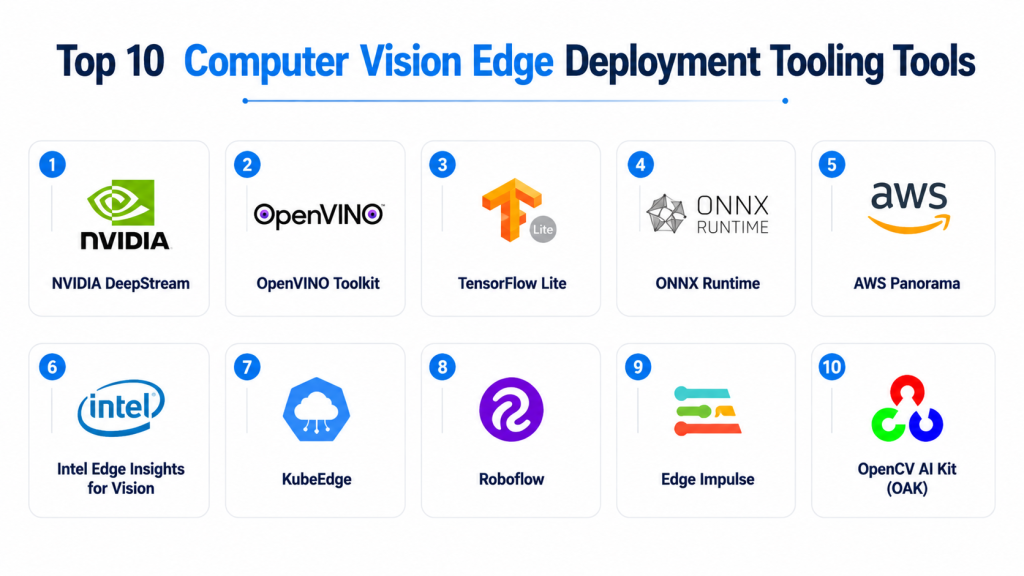
Top 10 Computer Vision Edge Deployment Tooling Tools
#1 — NVIDIA DeepStream
One-line verdict: Best for developers and enterprises building high-performance real-time AI video analytics at the edge.
Short description:
NVIDIA DeepStream is a framework designed for developing real-time video analytics applications using GPU acceleration. It helps organizations process multiple video streams, deploy AI models, and build intelligent vision systems for industries such as manufacturing, transportation, and smart infrastructure.
Standout Capabilities
- Real-time video analytics processing.
- GPU-accelerated AI inference.
- Support for multiple camera streams.
- AI pipeline development capabilities.
- Integration with computer vision models.
- Support for edge AI deployments.
- Optimized processing for NVIDIA hardware.
AI-Specific Depth
- Model support: Supports multiple AI frameworks and optimized model deployment workflows.
- RAG / knowledge integration: Not primarily designed for RAG workflows.
- Evaluation: Evaluation depends on connected AI testing frameworks and application design.
- Guardrails: Not primarily an AI safety platform; controls depend on implementation.
- Observability: Monitoring depends on deployment environment and connected tools.
Pros
- Strong performance for real-time video workloads.
- Mature ecosystem for AI vision developers.
- Supports complex multi-camera applications.
Cons
- Best performance requires compatible hardware.
- Requires technical expertise.
- More specialized for advanced AI workloads.
Security & Compliance
Security capabilities depend on the deployment architecture, device configuration, and connected systems. Specific certifications vary by implementation.
Deployment & Platforms
- Edge deployment.
- Embedded AI systems.
- Cloud-connected architectures.
- Linux-based environments.
Integrations & Ecosystem
NVIDIA DeepStream integrates with AI frameworks, cameras, edge hardware, and analytics platforms.
Common integrations include:
- AI inference frameworks.
- Video sources.
- GPU hardware.
- APIs.
- Analytics systems.
- Developer tools.
Pricing Model
Software availability and infrastructure costs vary depending on hardware requirements and deployment configuration.
Best-Fit Scenarios
- Smart surveillance systems.
- Industrial computer vision.
- Real-time video analytics.
#2 — OpenVINO Toolkit
One-line verdict: Best for optimizing and deploying computer vision models across Intel-based edge hardware.
Short description:
OpenVINO Toolkit helps developers optimize and deploy deep learning models across Intel hardware environments. It is commonly used for computer vision applications requiring efficient inference on edge devices.
Standout Capabilities
- AI model optimization.
- Hardware-aware inference acceleration.
- Support for computer vision workloads.
- Edge deployment support.
- Model conversion workflows.
- Developer-focused tools.
- Efficient inference execution.
AI-Specific Depth
- Model support: Supports various deep learning model formats and optimized deployment workflows.
- RAG / knowledge integration: Not applicable for core computer vision deployment.
- Evaluation: Supports performance testing workflows; exact capabilities vary.
- Guardrails: Not primarily designed for AI safety controls.
- Observability: Depends on deployment monitoring tools.
Pros
- Strong optimization capabilities.
- Useful for Intel-based edge deployments.
- Supports efficient inference workflows.
Cons
- Best suited for compatible hardware environments.
- Requires technical implementation knowledge.
- Less focused on complete enterprise lifecycle management.
Security & Compliance
Security depends on deployment configuration. Specific certifications are not publicly stated.
Deployment & Platforms
- Edge devices.
- Embedded systems.
- Linux and supported development environments.
Integrations & Ecosystem
Common integrations include:
- Deep learning frameworks.
- Edge hardware.
- Computer vision applications.
- Development tools.
- APIs.
Pricing Model
Open-source availability with enterprise support options varying by usage requirements.
Best-Fit Scenarios
- Industrial edge AI.
- Embedded computer vision.
- Optimized inference applications.
#3 — TensorFlow Lite
One-line verdict: Best for developers deploying lightweight machine learning models on mobile and embedded devices.
Short description:
TensorFlow Lite is a lightweight machine learning framework designed for running AI models on edge devices. It is widely used for mobile applications, embedded systems, and resource-constrained environments.
Standout Capabilities
- Lightweight model execution.
- Mobile and embedded deployment.
- Model optimization support.
- Efficient inference workflows.
- Broad developer adoption.
- Support for edge AI applications.
- Integration with TensorFlow ecosystem.
AI-Specific Depth
- Model support: Supports TensorFlow-based models and optimized formats.
- RAG / knowledge integration: Not designed for RAG workflows.
- Evaluation: Model evaluation depends on development workflows.
- Guardrails: Not an AI governance platform.
- Observability: Requires additional monitoring solutions.
Pros
- Large developer ecosystem.
- Suitable for lightweight edge AI.
- Flexible deployment options.
Cons
- Requires development expertise.
- Enterprise management features are limited.
- Advanced monitoring requires additional tools.
Security & Compliance
Security depends on application implementation and deployment environment.
Deployment & Platforms
- Android.
- Embedded devices.
- Mobile platforms.
- Edge environments.
Integrations & Ecosystem
Integrates with:
- TensorFlow models.
- Mobile applications.
- Embedded hardware.
- Developer frameworks.
- AI development tools.
Pricing Model
Open-source framework. Additional infrastructure costs depend on deployment requirements.
Best-Fit Scenarios
- Mobile computer vision applications.
- Embedded AI products.
- Lightweight edge inference.
#4 — ONNX Runtime
One-line verdict: Best for developers needing flexible cross-framework AI model deployment across edge environments.
Short description:
ONNX Runtime is an inference engine designed to execute machine learning models across different hardware platforms. It supports flexible deployment of AI models and is commonly used for optimizing computer vision applications.
Standout Capabilities
- Cross-framework model support.
- Efficient inference execution.
- Hardware acceleration options.
- Flexible deployment environments.
- Developer-friendly architecture.
- Support for edge AI workloads.
- Model optimization capabilities.
AI-Specific Depth
- Model support: Supports ONNX models and multiple AI frameworks through conversion workflows.
- RAG / knowledge integration: Not applicable for computer vision inference.
- Evaluation: Depends on external testing workflows.
- Guardrails: Not designed for AI safety management.
- Observability: Requires additional monitoring tools.
Pros
- Flexible model deployment.
- Supports multiple hardware environments.
- Reduces framework dependency.
Cons
- Requires technical expertise.
- Not a complete AI operations platform.
- Additional tooling may be required for lifecycle management.
Security & Compliance
Security depends on deployment architecture. Specific certifications vary.
Deployment & Platforms
- Edge devices.
- Cloud environments.
- Desktop and embedded systems.
Integrations & Ecosystem
Common integrations include:
- AI frameworks.
- Hardware accelerators.
- Model pipelines.
- Developer applications.
- APIs.
Pricing Model
Open-source framework. Enterprise costs depend on infrastructure and support requirements.
Best-Fit Scenarios
- Cross-platform AI deployment.
- Developer-focused computer vision projects.
- Flexible inference environments.
#5 — AWS Panorama
One-line verdict: Best for enterprises deploying computer vision applications across edge devices in operational environments.
Short description:
AWS Panorama is designed to help organizations run computer vision applications at the edge, especially in environments where video analysis needs to happen locally. It supports applications such as industrial monitoring, quality inspection, and operational intelligence without requiring continuous video transfer to cloud systems.
Standout Capabilities
- Edge-based computer vision processing.
- Local video analytics execution.
- Integration with cloud management workflows.
- Support for AI vision applications.
- Reduced dependency on continuous cloud streaming.
- Designed for operational environments.
- Supports distributed edge deployments.
AI-Specific Depth
- Model support: Supports computer vision models compatible with supported deployment workflows; exact model options vary.
- RAG / knowledge integration: Not designed for RAG workflows.
- Evaluation: Depends on model testing processes and connected analytics tools.
- Guardrails: AI safety controls depend on application design.
- Observability: Monitoring capabilities depend on connected cloud services.
Pros
- Supports local AI inference.
- Useful for privacy-sensitive video workloads.
- Integrates with enterprise cloud environments.
Cons
- Requires compatible edge infrastructure.
- More focused on specific enterprise use cases.
- Advanced AI lifecycle management may require additional tools.
Security & Compliance
Security depends on device configuration, cloud integration, and deployment practices. Specific certifications vary based on implementation.
Deployment & Platforms
- Edge appliances.
- Cloud-managed environments.
- Enterprise operational systems.
Integrations & Ecosystem
Common integrations include:
- Computer vision models.
- Edge devices.
- Cloud services.
- Video sources.
- APIs.
Pricing Model
Usage and infrastructure-based pricing. Exact costs vary depending on deployment requirements.
Best-Fit Scenarios
- Industrial inspection.
- Retail analytics.
- Operational video intelligence.
#6 — Intel Edge Insights for Vision
One-line verdict: Best for enterprises building scalable computer vision solutions on Intel edge infrastructure.
Short description:
Intel Edge Insights for Vision provides software components and tools for developing computer vision applications at the edge. It supports organizations that need optimized AI workloads for industrial, retail, and enterprise environments.
Standout Capabilities
- Edge computer vision development.
- AI workload optimization.
- Support for Intel hardware acceleration.
- Video analytics capabilities.
- Industrial application support.
- Developer-focused components.
- Edge deployment workflows.
AI-Specific Depth
- Model support: Supports optimized AI model deployment across supported frameworks.
- RAG / knowledge integration: Not applicable for computer vision deployment.
- Evaluation: Depends on selected AI evaluation workflows.
- Guardrails: Not primarily designed for AI governance.
- Observability: Monitoring depends on deployment environment.
Pros
- Optimized for Intel edge hardware.
- Suitable for enterprise deployments.
- Supports industrial computer vision applications.
Cons
- Hardware ecosystem dependency.
- Requires technical implementation.
- Less suitable for general-purpose AI workflows.
Security & Compliance
Security capabilities depend on system architecture and deployment configuration. Specific certifications vary.
Deployment & Platforms
- Edge devices.
- Industrial systems.
- Linux-based environments.
Integrations & Ecosystem
Integrations include:
- Computer vision frameworks.
- Edge hardware.
- AI development tools.
- Industrial applications.
- APIs.
Pricing Model
Pricing varies depending on software components, hardware requirements, and enterprise agreements.
Best-Fit Scenarios
- Industrial inspection.
- Smart manufacturing.
- Enterprise edge AI deployments.
#7 — KubeEdge
One-line verdict: Best for developers building cloud-native edge computing platforms with AI workloads.
Short description:
KubeEdge extends cloud-native computing capabilities to edge environments. It helps developers manage edge devices, applications, and workloads using Kubernetes-based approaches, making it useful for distributed AI and IoT deployments.
Standout Capabilities
- Kubernetes-based edge management.
- Distributed edge application deployment.
- Cloud-edge synchronization.
- Support for IoT workloads.
- Container-based deployment.
- Edge resource management.
- Developer-focused architecture.
AI-Specific Depth
- Model support: Depends on deployed AI frameworks and containers.
- RAG / knowledge integration: Not directly designed for RAG workflows.
- Evaluation: Depends on integrated AI systems.
- Guardrails: Requires additional AI governance solutions.
- Observability: Can integrate with monitoring systems; exact capabilities vary.
Pros
- Flexible cloud-native architecture.
- Useful for large edge networks.
- Supports containerized workloads.
Cons
- Requires Kubernetes expertise.
- Not a specialized computer vision platform.
- Additional AI tooling is needed.
Security & Compliance
Security depends on Kubernetes configuration, device security, and deployment practices. Specific certifications vary.
Deployment & Platforms
- Edge devices.
- Cloud environments.
- Kubernetes-based systems.
Integrations & Ecosystem
Common integrations include:
- Kubernetes tools.
- Container platforms.
- IoT devices.
- AI applications.
- Cloud services.
Pricing Model
Open-source platform. Infrastructure and operational costs vary.
Best-Fit Scenarios
- Large distributed edge environments.
- Developer-driven AI infrastructure.
- Cloud-edge architectures.
#8 — Roboflow
One-line verdict: Best for teams developing, managing, and deploying custom computer vision models quickly.
Short description:
Roboflow provides tools for building computer vision workflows, including dataset management, model training, and deployment support. It is commonly used by developers and organizations creating custom vision applications.
Standout Capabilities
- Computer vision dataset management.
- Model training workflows.
- Image annotation support.
- Vision model deployment.
- Rapid prototyping.
- Developer-focused workflows.
- Support for custom AI applications.
AI-Specific Depth
- Model support: Supports computer vision model workflows; exact model compatibility varies.
- RAG / knowledge integration: Not applicable for core vision workflows.
- Evaluation: Supports model evaluation workflows for computer vision projects.
- Guardrails: Not primarily designed for AI safety controls.
- Observability: Monitoring depends on deployment configuration.
Pros
- Strong developer workflow.
- Simplifies computer vision development.
- Useful for custom AI projects.
Cons
- Less focused on industrial-scale device management.
- Enterprise requirements may need additional tooling.
- Requires quality training data.
Security & Compliance
Security and compliance details depend on deployment configuration. Specific certifications vary.
Deployment & Platforms
- Cloud-based development.
- Edge deployment options vary.
- Application integrations.
Integrations & Ecosystem
Common integrations include:
- Computer vision models.
- Annotation workflows.
- APIs.
- Development environments.
- Edge applications.
Pricing Model
Tiered and usage-based pricing models. Exact pricing varies.
Best-Fit Scenarios
- Custom vision applications.
- AI prototypes.
- Developer-focused deployments.
#9 — Edge Impulse
One-line verdict: Best for embedded AI developers creating optimized vision models for edge devices.
Short description:
Edge Impulse is a development platform focused on deploying machine learning models on embedded and edge devices. It supports developers working on computer vision, sensor intelligence, and low-power AI applications.
Standout Capabilities
- Embedded machine learning workflows.
- Edge model optimization.
- Dataset management.
- Model training pipelines.
- Deployment to hardware devices.
- Support for resource-constrained environments.
- Developer-friendly tools.
AI-Specific Depth
- Model support: Supports custom machine learning models and edge deployment workflows.
- RAG / knowledge integration: Not designed for RAG applications.
- Evaluation: Supports model testing and performance measurement.
- Guardrails: Not primarily an AI safety platform.
- Observability: Device monitoring depends on implementation.
Pros
- Designed for edge AI development.
- Good support for embedded applications.
- Useful for rapid experimentation.
Cons
- Not a complete enterprise AI operations platform.
- Requires machine learning knowledge.
- Large-scale management may require additional systems.
Security & Compliance
Security capabilities depend on deployment architecture. Specific certifications are not publicly stated.
Deployment & Platforms
- Embedded devices.
- Edge hardware.
- Cloud development environment.
Integrations & Ecosystem
Common integrations include:
- Embedded hardware.
- AI frameworks.
- Sensor platforms.
- Developer tools.
- APIs.
Pricing Model
Offers different usage tiers. Exact pricing varies.
Best-Fit Scenarios
- Embedded computer vision.
- Edge AI prototypes.
- Low-power AI applications.
#10 — OpenCV AI Kit (OAK)
One-line verdict: Best for developers building affordable edge vision applications using AI-enabled cameras.
Short description:
OpenCV AI Kit provides hardware and software tools for building computer vision applications using AI-enabled cameras. It is used by developers, researchers, and organizations experimenting with real-time vision applications.
Standout Capabilities
- AI-enabled camera workflows.
- Real-time computer vision processing.
- Depth sensing support.
- Edge inference capabilities.
- Developer-focused ecosystem.
- Robotics application support.
- Rapid computer vision experimentation.
AI-Specific Depth
- Model support: Supports computer vision model deployment workflows.
- RAG / knowledge integration: Not applicable.
- Evaluation: Depends on application testing methods.
- Guardrails: Requires external safety mechanisms.
- Observability: Depends on connected monitoring solutions.
Pros
- Accessible for developers.
- Useful for robotics and vision experiments.
- Supports real-time edge applications.
Cons
- More developer-focused than enterprise-focused.
- Requires technical implementation.
- Enterprise governance features may be limited.
Security & Compliance
Security depends on deployment architecture. Specific certifications vary.
Deployment & Platforms
- Edge cameras.
- Embedded systems.
- Development environments.
Integrations & Ecosystem
Common integrations include:
- OpenCV workflows.
- Robotics platforms.
- AI models.
- Embedded systems.
- Developer applications.
Pricing Model
Hardware and development costs vary depending on selected components.
Best-Fit Scenarios
- Robotics projects.
- AI camera applications.
- Computer vision prototypes.
Comparison Table
| Tool Name | Best For | Deployment (Cloud/Self-hosted/Hybrid) | Model Flexibility | Strength | Watch-Out | Public Rating |
|---|---|---|---|---|---|---|
| NVIDIA DeepStream | Real-time video AI analytics | Edge / Hybrid | Multi-model / Custom | High-performance inference | Hardware dependency | N/A |
| OpenVINO Toolkit | Intel-based edge AI | Edge / Local | Multi-framework | Model optimization | Requires technical skills | N/A |
| TensorFlow Lite | Mobile and embedded AI | Edge | Open-source models | Lightweight deployment | Limited enterprise controls | N/A |
| ONNX Runtime | Cross-platform inference | Edge / Cloud | Multi-framework | Model flexibility | Requires engineering | N/A |
| AWS Panorama | Enterprise edge vision | Edge / Cloud | Hosted / Custom | Operational video AI | Specific deployment needs | N/A |
| Intel Edge Insights for Vision | Industrial edge AI | Edge | Framework-based | Enterprise optimization | Hardware focus | N/A |
| KubeEdge | Cloud-native edge computing | Hybrid | Container-based | Edge orchestration | Kubernetes complexity | N/A |
| Roboflow | Custom vision development | Cloud / Edge | Custom models | Developer workflow | Less device management | N/A |
| Edge Impulse | Embedded AI development | Edge / Cloud | Custom models | Rapid edge ML | Scale limitations | N/A |
| OpenCV AI Kit | AI camera development | Edge | Custom models | Affordable experimentation | Limited enterprise features | N/A |
Scoring & Evaluation (Transparent Rubric)
The following scoring provides a comparative evaluation of Computer Vision Edge Deployment Tooling based on common technical and business requirements. The scores are not absolute because different organizations have different workloads, hardware environments, security requirements, and deployment goals.
The evaluation focuses on model deployment flexibility, AI reliability, optimization capabilities, ecosystem maturity, operational management, security readiness, and developer experience.
| Tool | Core | Reliability/Eval | Guardrails | Integrations | Ease | Perf/Cost | Security/Admin | Support | Weighted Total |
|---|---|---|---|---|---|---|---|---|---|
| NVIDIA DeepStream | 10 | 9 | 7 | 9 | 7 | 9 | 8 | 9 | 8.75 |
| OpenVINO Toolkit | 9 | 8 | 7 | 8 | 8 | 9 | 8 | 9 | 8.35 |
| TensorFlow Lite | 8 | 8 | 6 | 9 | 9 | 9 | 7 | 9 | 8.10 |
| ONNX Runtime | 9 | 8 | 6 | 9 | 8 | 9 | 8 | 9 | 8.25 |
| AWS Panorama | 8 | 8 | 7 | 9 | 7 | 8 | 9 | 9 | 8.10 |
| Intel Edge Insights for Vision | 8 | 8 | 7 | 8 | 7 | 9 | 8 | 8 | 8.00 |
| KubeEdge | 8 | 8 | 7 | 9 | 6 | 8 | 8 | 8 | 7.75 |
| Roboflow | 8 | 8 | 7 | 8 | 9 | 8 | 7 | 8 | 7.95 |
| Edge Impulse | 8 | 8 | 6 | 8 | 9 | 9 | 7 | 8 | 7.90 |
| OpenCV AI Kit | 7 | 7 | 6 | 8 | 9 | 8 | 7 | 8 | 7.45 |
Top 3 for Enterprise
1. NVIDIA DeepStream
Best suited for enterprises requiring high-performance real-time video analytics across industrial, transportation, and smart infrastructure environments.
2. AWS Panorama
A strong choice for organizations requiring managed edge computer vision deployments connected with cloud operations.
3. OpenVINO Toolkit
Suitable for enterprises optimizing AI workloads across Intel-based edge environments.
Top 3 for SMB
1. Roboflow
Useful for smaller teams building custom computer vision solutions without requiring complex infrastructure.
2. Edge Impulse
A practical option for businesses developing focused edge AI applications.
3. TensorFlow Lite
Suitable for teams building lightweight AI applications on mobile and embedded devices.
Top 3 for Developers
1. ONNX Runtime
Provides flexibility for developers working with multiple AI frameworks and deployment environments.
2. TensorFlow Lite
A strong choice for mobile and embedded computer vision development.
3. Edge Impulse
Useful for developers creating optimized machine learning applications for edge hardware.
Which Computer Vision Edge Deployment Tooling Is Right for You?
The best Computer Vision Edge Deployment Tooling depends on your objectives, technical resources, hardware environment, and AI maturity. A robotics startup, manufacturing enterprise, and mobile application team may require completely different solutions.
Solo / Freelancer
Individual developers and independent builders usually need tools that provide flexibility, learning resources, and fast experimentation.
Recommended options:
- TensorFlow Lite for lightweight mobile and embedded AI applications.
- Edge Impulse for embedded machine learning projects.
- OpenCV AI Kit for computer vision experiments and prototypes.
Important selection factors:
- Easy setup.
- Hardware compatibility.
- Community support.
- Availability of examples and development resources.
- Low infrastructure requirements.
Avoid complex enterprise platforms unless the project requires large-scale deployment.
SMB
Small and medium businesses generally need practical solutions that balance capability and operational simplicity.
Recommended options:
- Roboflow for custom computer vision development.
- Edge Impulse for edge AI products.
- OpenVINO Toolkit for optimized local inference.
SMBs should focus on:
- Faster deployment.
- Predictable operational costs.
- Easy model updates.
- Simple device management.
- Minimal infrastructure overhead.
A smaller company should avoid building a complete custom AI deployment stack unless it has dedicated engineering resources.
Mid-Market
Mid-market organizations often require scalable solutions while maintaining manageable complexity.
Recommended options:
- NVIDIA DeepStream for real-time video analytics.
- AWS Panorama for operational computer vision.
- ONNX Runtime for flexible AI deployment.
Important considerations:
- Deployment automation.
- Model lifecycle management.
- Hardware scalability.
- Security controls.
- Monitoring capabilities.
Mid-market companies should choose platforms that can support future growth without unnecessary complexity.
Enterprise
Large organizations typically need reliable, secure, and scalable computer vision deployments across many locations.
Recommended options:
- NVIDIA DeepStream for large-scale AI video processing.
- AWS Panorama for enterprise edge vision workflows.
- Intel Edge Insights for Vision for industrial environments.
- OpenVINO Toolkit for optimized edge inference.
Enterprise buyers should evaluate:
- Device fleet management.
- Security architecture.
- AI governance.
- Model update processes.
- Data privacy controls.
- Operational monitoring.
Regulated Industries (Finance, Healthcare, Public Sector)
Organizations handling sensitive information should prioritize privacy, security, and governance.
Important evaluation areas:
- Local processing capabilities.
- Data retention controls.
- Encryption practices.
- Access management.
- Audit visibility.
- Controlled AI decision workflows.
Recommended approaches:
- Process sensitive video data closer to the source when possible.
- Minimize unnecessary data transfer.
- Maintain strong model validation processes.
- Use human oversight for important decisions.
Budget vs Premium
Budget-focused approach
Suitable for startups and smaller teams:
- Use open-source frameworks where practical.
- Deploy smaller optimized models.
- Select hardware carefully.
- Focus on specific high-value use cases.
Common choices:
- TensorFlow Lite.
- ONNX Runtime.
- Edge Impulse.
- OpenCV AI Kit.
Premium enterprise approach
Suitable for large-scale operations:
- Invest in managed infrastructure.
- Use advanced monitoring.
- Support multiple deployment environments.
- Build strong governance processes.
Common choices:
- NVIDIA DeepStream.
- AWS Panorama.
- Intel Edge Insights for Vision.
Build vs Buy (When to DIY)
Building a custom computer vision edge deployment system may be appropriate when:
- The organization has unique hardware requirements.
- Existing platforms cannot meet technical needs.
- Full control over AI pipelines is important.
- The company has experienced AI engineering teams.
Buying a platform is usually better when:
- Faster deployment is required.
- Standard workflows are sufficient.
- Security and maintenance resources are limited.
- Enterprise support is needed.
A hybrid strategy is often effective: use established deployment frameworks while customizing models and workflows.
Implementation Playbook (30 / 60 / 90 Days)
First 30 Days: Pilot and Define Success Metrics
The first stage should focus on validating technical feasibility and business value.
Key activities:
- Select one high-value computer vision use case.
- Identify required cameras, sensors, and hardware.
- Prepare training and testing datasets.
- Deploy an initial edge model.
- Measure inference speed and accuracy.
- Define operational success metrics.
- Document system requirements.
AI-specific tasks:
- Create evaluation datasets.
- Test model accuracy.
- Measure false positives and false negatives.
- Define acceptable performance thresholds.
- Establish model version tracking.
First 60 Days: Security, Evaluation, and Controlled Rollout
The second stage focuses on improving reliability and preparing for production.
Key activities:
- Expand deployment coverage.
- Improve model performance.
- Configure device security.
- Implement monitoring.
- Validate system reliability.
- Establish update processes.
AI-specific tasks:
- Create model evaluation pipelines.
- Perform adversarial testing where relevant.
- Review unexpected predictions.
- Track model changes.
- Establish rollback procedures.
First 90 Days: Optimize Cost, Latency, and Governance
The final stage focuses on scaling and operational maturity.
Key activities:
- Optimize hardware utilization.
- Reduce unnecessary cloud processing.
- Improve inference efficiency.
- Establish governance policies.
- Expand successful deployments.
- Create incident response procedures.
AI-specific tasks:
- Monitor model drift.
- Track inference costs.
- Optimize model size.
- Maintain deployment history.
- Review AI performance continuously.
Common Mistakes & How to Avoid Them
- Choosing hardware before understanding AI requirements: Select hardware based on model size, latency, and workload needs.
- Skipping model evaluation: Always test accuracy and reliability before production deployment.
- Ignoring edge device limitations: Consider memory, power consumption, and processing capability.
- Poor data preparation: Weak training data leads to unreliable computer vision results.
- No model version control: Track model updates to prevent deployment confusion.
- Ignoring privacy requirements: Process sensitive visual data responsibly.
- Lack of observability: Monitor device health, inference performance, and AI behavior.
- Over-automating decisions: Maintain human review for critical applications.
- Not planning for scale: A prototype deployment may not work across thousands of devices.
- Ignoring security risks: Protect devices, models, and communication channels.
- High cloud dependency: Excessive cloud processing can increase latency and costs.
- Vendor lock-in: Maintain flexibility through open standards and portable models.
- No update strategy: AI models require continuous improvement after deployment.
FAQs
What is Computer Vision Edge Deployment Tooling?
Computer Vision Edge Deployment Tooling helps organizations run AI vision models directly on edge devices. It supports faster decisions by processing images and video closer to where data is generated.
Why deploy computer vision models at the edge?
Edge deployment reduces latency, improves privacy, lowers cloud dependency, and enables real-time AI decisions in environments with limited connectivity.
Can edge AI tools work with existing cameras?
Many platforms support common camera systems and video inputs. Compatibility depends on hardware, software frameworks, and deployment requirements.
Do these tools support custom AI models?
Many edge deployment tools support custom models, optimized versions, or multiple AI frameworks. Specific capabilities vary by platform.
Are open-source options available?
Yes, several computer vision deployment frameworks provide open-source components for developers and organizations building custom solutions.
How do companies evaluate edge AI accuracy?
Organizations typically use testing datasets, accuracy measurements, performance benchmarks, and real-world validation before deployment.
Can computer vision AI run without internet connectivity?
Yes, many edge AI solutions are designed to perform inference locally without continuous internet access.
How secure are edge computer vision deployments?
Security depends on implementation. Organizations should evaluate device protection, encryption, access controls, and monitoring capabilities.
What factors affect edge AI costs?
Costs depend on hardware, model complexity, device count, infrastructure needs, maintenance requirements, and deployment scale.
Can companies use their own hardware?
Many tools support custom hardware environments, although compatibility depends on the framework and deployment architecture.
How do organizations avoid vendor lock-in?
Using open formats, portable models, APIs, and flexible deployment architectures can reduce dependency on a single provider.
What is the difference between cloud and edge computer vision?
Cloud computer vision processes data remotely, while edge computer vision processes data locally on devices or nearby infrastructure.
Is edge deployment suitable for AI agents?
Yes, edge AI can support intelligent workflows where models analyze visual information and trigger automated actions, depending on system design.
Conclusion
Computer Vision Edge Deployment Tooling is becoming a critical component of modern AI infrastructure. Organizations are moving toward faster, more private, and more efficient visual intelligence systems by deploying AI models closer to where data is created.The right solution depends on technical requirements, industry needs, hardware environment, and operational goals. Developers may prioritize flexibility and experimentation, while enterprises may require governance, security, and large-scale management capabilities.Successful edge AI adoption requires more than selecting a deployment framework. Organizations need reliable data pipelines, continuous model evaluation, strong security practices, and clear operational processes.

Find Trusted Cardiac Hospitals
Compare heart hospitals by city and services — all in one place.
Explore Hospitals
One operational challenge with edge vision is keeping a large device fleet consistent over time. Different firmware versions, model builds, configuration changes, or hardware revisions can quietly create different inference behavior across locations. A centralized inventory, device-level version tracking, staged rollouts, and automated drift detection can make deployments much safer, especially when devices are distributed across sites and cannot be manually maintained.