
Introduction
Real-Time Vision Analytics Pipelines are AI-powered systems that process video streams, images, and visual data continuously to generate insights, detect events, and support automated decision-making. These pipelines combine computer vision models, data processing frameworks, AI inference engines, and monitoring systems to analyze visual information with minimal delay.
Unlike traditional video analytics systems that store footage for later review, real-time vision analytics pipelines are designed to understand events as they happen. They can identify objects, recognize patterns, detect anomalies, track movement, and trigger automated workflows across industries.
The demand for these pipelines is increasing as organizations adopt AI-driven cameras, smart infrastructure, robotics, autonomous systems, and industrial automation. Modern solutions increasingly focus on edge processing, multimodal AI, privacy protection, model evaluation, and cost-efficient scaling.
Real-world use cases include:
- Manufacturing quality inspection using AI cameras to detect defects and production issues.
- Smart cities analyzing traffic patterns, vehicle movement, and public infrastructure conditions.
- Retail environments using computer vision for customer behavior analysis and inventory monitoring.
- Transportation systems using AI vision for safety monitoring and autonomous operations.
- Healthcare facilities using vision analytics for operational support and patient monitoring.
- Security environments detecting unusual activities, unauthorized access, and safety risks.
When evaluating Real-Time Vision Analytics Pipelines, buyers should consider:
- Real-time video processing performance.
- AI model compatibility and flexibility.
- Edge and cloud deployment options.
- Hardware acceleration support.
- Object detection, tracking, and classification capabilities.
- Model evaluation and accuracy monitoring.
- Data privacy and retention controls.
- Security architecture and access management.
- Integration with existing camera systems and applications.
- Scalability across multiple locations.
- Cost optimization and resource management.
- Developer ecosystem and customization options.
Best for: Manufacturing companies, smart city operators, security organizations, transportation providers, retail businesses, robotics teams, healthcare technology providers, and enterprises that need immediate insights from large-scale visual data streams.
Not ideal for: Organizations that only require basic video recording, occasional image analysis, or simple monitoring workflows. Traditional surveillance systems or basic analytics platforms may be more suitable when real-time AI processing is unnecessary.
What’s Changed in Real-Time Vision Analytics Pipelines in 2026+
Real-time vision analytics is evolving from simple video monitoring into intelligent AI-driven decision systems. Organizations increasingly need pipelines that can process complex visual information, support automation, and operate securely at scale.
Key trends shaping this category include:
- AI-powered video understanding: Modern pipelines are moving beyond object detection toward deeper scene understanding, activity recognition, and context-aware analysis.
- Edge-first vision processing: Organizations are processing more video locally to reduce latency, improve privacy, and lower cloud processing costs.
- Multimodal AI workflows: Vision pipelines are increasingly combining images, video, sensor data, audio, and operational information for better decision-making.
- AI agent integration: Vision systems are beginning to support intelligent agents that analyze events, recommend actions, and automate operational responses.
- Improved model evaluation: Enterprises are requiring stronger validation methods to measure accuracy, reliability, false detections, and performance changes.
- Real-time observability: Organizations need visibility into model performance, inference speed, system health, and resource usage.
- Privacy-focused analytics: Local processing, controlled data retention, and privacy-aware AI workflows are becoming essential requirements.
- Hardware acceleration improvements: Vision pipelines increasingly use GPUs, NPUs, and specialized AI accelerators for faster inference.
- Automated model lifecycle management: Teams are adopting workflows for model deployment, updates, monitoring, and rollback.
- Cloud-edge hybrid architectures: Many organizations combine edge inference with cloud-based analytics, storage, and AI management.
- AI security and governance: Enterprises are focusing more on protecting models, controlling access, and maintaining audit visibility.
- Lower-cost AI deployment: Optimization techniques are helping organizations scale vision analytics without excessive infrastructure costs.
Quick Buyer Checklist (Scan-Friendly)
Use this checklist when selecting a Real-Time Vision Analytics Pipeline:
- Check support for existing camera and video sources.
- Evaluate real-time processing latency.
- Verify AI model compatibility.
- Review object detection and tracking capabilities.
- Check support for custom AI models.
- Evaluate edge, cloud, and hybrid deployment options.
- Confirm GPU, CPU, and AI accelerator support.
- Review model evaluation and testing capabilities.
- Check monitoring and observability features.
- Evaluate privacy and data retention controls.
- Review security features and access management.
- Confirm API and SDK availability.
- Check integration with existing business systems.
- Understand infrastructure and operational costs.
- Evaluate scalability across locations and devices.
AI-specific considerations:
- Data privacy and retention: Understand how video data is processed, stored, and protected.
- Model choice: Check support for hosted models, custom models, open-source models, and multiple AI frameworks.
- Evaluation: Verify accuracy testing, regression testing, and performance benchmarking.
- Guardrails: Evaluate controls that prevent unsafe or incorrect AI-driven actions.
- Observability: Ensure visibility into latency, inference performance, and system health.
- Cost controls: Review hardware requirements, processing costs, and scaling expenses.
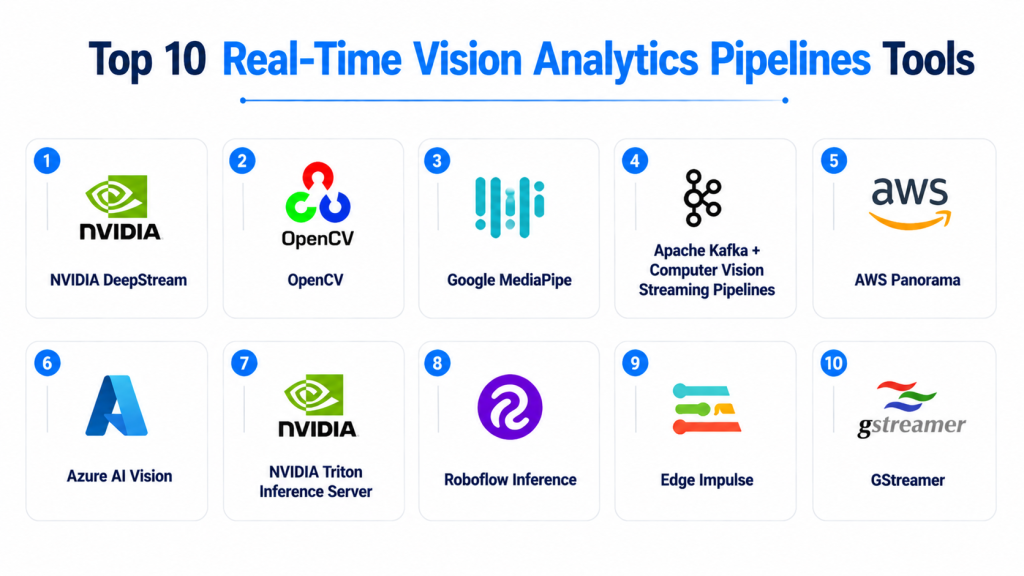
Top 10 Real-Time Vision Analytics Pipelines Tools
#1 — NVIDIA DeepStream
One-line verdict: Best for enterprises building high-performance real-time video analytics with GPU acceleration.
Short description:
NVIDIA DeepStream is a framework for developing real-time AI video analytics applications. It enables organizations to process multiple video streams, integrate AI models, and build intelligent vision solutions for industrial, transportation, security, and smart infrastructure environments.
Standout Capabilities
- Real-time video stream processing.
- GPU-accelerated AI inference.
- Multi-camera analytics support.
- Computer vision pipeline development.
- AI model integration.
- Edge deployment optimization.
- High-performance video analytics workflows.
AI-Specific Depth
- Model support: Supports multiple AI frameworks and optimized inference workflows.
- RAG / knowledge integration: Not primarily designed for RAG workflows.
- Evaluation: Depends on connected testing frameworks and application requirements.
- Guardrails: Not primarily an AI safety platform; controls depend on implementation.
- Observability: Monitoring depends on connected infrastructure and deployment tools.
Pros
- Strong performance for large-scale video workloads.
- Mature AI vision ecosystem.
- Suitable for complex real-time applications.
Cons
- Requires technical expertise.
- Best performance requires compatible hardware.
- Can be complex for small projects.
Security & Compliance
Security depends on deployment architecture, device configuration, and application design. Specific certifications vary.
Deployment & Platforms
- Edge deployment.
- GPU-based systems.
- Cloud-connected architectures.
- Linux environments.
Integrations & Ecosystem
Common integrations include:
- AI frameworks.
- Camera systems.
- GPU infrastructure.
- Video analytics applications.
- APIs and developer tools.
Pricing Model
Software and infrastructure costs vary depending on hardware, deployment size, and requirements.
Best-Fit Scenarios
- Industrial video analytics.
- Smart city monitoring.
- Large-scale AI camera deployments.
#2 — OpenCV
One-line verdict: Best for developers building customizable computer vision pipelines with flexible AI integrations.
Short description:
OpenCV is an open-source computer vision library widely used for image processing, video analytics, and AI vision development. It provides building blocks for creating custom real-time vision pipelines across many industries.
Standout Capabilities
- Extensive computer vision functions.
- Image and video processing.
- Object detection workflows.
- Custom pipeline development.
- Hardware acceleration support.
- Broad developer ecosystem.
- Integration flexibility.
AI-Specific Depth
- Model support: Supports integration with various AI frameworks and computer vision models.
- RAG / knowledge integration: Not applicable for core vision processing.
- Evaluation: Depends on external testing frameworks.
- Guardrails: Not designed for AI safety management.
- Observability: Requires additional monitoring tools.
Pros
- Highly flexible and customizable.
- Large developer community.
- Suitable for many vision applications.
Cons
- Requires development expertise.
- Does not provide complete enterprise pipeline management.
- Additional components may be required.
Security & Compliance
Security depends on application implementation. Specific certifications are not publicly stated.
Deployment & Platforms
- Windows.
- Linux.
- macOS.
- Embedded systems.
- Edge devices.
Integrations & Ecosystem
Common integrations include:
- AI frameworks.
- Camera systems.
- Robotics platforms.
- Embedded hardware.
- Development environments.
Pricing Model
Open-source toolkit. Infrastructure costs depend on deployment requirements.
Best-Fit Scenarios
- Custom computer vision solutions.
- Research projects.
- Developer-focused AI applications.
#3 — Google MediaPipe
One-line verdict: Best for lightweight real-time vision applications across mobile and edge devices.
Short description:
Google MediaPipe provides frameworks and solutions for building real-time perception applications. It is commonly used for tasks such as hand tracking, pose estimation, face analysis, and other interactive vision experiences.
Standout Capabilities
- Real-time perception pipelines.
- Lightweight vision models.
- Mobile-friendly deployment.
- Prebuilt computer vision solutions.
- Cross-platform support.
- Efficient inference workflows.
- Developer-friendly APIs.
AI-Specific Depth
- Model support: Supports MediaPipe models and integrated AI workflows.
- RAG / knowledge integration: Not applicable.
- Evaluation: Depends on application testing.
- Guardrails: Not designed for AI governance.
- Observability: Requires additional monitoring solutions.
Pros
- Lightweight and efficient.
- Good for interactive applications.
- Supports multiple platforms.
Cons
- Less focused on enterprise-scale video analytics.
- Advanced customization may require expertise.
- Limited operational management features.
Security & Compliance
Security depends on application implementation. Specific certifications vary.
Deployment & Platforms
- Mobile devices.
- Web applications.
- Edge environments.
- Supported development platforms.
Integrations & Ecosystem
Common integrations include:
- Mobile applications.
- Computer vision models.
- Edge devices.
- Development frameworks.
- APIs.
Pricing Model
Open-source availability. Infrastructure costs depend on deployment.
Best-Fit Scenarios
- Mobile vision applications.
- Human-computer interaction.
- Lightweight AI experiences.
#4 — Apache Kafka + Computer Vision Streaming Pipelines
One-line verdict: Best for organizations building scalable event-driven vision data processing architectures.
Short description:
Apache Kafka-based vision pipelines enable organizations to stream, process, and distribute large volumes of video events and analytics data. These architectures are commonly used when organizations need scalable real-time data movement between vision systems and enterprise applications.
Standout Capabilities
- Real-time data streaming.
- Event-driven architecture.
- Scalable data pipelines.
- Integration with analytics systems.
- Distributed processing support.
- High-volume data handling.
- Flexible architecture design.
AI-Specific Depth
- Model support: Depends on integrated AI inference systems.
- RAG / knowledge integration: Not a primary RAG platform.
- Evaluation: Depends on connected AI services.
- Guardrails: Requires additional AI governance systems.
- Observability: Requires monitoring infrastructure.
Pros
- Highly scalable architecture.
- Flexible enterprise integrations.
- Suitable for large data workflows.
Cons
- Requires significant engineering expertise.
- Not a complete vision AI platform.
- Additional AI components are required.
Security & Compliance
Security depends on deployment configuration, access controls, and infrastructure design.
Deployment & Platforms
- Cloud.
- Self-hosted.
- Hybrid environments.
Integrations & Ecosystem
Common integrations include:
- AI inference systems.
- Databases.
- Streaming applications.
- Analytics platforms.
- APIs.
Pricing Model
Open-source software. Infrastructure costs depend on deployment size.
Best-Fit Scenarios
- Large-scale streaming architectures.
- Enterprise analytics platforms.
- Complex AI data pipelines.
#5 — AWS Panorama
One-line verdict: Best for enterprises deploying computer vision applications directly at the edge.
Short description:
AWS Panorama helps organizations run computer vision applications locally on edge devices instead of sending all video data to the cloud. It is designed for operational environments where real-time processing, privacy, and low latency are important.
Standout Capabilities
- Edge-based computer vision processing.
- Local AI inference execution.
- Support for industrial vision applications.
- Reduced dependency on cloud video processing.
- Integration with cloud management workflows.
- Real-time visual analytics support.
- Distributed edge deployment capabilities.
AI-Specific Depth
- Model support: Supports computer vision models compatible with supported deployment workflows.
- RAG / knowledge integration: Not designed for RAG workflows.
- Evaluation: Depends on connected model testing and validation processes.
- Guardrails: AI behavior controls depend on application design.
- Observability: Monitoring depends on connected cloud services and operational tools.
Pros
- Enables low-latency edge vision processing.
- Useful for privacy-sensitive video workloads.
- Supports enterprise cloud integration.
Cons
- Requires compatible edge infrastructure.
- Best suited for specific enterprise scenarios.
- Additional tools may be needed for complete AI lifecycle management.
Security & Compliance
Security depends on device configuration, deployment architecture, and cloud integration. Specific certifications vary by implementation.
Deployment & Platforms
- Edge devices.
- Cloud-managed environments.
- Enterprise operational systems.
Integrations & Ecosystem
Common integrations include:
- Camera systems.
- AI vision models.
- Edge devices.
- Cloud services.
- APIs.
Pricing Model
Pricing varies based on infrastructure, device usage, and deployment requirements.
Best-Fit Scenarios
- Industrial inspection.
- Retail analytics.
- Enterprise video intelligence.
#6 — Azure AI Vision
One-line verdict: Best for organizations requiring managed computer vision capabilities with cloud integration.
Short description:
Azure AI Vision provides computer vision capabilities for analyzing images and visual content. Organizations use it for image understanding, visual analysis, and integrating AI vision features into business applications.
Standout Capabilities
- Image analysis capabilities.
- AI-powered visual understanding.
- Integration with cloud applications.
- Developer APIs.
- Scalable processing workflows.
- Enterprise application integration.
- Support for custom AI solutions.
AI-Specific Depth
- Model support: Supports managed AI vision services and custom integrations depending on implementation.
- RAG / knowledge integration: Can connect with broader AI workflows; exact capability varies.
- Evaluation: Depends on application testing methods.
- Guardrails: AI governance depends on connected services and configuration.
- Observability: Monitoring available through connected cloud tools.
Pros
- Easy integration with enterprise applications.
- Managed AI capabilities.
- Suitable for organizations without large AI infrastructure teams.
Cons
- Cloud dependency for many workflows.
- Less control compared with fully custom pipelines.
- Costs can increase with high-volume processing.
Security & Compliance
Security depends on cloud configuration and organizational policies. Enterprise security controls are available through cloud services.
Deployment & Platforms
- Cloud deployment.
- Application integrations.
- Hybrid workflows vary.
Integrations & Ecosystem
Common integrations include:
- Enterprise applications.
- Cloud services.
- AI workflows.
- APIs.
- Developer platforms.
Pricing Model
Usage-based cloud pricing. Exact costs vary depending on processing volume and features.
Best-Fit Scenarios
- Enterprise image analytics.
- Business applications using AI vision.
- Cloud-based visual intelligence.
#7 — NVIDIA Triton Inference Server
One-line verdict: Best for organizations managing scalable AI inference workloads across multiple models.
Short description:
NVIDIA Triton Inference Server is an AI inference serving platform designed to deploy and manage machine learning models efficiently. It is commonly used in real-time vision systems requiring scalable model serving and optimized inference operations.
Standout Capabilities
- Multi-model inference serving.
- Real-time AI deployment.
- GPU acceleration.
- Model lifecycle management.
- Scalable inference architecture.
- Support for multiple frameworks.
- Production AI serving workflows.
AI-Specific Depth
- Model support: Supports multiple AI frameworks and model formats.
- RAG / knowledge integration: Not designed specifically for RAG workflows.
- Evaluation: Supports deployment testing and performance benchmarking.
- Guardrails: Requires additional AI governance solutions.
- Observability: Supports inference monitoring through connected tools.
Pros
- Strong production inference capabilities.
- Supports multiple AI models.
- Suitable for enterprise-scale deployments.
Cons
- Requires infrastructure expertise.
- Better suited for technical teams.
- Not a complete computer vision development platform.
Security & Compliance
Security depends on deployment architecture, access controls, and infrastructure configuration.
Deployment & Platforms
- Cloud.
- Edge servers.
- Enterprise AI infrastructure.
- GPU environments.
Integrations & Ecosystem
Common integrations include:
- AI frameworks.
- Model repositories.
- GPU infrastructure.
- Application APIs.
- Monitoring platforms.
Pricing Model
Software availability and infrastructure costs vary depending on deployment requirements.
Best-Fit Scenarios
- Enterprise AI inference.
- Large-scale vision systems.
- Multi-model deployment environments.
#8 — Roboflow Inference
One-line verdict: Best for teams deploying custom computer vision models with simpler development workflows.
Short description:
Roboflow Inference helps organizations deploy computer vision models for real-world applications. It is designed for developers and teams building custom vision solutions that require model deployment support and integration.
Standout Capabilities
- Custom computer vision deployment.
- Model inference workflows.
- Developer-friendly APIs.
- Vision application development.
- Model management workflows.
- Rapid prototyping support.
- Integration flexibility.
AI-Specific Depth
- Model support: Supports computer vision model deployment workflows.
- RAG / knowledge integration: Not applicable for vision inference.
- Evaluation: Supports model performance evaluation workflows.
- Guardrails: Not primarily an AI safety platform.
- Observability: Monitoring depends on deployment environment.
Pros
- Simplifies custom vision deployment.
- Good developer experience.
- Useful for rapid AI application development.
Cons
- Enterprise-scale requirements may need additional systems.
- Requires quality training data.
- Less focused on infrastructure management.
Security & Compliance
Security depends on deployment configuration. Specific certifications vary.
Deployment & Platforms
- Cloud.
- Edge deployment options vary.
- Application environments.
Integrations & Ecosystem
Common integrations include:
- Computer vision models.
- APIs.
- Development platforms.
- Edge applications.
- Data workflows.
Pricing Model
Tiered and usage-based pricing models. Exact pricing varies.
Best-Fit Scenarios
- Custom AI vision applications.
- Startup computer vision projects.
- Rapid model deployment.
#9 — Edge Impulse
One-line verdict: Best for developers building lightweight real-time vision applications on embedded devices.
Short description:
Edge Impulse provides tools for developing and deploying machine learning models on edge devices. It is commonly used for embedded AI applications where efficiency, low latency, and local processing are important.
Standout Capabilities
- Edge machine learning workflows.
- Model optimization support.
- Embedded AI deployment.
- Data collection workflows.
- Device-focused development.
- Lightweight inference.
- Developer tools.
AI-Specific Depth
- Model support: Supports custom machine learning models for edge deployment.
- RAG / knowledge integration: Not applicable.
- Evaluation: Supports model testing workflows.
- Guardrails: Not designed for AI safety management.
- Observability: Device monitoring depends on implementation.
Pros
- Designed for edge applications.
- Supports low-resource devices.
- Useful for rapid prototyping.
Cons
- Not designed for large enterprise video operations.
- Requires technical knowledge.
- Advanced management may require additional tools.
Security & Compliance
Security depends on deployment architecture. Specific certifications are not publicly stated.
Deployment & Platforms
- Embedded devices.
- Edge hardware.
- Cloud development environment.
Integrations & Ecosystem
Common integrations include:
- Sensors.
- Embedded hardware.
- AI frameworks.
- APIs.
- Development tools.
Pricing Model
Pricing varies based on usage and deployment requirements.
Best-Fit Scenarios
- Embedded vision systems.
- Smart devices.
- Edge AI prototypes.
#10 — GStreamer
One-line verdict: Best for developers building customizable real-time multimedia and vision processing pipelines.
Short description:
GStreamer is an open-source multimedia framework used to create streaming pipelines for video, audio, and image processing applications. It is widely used as a foundation for custom real-time vision analytics systems.
Standout Capabilities
- Real-time media processing.
- Flexible pipeline architecture.
- Video streaming support.
- Plugin-based design.
- Hardware acceleration integration.
- Custom workflow development.
- Cross-platform support.
AI-Specific Depth
- Model support: Depends on integrated AI inference components.
- RAG / knowledge integration: Not applicable.
- Evaluation: Requires external AI evaluation systems.
- Guardrails: Requires additional AI governance tools.
- Observability: Requires monitoring integrations.
Pros
- Highly customizable.
- Strong multimedia processing capabilities.
- Suitable for advanced developers.
Cons
- Requires programming expertise.
- Not a complete AI analytics platform.
- Requires additional AI components.
Security & Compliance
Security depends on implementation and deployment environment.
Deployment & Platforms
- Linux.
- Embedded systems.
- Cloud environments.
- Edge devices.
Integrations & Ecosystem
Common integrations include:
- Cameras.
- Video processing systems.
- AI inference engines.
- Hardware accelerators.
- Streaming applications.
Pricing Model
Open-source framework. Infrastructure costs depend on deployment requirements.
Best-Fit Scenarios
- Custom video analytics systems.
- Streaming AI pipelines.
- Developer-built vision applications.
Comparison Table
| Tool Name | Best For | Deployment (Cloud/Self-hosted/Hybrid) | Model Flexibility | Strength | Watch-Out | Public Rating |
|---|---|---|---|---|---|---|
| NVIDIA DeepStream | High-performance video analytics | Edge / Hybrid | Multi-model | GPU-powered vision pipelines | Hardware dependency | N/A |
| OpenCV | Custom vision development | Self-hosted / Edge | Multi-framework | Flexibility | Requires engineering | N/A |
| Google MediaPipe | Lightweight vision applications | Edge / Mobile | Integrated models | Fast perception workflows | Limited enterprise management | N/A |
| Apache Kafka Pipelines | Event-driven architectures | Cloud / Self-hosted | Integration-based | Scalable streaming | Requires engineering | N/A |
| AWS Panorama | Enterprise edge vision | Edge / Cloud | Custom models | Local inference | Specific hardware needs | N/A |
| Azure AI Vision | Managed AI vision services | Cloud | Hosted models | Easy integration | Cloud dependency | N/A |
| NVIDIA Triton | AI inference serving | Cloud / Edge | Multi-framework | Scalable serving | Requires expertise | N/A |
| Roboflow Inference | Custom vision apps | Cloud / Edge | Custom models | Developer workflow | Scale limitations | N/A |
| Edge Impulse | Embedded vision | Edge / Cloud | Custom models | Efficient deployment | Limited enterprise features | N/A |
| GStreamer | Custom streaming pipelines | Self-hosted / Edge | Integration-based | Pipeline flexibility | Development complexity | N/A |
Scoring & Evaluation (Transparent Rubric)
The following scoring evaluates Real-Time Vision Analytics Pipeline tools using a comparative framework. Scores are not absolute rankings because organizations have different requirements based on workload complexity, deployment environment, AI maturity, and operational goals.
The evaluation considers pipeline capabilities, AI reliability, integration flexibility, deployment options, performance optimization, security expectations, and ecosystem strength.
| Tool | Core | Reliability/Eval | Guardrails | Integrations | Ease | Perf/Cost | Security/Admin | Support | Weighted Total |
|---|---|---|---|---|---|---|---|---|---|
| NVIDIA DeepStream | 10 | 9 | 7 | 9 | 7 | 10 | 8 | 9 | 8.85 |
| OpenCV | 9 | 8 | 6 | 10 | 8 | 8 | 7 | 10 | 8.20 |
| Google MediaPipe | 8 | 8 | 6 | 9 | 9 | 9 | 7 | 9 | 8.05 |
| Apache Kafka Vision Pipelines | 9 | 8 | 7 | 10 | 6 | 9 | 8 | 9 | 8.15 |
| AWS Panorama | 8 | 8 | 7 | 9 | 8 | 8 | 9 | 9 | 8.10 |
| Azure AI Vision | 8 | 8 | 8 | 10 | 9 | 8 | 9 | 9 | 8.60 |
| NVIDIA Triton Inference Server | 10 | 9 | 7 | 10 | 7 | 10 | 8 | 9 | 8.85 |
| Roboflow Inference | 8 | 8 | 7 | 8 | 9 | 8 | 7 | 8 | 7.90 |
| Edge Impulse | 8 | 8 | 6 | 8 | 9 | 9 | 7 | 8 | 7.85 |
| GStreamer | 8 | 7 | 6 | 10 | 7 | 8 | 7 | 9 | 7.65 |
Top 3 for Enterprise
1. NVIDIA DeepStream
Best suited for organizations requiring high-performance, real-time video analytics across large-scale camera and AI deployments.
2. NVIDIA Triton Inference Server
A strong choice for enterprises managing multiple AI models and production inference workloads.
3. Azure AI Vision
Suitable for organizations looking for managed AI vision capabilities integrated with enterprise cloud environments.
Top 3 for SMB
1. Google MediaPipe
A practical choice for businesses building lightweight vision applications with limited infrastructure requirements.
2. Roboflow Inference
Useful for teams creating custom computer vision applications with simpler development workflows.
3. OpenCV
A flexible option for organizations that need customization and developer control.
Top 3 for Developers
1. OpenCV
Provides maximum flexibility for developers building customized computer vision pipelines.
2. NVIDIA DeepStream
Best for developers working on advanced real-time video analytics applications.
3. GStreamer
Useful for developers creating custom streaming and multimedia processing architectures.
Which Real-Time Vision Analytics Pipeline Tool Is Right for You?
The best Real-Time Vision Analytics Pipeline depends on your application type, data volume, hardware environment, latency requirements, and AI maturity. Different organizations need different approaches.
Solo / Freelancer
Individual developers usually need accessible tools that support experimentation and fast application development.
Recommended options:
- OpenCV for custom computer vision projects.
- Google MediaPipe for lightweight real-time applications.
- Edge Impulse for embedded vision solutions.
Focus on:
- Easy setup.
- Developer documentation.
- Community support.
- Hardware availability.
- Low infrastructure requirements.
Avoid complex enterprise platforms unless you are building a commercial-scale solution.
SMB
Small and medium businesses typically need practical AI vision solutions without large engineering teams.
Recommended options:
- Roboflow Inference for custom vision applications.
- Google MediaPipe for lightweight AI experiences.
- OpenCV for flexible development.
Important evaluation factors:
- Deployment simplicity.
- Predictable costs.
- Easy maintenance.
- Integration options.
- Model update workflows.
SMBs should focus on solving specific business problems instead of building overly complex AI architectures.
Mid-Market
Mid-market companies often require scalable systems while maintaining operational simplicity.
Recommended options:
- AWS Panorama for edge-based enterprise vision.
- NVIDIA DeepStream for real-time video processing.
- Azure AI Vision for managed AI workflows.
Key considerations:
- Device scalability.
- Security controls.
- Integration with existing systems.
- Monitoring capabilities.
- AI performance tracking.
Enterprise
Large organizations usually require robust infrastructure capable of supporting thousands of cameras, devices, and AI workloads.
Recommended options:
- NVIDIA DeepStream for large-scale video analytics.
- NVIDIA Triton Inference Server for production AI serving.
- Azure AI Vision for managed enterprise workflows.
- Apache Kafka-based pipelines for large data architectures.
Enterprise buyers should evaluate:
- Model lifecycle management.
- Data governance.
- Security architecture.
- Deployment automation.
- Observability.
- Cost optimization.
Regulated Industries (Finance, Healthcare, Public Sector)
Organizations handling sensitive visual data should prioritize privacy, security, and governance.
Important considerations:
- Local data processing.
- Access controls.
- Encryption.
- Data retention policies.
- Audit capabilities.
- Human oversight.
Recommended approaches:
- Use edge processing where possible.
- Reduce unnecessary video storage.
- Maintain strict AI validation processes.
- Control model updates carefully.
Budget vs Premium
Budget-focused approach
Best for startups and smaller organizations:
- Use open-source frameworks.
- Deploy smaller AI models.
- Process data locally where possible.
- Start with focused use cases.
Common choices:
- OpenCV.
- Google MediaPipe.
- Edge Impulse.
- GStreamer.
Premium enterprise approach
Best for organizations requiring reliability and scale:
- Use managed infrastructure.
- Implement monitoring.
- Support multiple AI models.
- Build governance processes.
Common choices:
- NVIDIA DeepStream.
- NVIDIA Triton.
- Azure AI Vision.
- AWS Panorama.
Build vs Buy (When to DIY)
Building a custom Real-Time Vision Analytics Pipeline may be appropriate when:
- The organization has unique processing requirements.
- Existing platforms cannot support specific workflows.
- Full control over AI models is required.
- Internal engineering expertise is available.
Buying a platform is usually better when:
- Faster deployment is needed.
- Standard workflows are sufficient.
- Operational support is important.
- Security requirements are complex.
A hybrid approach is often effective: use established pipeline frameworks while customizing AI models and business logic.
Implementation Playbook (30 / 60 / 90 Days)
First 30 Days: Pilot and Define Success Metrics
The initial phase should focus on validating the technical and business value of the vision pipeline.
Key activities:
- Select a specific vision use case.
- Identify cameras and data sources.
- Define performance goals.
- Deploy a small-scale prototype.
- Measure latency and accuracy.
- Validate hardware requirements.
- Document system architecture.
AI-specific tasks:
- Create evaluation datasets.
- Measure detection accuracy.
- Track false positives and false negatives.
- Establish model performance benchmarks.
- Define acceptable AI behavior.
First 60 Days: Security, Evaluation, and Controlled Rollout
The second phase focuses on improving reliability and preparing production workflows.
Key activities:
- Expand deployment coverage.
- Improve pipeline reliability.
- Configure security controls.
- Implement monitoring.
- Optimize model performance.
- Establish operational procedures.
AI-specific tasks:
- Build evaluation pipelines.
- Perform regression testing.
- Track model versions.
- Review unexpected predictions.
- Establish rollback procedures.
First 90 Days: Optimize Cost, Latency, and Governance
The final phase focuses on scaling and operational maturity.
Key activities:
- Optimize processing costs.
- Improve inference speed.
- Expand successful deployments.
- Establish governance policies.
- Automate operational workflows.
- Improve system reliability.
AI-specific tasks:
- Monitor model drift.
- Review accuracy changes.
- Optimize hardware utilization.
- Maintain model documentation.
- Improve AI lifecycle management.
Common Mistakes & How to Avoid Them
- Ignoring latency requirements: Real-time applications require careful planning around processing speed.
- Using poor-quality video data: Low-quality inputs reduce AI accuracy.
- Skipping model evaluation: Always test AI performance before production deployment.
- Overlooking hardware requirements: Select infrastructure based on workload needs.
- No observability strategy: Monitor pipeline health, model performance, and system costs.
- Ignoring privacy concerns: Protect visual data through proper controls.
- Over-automating critical decisions: Maintain human review where necessary.
- Poor model version management: Track AI updates and deployment history.
- Not planning for scale: Ensure pipelines can support future growth.
- Excessive cloud dependency: Consider edge processing for latency-sensitive workflows.
- Ignoring security risks: Protect cameras, models, and communication channels.
- Building without clear objectives: Focus on measurable business outcomes.
- Vendor lock-in without planning: Use flexible architectures where possible.
FAQs
What are Real-Time Vision Analytics Pipelines?
Real-Time Vision Analytics Pipelines are systems that process images and video streams continuously using AI models to generate immediate insights and automated actions.
Why are real-time vision pipelines important?
They help organizations make faster decisions, reduce manual monitoring, and enable intelligent automation across many industries.
Can these pipelines work with existing cameras?
Many solutions support common camera systems, although compatibility depends on hardware and software requirements.
Do real-time vision pipelines require cloud infrastructure?
No. Many systems support edge, cloud, or hybrid deployments depending on latency and privacy needs.
What AI models are used in vision analytics pipelines?
Common models include object detection, classification, segmentation, tracking, and activity recognition models.
How do companies evaluate vision AI accuracy?
Organizations use testing datasets, performance metrics, real-world validation, and ongoing monitoring.
Are real-time vision systems secure?
Security depends on implementation. Organizations should evaluate encryption, access controls, and monitoring capabilities.
Can companies use custom AI models?
Many platforms support custom models or integrations with external AI frameworks.
What affects the cost of vision analytics pipelines?
Costs depend on cameras, hardware, processing requirements, storage, AI models, and deployment scale.
Can vision analytics run on edge devices?
Yes. Many modern pipelines support local inference on edge devices to reduce latency and improve privacy.
How do organizations prevent AI mistakes?
They use evaluation processes, monitoring, human review, and controlled automation workflows.
Are open-source vision pipeline tools available?
Yes. Several open-source frameworks support custom real-time computer vision development.
How can companies avoid vendor lock-in?
Using open standards, portable models, APIs, and flexible architectures helps maintain deployment flexibility.
Conclusion
Real-Time Vision Analytics Pipelines are becoming a key component of modern AI infrastructure. Organizations are using these systems to transform video and image data into actionable intelligence across manufacturing, transportation, retail, healthcare, security, and smart infrastructure.The right platform depends on business requirements, technical capabilities, deployment environment, and scalability needs. Developers may prioritize flexibility and customization, while enterprises may focus on security, governance, and operational reliability.Successful implementation requires more than selecting a computer vision tool. Organizations need strong data practices, continuous AI evaluation, secure deployment processes, and effective monitoring strategies.

Find Trusted Cardiac Hospitals
Compare heart hospitals by city and services — all in one place.
Explore Hospitals
A real production challenge is maintaining reliable vision results when the input environment changes. Poor lighting, dirty lenses, dropped frames, network congestion, or overloaded edge hardware can reduce detection quality without completely stopping the pipeline. Teams should define confidence thresholds, health checks, fallback behavior, and alerts for degraded inference so the system can fail safely instead of continuing to produce decisions that appear valid but are increasingly unreliable.