
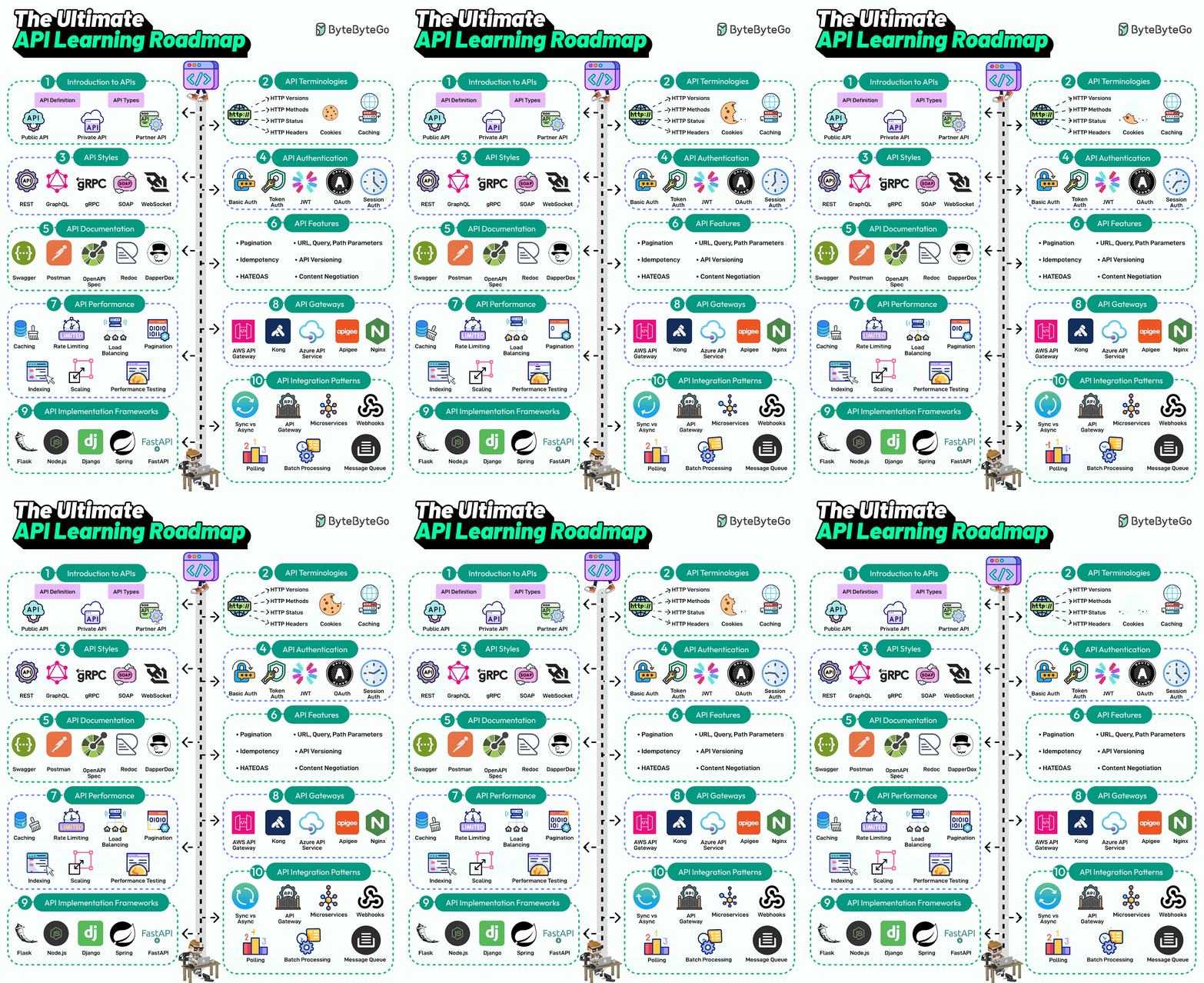
🔹 What is an API?
✅ API (Application Programming Interface) is a set of rules and protocols that allows different software applications to communicate with each other.
✅ APIs define how requests and responses should be structured, enabling applications to share data and functionality.
📌 Example:
- A weather app uses an API to fetch real-time weather data from a remote server.
- A payment gateway (PayPal, Stripe, Razorpay) API allows e-commerce websites to process payments.
🔹 Use Cases of APIs
✅ 1️⃣ Web & Mobile Applications → APIs enable frontend apps (React, Angular, Flutter, etc.) to communicate with backend services.
✅ 2️⃣ Cloud Computing → AWS, Azure, and Google Cloud provide APIs to manage cloud resources.
✅ 3️⃣ IoT (Internet of Things) → Smart devices use APIs to interact with cloud services.
✅ 4️⃣ Social Media Integration → APIs allow apps to post content, fetch user data, and analyze social media trends (Facebook, Twitter APIs).
✅ 5️⃣ Payment Processing → APIs like Stripe, PayPal, Razorpay allow businesses to accept payments online.
✅ 6️⃣ Machine Learning & AI → AI APIs (OpenAI, Google AI, AWS Rekognition) enable applications to perform text analysis, image recognition, and chatbot automation.
✅ 7️⃣ Data Aggregation & Analytics → APIs collect data from multiple sources for business intelligence, finance, and real-time analytics.
✅ 8️⃣ DevOps & Automation → CI/CD tools like Jenkins, GitHub Actions, Terraform, Kubernetes use APIs to automate infrastructure.
🔹 Key Terminology Used in API
| Term | Description |
|---|---|
| Endpoint | A specific URL where an API receives requests (e.g., https://api.example.com/users). |
| Request | The action performed by the client (e.g., GET, POST, PUT, DELETE). |
| Response | The data returned by the API (JSON, XML, etc.). |
| HTTP Methods (Verbs) | GET (Read), POST (Create), PUT (Update), DELETE (Remove). |
| Headers | Metadata sent with an API request (e.g., Authorization, Content-Type). |
| Authentication | Securing API access using API keys, JWT, OAuth, Basic Auth. |
| Rate Limiting | Restricting API calls to prevent abuse (e.g., 100 requests per minute). |
| Webhooks | APIs that send real-time updates to clients (e.g., payment confirmation from Stripe). |
| API Gateway | A middleware layer that manages API traffic (e.g., AWS API Gateway, Kong, Apigee). |
| Versioning | Handling different API versions (v1, v2, etc.) to avoid breaking changes. |
🔹 List of Different Types of APIs
| API Type | Description | Examples |
|---|---|---|
| REST API (Representational State Transfer) | Uses HTTP methods (GET, POST, PUT, DELETE), stateless, easy to use. | Twitter API, GitHub API |
| SOAP API (Simple Object Access Protocol) | Uses XML-based messaging, strict standards, used in enterprise applications. | PayPal API, Banking APIs |
| GraphQL API | Allows clients to request exactly what they need, reducing over-fetching. | GitHub GraphQL API, Shopify API |
| gRPC API | Uses Protocol Buffers (Protobuf) instead of JSON, supports high-speed communication. | Kubernetes API, Netflix API |
| WebSockets API | Real-time, two-way communication between client and server. | Chat apps (WhatsApp, Slack), Stock Trading APIs |
| Streaming API | Continuous data stream instead of one-time responses. | Twitter Streaming API, Kafka APIs |
| Internal APIs (Private APIs) | Used within an organization, not exposed to external users. | Internal microservices communication |
| Open APIs (Public APIs) | Available for public use, often requires API keys. | Google Maps API, Weather APIs |
| Partner APIs | Shared between specific business partners, requires authentication. | PayPal Business API, Stripe API |
🔹 List of API Features
| Feature | Description |
|---|---|
| Stateless Communication | Each request is independent, no session storage required. |
| Authentication & Authorization | APIs use API Keys, OAuth, JWT tokens for security. |
| Rate Limiting & Throttling | Prevents abuse by restricting the number of API calls per user. |
| Caching | Improves performance by storing frequently accessed data. |
| Error Handling | APIs return status codes (200 OK, 400 Bad Request, 500 Internal Server Error). |
| Versioning | Supports multiple API versions (v1, v2, etc.) for backward compatibility. |
| Data Formats | Supports JSON, XML, Protobuf, Avro for data exchange. |
| Logging & Monitoring | Tracks API usage and performance (New Relic, Datadog, AWS CloudWatch). |
| Webhooks (Event-Driven APIs) | Triggers real-time notifications (e.g., Payment confirmations, Slack notifications). |
| Pagination | Handles large datasets using page-based or cursor-based pagination. |
| Cross-Origin Resource Sharing (CORS) | Controls API access from different domains. |
| Multi-Protocol Support | Supports REST, SOAP, GraphQL, gRPC, WebSockets for flexibility. |
🔹 Final Summary
- API is a bridge that allows applications to communicate and exchange data.
- Different API types (REST, SOAP, GraphQL, gRPC, WebSockets) serve different needs.
- APIs are widely used in web apps, mobile apps, IoT, automation, DevOps, cloud computing, and AI.
- Key features include authentication, rate limiting, caching, versioning, and logging.

I’m Rajesh Kumar, a DevOps, SRE, DevSecOps, Cloud, and Platform Engineering expert passionate about sharing practical knowledge, real-world experiences, and industry best practices. I have worked at Cotocus and regularly write about technology, travel, investing, health, product reviews, and digital marketing through my various platforms.
I publish technical articles at DevOps School, travel stories at Holiday Landmark, stock market insights at Stocks Mantra, health and fitness guidance at My Medic Plus, product reviews at TrueReviewNow, and SEO and digital marketing strategies at Wizbrand.
Find Trusted Cardiac Hospitals
Compare heart hospitals by city and services — all in one place.
Explore Hospitals